Specifically, this alarm is raised to draw attention to the mindset involved in configuring industrial or manufacturing control systems that rely on network communication. Particular emphasis is placed—albeit implicitly—on the approach taken when configuring access to the communication medium for devices, controllers, and all related hardware. MikroTik cannot stop you from port-forwarding a controller—say, one that flushes the toilet after a user stands up—without securing it, and then acting surprised when a student hijacks it just to watch the water meter spin. Ultimately, there is often a lack of foresight among those working in automation—something no one can really be blamed for—which is why it is beneficial, or even essential, to have someone with a more open, creative mindset oversee and manage the protection of the infrastructure. If it were easy, there would be no need for forums ...
7.25rc1 brought a notable improvement with this - Dude is finaly able to connect to mipsbe devices which run 7.25rc1. It needs patience - you just have to leave Dude "connecting" and wait for 30 minutes or more and finally it rewards with OK and all data being available.
My config work without issues on 1.24.4 including after reboots on both sides. Before upgrade tunnel was active. But after upgrade of one of routers tunnel stop working. Upgrade of other router don't fix the problem. ipv6 addresses are available and ping have no lost packets. Maybe some additional configuration needed for 1.24.5, can you share a link for this?
You can, routerboard firmware (a.k.a. routerboot; under /system/rouberboard ) is only slightly tied to routerOS (under /system/packages). Versions can be out of sync, most often without any problem what so ever. Generally there's no reason why routerboot couldn't be (temporarily, until you downgrade it as well) newer than ROS.
For that matter, once ROS is downgraded, it will then offer the older RouterBoard firmware as the "upgrade" and you can downgrade it as well. Not an issue at all . . .
When my ISP changes the delegated IPv6 prefix, RouterOS starts advertising the new prefix correctly. It also advertises the old prefix with preferred-lifetime=0, which correctly deprecates it.
However, RouterOS continues advertising the old prefix in subsequent Router Advertisements with a non-zero valid-lifetime (600 seconds). The valid lifetime of the old/deprecated prefix is therefore repeatedly refreshed instead of being allowed to expire.
For example, after a prefix change, I see:
New prefix:
    preferred lifetime: 600s
    valid lifetime:     600s

Old prefix:
    preferred lifetime: 0s
    valid lifetime:     600s
Subsequent RAs continue advertising the old prefix with preferred-lifetime=0 and valid-lifetime=600.
This causes clients to retain addresses from the old prefix as deprecated addresses. In particular, Android clients can lose IPv6 connectivity after the ISP prefix changes and only recover after reconnecting to Wi-Fi.
This is not a place to report bugs, its to discuss them.
While MT people do read forums, they might not see it, best bet to get them to see your report is to send the report here:
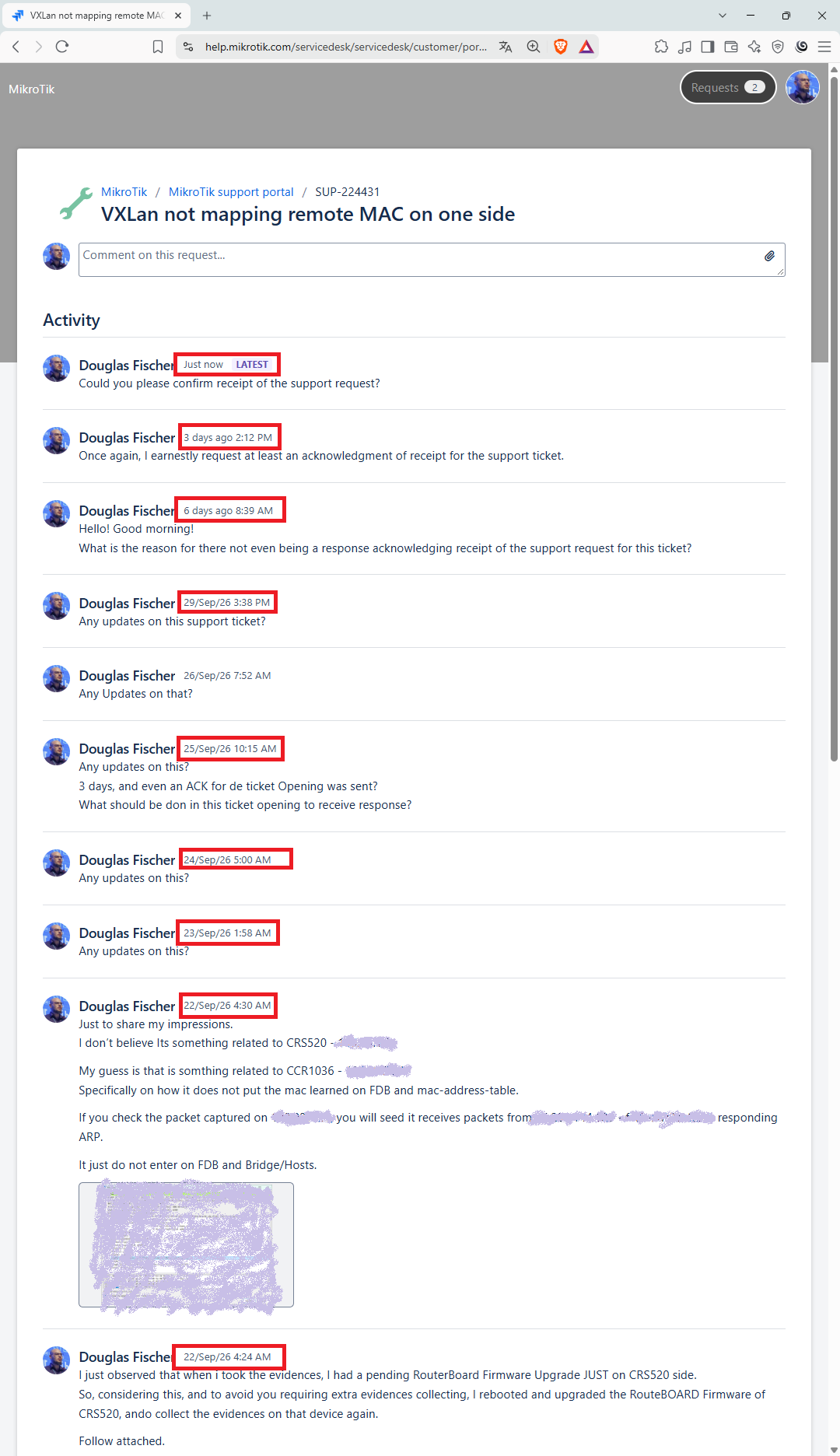
The problem is that, even when using the ticketing system (Atlassian Jira), they prefer to simply ignore the issue and leave the customer completely in the dark.
I have sent a complete and detailed, with rif/backup/rsc files, pcap files, screenshots, topology.
Ticket was opened 2026-09-22, since than 9(nine) interactions from me, and they didn't even acknowledge receipt of the issue!
I have no idea about this, but the issues i had, its either they were wrong about fixing something and i told them theyre wrong i tried it and it doesnt work and then i switched to a similar thing that does the same thing the same way (quad9 doh) or it took 2 days between responses to my tickets, which were well made, in detail describing what i did how to replicate it what i tried to fix it what i suspect it is.
Their support is very hit or miss.
My take on your report is, its probably something complex they have to have a discussion about on the side, either without letting you know theyre working on it (which is kinda stupid if u think about it if i reported a problem why wouldnt i get feedback if its in the works or being worked on??), or they seem to ignore u for some reason which only you and them can know.
I had a strange network/forwarding issue with a CRS125-24G-1S running RouterOS 7.24.5 and I'm wondering if anyone has seen something similar.
A Debian server connected to p12 suddenly became almost unreachable through that interface. The link was up at 1G/full duplex and ethtool showed no obvious problems, but I was seeing around 90%+ packet loss and only a very limited amount of traffic getting through.
I tried flapping both the NIC and the Linux bridge several times, and even assigned another IP, but the behaviour remained strange.
Interestingly, without changing the cable or anything on the server, I moved the cable from p12 to p7, and the network immediately became much more stable.
Moving it back to p12 brought the problem back. Finally, I rebooted the CRS125 and everything returned to normal.
The switch log did show some link flapping around this period, including one brief negotiation at 10 Mbps, but there were no obvious port errors.
I'm wondering if this could be related to a switch-chip / bridge forwarding / hardware-offload issue on the CRS125.
I also noticed that the recent 7.24.5 changelogs mention:
bridge changes
Ethernet stability improvements
system stability improvements
Has anyone experienced something similar (and a reboot clearing the problem) ?