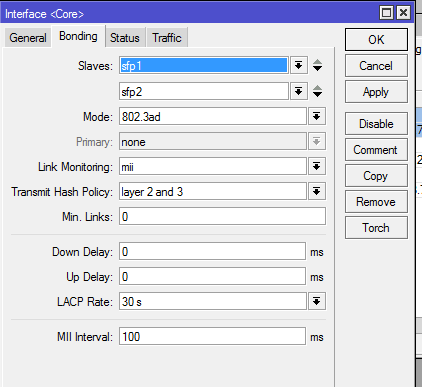
I am using a CCR1036-12G-4S (6.37.4) and bonding 2 SFP modules to a Cisco Nexus 3064 switch. The bonding does not seem to be working properly. I expect it is an issue with the Mikrotik configuration as I am seeing data coming from the switch on both ports, but data originating from the Mikrotik is only traveling on one interface. I have 2 devices on the other side of the switch that are both generating/receiving data (Each device is on a different network and segmented via VLANs). While I would not expect to see even traffic flow on the Ethernet Interfaces, I would expect traffic on both.
Mikrotik Interfaces being bonded (shows zero TX traffic on one port)
Mikrotik bonding Interface showing the 2 VLANs and traffic on them
Mikrotik bonding configuration
Cisco Configuration…
interface port-channel1
switchport mode trunk
switchport trunk allowed vlan 206,607
no negotiate auto
I have Spanning Tree Disabled on the VLANs. It is traffic originating from the Mikrotik that is going only on one interface. Traffic from the switch is being distributed on both interfaces. When I had it originally connected, I was not passing Layer 3 traffic and saw that I forgot to set the Hash Policy to layer 2 and 3 (was set to 2). I did get it working by unplugging one of the ports and then saw my goof and plugged the port back in again.
I see that you deleted your response, but I wanted to answer it anyways.
Sorry I saw I miss-read your post that is why I deleted mine. When I re-read it I realized you had figured that out already and you have confirmed that.