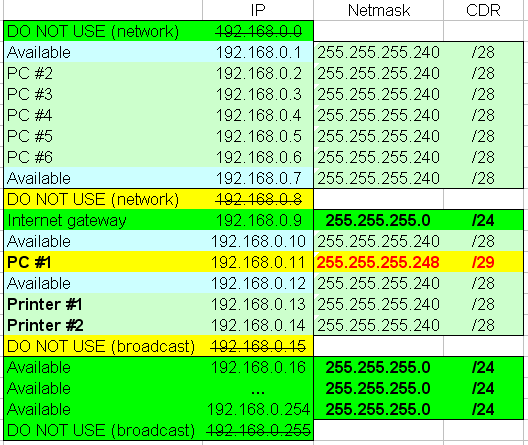
The idea is that PC#1 can only "talk" with internet and the two printers only, PC's #2 to #6 can "talk" among them, with internet and the two printers and possible (future) devices with IP above 192.168.0.15 will be able to access internet and "talk" among them.
I tested this setup (simplified) in a lab and it seems like doing what it is supposed to do.
The question is whether this kind of sub-network inside sub-network inside network is:
crazy
stupid
both the above
none of the above
And - if any of 1-3 above is true - what would be your approach to obtain the same kind of "isolation" of devices?
The idea is not that original, and there's nothing wrong with it.
The problems start when you try to actually lay out the network diagram. E.g. if you connect everything to a single unmanaged switch, there's nothing stopping someone from changing the netmask on pc1, giving it access to everything. Isolation has to be provided by separating the L2 segments, e.g. with vlans.
One instance where these sorts of tricks can come in handy are devices with really primitive network stacks (or no real configuration access to the settings,) usually combined with some version of proxy arp.
The scope is not about security, it is only to prevent the casual user of PC#1 from seeing the other computers in network resources (in Windows 10), in it there are now only "itself" and the two printers.
This "casual" user on PC#1 has not the credentials to change network card settings but I know that the setup is not "secure", and in the specific place there are actually only the router, the PC's and printers and an unmanaged switch, so this is the best I could come out with, my perplexities were more about undesired effects of the subnets being "telescopic".
And in the future I can still add devices as 192.168.0.10 and 192.168.0.12 that would be accessible by all the PC's, including PC#1.
And - if the principle is correct - the /29 could become a /28 and the /28 could become a /27 to be able to add more devices.
I have done similar, but by different means. I have given IP addresses on a different subnet to the PCs 2-6 group besides their IP addresses on the main network
Sh... don't anybody tell them about non-contiguous subnet masks
Wondering how many modern stacks still support that. Similarly BSD dropped all zero broadcast in 4.3 but I would not be surprised if Cisco IOS still had a switch for that.
Printers [and internet] were unrestricted resource, so took addresses on the unrestricted subnet. NAS's were a restricted resource and took addresses on the restricted subnet without a gateway to 0.0.0.0
I think your choices are similar to a False dichotomy.
As stated, if it must work with unmanaged switches, and "you control the clients" i.e. someone can't use their own laptop and does not have the ability to modify the config on the supplied client PC, then it may "work" well enought for you specific use case, but it isn't something I would even consider outside of a "lab situation" where you are just trying things out.
The proposed solution is hard to manage. DHCP won't work in general (although you may be able to get client specific options with some dhcp servers). Non-uniform netmasks are a pain to troubleshoot. The broadcast domain being larger than the ip netmask leads to problems with protocols that are ethernet broadcast based that won't honor ip netmasks.
As long as you are aware of the limitations and illusion of separation, it will "work".
What is driving the requirement that the printer be in the same "subnet" as the client?
As far as using the same broadcast domain to support multiple subnets or overlapping subnets, that was "common" in the early days of ethernet. In the 1980's when thin-net was "the latest technology", schemes like this were used. But that was before dhcp, or security was a consideration. And back then you needed specialized equipment to capture and display ethernet traffic (Wireshark was originally called Ethereal and Ethereal 0.2.0 was announced in July 1998, before that tcpdump was available on freebsd 2.0 (~1994). Prior to those most people had to use expensive network analyzers, so the threat was much smaller.
In the specific case there Is no DHCP, everything Is static, so there are no DHCP related issues possible.
Can you expand on the other protocols that may be affected?
The only issue I had was dhcp. And that was not really an issue. I used dhcp on the unrestricted subnet and manually added an IP address on the restricted subnet for those devices which needed it. For your proposal, I would swap the address spaces for PC#1 and the printers and statically address them, then start the IP address pool at the bottom of the higher range.
Yep, as said in this case all addresses are static, so no issues there, but if really needed a DHCP server could be added for the /28 range (minus the few addresses that need to remain static or can be made fixed by MAC).
Or - keeping the first 14 addresses static - add a DHCP server for "the rest" with a pool of 192.168.0.16-192.168.0.254/24 and the gateway 192.168.0.9.
Any non-ip ethernet protocol will not honor ip subnets. With windows it probably isn't a big issue.
However, if the goal is to isolate a single PC, and you have a MikroTik router, just put the restricted PC on its own subnet and route the traffic you want to allow. For most IP based printers, it isn't a requirement to have a printer on the same subnet. It will take extra work to set it up, but compared to the work and extra troubleshooting and documentation required by the proposed solution involving non-uniform subnet masks and overlapping subnets, I know which option I would choose.
Rather than have them on the same actual network segment, I would put the /28 on a different vlan/port with its own DHCP server (if needed).
The router will be happy to route stuff between these 2 networks. (You can apply firewall rules)
(Alter the DHCP server pool on the /24 to not assign IPs in the /28 range)
Then use proxy arp on the main /24 segment, so devices there can arp for devices on the /28 segment (which they think is in their subnet) and get a reply from the router. (Preferably use static published arp entries rather than proxy arp which is a bit blunt)
A remaining issue is printer discovery.
But you can perhaps enable the mdns repeater over the 2 networks.
Which router?
There Isn't any (Mikrotik) router, there Is only a (ISP provided) router/modem as gateway at 192.168.0.9.
If I have to add a device, I would probably choose to replace the unmanaged switch with a managed one, but you are right, using instead a small router - let'say a hAP Ax lite - for just the PC#1 while not cost 0, would be cheaper.
With just the ISP router you would need to test the isolation carefully.
The isolated PC could attempt to talk to one of the /24 devices and would send its request to the ISP router, which may or may not forward it to the target device. If forwarded you would possibly wind up with triangle routing which may or may not break things.