Hi all,
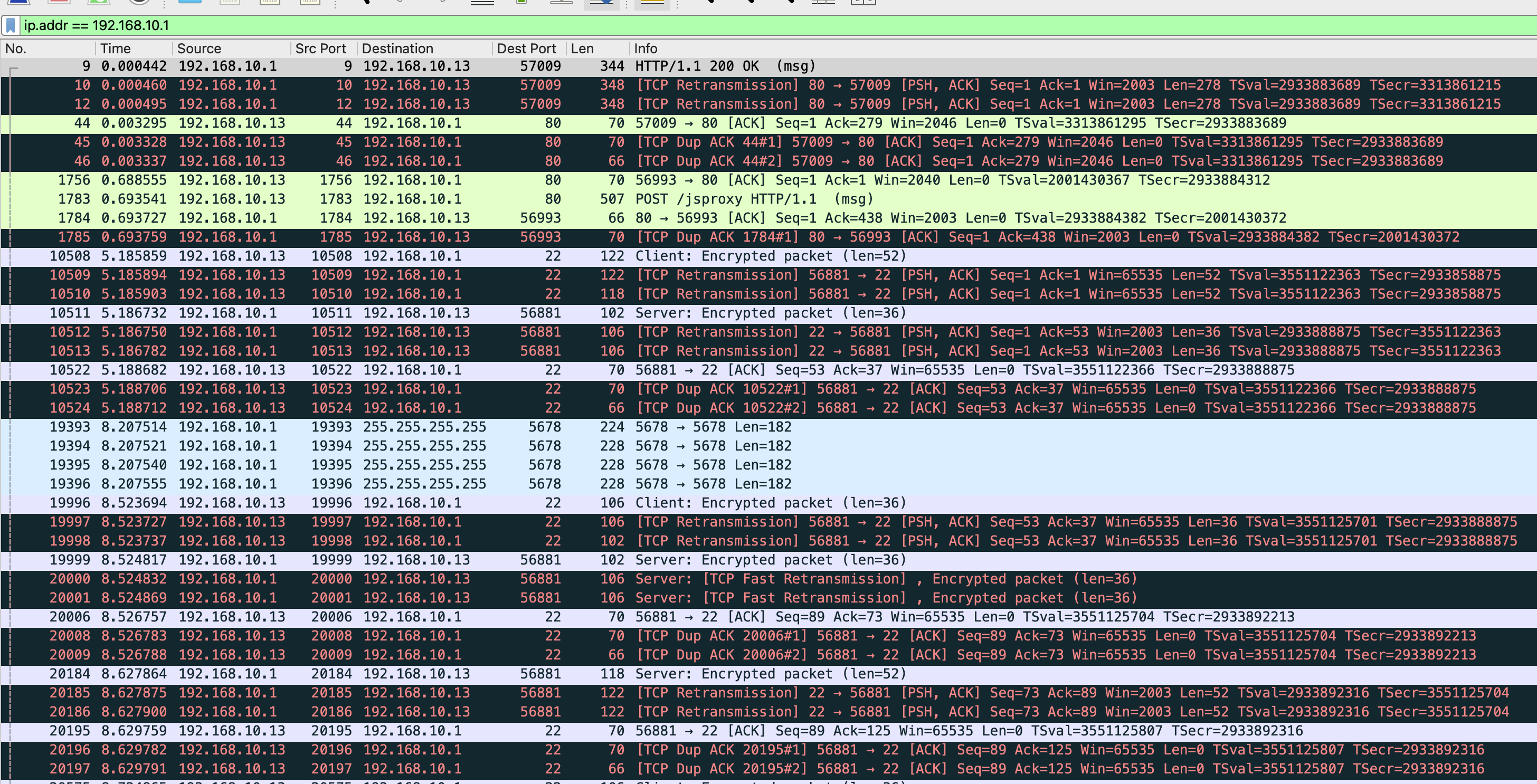
I’m currently struggling with a lot of TCP Retransmits and Dup ACKs in my Setup with no idea where they come from.
A few discoveries I had:
- This happens with different devices and different mediums (Ethernet and WiFi and also tested with different devices)
- For testing I also already removed all ethernet cables except for eth1 (which is connected to my ISP Router) with the same result
- This happens on IPv4 and IPv6
- This happens different connections (device to internet, device to local device and even device to router interface (SSH/HTTP))
A few things I’ve checked and tested:
- This was already happening on a 6.X firmware but still persists after upgrading to the latest Firmware (7.16.2) both on the RouterBoard and Packages.
- I have 2 identical router models (hAP ac3) And I tested on both of them with exactly the same behavior
- There is no high load on the router (CPU Usage stays below 10% even while the Packet Sniffer is running)
- There is enough free memory (170MB of 256MB free)
Screenshot filtered for router IP:
My Config (w/o sensitive values):
# 2025-01-02 10:20:43 by RouterOS 7.16.2
# software id = UKL1-66QJ
#
# model = RBD53iG-5HacD2HnD
# serial number = HEH08H2HHG5
/interface bridge
add name=vlan-bridge vlan-filtering=yes
/interface wireguard
add listen-port=13231 mtu=1420 name=wireguard
/interface vlan
add interface=vlan-bridge name=vlan1 vlan-id=1
add interface=vlan-bridge name=vlan10 vlan-id=10
add interface=vlan-bridge name=vlan20 vlan-id=20
add interface=vlan-bridge name=vlan30 vlan-id=30
/interface list
add name=gast_list
add name=iot_list
add name=privat_list
add name=wan_list
/interface wireless security-profiles
set [ find default=yes ] supplicant-identity=MikroTik
add authentication-types=wpa2-psk mode=dynamic-keys name=privat \
    supplicant-identity=MikroTik
add authentication-types=wpa2-psk mode=dynamic-keys name=iot \
    supplicant-identity=MikroTik
add authentication-types=wpa2-psk mode=dynamic-keys name=gast \
    supplicant-identity=MikroTik
/interface wireless
set [ find default-name=wlan1 ] band=2ghz-b/g/n country=germany disabled=no \
    distance=indoors installation=indoor mode=ap-bridge security-profile=\
    privat ssid=0815_2.4G vlan-id=10 vlan-mode=use-tag
set [ find default-name=wlan2 ] band=5ghz-a/n/ac country=germany disabled=no \
    distance=indoors installation=indoor mode=ap-bridge security-profile=\
    privat ssid=0815 vlan-id=10 vlan-mode=use-tag
add disabled=no mac-address=4A:A9:8A:D3:6D:F6 master-interface=wlan2 name=\
    gast security-profile=gast ssid=0815_Gast vlan-id=30 vlan-mode=use-tag
add disabled=no mac-address=4A:A9:8A:D3:6D:F5 master-interface=wlan1 name=\
    gast2_4 security-profile=gast ssid=0815_Gast_2.4G vlan-id=30 vlan-mode=\
    use-tag
add disabled=no mac-address=4A:A9:8A:D3:6D:F4 master-interface=wlan2 name=iot \
    security-profile=iot ssid=0815_IoT vlan-id=20 vlan-mode=use-tag
add disabled=no mac-address=4A:A9:8A:D3:6D:F3 master-interface=wlan1 name=\
    iot2_4 security-profile=iot ssid=0815_IoT_2.4G vlan-id=20 vlan-mode=\
    use-tag
/ip pool
add name=dhcp_vlan1_pool ranges=192.168.1.2-192.168.1.254
add name=dhcp_privat_pool ranges=192.168.10.2-192.168.10.254
add name=dhcp_iot_pool ranges=192.168.48.2-192.168.48.254
add name=dhcp_guest_pool ranges=192.168.30.2-192.168.30.254
/ip dhcp-server
add address-pool=dhcp_vlan1_pool interface=vlan1 lease-time=10m name=\
    dhcp_vlan1
add address-pool=dhcp_privat_pool interface=vlan10 lease-time=10m name=\
    dhcp_privat
add address-pool=dhcp_iot_pool interface=vlan20 lease-time=10m name=dhcp_iot
add address-pool=dhcp_guest_pool interface=vlan30 lease-time=10m name=\
    dhcp_guest
/interface bridge filter
add action=drop chain=forward comment="deny intra gast communication" \
    in-interface-list=gast_list out-interface-list=gast_list
add action=drop chain=forward comment="deny intra iot communication" \
    in-interface-list=iot_list out-interface-list=iot_list
/interface bridge port
add bridge=vlan-bridge comment=TV frame-types=\
    admit-only-untagged-and-priority-tagged ingress-filtering=no interface=\
    ether2 pvid=20
add bridge=vlan-bridge frame-types=admit-only-untagged-and-priority-tagged \
    ingress-filtering=no interface=ether3 pvid=20
add bridge=vlan-bridge frame-types=admit-only-untagged-and-priority-tagged \
    ingress-filtering=no interface=ether4 pvid=20
add bridge=vlan-bridge frame-types=admit-only-untagged-and-priority-tagged \
    ingress-filtering=no interface=ether5 pvid=10
add bridge=vlan-bridge frame-types=admit-only-vlan-tagged ingress-filtering=\
    no interface=wlan1 pvid=10
add bridge=vlan-bridge frame-types=admit-only-vlan-tagged ingress-filtering=\
    no interface=wlan2 pvid=10
add bridge=vlan-bridge frame-types=admit-only-vlan-tagged ingress-filtering=\
    no interface=iot2_4 pvid=20
add bridge=vlan-bridge frame-types=admit-only-vlan-tagged ingress-filtering=\
    no interface=iot pvid=20
add bridge=vlan-bridge frame-types=admit-only-vlan-tagged ingress-filtering=\
    no interface=gast2_4 pvid=30
add bridge=vlan-bridge frame-types=admit-only-vlan-tagged ingress-filtering=\
    no interface=gast pvid=30
/ipv6 settings
set accept-router-advertisements=yes
/interface bridge vlan
add bridge=vlan-bridge tagged=vlan-bridge vlan-ids=1
add bridge=vlan-bridge tagged=vlan-bridge,wlan1,wlan2 vlan-ids=10
add bridge=vlan-bridge tagged=vlan-bridge,iot,iot2_4 vlan-ids=20
add bridge=vlan-bridge tagged=vlan-bridge,gast2_4,gast vlan-ids=30
/interface list member
add interface=gast list=gast_list
add interface=gast2_4 list=gast_list
add interface=iot list=iot_list
add interface=iot2_4 list=iot_list
add interface=wlan1 list=privat_list
add interface=wlan2 list=privat_list
add interface=ether2 list=privat_list
add interface=ether3 list=privat_list
add interface=ether4 list=privat_list
add interface=ether5 list=privat_list
add interface=vlan10 list=privat_list
add interface=ether1 list=wan_list
add interface=wireguard list=privat_list
/interface wireguard peers
add allowed-address=192.168.100.2/32 comment=foo-handy interface=wireguard \
    name=peer1 public-key="FWUcz+9f0wgJc48BsHm7860LXbkpoxCIofmvqhajFEQ="
add allowed-address=192.168.100.3/32 comment=foo-tablet interface=wireguard \
    name=peer2 public-key="+1Al+1tQhj/M7ORMKKOr29zJXCnGN6YbY89GLX0Jhg0="
add allowed-address=192.168.100.11/32 comment=tablet-handy interface=\
    wireguard name=peer3 public-key=\
    "wJtCob2tx8KMJvZU/T/xMs/UqMp8G/3aCGNlYrCDoB8="
add allowed-address=192.168.100.10/32 comment=bar-handy interface=\
    wireguard name=peer4 public-key=\
    "qUDJ16mSuDQ+gY1T/ErY8T4I3Dzjrr1ilm11NOOrhRY="
add allowed-address=192.168.100.20/32 comment=travelrouter interface=\
    wireguard name=peer5 public-key=\
    "31yaNo8mMhN8IeKbWYFpgt2ziY9Iov9MCWSsaB8uSUg="
/ip address
add address=192.168.1.1/24 interface=vlan1 network=192.168.1.0
add address=192.168.10.1/24 interface=vlan10 network=192.168.10.0
add address=192.168.48.1/24 interface=vlan20 network=192.168.48.0
add address=192.168.30.1/24 interface=vlan30 network=192.168.30.0
add address=192.168.100.1/24 interface=wireguard network=192.168.100.0
/ip dhcp-client
add interface=ether1 use-peer-dns=no
/ip dhcp-server lease
<ENTRIES REMOVED FOR PRIVACY>
/ip dhcp-server network
add address=192.168.1.0/24 gateway=192.168.1.1
add address=192.168.10.0/24 dns-server=192.168.10.1 gateway=192.168.10.1
add address=192.168.30.0/24 dns-server=192.168.30.1 gateway=192.168.30.1
add address=192.168.48.0/24 dns-server=192.168.48.1 gateway=192.168.48.1
/ip dns
set allow-remote-requests=yes servers=8.8.8.8,8.8.4.4 verify-doh-cert=yes
/ip dns static
add address=192.168.10.200 name=homeassistant.<HIDDEN> ttl=10m type=A
add address=192.168.100.1 name=wireguard.<HIDDEN> ttl=10m type=A
add address=192.168.32.1 name=fritz.box ttl=10m type=A
add address=8.8.8.8 disabled=yes name=dns.google type=A
add address=8.8.4.4 disabled=yes name=dns.google type=A
add address=2001:4860:4860::8888 disabled=yes name=dns.google type=AAAA
add address=2001:4860:4860::8844 disabled=yes name=dns.google type=AAAA
add disabled=yes forward-to=dns.google regexp="\\\\.*\$" ttl=10m type=FWD
/ip firewall address-list
add address=0.0.0.0/8 comment=RFC6890 list=special_ranges
add address=10.0.0.0/8 comment=RFC6890 list=special_ranges
add address=100.64.0.0/10 comment=RFC6890 list=special_ranges
add address=127.0.0.0/8 comment=RFC6890 list=special_ranges
add address=169.254.0.0/16 comment=RFC6890 list=special_ranges
add address=172.16.0.0/12 comment=RFC6890 list=special_ranges
add address=192.0.0.0/24 comment=RFC6890 list=special_ranges
add address=192.0.2.0/24 comment=RFC6890 list=special_ranges
add address=192.88.99.0/24 comment="6to4 relay Anycast [RFC3068]" list=\
    special_ranges
add address=192.168.0.0/16 comment=RFC6890 list=special_ranges
add address=198.51.100.0/24 comment=RFC6890 list=special_ranges
add address=198.18.0.0/15 comment=RFC6890 list=special_ranges
add address=203.0.113.0/24 comment=RFC6890 list=special_ranges
add address=224.0.0.0/4 comment=Multicast list=special_ranges
add address=240.0.0.0/4 comment=RFC6890 list=special_ranges
add address=192.168.10.1 comment="VLAN10 gateway" list=gateways
add address=192.168.48.1 comment="VLAN20 gateway" list=gateways
add address=192.168.30.1 comment="VLAN30 gateway" list=gateways
add address=192.168.48.220 list=WLED
add address=192.168.48.221 list=WLED
/ip firewall filter
add action=accept chain=input comment="accept established,related" \
    connection-state=established,related
add action=accept chain=input comment="allow WireGuard" dst-port=13231 \
    protocol=udp
add action=accept chain=input comment="allow WireGuard traffic" src-address=\
    192.168.100.0/23
add action=drop chain=input connection-state=invalid
add action=accept chain=input comment="allow ICMP" in-interface=ether1 \
    protocol=icmp
add action=drop chain=input comment="block everything else" in-interface=\
    ether1
add action=accept chain=forward comment="accept established,related" \
    connection-state=established,related
add action=drop chain=forward connection-state=invalid
add action=drop chain=forward comment=\
    "drop access to clients behind NAT from WAN" connection-nat-state=!dstnat \
    connection-state=new in-interface=ether1
add action=accept chain=forward comment=\
    "allow private network to iot devices" in-interface=vlan10 out-interface=\
    vlan30
add action=accept chain=forward comment="foo Handy from any network" \
    src-mac-address=<HIDDEN>
add action=accept chain=forward comment="bar Handy from any network" \
    src-mac-address=<HIDDEN>
add chain=forward comment="Cross communication between WLED" \
    dst-address-list=WLED port=21324 protocol=udp src-address-list=WLED
add chain=forward comment="Cross communication between WLED" \
    dst-address-list=WLED port=65506 protocol=udp src-address-list=WLED
add action=drop chain=forward comment=\
    "drop guest to special ranges (RFC6890)" dst-address-list=special_ranges \
    in-interface=vlan30
add action=drop chain=input comment=\
    "deny ingress to mikrotik if not in private" dst-address-list=gateways \
    in-interface-list=!privat_list port=22,80 protocol=tcp
add action=accept chain=forward comment="MQTT to Hassio" dst-address=\
    192.168.10.200 src-address=192.168.40.236
add action=accept chain=forward comment="MQTT to Hassio" dst-address=\
    192.168.10.200 dst-port=1883 in-interface=vlan20 protocol=tcp
add action=drop chain=forward comment="drop iot to special ranges (RFC6890)" \
    dst-address-list=special_ranges in-interface=vlan20
/ip firewall nat
add action=masquerade chain=srcnat out-interface=ether1
add action=dst-nat chain=dstnat dst-port=80 in-interface=ether1 protocol=tcp \
    to-addresses=192.168.10.200 to-ports=80
add action=dst-nat chain=dstnat dst-port=443 in-interface=ether1 protocol=tcp \
    to-addresses=192.168.10.200 to-ports=443
/ip ipsec profile
set [ find default=yes ] dpd-interval=2m dpd-maximum-failures=5
/ipv6 address
add address=::1 from-pool=ipv6-dhcp-pool interface=vlan10
/ipv6 dhcp-client
add add-default-route=yes interface=ether1 pool-name=ipv6-dhcp-pool \
    prefix-hint=::/57 request=prefix
/ipv6 nd
set [ find default=yes ] hop-limit=64
/system clock
set time-zone-name=Europe/Berlin
/system note
set show-at-login=no
/system routerboard settings
set auto-upgrade=yes
/tool mac-server
set allowed-interface-list=privat_list
/tool mac-server mac-winbox
set allowed-interface-list=privat_list