Hello
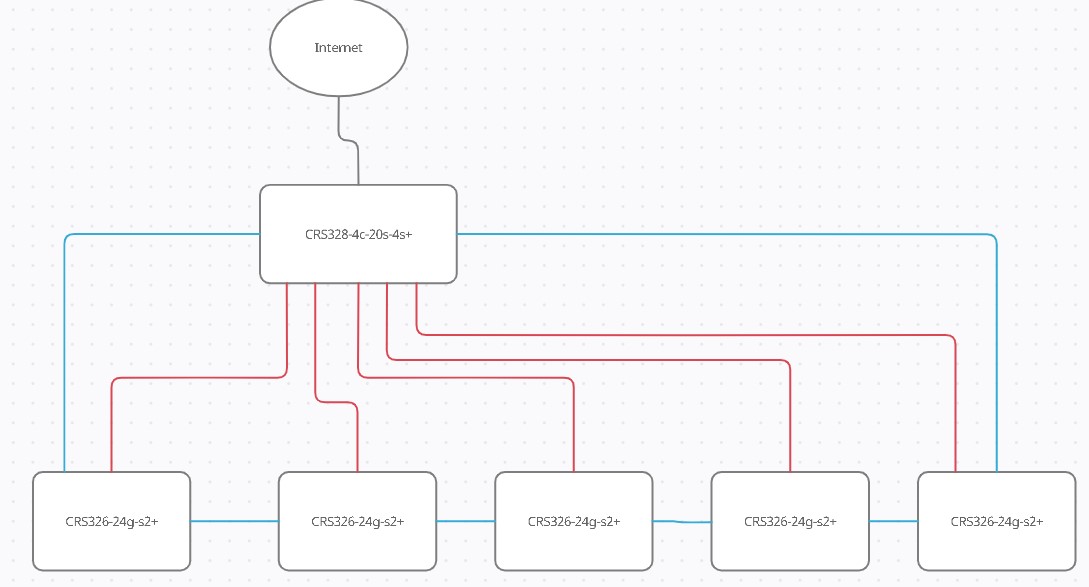
My goal is to make 5Gbps network (distance is more than 30m 10Gbps will not work) with 1Gbps backup
I have this hardware :
1x Main Router CRS328-4c-20s-4s with 4x SFP+ 4x RJ45 combo and 24x SFP
5x CRS326-24g-s2+ with 2x SFP+ 24x RJ45
for wifi Ubiquiti UniFi UAP-AC-HD
I am ordering Mikrotik SFP S-RJ01 and SFP+ S+RJ10 Modules
Note:
Ubiquiti UF-RJ45-1G - Didnt work with Mikrotik)
Ubiquiti UF-RJ45-10G - Works 10Gbps up to 30m or 1Gbps up to 100m
My idea is to connect them in to series with using SFP+ (S+RJ10) and parallel with SFP (S-RJ01)
5Gbps main connection and 1Gbps backup line
Config
Main router
3x DHCP LAN+WIFI , Guest WIFI and CCTV/ip camera
2x VLAN
everything works exceps backup line
I was able to setup active backup between main router and one CRS326-24g-s2+
but not albe to setup another
Blue is for 5Gbps red 1Gbps backup line
can somebody pls help me ?
I’m sorry for not being able to help with configuration …
But there’s something about your physical setup bothering me: can’t you pull a few fibre runs between CRS328 and CRS326 devices? Fibre should allow you to run connections at 10Gbps at your distances and SFP modules will run a lot cooler, all 10Gbps RJ45 modules tend to produce quite some heat (which sometimes makes operation of link unreliable).
Besides: CRS328-4c-20s-4s+ has only got 4 SFP+ ports capable of running faster than 1Gbps … your diagram has 5 links with speeds of 5Gbps. How did you achieve that?
Regarding the “blue ring” for redundancy: it seems you want to build ERPS … unfortunately ROS doesn’t seem to support it.
Edit: just noticed I’ve got the colours wrong, it’s 5Gbps ring you want to have as primary path and 1Gbps (red) for backup. Same principle applies, only my question about 5 SFP+ links from CRS328 is invalid.
first: fiber optic would be good but for that i would need to call somebody who can make pigtails for fiber
second: you probably miss understod
you are riught with CRS328-4c-20s-4s+ has only 4SFP+ ports and I want to use only 2
red line 1Gbps is will be connected with using of SFP 1Gbps this CRS328-4c-20s-4s+ has 20+4 SFP , 4 comdo (sfp or rj45) and 4x SFP+
I am a bit confused when you call the CRS328 a “router”, I assume you are aware of the fact that its total throughput as a router is far below 2 Gbps. Nothing bad about it, though, if the bulk of your traffic runs inside the network.
As for the redundancy - the only thing to do is to use STP. On these switch models, you can use MSTP without losing the hardware switching capability. But unlike other vendors, Mikrotik doesn’t assign path costs to interfaces automatically depending on their bandwidth, so you have to configure path costs on /interface bridge port rows manually, to make the devices prefer links with higher bandwidth when calculating the spanning tree topology.
I wonder where it is much easier to purchase active elements like switches than factory-made LC patchcords of 50 meters.
So now time has come to start No other way available.
It’s basically not complex - you set both path-cost and internal-path-cost to 10 for all 10G ports, to 100 on all 1 G ports used as backup links, and to 1000 on all other ports, and you should be good to start. Then, you can do some tests and eventually fine-tune the values. Don’t forget to set priority of the bridge at the CRS328 to 0x4000 if you keep it at default 0x8000 on all the other machines.
/interface bridge monitor [find] once will show you the common state of the spanning tree on the device, /interface bridge port monitor [find interface~"sfp-sfpplus[134]" will show you the spanning tree related status of ports sfp-sfpplus1, sfp-sfpplus3 and sfp-sfpplus4.
If you have a separate bridge for each VLAN, only one of them is hardware accelerated; if you have the /interface vlan attached directly to ethernet/sfp-sfpplus ports, which are at the same time member ports of the “LAN+WIFI” bridge, it’s all wrong.
To have hardware switching on all VLANs, you have to use the “all VLANs on a common bridge” method with vlan-filtering=yes.
I’d recommend you to post the current configs of the 328 and one of the 326 as per my automatic signature below for a review.
 No other way available.