I want add mikrotik active user using PHP API. Please help me.
Adding what user? A hotspot user?
Since recent versions (6.3, you can use the “/ip hotspot active login” command. In addition to the username to login, you need to specify the IP that this username should be associated with, and you can optionally specify the MAC address too (particularly useful for cases where the device is not connected yet or doesn’t have an IP yet).
With the client from my signature (logging in a hotspot user called “user1” to the IP address “192.168.88.254”):
<?php
use PEAR2\Net\RouterOS;
require_once 'PEAR2_Net_RouterOS-1.0.0b5.phar';

$client = new RouterOS\Client('192.168.88.1', 'admin', 'password');
$loginRequest = new RouterOS\Request('/ip hotspot active login');
$loginRequest
    ->setArgument('user', 'user1')
    ->setArgument('ip', '192.168.88.254');
$client->sendSync($loginRequest);
Yes, hotspot user active (Version is 6.23) I try it, user does not active. How can I do it. Could you please explain step by step.
Best Regards,
I mistyped before - I meant to say it’s been there since 6.3*, and now that I looked back at the change log, I can even pinpoint the exact version - since 6.34.
You need to upgrade RouterOS to at least that version for the above to work. Earlier versions (including 6.23) don’t support this.
The only way with earlier versions is to redirect to the hotspot login URL, with the credentials in the URL, like
<?php
header('Location: http://192.168.88.1/login?username=user1&password=pass1');
(Though if you want to validate against an external source, like Facebook or a custom database, then on success, you can use the API to create a brand new temporary username and password, redirect to it, and set an on-logout script to remove the user on logout)
Dear Bro,
I write this code. but user does not active and internet does not connect it. Could you please help me?
Hotspot User Name : nay
Hotspot Password : 123
<?php
use PEAR2\Net\RouterOS;
require_once 'PEAR2_Net_RouterOS-1.0.0b5.phar';

$client = new RouterOS\Client('192.168.1.1', 'admin', '');
$loginRequest = new RouterOS\Request('/ip hotspot active login');
$loginRequest
    ->setArgument('user', 'nay')
    ->setArgument('ip', '192.168.1.6');
$client->sendSync($loginRequest);
?>
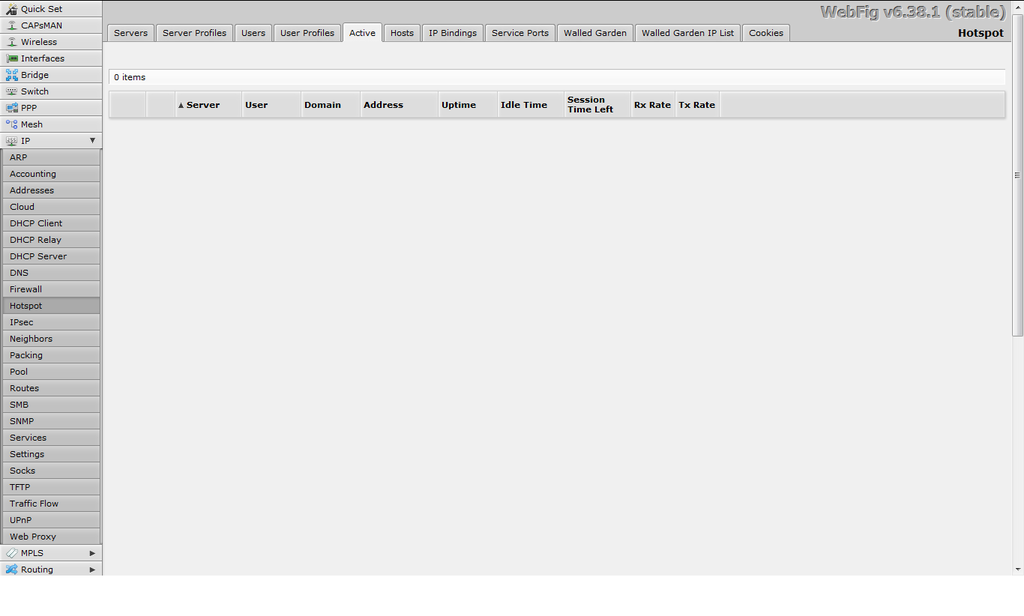
From some quick testing from the command line, I’m seeing that the IP must already be in the “Hosts” list (the “/ip hotspot host” menu). Otherwise, it fails with an error that says “unknown host IP 192.168.1.6” or whatever the value of IP was.
To double check if that’s the error you’re getting, you can change the line
$client->sendSync($loginRequest);
to
var_dump($client->sendSync($loginRequest)->toArray());
in order to have all API replies (including errors) printed on screen.
If that IS the error you’re getting… you’ll have to somehow make sure the device is already connected, and get its IP, and use that, rather than an arbitrary IP.
If the router and web server are both in the same LAN (as the case appears to be), then you can just use $_SERVER[‘REMOTE_ADDR’] in place of 192.168.1.6, but otherwise, it’s a little trickier.
Dear Bro,
I changed the code like that.
User Name is nay
is it need password or not?
<?php
use PEAR2\Net\RouterOS;
require_once 'PEAR2_Net_RouterOS-1.0.0b5.phar';

$client = new RouterOS\Client('192.168.1.1', 'admin', '');
$loginRequest = new RouterOS\Request('/ip hotspot active login');
$loginRequest
    ->setArgument('user', 'nay')
    ->setArgument('ip', $_SERVER['REMOTE_ADDR']);
var_dump($client->sendSync($loginRequest)->toArray());
?>
Appear this message.
array(2) { [0]=> object(PEAR2\Net\RouterOS\Response)#4 (4) { [“unrecognizedWords”:protected]=> array(0) { } [“_type”:“PEAR2\Net\RouterOS\Response”:private]=> string(5) “!trap” [“attributes”:protected]=> array(1) { [“message”]=> string(15) “no such command” } [“_tag”:“PEAR2\Net\RouterOS\Message”:private]=> NULL } [1]=> object(PEAR2\Net\RouterOS\Response)#5 (4) { [“unrecognizedWords”:protected]=> array(0) { } [“_type”:“PEAR2\Net\RouterOS\Response”:private]=> string(5) “!done” [“attributes”:protected]=> array(0) { } [“_tag”:“PEAR2\Net\RouterOS\Message”:private]=> NULL } }
Best Regards,
That’s weird… as you can see from the output, the error message is
["message"]=> string(15) "no such command"
but that particular error should only happen if your RouterOS version is earlier than 6.34… But I can see from your screenshot earlier that you’ve already upgraded to 6.38.1, so that should not happen. I also double checked the spelling of the request, and that’s OK too.
I tried this on my home router that I just upgraded to 6.38.1 also, just in case, and I don’t get that error. Because I don’t use hotspot myself, I still get the “unknown host IP XXX.XXX.XXX.XXX” error, but that’s to be expected.
The only thing I can suggest at this point is that you double check the router you’re testing with is upgraded. One way to do that is to add
var_dump($client->sendSync(new RouterOS\Request('/system resource print .proplist=version'))->toArray());
and check if the output includes
["version"]=> string(15) "6.38.1 (stable)"
as opposed to… anything else… Oh, and that the “hotspot” package is installed and enabled.