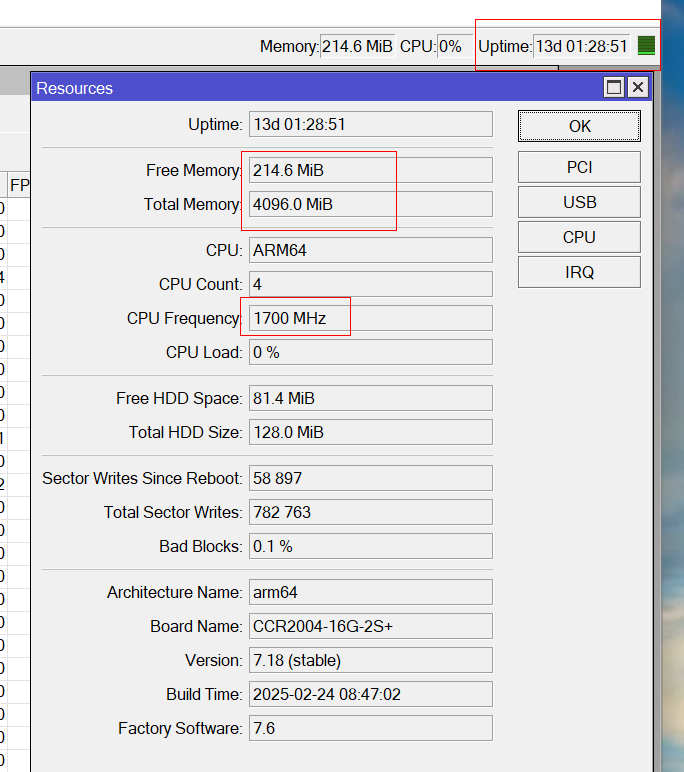
After reading an article about Adlist feature in DNS, I tried it. I increased the cache size of my back router CCR2004 to 768 Mbytes, and I got eight (8) URLs and started with these. After some days I deleted the URls so I thought that Adlist has stopped.
After about 11 days, my 2004 rebooted (log):
router was rebooted without proper shutdown, probably kernel failure
kernel failure in previous boot
out of memory condition was detected
I realized it after a week (the 2004 rebooted ok)…
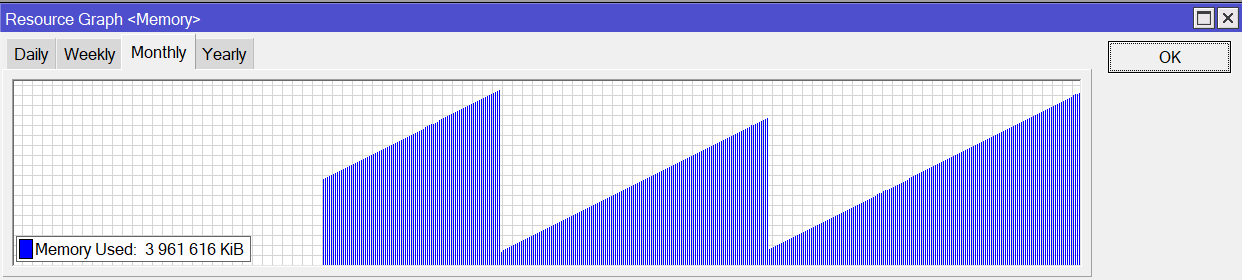
I also applied these to a 686 (PC) router with 1 GB cache size (ram = 4 Gbytes like the 2004). The same thing happened! See attached image.
I rebooted 686 and the problem exists. I made an update to 7.81.1, and the problem persists. It’s like a Virus is installed in the O/S…
In the mean time, I also updated 2004 to 7.18, and the problem persists. So it has nothing to do with the platform. Everything was working fine until the Adlist try. In the relevant DNS Adlist page there is no clue if anything is running. I also tried the [pause] feature, nothing changed. I decreased the cache size, the same.
My 2004 is a production router and I don’t want to netinstall.
Adlist feature needs a lot of ram to run (fills the cache with data). 768 I mean 3/4 of a
Gbyte, it’s an arbitrary number as long there is enough to host the adlist(s).
How big are your lists? Currently I’m using three (well known) lists and set cache to 64MB, halve of the cache isn’t used.
And how many users are you providing network?
An exact same CCR2004 is my front router and works ok, as the problem router worked before the Adlist activation. The 686 router also started leaking after the Adlist activation, so yes, this is the reason. I didn’t do any serious change to the 2004 router to justify such a problem. I activated the Adlist somewhere after the 7.14 version.
To be fair, its a fairly new functionality and it wouldnt be a surprize to have some type of leak.
Good of you to be monitoring and tracking it and trying to pin it down!
At some point you should take some supout reports if unable to remove the leak and report a bug to MT.
That’s the point, I DON’T use the service, the Adlist page is empty and the leak stays AND survives reboot/updates! My other CCR2004 in which never started Adlist is doing fine.
If he has actually removed all the config for Adlist and yet it still fills up the memory after an upgrade, wouldn’t that indicate that a Netinstall should be next? Seem like there’s some stuck configuration here.
This is our main (back) router, I don’t have the luxury to Netinstall… I will buy a new one, and after the replacement, I will Netinstall the old router offline, safely, and without seriously interrupting our operations.