Hello.
RouterOS x86 7.15.3 is installed in a Dell R630 server with an Intel X710 adapter.
Intel X710 is connected via SFP+ with a direct connection cable to the CRS326-24G-2S+RM.
After rebooting the server, the link disappears, which is restored by manually changing any settings for the corresponding SFP+ port in the CRS326-24G-2S+RM.
If you install Windows 10 on the same server, the problem does not occur.
How can this problem be solved?
I also had problems with my X710. They were resolved after updating the firmware. Boot into some live linux distro and get the nvmupdate utility from intels website.
https://www.intel.com/content/www/us/en/download/18190/non-volatile-memory-nvm-update-utility-for-intel-ethernet-network-adapter-700-series.html
Powercycle the device afterwards.
I have Dell Intel X710 10Gb i350 2xRJ-45 2xSFP+ 06VDPG and the latest firmware version 22.0.9 is already installed.
Hi!
Install hypervisor on your server, then use RouterOS as VM (Virtual Machine).
The Hypervisor will handle the NIC-card, inside the VM use virtualized NIC-cards ( vmxnet, virtio ).
I know about such a scheme, but I would like to do it without virtualization.
Intel Ethernet NVM Update Tool 1.41.3.3 cannot update firmware for Dell X710.
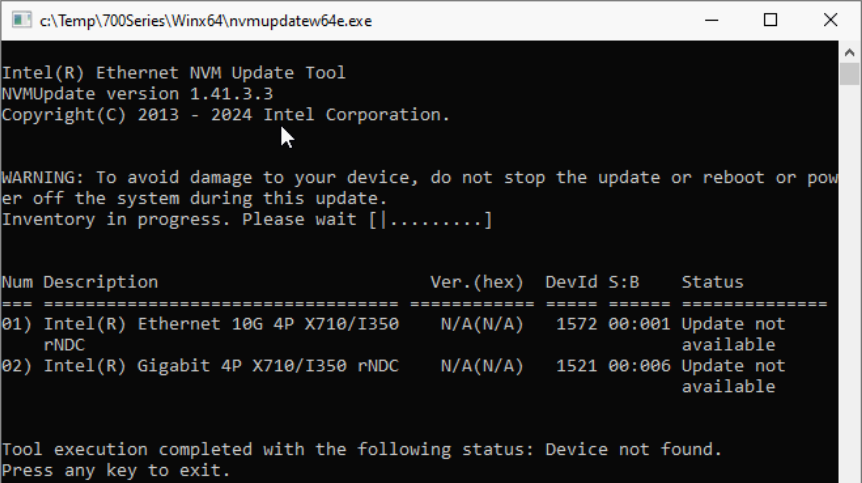
I found a more current update from Dell to version 22.5.7, but it did not help.
that’s unfortunate. Is the link restored when you manually disable / enable the interface?
In this case you could execute a script that automatically restarts the nic using tools/netwatch or system/scheduler.
something like this:
/system scheduler
add name=fix-link on-event="/interface/set etherX disabled=yes\r\
    \n:delay 2\r\
    \n/interface/set etherX disabled=no" start-time=startup
you should create a supout file while the issue is present and send it to mikrotik support.
I replaced the network adapter with an X520 (Dell Intel 4P X520/I350 rNDC), and there is no problem with this network adapter.
P.S. The X520 loses to the X710 in CPU load. The RouterOS-built-in bidirectional throughput test for a single 10Gb port loads two Intel Xeon E5-2690v4 processors by 30% and 22%, respectively.
Hello,
Mikrotik has broken something in the drivers and currently all cards with the Intel Ethernet Controller X710 chipset have stopped working.
Report the problem to Mikrotik support and maybe they will fix it faster.
Don’t waste your time, it’s a driver problem.
disable or enable interface will not work..
need to pull out the sfp or cable and insert again..then i will work agan..
so strange.. any fix until now?
Intel X710 is a very bad card with problems, please don’t even try to use it.
I recommend it, it works perfectly in Mikrotik Intel E810, the system is newer, faster and has more functions, for example:
Intel E810-XXVDA2 Ethernet 10/25Gb 2-port Compatible SFP-RJ45, SFP, SFP+ and SFP28 Adapter
Intel E810-XXVDA4 Ethernet 10/25Gb 4-port Compatible SFP-RJ45, SFP, SFP+ and SFP28 Adapter
Intel E810-CQDA2 Ethernet 100Gb 2-port QSFP28 Adapter
This card has no flaws!
I especially recommend HPE cards because they don’t have a lock for Intel on any SFP connector.
For example:
- HPE-P08443-B21-Intel E810-XXVDA2
- HPE-P21112-B21-Intel E810-CQDA2
I have done the firmware update. however my problem is still not really solved. why is that?
You can’t do anything with X710 this card doesn’t work well with mikrotik. I’ve been testing for a few months. Intel E810 is great.
Changelog of development release 7.22beta3 (2026-Jan-14 14:35) says:
*) x86 - improved link establishing on Intel X710 series NIC;
Has anyone tested yet?
To answer my own question  Tested on 7.22beta5 and the link-up issue after reboot seems fixed. I'll perform further checks when it reaches the stable release, but it looks like my X710 is finally ready for production!