Hi everyone,
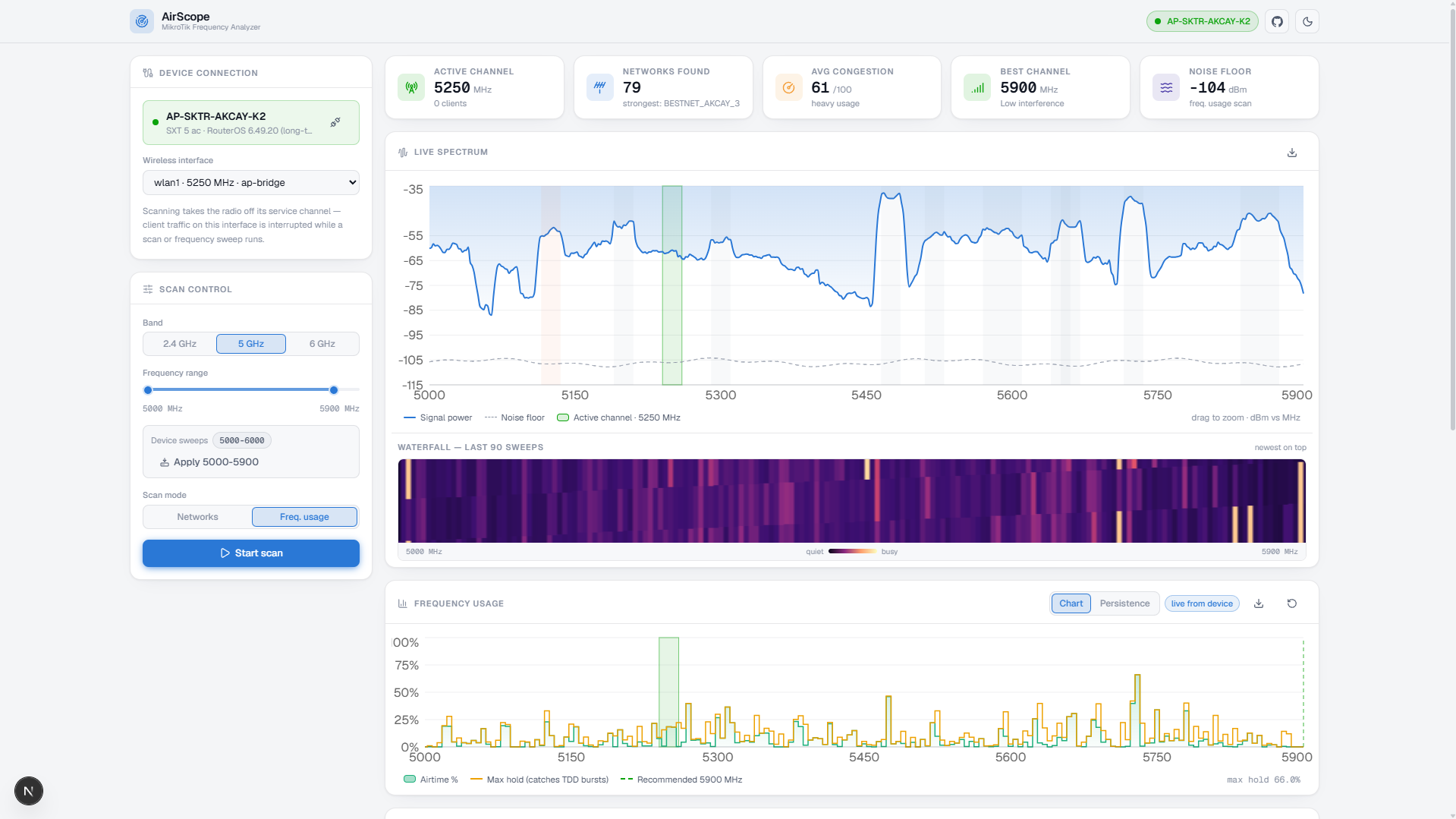
I’ve built a tool called AirScope, a visual frequency-scanning dashboard for MikroTik devices. It’s designed specifically for WISP operators who rely heavily on tools like Scan and Frequency Usage in Winbox but want something more visual, persistent, and insightful.
GitHub: GitHub - berksmbl/AirScope: MikroTik Frequency Analyzer · GitHub
 What is AirScope?
AirScope replaces the raw tables in Winbox with a modern, real-time dashboard that helps you see what’s happening across the spectrum.
It connects to your MikroTik via the RouterOS API and continuously collects scan + frequency usage data, then visualizes it in multiple ways — including a live spectrum graph, waterfall, and channel heatmap.
 Key Features
• Device Connection Panel
-
Connect via RouterOS API (port 8728)
-
Save device profiles (no passwords stored)
-
Supports both legacy wireless and RouterOS v7 wifi
• Dual Scan Modes (Continuous)
-
Networks Scan — detects and accumulates nearby APs (like Winbox scan, but persistent)
-
Frequency Usage — real airtime % + noise floor per frequency (~200 bins per sweep)
-
Max-hold logic ensures bursty/TDD signals are not missed
• Live Spectrum Graph
-
dBm vs MHz visualization
-
Signal + noise floor
-
Network overlays
-
Zoom + hover + PNG export
• Spectral Waterfall
- Scrolling spectrogram of recent activity
• Channel Heatmap
-
One cell per 20 MHz channel
-
Combines:
-
Wi-Fi congestion
-
Raw spectrum energy
-
-
Clearly shows non-WiFi interference too
• Non-WiFi Interference Detection
-
Detects spectrum energy not explained by Wi-Fi networks
-
Flags things like:
-
Microwave interference
-
Radar
-
Proprietary links
-
-
Visualized as dashed bands + heatmap indicators
• Persistence (CDF) View
-
Mimosa-style frequency analysis
-
Shows how often airtime levels occur (not just averages)
-
Easily distinguish constant load vs burst interference
• Smart Channel Recommendation
-
Scores channels based on:
-
Overlapping signal strength
-
Spectrum usage
-
-
Suggests:
-
Best channel
-
Alternates
-
Cleanest 40/80 MHz blocks
-
• History & Compare
-
Save scans locally
-
Overlay past scans on live data
• Export Options
-
CSV (networks + usage)
-
PNG (spectrum graph)
• UI/UX
-
Dark mode (default) + light mode
-
Fully responsive
-
Real-time updates (SSE stream)
 How It Works
-
The frontend (Next.js) opens a live stream (SSE over POST)
-
Backend maintains continuous RouterOS scan/usage streams
-
Data is accumulated server-side and pushed every second
-
Analysis (congestion, interference, recommendations) runs client-side
 Getting Started
git clone https://github.com/BerkSMBL/AirScope.git
cd AirScope
npm install
npm run dev
Then open:
http://localhost:3000
 Connecting to MikroTik
- Enable API:
/ip service enable api
- Enter:
-
Router IP
-
Username / Password
-
Select wireless interface
Scanning starts automatically after connection.
 Notes / Limitations
-
Background scanning is used when possible, but some modes require foreground scan → may interrupt traffic
-
One radio = one active tool (multiple sessions may conflict)
-
API (8728) is unencrypted → use only in trusted networks
-
Streams auto-stop after ~20s if UI disconnects
 Why I Built This
As a WISP operator, I found Winbox tools:
-
Not visual enough
-
Not persistent
-
Hard to correlate spectrum vs detected networks
AirScope tries to combine:
-
MikroTik scan data
-
Real spectrum usage
-
Interference detection
-
Smart channel selection
…into a single, usable interface.
 Feedback
I’d really appreciate feedback from other MikroTik / WISP users:
-
Feature ideas
-
Performance improvements
-
Compatibility issues (especially RouterOS v7 wifi)
Feel free to open issues or PRs on GitHub.
Thanks 
 .
.
 AirScope Update — Spectrum Rules, a Rebuilt Scoring Engine & Docker
 Not all channels are equal — and now you can see it


 not allocated — the second one is aeronautical, including microwave landing systems
 Zero extra scanning for any of this. Static data, nobody's subscribers get dropped.
 The scoring engine got rebuilt
 Measured noise floor is part of the score, referenced against the quietest bin in the sweep
 Adjacent-channel skirt — a strong carrier just outside your channel still desenses the front end
 Burstiness penalty from the p95–p50 spread — TDMA links feel variance harder than steady load
 Confidence levels, so you know when the recommendation is still guessing
 Hysteresis, so the headline frequency stops flapping between near-equal candidates
 RouterOS v7 fixed
 Sector view that costs you nothing
 Docker
 What it still won't do
 The regulatory tables are a planning aid, not a compliance statement — national licensing varies, especially 5.7–5.9 GHz.
 Repo
Repo