There some weird issue on my (RB2011UiAS-2HnD-IN): all interfaces get down and immediately up again when i got max (950MB/s-980MB/S) load from any interface, when download something from lan. They all bridged, no max CPU load or something.
I cannot reproduce this issue on my RB2011UiAS-2HnD running v6.49.18. Just did the test by copying a couple 100GBs from my NAS to my desktop and it’s doing ~950Mbps without causing any link downs. Have you tried using another power supply?
I suspect all bridge traffic is going to CPU, and given that link between gb switch and cpu is 1gb, it’s saturated.
why not use hw offloading (switching)?
why not use hw vlan handling? → bridge-cosmos: i would replace it vlan interface on bridge-base with eth2 part of it
as next step you could also consider inter-vlan routing using hw rules
@sebastia: he set hw=no as a workaround for the issue, as he mentions in the third post.
I actually managed to reproduce the issue on my RB2011 as well by a copying a couple of TBs of data from my NAS to my desktop. All ports on the first switch chip went down in the middle of the copy and immediately came back up again. Lost 3-4 pings. NIC on desktop also reports a clear link down event.
I disabled hw offloading as workaround to fix this issue. I also disable all VLANs just for test and problem still exist.
Interesting… this is exacly what i have. Also log of mikrotik says that all connected ports are link down and up.
About power supply, Its runs on POE (20v input) and i tried external 12v (1A) power supply and still have a same issue.
Ye, seems like removing vlan from bridge-cosmos on eth2 fixed the problem. I still try to learn vlan stuff, but its kind of hard..
replace it vlan interface on bridge-base with eth2 part of it
Can you explin this part pls? (pictures will be great) All i need is just forward interface eth2 to my hyper-v vlan5 port. Like i plugget cable direct to my hyper-v VM interface.
I’m not using any VLANs and I still see this issue. Also, I confirmed in post #6 that I’m running the latest v6 and I can successfully reproduce the problem. I expect the problem to be related to the switch buffers being full, eventually causing a reset of the switch chip. We’ve seen this problem before (eg on the RB3011, RB4011 and CCR2004 series).
Yes, SERVER-FSG (eth3) - is there where VM with vlan5 port, there is no need for vlan 5 access on router, just need physical eth2 on mikrotik (there provider with static IP own DHCP and etc) connectet directly to VM on SERVER-FSG (VM port with vlan id5).
So this Mikrotik’s eth2 port should simply go directly to the virtual machine that behind eth3 mikrotik port.
/interface vlan
→ remove name=vlan-cosmos vlan-id=5
because no need to access vlan 5 on router
/interface bridge port
→ remove interface=vlan-cosmos
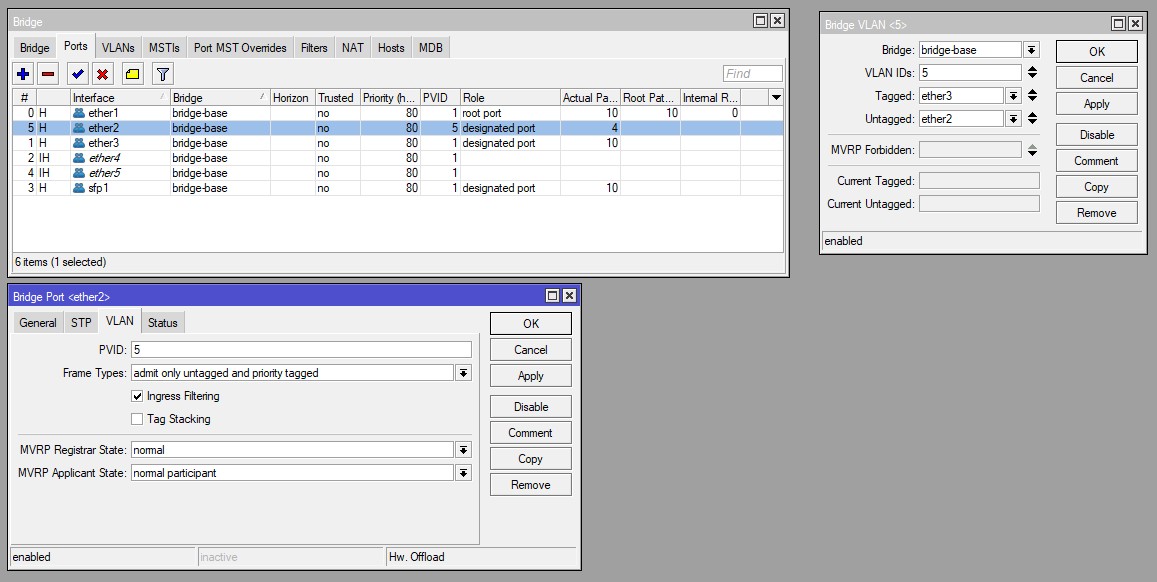
→ assign interface=ether2 to bridge-base pvid=5 frame-types=admit-only-untagged-and-priority-tagged
because eth2 will be part of main bridge, with (optional) vlan-filtering in hw
→ consider defining eth1 & eth4 explicitly in bridge config: access ports as for eth2 above or tagged
/interface bridge
→ remove name=bridge-cosmos
/interface bridge vlan
→ add vlan 5 with tagged=eth3 untagged=eth2
what is this about?
/ip dhcp-client
  add interface=bridge-base
using default vlan 1? → make it explicit in /interface bridge vlan, see also comment above about eth1 & eth4
Thank you for your help and answers. Not working.
VM doesnt get any DHCP from this eth2.
upd: i enabled VLAN Filtering and it worked. But this option disables Hardware Offload
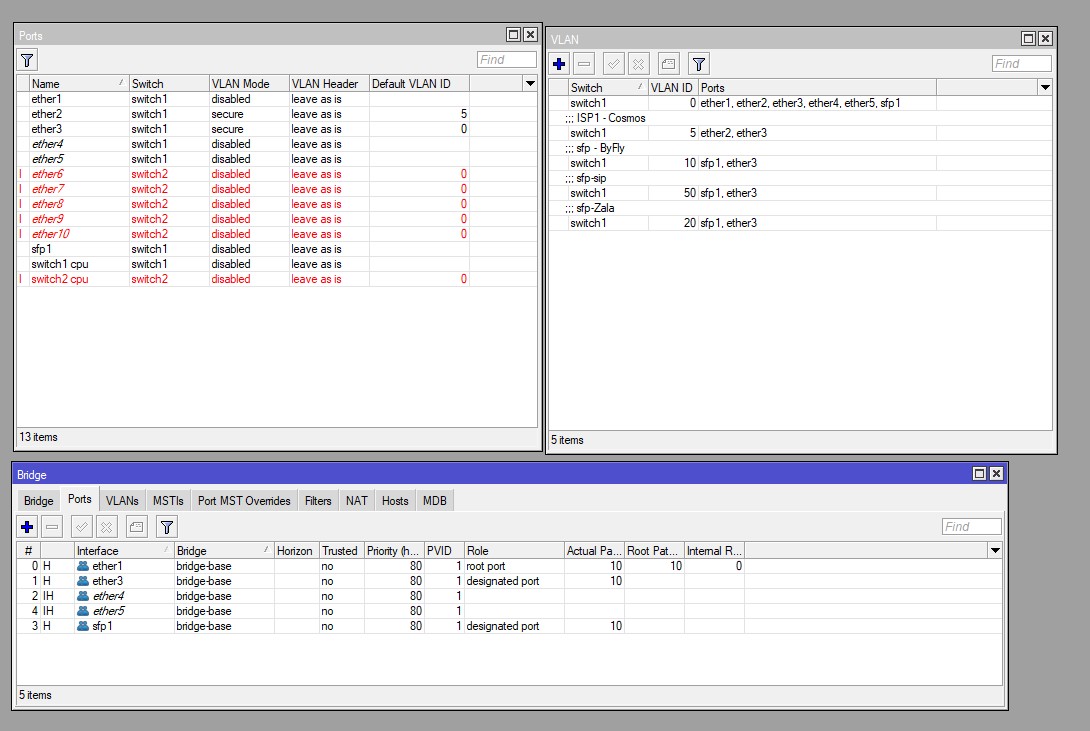
/interface ethernet switch port
set ether2 vlan-mode=secure vlan-header=leave-as-is default-vlan-id=5
set ether3 vlan-mode=secure vlan-header=leave-as-is