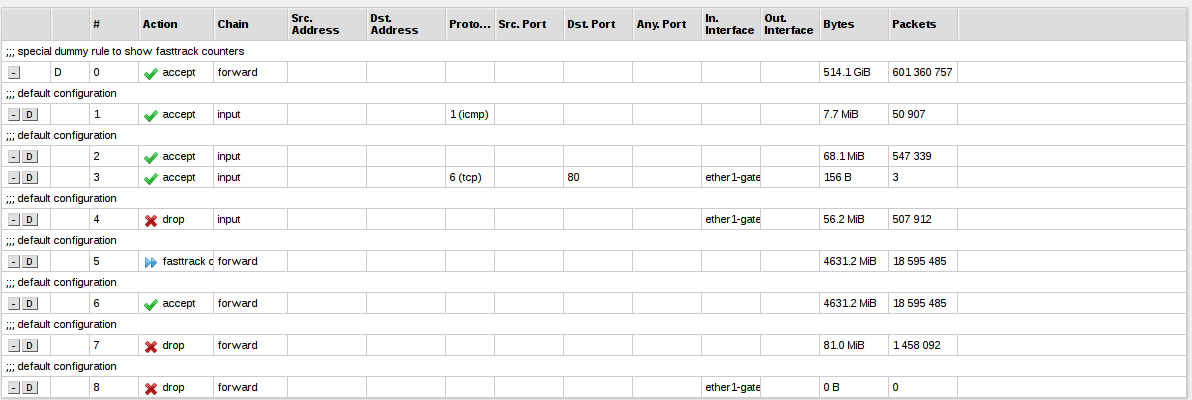
Bit of a newb, I’m trying to allow access to port 80 through my gateway interface, which has IP address 192.168.10.1
When connected to the LAN side, I can access webfig on port 80 at bot 192.168.88.1 and 192.168.10.1 fine, however when I’m connected to my modem/router device (which is on the gateway interface) with a 192.168.10.x address, I can’t access port 80.
I have all the default rules in the firewall, and have added an explicit accept for port 80 on the gateway interface.
Most likely, your new rule comes later in the input chain than the rule which is blocking all connections by default.
You can drag the rule higher up in the input chain.
Another place to look is in the IP > Services
See if there’s an IP range specified for the http service - this would limit the service itself to only clients from the specified address(es).
Obviously one of the criteria of your accept rule is not true.
in-interface=ether1-gateway… for instance this rule is only true if the packet actually arrives on the interface ether1-gateway. (regardless of src/destination IP address)
Perhaps there is an IP address-list criteria you’ve also defined, but isn’t shown in the screenshot…
execute this on the command line interface and paste the results here:
/ip firewall filter print detail [ find where chain=input ]