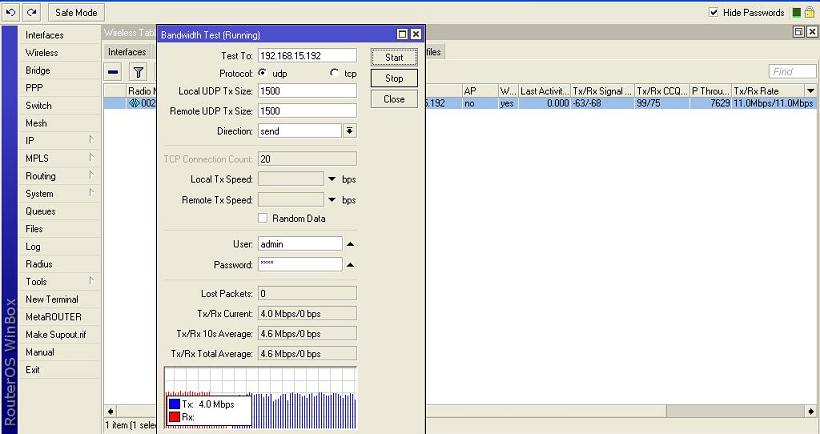
I just setup a very long link according to me. Almost 50 km and along a river. I am attaching the bandwidth test which shows 4 mbps Rx and had showed 5 mbps Tx.
I am using 433AH with XR2 and parabolic grid at one end and 433AH with Dbii and parabolic grid at the other end. Both the antennas are vertically mounted. I have no idea about Fresnel zones or interference in between.
My queries:
Is it decent to have a such a result in bandwidth test.
The TX/RX signal is varies a lot. It is 63/68 or approx during late evening till early morning but during day it is normally 79/84. I have no idea why there is such difference.
The CCQ does not vary much (betn 90-98) but the bandwidth test goes to 1mbps when the TX/RX signal is 79/84.
My peers are advising me not to use 5Ghz because it would be diff. to align the link. Is it so??
The distance showed by Mikrotik Router OS 5.0 is 24km although I am sure this link can never be less than 50 km.
I am having one end of the radio in bridge mode and the other as station wds, because keeping both the end in bridge mode was causing some broadcasting in the network and there was constant Tx/Rx traffic dunno from where.
Reluctant to use NV2 because I have found that CCQ goes really bad with NV2. I do not know if I can use 10MHz channel in 2.4 frq.
There can be some industries and chimneys in the path or the river meandering. How do I trace the path?? The industries/chimney or some strong interference can be the cause of change in TX/RX signal
with those signal levels, you should be able to get more than 11Mbit/s. You don’t say what size antennas you’re using, but with 24db antennas, you should be at about -62. I’m guessing you have 19db grids? Set the radios to G-only/nv2 and see what you get. You should be able to lock in at 24 or 36Mbit/s.
Since you’re shooting down a river, use the biggest antennas you can get (3’ dishes?). This will give you the narrowest beamwidth possible, reducing reflections 'n stuff.
Also, keep in mind that the 802.11n stuff will actually take advantage of those reflections, so maybe you NEED to try a pair of SR71 radios (2.4 or 5.. 5.8 would be best, as it’s fresnel is about half of what you have at 2.4, further eliminating reflections.
5Ghz is no more difficult to align than 2.4Ghz, assuming that you’re getting optimal alignment on the 2.4 to begin with. The biggest thing is that at 5Ghz, you have a tighter fresnel, so alignment is more critical, but still not more difficult.
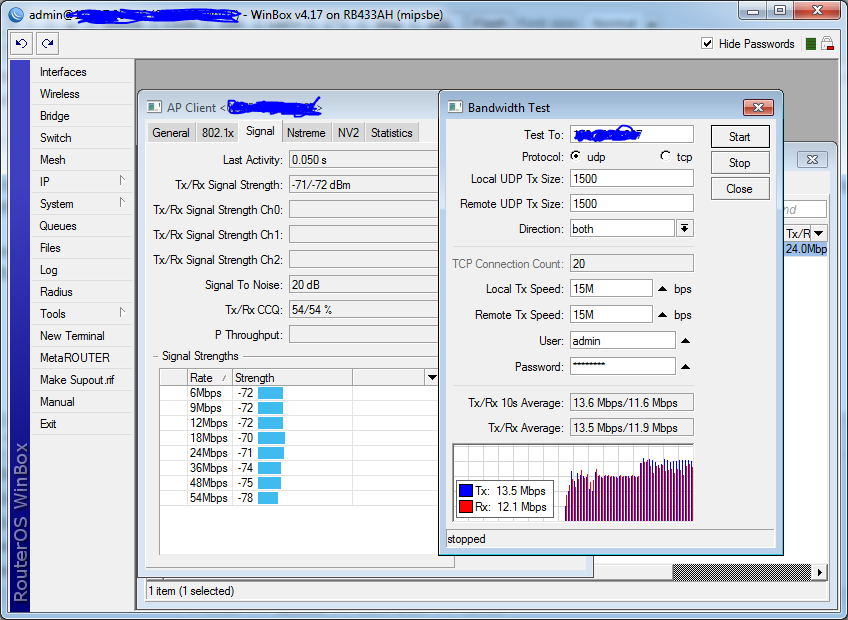
As for nv2, don’t worry too much about the ccq numbers… Every link I changed from 802.11a/nstreme has been a top performer, even with the CCQ going from 90’s to crap.
Here’s a 38km link (XR5 radios, 2’ antennas I think). I’m pretty sure that the antennas aren’t aligned properly, as the signal should be about 14db stronger. I’ m not gonna complain though, because I’m getting ready to move the remote site to a new distribution tower anyways.
I am using 2.4 B mode hence locked at 11.0 mbps and I am using Andrews 24dbi parabolic Grids.
As for NV2 I see the latency going high and the CCQ going bad. also if i change from b to b/g i might loose the link but i think i should try. there is a 5 km stretch of industrial area with chimneys near the transmitting side. some folks suggested me to use the r52h cards instead of xr2 and dbii.
moreover the signal stays at 63/68 for very less usable times. it is usually 80/82. ccq is 95/98 during no load but it goes to 80/10 when there is a user at the other end.
this is what is bothering me.
you can use google earth ruler to find the exact distance.
slight off topic, but that will be exactly opposite to “exact”. at least use a GPS unit to get both coordinates, then use calculator from here http://www.gpsvisualizer.com/calculators
True. i should have used the words exact, perhaps “Approximate” might have been better
Sometimes i like the quick and dirty…
If you are afraid of dropping link, you can always log into winbox at the remote router, open up a terminal and hit CTRL-X. In the Terminal you will see the word then keep that winbox session open.
If you drop your winbox session out, your changes should revert back to the previous functioning ones.
if you do get it working with a new config, make sure to go back to the remote terminal and hit CTRL-X to exit out of safe mode, otherwise when you close winbox, the settings will revert because it will treat you closing winbox as a disconnect.
How high up are your antennas? its very possible you are having obstruction issues. If you have some larger grids or some more height its likely to help you get the link more stable.
There cannot be any obstruction because both sights r on the periphery of the cities with fields and the river in between them. There r some chimneys of some industries in betn but i do not think they r high enuf.
i tried nv2 but my link wont connect. it connects good at nstreme but works only at night …during day it keeps connecting n disconnecting whn i run a bandwidth test.
i am running it at 802.11 but not happy wit the thruput during day hours . at night the same link gives upto 8 mbps but in day even 1.5 mbps is not consistent.
I have a 24 mile link running 3.30. Works great. Somewhere around 7mb usable, enable Nstreme and I get 10+, but it interferes with another link on my tower.
I installed 4.17 and enabled the NV2 wireless package and the link would not come back up until I set the ack timeout to 300. It would not auto detect the ack at that distance.
As you have your problem during the day it sounds like moisture from the river. 5GHz is a better solution for this link than 2.4GHz as long as you are legally allowed enough power to make the link.
0ldman, let me ask you something abt this interference.
If you left both links at A mode, no interference. If you use one of them with Nstreme, it interferes at the remaining A mode link.
I assume they’re not at the same freq neither overlapping ones.
Are this cards at the same RB minipci bays? Can Nstreme push card power above the “default” power, increasing intermodulation an creating some splatter? Any other reason you thought may be?
I think the tighter beam of a higher gain at 2.4GHz may actually make it worse if we’re looking at moisture and temperature differentials causing the signal to bend and scatter.
If it was not shooting over a river I would agree with you.
0ldman, let me ask you something abt this interference.
If you left both links at A mode, no interference. If you use one of them with Nstreme, it interferes at the remaining A mode link.
I assume they’re not at the same freq neither overlapping ones.
Are this cards at the same RB minipci bays? Can Nstreme push card power above the “default” power, increasing intermodulation an creating some splatter? Any other reason you thought may be?
Regards;
Both in A mode works fine, though I don’t get the speed I want, I still have more than I need right now. Each shot is on its own board, the 23 mile using a 433 with an XR5 and R52 (2.4 backup link), 411A with R52H, 26 dBi gain on both 5GHz shots. 23 mile shot is on 5765MHz, 4 mile shot is using 5.28GHz, DFS, so hardly any power there at all, under 1W. There is a third shot to my fiber in town, 5.8GHz, H polarization, Nstreme, works fine.
Both are 97+ ccq right now moving data. If I enable Nstreme on the long link the short link drops to around 15% ccq. Even if I turn the power up on the short shot, disable DFS, turn the power down on the long shot, there is still interference, 400MHz worth of separation. I plan on enabling nstreme on all of the links at the same time to see if I still have issues, just haven’t had the chance yet.
Some weeks ago I received an AirView 2.4M Ext by mistake (should be 900M Ext) but I put it in service to watch a R52Hn spectrum, using a X86 on the bench.
Spectrum mask for G mode, Nstreme and NV2 was exactly the same, e.g. there was not any difference in sideband waveforms, generated they’re by intermodulation.
One nice test, if you have signal margin on the shortest link, is install some N attenuator both sides … if actual signal is -60 and -75 still a usable signal, 7 or 8dB each side for example. May be this ceases a possible LNA overload … may be A mode does not mess things as much as Nstreme / NV2 for some reason.
As soon as you are shooting over water you increase multi-pathing. 50Km is a very long way for 2.4ghz. Since you are shooting over water a tighter beam width will help. One thing to remember is the bigger the dish the tighter and more delicate the tuning is. If you go to a 3 foot dish you will have about 1/8 on an inch of travel in azimuth and elevation. In other words make sure your mounting is very, very, very solid otherwise the wind will move the antenna enough to make your connection erratic.
5ghz is a way better option for a link of that distance.
There are more channels that don’t overlap so you have better odds to find a frequency that works good for that location.
There is just way less floor noise in 5Ghz although it is getting crowded too.
Have you considered going to 3.65 or some other licensed frequency?
 I do not know if I can use 10MHz channel in 2.4 frq.