I’ve been trying to get my IPTV box to use a DNS other than my LAN’s. I tried netmap as shown below but it did not work, maybe because of the redirect above it ? Hoping for an easy solution with firewall. I may have to remove the IPTV box’s ethernet port from bridge and give it its own IP etc or go VLAN. I was hoping I there may be another way, thought I’d ask here before I went down either of those roads.
/ip dns
set allow-remote-requests=yes servers=“208.67.222.222,208.67.220.220,208.67.22
2.220,208.67.220.222,::ffff:208.67.222.222,::ffff:208.67.220.220,::ffff:20
8.67.222.220,::ffff:208.67.220.222”
/ip dns static
add address=192.168.88.1 name=router
I haven’t personally tried this, but I think the cleanest way to do it is to obtain the MAC address of your IPTV box, assign it a static IP address in /ip dhcp-server lease, and set the DHCP-options field according to the IANA standard (link provided in wiki) to denote a custom DNS server for that device.
When your device picks up its IP address from the DHCP server, the DNS server that comes along with the reservation should be the one it ends up using.
as you can see, for whole LAN range, there is google DNS assigned, but for one specific IP (I made the lease static so it always goes to specific device) DHCP server will send different IP (its own) as DNS server.
I tested both methods and both work fine.
Very cool solution, if it works reliably. The wiki doesn’t even hint that this is a possibility, or that the networks will necessarily be matched in order of specificity. But I will certainly remember it.
You are right… It is not specified, therefore it is not guaranteed. I guess I figured out some time ago on my own.
I adjusted the answer. It is truly not “easier” solution because it is not clear from the lease, if there will be something special. The DHCP option might be actually better due to this - you will see straight from lease, that there is extra DHCP option
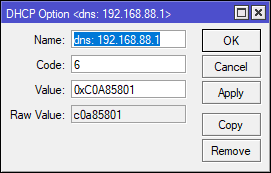
This is amazing, I love those solutions, very ingenious. Since I make hard wired connections in my LAN static I went for the solution suggested by vecernik87. I added the info through winbox GUI (below is the export). I rebooted my IPTV box and voila, it is now using the preferred DNS as described by the IPTV provider and not OpenDNS which I prefer for my LAN.
So happy now, because I did try pulling ether3 from the bridge assigning its own IP etc. etc. but got nowhere other than frustration city with that. (I ended up having to restore my config on my RB750GR3)
Although the device now has an alternate DNS from the LAN, it is not working ie. there is blocking on the device from OpenDNS.
I tried the DHCP-option with winbox gui on the static lease for the IPTV box, and it only allows unknown to be selected. Maybe CLI will allow it ? I saw from the IANA link, option 6 would allow me to input DNS server in options for that lease.
quick tip: You don’t need to calculate hex values. If you follow manual, you will find that IP can be added with apostrophes
This is working example from my tests:
(notice the apostrophes within quotation marks. in GUI, you just type
'1.1.1.1'
)
it is not working ie. there is blocking on the device from OpenDNS.
I tested both methods and my device got DNS IP correctly. I am unsure how to understand your issue - what exactly isn’t working (what is being blocked etc). I don’t really use openDNS so I may be missing some important knowledge which you are referring to.
wild guess: DNS requests from your TV will be probably NATted so from external-dns-server, it will look absolutely same as if your router does the DNS request.
Maybe that is the issue?
Hi vecernik87,
there is a stream that won't work ie. it is blocked. I can go into opendns website panel to disable filtering and it works then. So, even though my specific device has google DNS now it is still not picking up that stream. I'm wondering if it's because i use DNS setting for the whole router in the /ip/dns setting like your wild guess. Maybe I should use DNS settings per DHCP network and remove the /ip/dns settings, but it will still be NATed by the router.
I know I have a pretty bastardized setup between defconf and all the stuff I've mucked with. I may start fresh when I have more time to play, I do enjoy the challenge.
I'm going to start a new thread for how to get ether3 to work independently of the LAN. I've tried this unsuccessfully.
The NATting shouldn’t make a difference one way or the other. In a home network, any device can choose to use any DNS server; they all go through NAT, and it all works. The only difference in your configuration is that you have a device that needs to be fed a custom DNS value instead of having an operator that chooses one for himself.
Here’s an experiment: use the suggested set up to force a custom DNS to a particular PC instead of your dumb device, then inspect the PCs Internet settings, make sure they are what you expected them to be, and make sure that the DNS works. If it works for the PC, it ought to work for the dumb device, as long as it is honoring the DHCP information properly.
So, I’m still looking at this problem. If I am using the routers /ip/dns as seen from the export in the original post do I have to add my iptv box ip as static in this section to get this to work?
/ip dns
set allow-remote-requests=yes servers=“208.67.222.222,208.67.220.220,208.67.22
2.220,208.67.220.222,::ffff:208.67.222.222,::ffff:208.67.220.220,::ffff:20
8.67.222.220,::ffff:208.67.220.222”
/ip dns static
add address=192.168.88.1 name=router
So I tried this on my main PC’s IP. It did give give the custom DNS information as seen from the windows command /ipconfig /all. However, this did break the network connection for that PC; no internet, could not even connect to the router. I had to revert settings on router from another machine on the network.
Weird because the dumb device (it uses linux 3.3) still has connection when sent a custom DNS