BETA Schema validation for /app YAML format
UPDATED to support validation with YAML needed for being an "App Store". This is simple, since custom apps downloaded by a
app-store-urlsin/app/settingsare just an array of/appYAML.However, for tools like VSCode there is a different schema file to use, the instructions below have been updated to include both a single "Custom
/app" and the "/appStore" YAML with multiple. For automatic schema detection of a/appStore YAML file, use a file matching.tikappstore.yaml(with the "single app" form ending in.tikapp.yaml)
RouterOS 7.22beta introduced "custom /app" support that uses YAML to define a new /app in the RouterOS container catalog. RouterOS /app uses its own YAML format. While similar to docker-compose, it not the same. In order to provide validation of MikroTik-specific /app YAML, my TIKOCI project repo has an experimental "JSON" schema to enable validation of /app YAML format in editors like VSCode. _Since custom /app are still in beta, TIKOCI /app YAML schema has not published to https://www.schemastore.org yet - which allow tools like VSCode to automatically use to do YAML validation. The schema is in JSON, but editors will use for YAML too.
Download the "beta" RouterOS /app YAML schema - https://tikoci.github.io/restraml/routeros-app-yaml-schema.latest.json
The schema can be used in a various editors that support YAML validation. However only VSCode has been tested
Adding /app YAML validation to VSCode
To use the schema to check /app YAML in VSCode:
- VSCode's YAML extension need to be installed, which adds basic YAML support and schema validation.
- You'll need to add the
/appYAML schema to VSCode "User Settings" via JSON. To access the settings, use shift + command + P, then search for "Open User Settings (JSON)", and select it. - In the JSON file appears, add the following text within the outer
{}block:{ "yaml.schemas": { "https://tikoci.github.io/restraml/routeros-app-yaml-schema.latest.json": [ "tikapp.yaml", "tikapp.yml", "*.tikapp.yaml", "*.tikapp.yml", ], "https://tikoci.github.io/restraml/routeros-app-yaml-store-schema.latest.json": [ "tikappstore.yaml", "tikappstore.yml", "*.tikappstore.yaml", "*.tikappstore.yml", ] }, ... } - Create a new file ending in
.tikapp(or any of the endings used insettings.jsonabove), and any errors will be highlight with red underline, and listed in the "Problems" view.
Here is what happens with "bad /app YAML" in VSCode, with the routeros-app-yaml-schema.latest.json schema used:

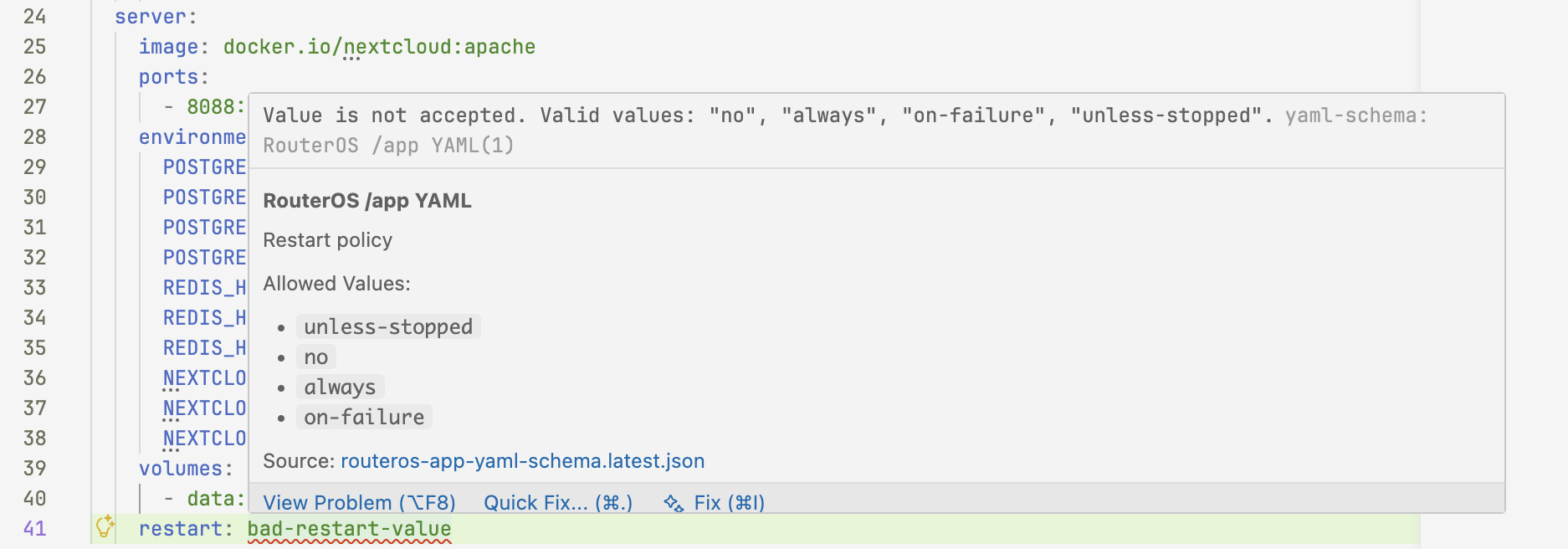
And if you "hover" over an error, some help will automatically appear:
PRO TIP
If you add a header to the "/appYAML" like this:# yaml-language-server: $schema=https://tikoci.github.io/restraml/routeros-app-yaml-schema.latest.json name: amm0-note descr: Use a YAML comment at top of file to load a schema services: example: image: docker.io/library/alpineThis will cause the VSCode and YAML extension to load the current /app YAML schema without modifying VSCode setting to map extensions. With this as the first line in a
.yaml/.ymlfile:# yaml-language-server: $schema=https://tikoci.github.io/restraml/routeros-app-yaml-schema.latest.jsonAll that's is needed is YAML extension installed, which will look for "first line" to load the
/appYAML schema.For a combined
/appStore YAML file available for download viaapp-store-urls, use the following header instead:# yaml-language-server: $schema=https://tikoci.github.io/restraml/routeros-app-yaml-store-schema.latest.jsonNote that
-storeis added to the single file form