I wrote in support and even gave a link to this topic in the text of the letter here.
So, after some help from wiktorbgu we managed to get this docker instance working using following options:
awg.conf
[Interface]
PrivateKey = sFMkMpJqU+8fzsKFiUvmZs64GzpafAPDJgSlil9HslE=
Address = 10.0.0.2/24
MTU = 1440
Jc = 4
Jmin = 50
Jmax = 1000
S1 = 146
S2 = 42
H1 = 532916466
H2 = 2096090865
H3 = 406337014
H4 = 57583056


# Add IP masquerading
PostUp = iptables -t nat -A POSTROUTING -o %i -j MASQUERADE
# Del IP masquerading
PostDown = iptables -t nat -D POSTROUTING -o %i -j MASQUERADE

Table = awg
PostUp = ip rule add priority 300 from all iif eth0 lookup awg || true
PostDown = ip rule del from all iif eth0 lookup awg || true

[Peer]
PublicKey = z7tnHzJqSqwtkt4MiqfoQAZW4f5YM0JUR3elbOr8bh0=
AllowedIPs =  0.0.0.0/1, 128.0.0.0/1 # don't use 0.0.0.0/0
PersistentKeepalive = 25
Endpoint = *.sn.mynetname.net:51820
Replace * with your DNS name.
This is for server, awg0.conf
[Interface]
Address = 10.0.0.1/24
ListenPort = 51820
PrivateKey = 2ONX7xNsinRtVLG5STJwGkA1T57sX1SJ8Sy898rB6Us=
Jc = 4
Jmin = 50
Jmax = 1000
S1 = 146
S2 = 42
H1 = 532916466
H2 = 2096090865
H3 = 406337014
H4 = 57583056

# Add IP masquerading
PostUp = iptables -t nat -A POSTROUTING -o eth0 -j MASQUERADE
# Del IP masquerading
PostDown = iptables -t nat -D POSTROUTING -o eth0 -j MASQUERADE

Table = awg
PostUp = ip rule add priority 300 from all iif eth0 lookup awg || true
PostDown = ip rule del from all iif eth0 lookup awg || true

[Peer]
PublicKey = kY6T9/56TWyaWg2uKIZynED7uOdJWR5ygOyG60OEZHA=
AllowedIPs = 0.0.0.0/0
Hello! I wrote to technical support and received the following response:
Hello,
Thank you for contacting MikroTik Support.
We do not have any plans to add such a feature at the moment, but if more users will request it, we will see how this can be implemented.
Best regards,
Therefore, if you are interested in adding the protocol, also write to technical support with a request to add amneziawg
On my Mikrotik RB5009, your container started without problems, but on the Mikrotik CHR it doesn’t start. Start and immediately stop occurs without recording in the logs. I think it’s because i need an amd64 docker image. Please add an amd64 image.
Initially, everything is done and tested for all Mikrotik arm, arm64 and amd64.
https://hub.docker.com/r/wiktorbgu/amneziawg-mikrotik/tags
Yes, you’re right, I didn’t see this tag.sorry
Your container starts only if there is a ‘usb1’ root folder in the files didectory.
For example if dir is ‘/usb1/docker/pull’ - all is ok, if dir is ‘/docker/pull’ - image not starting.
I think there is no need to set the ‘usb1’ root directory in Mikrotik CHR…but for this image it is necessary.
i am getting error: was unable to import, container
i followed each step:
/container/config set registry-url=https://registry-1.docker.io tmpdir=/usb1/docker/pull
/container/mounts add dst=/etc/amnezia/amneziawg name=amnezia_wg_conf src=/usb1/docker_configs/amnezia_wg_conf
/container/add remote-image=wiktorbgu/amneziawg-mikrotik interface=AMNEZIAWG root-dir=/usb1/docker/amneziawg start-on-boot=yes logging=yes mounts=amnezia_wg_conf
is the image still up?
Which Version of ROS are you on?
You also might want to try the registry-url “https://docker.io” or “https://registry.hub.docker.com”
Support this request. Would be a “killer” feature.
Sent e-mail to support@mikrotik.com as well.
This answer is from Mikrotik team to my mail about Amnezia
Hello,
Thank you for contacting MikroTik Support.
We appreciate the suggestion, feature addition is being considered.
No ETA or timeline can be shared as of today.
Best regards,
I forget, what does Amnezia do ?? bada bing!!
+1
I still need this in 2025
+1
This feature would be really great to have.
Also contacted mikrotik support with feature request.
+1, I fully support this — native AmneziaWG obfuscation is needed.
-1
amneziaWG is not needed, because there is absolutely no difference from the already added wireguad, and everyone who asks to add… for them this protocol will become absolutely useless when it is blocked in their country, what will they then ask for some kind of vless, xray, lol
Both AWG and xray can be installed wia containers. but not every mikrotik supports them, so we need as much native ways to use modern vpn’s as possible, including xray, btw.
It’s not as hard to add this feature as it seems to be. Just add as an additional packet.
Right now AWG in Russia is trying to be blocked, but amnezia developers successfully resist.
It should be relatively easy to add given that it is obfuscation layer on top of plain Wireguard.
It’s basically transforms wireguard packets in a way configured by parameters and receiver of packets reverts this transformation, everything else is just Wireguard that’s already implemented.
Vless and Xray would be also nice to have, but implementing them likely will be much more labor intensive.
+1 in fact, these are just a couple of additional settings in WireGuard settings that will make life easier for many people who are under DPI blocks.
All you need to do is add the ability to change the values of these fields. By default, they are standard, but the essence of amnesia is that by redefining the standard values of these parameters, you can bypass the blocking of the wireguard protocol
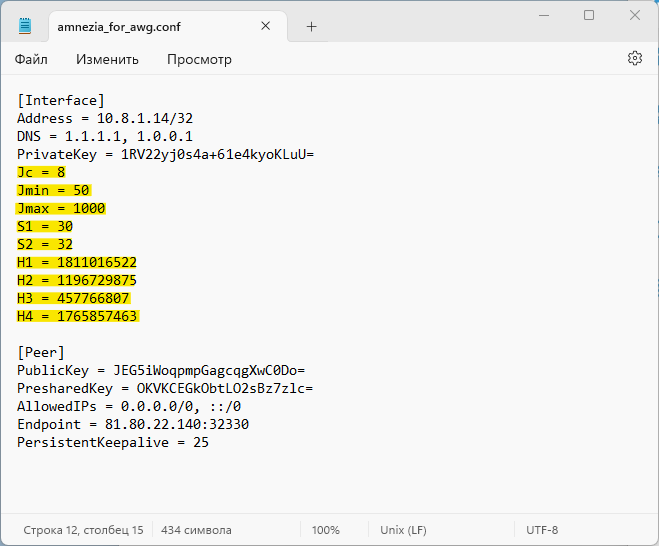
Do both ends of the connection require the same set of altered values in the highlighted fields?