As from a little later this year, maximum TLS certificate lifetime is reduced to 200 days, and in the coming year and a half it will progressively drop to 47 days. So, we’ll all have to move to automated certificate renewal.
I see that ROSv7 supports ACME, but all of the forum threads that I’ve found which talk about ACME seem to refer to Let’s Encrypt.
Any experience using ROSv7, ACME, and a commercial Certificate Authority e.g. Sectigo, RapidSSL, any of the not-overly-expensive CAs, for automated certificate renewals for your RouterOS www-ssl, sstp, etc service ports?
Or, alternatively, automated certificate rewewal, all in ROSv7, via whatever means (scripts, I suppose), withOUT having to integrate the output of certificate management running on a different box, regardless whether it’s strictly ACME?
For years I have bought RapidSSL (descending from DigiCert) certs through RapidSSLOnline - cheap, and it works. But when I asked them today about ACME, they referred me to far more expensive products (which doesn’t make sense, since automation should reduce their costs, too…). Then I chatted with SSL2Go, which specifically said they don’t know of anyone using ACME from ROS…
No matter what I search for, the concepts (ACME, SCEP) sound like they’re meant for this, but I fail to find examples of how ROSv7 can do it. (Or, it’s right in front of my eyes, and I’ll take whateve abuse you want to throw my way for me having missed it, as long as you point me at it, please :-/ )
Starting from 7.22 you use the /certificate add-acme command:
What you need is the directory-url that should be provided by the certificate authorities that support ACME. The documentation only gives the example URL for Let's Encrypt.
The www service must be running (check under IP -> Services) and the firewall must not block port TCP 80 during the request/renewal.
The generated certificates will have the a flag (for ACME) and can auto-renew if the www service is kept running and the port is kept open (but that's a security risk).
Aha, thanks; I use the long-term channel, so this option isn’t yet available to my production boxes.
But I’ll set up my test box on stable and see if I can make this work.
Bugger that it requires at least sometimes opening HTTP inbound from the Internet. I’ll check whether the CA (I’m looking at Sectigo simply because it’s cheap, to start) publishes a short-list of “Our ACME requires you to allow inbound HTTP access from {IP addresses}” to avoid the need for general openness.
If you are still using 7.20, then the old command is enable-ssl-certificate, and with it you can also specify the directory-url, eab-hmac-key, eab-kid. Here is the old documentation:
The difference is that it only maintains one ACME certificate at a time (the issued certificate will be assigned to the www-ssl service). If you only need one ACME certificate per RouterOS device then that is enough.
The change in 7.22 with add-acme allows you to request and manage multiple ACME certificates, decoupled from the one assigned to www-ssl.
Sectigo replied that they do not have a whitelistable list of source IP addresses from which an ACME client must accept connections, so the security risk would remain.
Since my devices are internal, and I’d have to script updates to my external DNS provider (well, my dynamic DNS may already have that done for me), and in any case I do not want to keep the HTTP port on my MikroTik devices exposed, I’m thinking of looking at a manual process that I’ll run on my main Windows box, at least for now.
This whole thing stinks of “Security theory over practical implications”.
There is also option to renew certificate with ROS scheduler using script instead manually (things that can be performed over Winbox can be automated), where scheduler script can check if certificate is near to expire (some time offset set in script) and perform renew and also to enable firewall filter rule to accept tcp 80 before process begins and disable that rule when is finished.
For additionally securing filter tcp 80 rule, since they cannot provide IP list for whitelisting, you can check from which IP request is performed to router and whitelist its AS range, not full-proof but is still somewhat restricted. Potential issue is here if they are using different IP’s on different AS range, if their host DC have many AS or they are balancing between multiple DCs. But that can be detected if renew fails because of it new AS range can be added into whitelist.
I thought this was an elegant solution using firewall address lists to briefly allow port 80 when the certificate is renewed, without needing a script.
I still dislike exposing the www service to the internet, however. So I just use a shell script on a Linux box to run acme.sh, and if it renews the certificate it copies it to the router via ssh.
Indeed, and I’d thought of that; it’ll probably be the way to go. (That is, adding scripting around renewal time, to avoid always having the router accessible from the Internet).
Yeah, IFF my routers were generally accessible, I might be okay with the additional attack surface, but usually I only allow access from outside to the SSTP VPN server port - to get to the webfig port requires port knocking first. So this seems like a large potentil expansion of attack surface.
And, oh, FROTZ! When I read the MikroTik ROS documentation on Certificates and ACME, and I read “TCP port 80 must be accessible from the WAN (HTTP-01 challange is used)“, I had hoped they did NOT mean “www” (webfig front door) has to be accessible. That’s .. awful. (It was already bad enough, in my mind, when JUST an ACME validation server had to be running; I hadn’t realized that it was THE RouterOS web server). As pointed out by others, that lack of separation really is an unnecessary security risk. Ouch.
So, anyone got a script written for ROSv7 which monitors certificate lifetimes, and only opens port 80 when renewal day comes up? It’s still a significant security exposure, but at least one day out of 47 instead of everyday……. Or shall I get cracking on some nifty MikroTik ROS scripting?
p.s. Having opened my router’s raincoat (that is, inbound www/port 80, which, yes, does make the router’s webfig login page accessible to the whole bloody world), the ACME client worked immediately, and my router got its ACME-renewable certificate.
Check my reply above - there’s a more elegant solution using firewall address lists that only opens 80 for a minute, and only when the router makes an outbound connection to the ACME directory server.
Oh, yes, sorry, I had meant to respond to this. I did my current test using a Sectigo ACME certificate purchased (very cheaply) through GoGetSSL.com.
I communicated with both GoGetSSL and Sectigo; unfortunately, the endpoints from which the domain validation inbound HTTP connections to the MikroTik are NOT a published whitelist, and are NOT related to the network number within which their published ACME Directory URL is located (I can confirm that the first octet of the outbound ACME request and the first octet of the inbound validation HTTP request were quite different), so “open all source addressed to destination HTTP during ACME renewal” seems to be the best we can do.
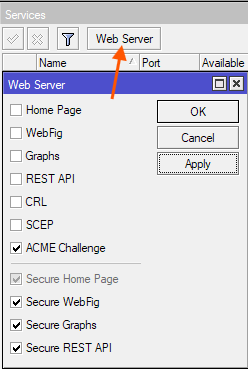
The documentation doesn’t go much into this, and the user interface isn’t clear to me; the top section are the services that www will offer on port 80, and the bottom section (all called “Secure …”) are the servers that www (that is, www-ssl) will offer on port 443?
Under IP -> Services you can enable disable several RouterOS services, such ash SSH, API, WinBox etc...
www is the service that runs behind port TCP 80 (of course here you can also change this port). By default WebFig (the management UI over web browsers), the graphs, als well as other stuffs you see at the top of the above screenshot are available when you enable this www service.
Then there is another service that you can enable/disable/change port from the default TCP 443, which is www-ssl. That one is HTTPS instead of plain HTTP. When you enable www-ssl you also need to assign a TLS certificate to the service.
In the screenshot above, the checkboxes Secure Home Page and below control what are available on this www-ssl HTTPS interface.
So you can enable www-ssl with WebFig running on it, and only make port 443 available in your LAN, and can use WebFig or the REST API to manage the router over HTTPS without having to enable www or having WebFig and REST API available on plain HTTP.
Stuff like ACME / SCEP / CRL obviously only works with plain HTTP, that's why there is no option to control them under www-ssl.
Yes, none of them publish their source IPs. But look carefully at the firewall rules I posted. They don’t care where the request is coming from. They just open port 80 to anyone for 1 minute after the router makes an outgoing request to the directory server.
Ah, yes, thanks for the pointer - I’d missed that.
So, how often does an /ip firewall address-list list address, e.g. from your Let’s Encrypt example “acme-v02.api.letsencrypt.org”, get re-DNS-looked-up by RouterOS? .. so that, when presumably it updates from time to time, the mangle trigger actually catches the outgoing ACME request?
I understand that e.g. the NTP client dynamically looks up the IP addresses, but whereas NTP is a predictbly occasional protocol (at boot, then declining frequency as clock drift is established over time), the mangle trigger has to function correctly at any moment, and the mangle rule doesn’t know when an ACME client might fire. ?
The router’s internal ACME client will renew a certificate 75% of the way through its validity, so 67 days after issuing the 90-day cert.
The mangle firewall rule just adds the router’s own WAN address to the acme-client list for one minute after the router makes an outbound connection to the directory server. Since the accept firewall rule only allows connections to the acme-client list, and that list is generally empty except for one minute after the router connects to the directory server, the effect is to block port 80 inbound except for that one minute every 67 days.
Reread the three rules slowly and you will understand what they’re doing.
My question is when/how often RouterOS will (re-)lookup “acme-v02.api.letsencrypt.org” so that it will know when the outgoing ACME request has occurred. If RouterOS looks that up only at the moment when we enter the command above, and sometime in the 67 days after that letsencrypt (or, in my case, Sectigo) changes the IP address(es) that they publish for the DNS name of their Directory URL, then I wouldn’t expect the mangle rule to notice the outgoing connection (I’m assuming that RouterOS does not keep track of the fact that the ACME client resolved ${someDirectoryURL} to whatever IP address the firewall outbound/mangle rules see connecting out (to what we know is the ACME server).
Or to put it another way, why does the mangle rule that you propose work? We know what we’re expecting, but I assume that RouterOS converts to IP addresses, early and not very often, and so might not match when the ACME renewal time comes around. No? Apologies if I’m being dense here.