[ATL 5G R16] Problems connecting to the built-in management portal after configuring passthrough mode

I have just taken delivery of an ATL 5G R16 to replace my existing external 5G modem. For context, my set up is a Zyxel NR7101 and Starlink presenting two WAN connections into a pfsense firewall. The Zyxel is the primary internet feed, with Starlink as a failover/backup.

Both the NR7101 and the Startlink are configured in bridge/passthrough mode. I have both configured to allow access to their built-in management portals (192.168.3.1 for the NR7101 and 192.168.100.1 for Startlink) and using pfsense routing rules. I don’t use VLANS.

Before dropping the ATL 5G R16 in place of the NR7101 I’ve been pre-staging the configuration to get it correct, with the access I need, before mounting on the roof mast.

I’ve successfully configured the esim, and have an Internet connection. Connecting this to the pfsense firewall, a WAN address is given to the pfsense as expected - trying it with the modem configured without passthrough, and with passthrough. When not using the modem in passthrough mode, as expected, the management portal is available, but as soon as I set the LTE APN to passthrough, I lose access to the portal.

I’ve watched various videos (including the Mikrotik one) and read various discussions about how to access the management portal, but none seem to offer all the information needed.

I’m currently testing without the pfsense firewall involved, to keep the set-up simple - just plugging a PC directly into the ATL 5G R16. Based on the various information I can find online, I’m doing the following :

  • Deleting the IP DHCP Server
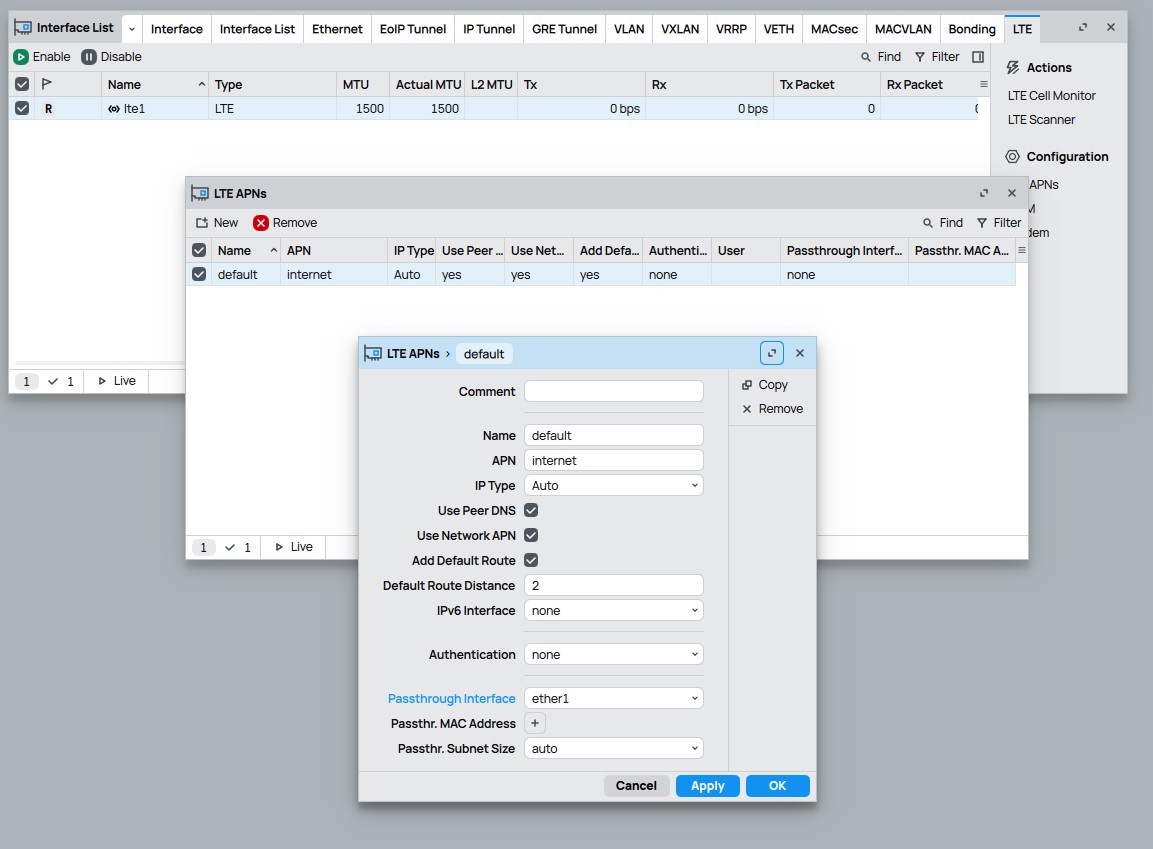
  • Setting the LTE APN to passthrough
  • I’ve also seen mention of adding a private IP to Ether1 for access to the internal portal after passthrough is enabled - however, when looking to do this, there is already an additional IP address present - the default 192.168.188.1

Since an additional private IP is already listed (in addition the the public WAN IP), should this not be being presented on ether1 already?

The WAN address being presented by my mobile ISP is 192.0.0.1 (it’s CGNAT - which is why I want to use passthrough, and avoid double NAT). For testing I’ve therefore given my PC NIC card a static IP address of 192.0.0.2 (it does get this through DHCP also, but I need to change it to static in order to add additional IPs to the NIC). This works as expected, and I have full Internet access. I’ve then added a second IP address to the NIC card in Advanced settings (192.168.188.2) in order to allow access to the portal on 192.168.188.1. This doesn’t work. It is also not pingable.

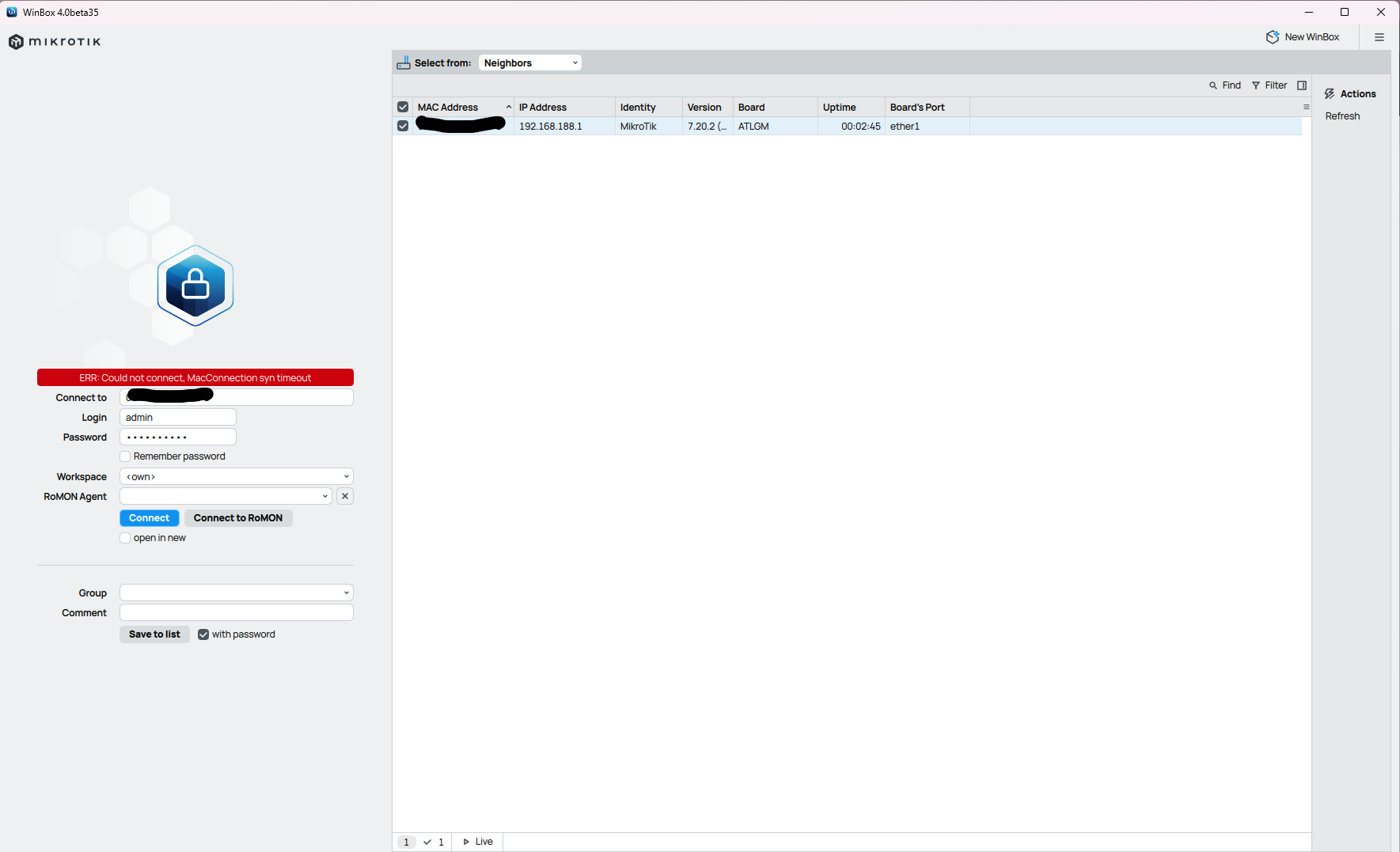
If I launch WinBox, ‘Neighbors’ displays the ATL 5G R16, and indicates an IP address of 192.168.188.1 It will not connect though. Is this an indication that the ATL 5G R16 is definitely presenting 192.168.188.1 on ether1 or not? As I can’t access the management portal, I have no way to be sure (and therefore may be trying to connect to an IP address that isn’t actually available).

Any thoughts on where I’ve got the set-up wrong? With the PC connected directly to the modem, and the NIC set up with two IP addresses, one on each of the relevant subnets, I don’t understand why this isn’t working. If I can get this working, it should be easy for me to move to connecting to pfsense, and setting up the required routing (like I have with the current NR7101).
Winbox allows (if everything is working correctly) in TWO ways:

  1. at L3 level (using IP) like any browser
  2. at L2 level (using MAC) using a proprietary protocol

BOTH connection methods may be inhibited by wrong firewall or other configuration settings (usually interface lists members or mac winbox server).

See:

Have you tried connecting via MAC (click on the MAC that you see in Winbox instead of the IP)?

Thank you for the reply.

Yes, I’ve tried with the MAC address also. There’s no firewall involved right now - I’m currently testing by connecting a single Ethernet cable between the PC and the ATL G5 R16. I did this to eliminate anything else interfering.

Well, there are a few things that you should check (after having reset the device and back to default configuration) before doing anything else.

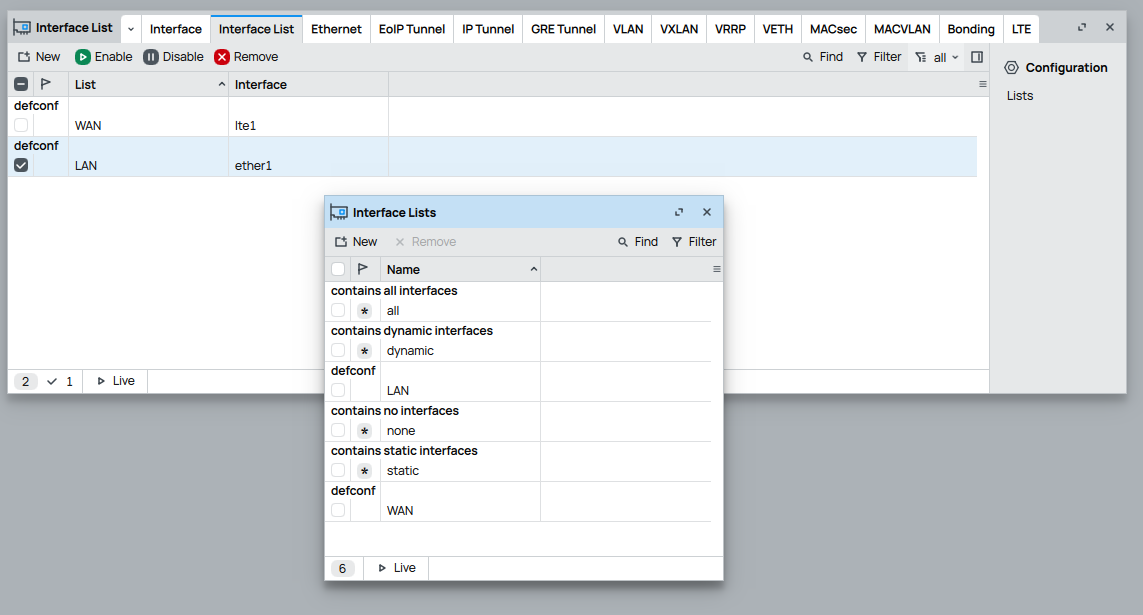
  1. Verify that in interface list there Is a LAN entry
  2. Verify that in interface list members ethernet port (ether1) Is part of LAN (or bridge if ether1 Is part of a bridge)
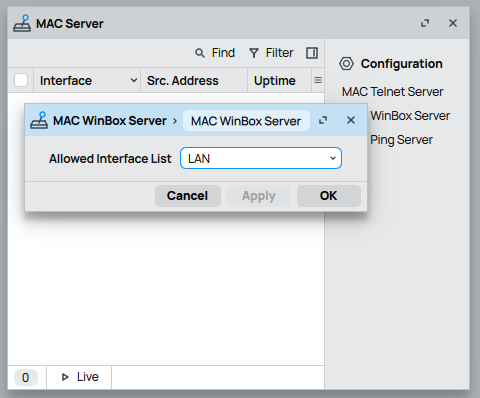
  3. Verify that in mac-winbox server allowed interface list Is LAN

Compare with:

Then test Winbox connection via MAC.

Thank you again for your suggestions. I’ve run through these, and it looks correct to me.

Verify that in interface list there Is a LAN entry

Verify that in interface list members ethernet port (ether1) Is part of LAN (or bridge if ether1 Is part of a bridge)

Verify that in mac-winbox server allowed interface list Is LAN

I then attempt to switch the LTE modem to passthrough. First I delete the IPv4 DHCP server, and then configure the LTE APN to passthrough.

Once I apply this change, WinBox disconnects.

I then restart the modem and PC. I have internet access, indicating that the passthrough change appears to be working as expected (NIC IPs are no longer 192.168.188.x), but trying to reconnect to WinBox gives timeout errors.

As you can see above, it’s discovering the device, but won’t connect anymore, after setting the LTE interface to passthrough.

It looks ok, but in "passthrough mode" the device should behave like a bridge, and you should have - I believe :confused: - lte1 and ether1 into a same bridge, in this case the allowed interface should be the bridge. (or maybe passthrough mode sets something differently?).

Try posting your complete configuration (the textual one, easier to read/understand than the screenshots) following these instructions:

Maybe there is something else amiss or wrongly configured in some other parts of config.

Probably irrelevant, but can you try with Winbox 3.x instead of 4.x?

While experimenting - and ONLY temporarily while experimenting - you could try setting the allowed interface lists to "all":

/tool mac-server
set allowed-interface-list=all
/tool mac-server mac-winbox
set allowed-interface-list=all

But more likely you are in this situation:

And you need either a management VLAN or a bridge to get access.

OK - I’ll try rolling back to 3.x, and setting the allowed interfaces to all.

I can’t really send the configuration export - as soon as I configure LTE to passthrough, I lose connection to WinBox to be able to export it :wink:

If you think it will help, I can share the configuration export as it is immediately before I configure passthrough - but at that point I have access to WinBox.

Yep, sure, the last one before you tick the passthrough box will do.

What is strange is that - while IP access should fail in IP mode - it shouild work in MAC/winbox anyway, at least in theory.

I’ve included the configuration content below.

# 2025-10-27 10:39:55 by RouterOS 7.20.2
# software id = 
#
# model = ATLGM
# serial number = 
/interface lte
set [ find default-name=lte1 ] allow-roaming=no band="" nr-band=""
/interface list
add comment=defconf name=WAN
add comment=defconf name=LAN
/ip pool
add name=default-dhcp ranges=192.168.188.10-192.168.188.254
/ip dhcp-server
add address-pool=default-dhcp interface=ether1 name=defconf
/port
set 0 name=serial0
/queue type
add fq-codel-ecn=no kind=fq-codel name=fq-codel-ethernet-default
/queue interface
set ether1 queue=fq-codel-ethernet-default
/ip neighbor discovery-settings
set discover-interface-list=LAN
/interface list member
add comment=defconf interface=ether1 list=LAN
add comment=defconf interface=lte1 list=WAN
/interface lte settings
set sim-slot=esim
/ip address
add address=192.168.188.1/24 comment=defconf interface=ether1 network=\
    192.168.188.0
/ip dhcp-server network
add address=192.168.188.0/24 comment=defconf dns-server=192.168.188.1 \
    gateway=192.168.188.1
/ip dns
set allow-remote-requests=yes
/ip dns static
add address=192.168.188.1 comment=defconf name=router.lan type=A
/ip firewall filter
add action=accept chain=input comment=\
    "defconf: accept established,related,untracked" connection-state=\
    established,related,untracked
add action=drop chain=input comment="defconf: drop invalid" connection-state=\
    invalid
add action=accept chain=input comment="defconf: accept ICMP" protocol=icmp
add action=accept chain=input comment=\
    "defconf: accept to local loopback (for CAPsMAN)" dst-address=127.0.0.1
add action=drop chain=input comment="defconf: drop all not coming from LAN" \
    in-interface-list=!LAN
add action=accept chain=forward comment="defconf: accept in ipsec policy" \
    ipsec-policy=in,ipsec
add action=accept chain=forward comment="defconf: accept out ipsec policy" \
    ipsec-policy=out,ipsec
add action=fasttrack-connection chain=forward comment="defconf: fasttrack" \
    connection-state=established,related hw-offload=yes
add action=accept chain=forward comment=\
    "defconf: accept established,related, untracked" connection-state=\
    established,related,untracked
add action=drop chain=forward comment="defconf: drop invalid" \
    connection-state=invalid
add action=drop chain=forward comment=\
    "defconf: drop all from WAN not DSTNATed" connection-nat-state=!dstnat \
    connection-state=new in-interface-list=WAN
/ip firewall nat
add action=masquerade chain=srcnat comment="defconf: masquerade" \
    ipsec-policy=out,none out-interface-list=WAN
/ipv6 firewall address-list
add address=::/128 comment="defconf: unspecified address" list=bad_ipv6
add address=::1/128 comment="defconf: lo" list=bad_ipv6
add address=fec0::/10 comment="defconf: site-local" list=bad_ipv6
add address=::ffff:0.0.0.0/96 comment="defconf: ipv4-mapped" list=bad_ipv6
add address=::/96 comment="defconf: ipv4 compat" list=bad_ipv6
add address=100::/64 comment="defconf: discard only " list=bad_ipv6
add address=2001:db8::/32 comment="defconf: documentation" list=bad_ipv6
add address=2001:10::/28 comment="defconf: ORCHID" list=bad_ipv6
add address=3ffe::/16 comment="defconf: 6bone" list=bad_ipv6
/ipv6 firewall filter
add action=accept chain=input comment=\
    "defconf: accept established,related,untracked" connection-state=\
    established,related,untracked
add action=drop chain=input comment="defconf: drop invalid" connection-state=\
    invalid
add action=accept chain=input comment="defconf: accept ICMPv6" protocol=\
    icmpv6
add action=accept chain=input comment="defconf: accept UDP traceroute" \
    dst-port=33434-33534 protocol=udp
add action=accept chain=input comment=\
    "defconf: accept DHCPv6-Client prefix delegation." dst-port=546 protocol=\
    udp src-address=fe80::/10
add action=accept chain=input comment="defconf: accept IKE" dst-port=500,4500 \
    protocol=udp
add action=accept chain=input comment="defconf: accept ipsec AH" protocol=\
    ipsec-ah
add action=accept chain=input comment="defconf: accept ipsec ESP" protocol=\
    ipsec-esp
add action=accept chain=input comment=\
    "defconf: accept all that matches ipsec policy" ipsec-policy=in,ipsec
add action=drop chain=input comment=\
    "defconf: drop everything else not coming from LAN" in-interface-list=\
    !LAN
add action=fasttrack-connection chain=forward comment="defconf: fasttrack6" \
    connection-state=established,related
add action=accept chain=forward comment=\
    "defconf: accept established,related,untracked" connection-state=\
    established,related,untracked
add action=drop chain=forward comment="defconf: drop invalid" \
    connection-state=invalid
add action=drop chain=forward comment=\
    "defconf: drop packets with bad src ipv6" src-address-list=bad_ipv6
add action=drop chain=forward comment=\
    "defconf: drop packets with bad dst ipv6" dst-address-list=bad_ipv6
add action=drop chain=forward comment="defconf: rfc4890 drop hop-limit=1" \
    hop-limit=equal:1 protocol=icmpv6
add action=accept chain=forward comment="defconf: accept ICMPv6" protocol=\
    icmpv6
add action=accept chain=forward comment="defconf: accept HIP" protocol=139
add action=accept chain=forward comment="defconf: accept IKE" dst-port=\
    500,4500 protocol=udp
add action=accept chain=forward comment="defconf: accept ipsec AH" protocol=\
    ipsec-ah
add action=accept chain=forward comment="defconf: accept ipsec ESP" protocol=\
    ipsec-esp
add action=accept chain=forward comment=\
    "defconf: accept all that matches ipsec policy" ipsec-policy=in,ipsec
add action=drop chain=forward comment=\
    "defconf: drop everything else not coming from LAN" in-interface-list=\
    !LAN
/system clock
set time-zone-name=Europe/London
/tool mac-server
set allowed-interface-list=LAN
/tool mac-server mac-winbox
set allowed-interface-list=LAN

The ‘LTE passthrough winbox issue’ thread you references is definitely what I’m trying to solve. I’ll read through the thread in detail to see if it helps. I was trying to avoid using VLANs, and achieve it how I have with other devices. Maybe that won’t be possible with the Mikrotik.

EDIT: For reference this is before I disable the DHCP server. As per the configuration advice I’ve seen elsewhere, I disable the DHCP server and then set the LTE-APN to passthrough.

I tried this :

/tool mac-server
set allowed-interface-list=all
/tool mac-server mac-winbox
set allowed-interface-list=all

but it doesn’t help.

Yep, but from what I understand the points are:

  1. once you enable passthrough mode you will loose IP access to management of the device
  2. MAC access will continue working with Winbox
  3. if you want to have IP access nonetheless you need to use a VLAN or make a bridge and ...[1]

What you report is that point 2) is not true (or not true anymore).

Let's wait if some of the more experienced members have an idea on what could be preventing MAC access or have another workaround.

It could be also a new "quirk" in 7.20.2, what is your factory software version on that device?

[1] imagine here that the set of instructions are actually clear (they aren't at least to me)

Yes, that is a fair summary. Point 1. I was expecting - it’s the same with my ZyXel and Starlink. However, with both of those the device’s ‘management’ IP continues to be exposed on the WAN port alongside the passthrough public IP. You then just need to configure appropriate routing.

The software is 7.20.2.

Hopefully someone else might be able to contribute. Otherwise I’ll need to accept a configuration with double NAT (may not be so bad, as I already use a VPN tunnel from the pfsense firewall to an Internet POP in order to get a fixed public IP address)

Yep, I know that you are running 7.20.2 (it is in the export you posted), I was asking which factory version is on the device (7.20.2 has come out on the 22th of October and I doubt that the device made it in a few days from factory to you).
Mikrotik devices cannot be downgraded to versions below the factory version.
Since sometimes the newest/best/latest has some issues it is a test to be made to downgrade (temporarily) to verify whther an issue is version specific or it is a more general one.

Ah, ok - took a while to find that info.

7.19

So it's not like there are that many versions to possibly experiment with.

It is entirely possible that something changed between 7.19 and 7.20.2 to mac Winbox access, but - since all people using LTE in passtrhrough mode seem to use the (IMHO stupid, unneededly complex and ugly) VLAN workaround to get normal access to the device - it is also possible that the issue happens since a much earlier version and noone noticed.

Anyway I am struggling to find a clear, reported to be working, complete, setup example for that workaround implementation, all the "solutions" I could find on the forum seem like either incomplete or similar to Vogon's poetry.

The relevant settings could be like:

/interface vlan
add comment=LTE_PASS interface=ether1 name=VLAN2_LTE vlan-id=2
add comment=MGMT interface=ether1 name=VLAN200_MGMT vlan-id=200

/interface lte apn
set [ find default=yes ] apn=internet.xxxxxxxx.xx passthrough-interface=VLAN2_LTE passthrough-mac=auto use-network-apn=no

/interface list member
add comment=defconf interface=ether1 list=LAN
add comment=defconf interface=lte1 list=WAN
add interface=VLAN200_MGMT list=LAN

/ip address
add address=192.168.188.1/24 comment=myconf interface=VLAN200_MGMT network=192.168.188.0

But I am not entirely sure about them, nor if they would work in your setup.

I’ve downgraded to 7.19, and I still can’t connect using the MAC address after configuring for passthrough.

I can see how I could apply the VLAN setting, but would need to reconfigure pfsense to match. I may need to resort to that, although I’m more inclined to give up on using passthrough and accept double NAT, even though that would be a step backwards from my ZyXel set up.

However, I’d also really like to understand why Winbox can’t connect using the MAC address - this is a really nice feature to allow you to connect even if you made a mistake when making changes to the IP configuration.

You can try only adding the VLAN for management, something like :

/interface vlan
add comment=MGMT interface=ether1 name=VLAN200_MGMT vlan-id=200


/interface lte apn
set [ find default=yes ] apn=internet.xxxxxxxx.xx passthrough-interface=ether1 passthrough-mac=auto use-network-apn=no

/interface list member
add comment=defconf interface=ether1 list=LAN
add comment=defconf interface=lte1 list=WAN
add interface=VLAN200_MGMT list=LAN

/ip address
add address=192.168.188.1/24 comment=myconf interface=VLAN200_MGMT network=192.168.188.0

this way the pass-through would remain the normal ether1 (no VLAN) and you would only need to set the VLAN 200 for connection management.

Though still no idea if it would work and why the Winbox connection doesn't without this stuff.

Personally I would like better (if possible) the suggested "other" (that should be simpler) workaround, making use of a bridge, but I cannot find a valid example to try.

I am not sure how to exactly implement Sebastia's suggestion here:

Yes, it would be good to have more detailed documentation on how to achieve this. It must be a common requirement for anyone configuring the device for passthrough, to also need access to the management portal using Winbox.

One such situation would be switching eSIM profiles. You need access to Winbox to do this.

I would test the VLAN option on my pfsense firewall, but can only do this when it’s convenient to disrupt Internet access for the network. It’s not easy to find a window for doing that.

Yep, the common way to do it is as @jaclaz explained it. Basically you have to somehow manufacture two separate interfaces, one for management, and another for passthrough. This is because “passthrough” - as the name suggests - assigns the given interface entirely to the modem.

The most straightforward is indeed to create a vlan interface on top of the ethernet interface. In this config, when ether1 is assigned for passthrough, this refers only to the untagged packets. Tagged packets (with the specified vlan id) continue to be received by your router and enable management. Usually in this case the vlan interface should be assigned to be part of the LAN interface list.

I’ve not had much time to work on this today, but did discover a way to access the management interface after configuring the lte apn to passthrough. The MAC address of the host first connecting to the ATL5G gets bound to the modem when it first connects. If you then connect a different host to the ATL5G, with a static IP on the 192.168.188.0 subnet, it connects to the management interface.

It seems that when you configure passthrough, it’s working at Layer 2, and everything from the initial host to connect is passed to the lte interface/modem.

In theory, if I put an unmanaged switch between the ATL5G and hosts, and then explicitly map the MAC address of the host I want to bind to the lte apn interface, another host connected to the switch with an appropriate static IP will connect to the management console. For my needs (occasional and infrequent access the ATL5G management), this may be sufficient.

I may still try the VLAN configuration option, but that will need to wait until I have a window to take the pfsense firewall offline for a few hours.

I also now understand why this is simpler to achieve when using Starlink or the ZyXel NR7101 I currently use.