I am having the same issue with a three node Audience installation. I’m connecting to the base node and the extension nodes are not handling any traffic or connecting to end points. No traffic over the backhaul radio. All three nodes were connected over the instructions and the lights are all green. Documentation is really poor.
ojnab, the first problem I see is one of the devices is Wifiwave2, the other is not. Can you at least install the wifiwave2 package on the Audience and try again? A second potential issue is you are trying to setup the CAP connection on an interface managed by CAP. Not sure that works.
CowboyChris, I suppose you mean the wlan3 for the backhaul. I have found that the mesh/wds links are not super reliable. Instead I have in my setup (1 manager, 2 satellites) the main router as ap bridge, the two satellites are station bridge over wlan3. wlan1 and wlan2 are managed via the main router (capsman).
Thanks all - I’ve now given up on using WDS as it seems I need wave2 and I’ve managed t install routeros 7.12.1 with wave2 on the Audience, and I’ve managed to configure it to use capsman as follows
gotsprings correct, no mesh with wave2 on the audience. During my tests, I have found that the mesh with the old drivers is at best unreliable. What is still possible is ap/station bridge, which works fine.
I tried wave2 but as I use vlan and needed the vlan-filtering, I had to go back to the old drivers.
If you want to use the QuickSet options to setup the mesh, that requires the “old” drivers (e.g. the ones it ships with).
But “new” Wi-Fi drivers (which have to be downloaded/installed, from mikrotik downloads) are WAY better than the old drivers, so that’s what you’d likely want to use. Only downside is the “mesh” has to be manually configured, and any of the QuickSet option won’t work with the new drivers.
Critically, “mesh” really not something special, it’s just a “station-bridge” configured on one of the 2nd Audience’s Wi-Fi interface. The Audience only special in that it has 2 x 5Ghz WiFi radios, so one can be dedicated to bridging — e.g. one has 2 chains, one has 4 chain interface, typically the 4 chain is the last wifi interface & what should be used for mesh. Additionally, you still may want to use “new” CAPsMAN on the non-bridge/non-mesh 5Ghz Wi-Fi so can enabling roaming between the two Audiences.
Final detail here is in 7.13rc/beta, how the “new” Wi-Fi drivers are changing… So if setting up a new network, I’d recommend using the 7.13rc so future upgrades will work without issue. But the setup of the Audience “mesh” is same using a “station-bridge” — only difference is the Audience has a dedicated “mesh” interface to use for it (rather than a virtual Wi-Fi interface).
Thank you! I’ll proceed as suggested. I have to say I would have expected a $160 AP to work as documented. First time I’ve been really disappointed with a Mikrotik product.
Every works fine when I add ether1 to to the bridge “bridge” and plug it in, my phone can connect to the internet through the audience.
When I unplug ether1 I can still connect to the Audience’s IP address via the HAPax2 but I’m not getting any bridging from wifi2 to wifi3. I can see it’s connecting on the HAPax2
/interface/wifiwave2/registration-table/print
Flags: A - AUTHORIZED
Columns: INTERFACE, SSID, MAC-ADDRESS, UPTIME, SIGNAL
#   INTERFACE  SSID             MAC-ADDRESS        UPTIME  SIGNAL
0 A cap-wifi2  my5gSSID  XX:XX:XX:XX:XX:XX  35s     -45
It’s as if station-bridge mode isn’t working as advertised.
In the failing scenario the Audience can connect to capsman on the HAPax2. the computer can connect to the Audience and if the phone is configured with static IP it can connect to the Audience.
Sniffer on the Audience shows that when the computer pings the phone and arp is received and replied to, but I don’t think the reply is getting to the HAPax2, when I ping the computer from the phone the arp is sent but no reply comes back again perhaps the arp isn’t getting to the HAPax2
Is the Audience also connected via Ethernet & you want the wifi mesh as a backup? I’m confused…
I ask since there is RSTP active by default & you’d have two paths to same bridge… You can adjust the cost of the wifi3 bridge port and/or mark as “Trusted”.
The Audience will have no ethernet connection when its placed where it’s needed. I only plug it in for configuration and tests.
You have a very good point about spanning tree, as the phone is going to be switching between the HAPax2 and Audience as I move around the building. Also, I’m not familiar with mesh so the only thing I did was …
So I’ve removed the proxy-arp setting and configured RSTP, but still the same problem
Why is the wifi3 interface on the Audience still not sending out packets that don’t originate from the Audience itself.
In the sales blurb it says that the Audience is supposed to be able to send traffic around the mesh on all 3 wifi radios, but if wifi1 and wifi2 are configured in AP mode, how can they also work in station mode?
The “station-bridge” is pretty simple – it doesn’t need any help from HWMP/“mesh”/etc — it just need to be a bridge port on the LAN your trying to extend (with the “ap” end also in the right bridge) & it needs to be connected (which it seems it is already).
e.g. Why are you using HWMP? You shouldn’t need “/interface mesh add hwmp-rann-propagation-delay=5 name=mesh1” on either end. If you did than mesh1 is what go to your bridge AFAIK but I’m not the HWMP expert & you’d want STP disabled (or port marked edge)
It also help to know final topology your looking for… I presume you have hAPax and Audience, and have a single LAN… if so station-bridge on one end is what you’d want. If you have multiple VLAN etc, that’s whole different animal here…
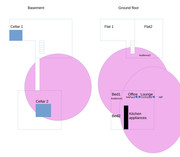
Just to give you an idea of what I’m planning. Here’s the layout of my building, and I was thinking about getting 2 Audience units one in the bedroom1 to give me a good signal in bedroom2 and if it works out good then I was thinking of either asking the HOA for permission to put a 2nd one in the laundry room or it might be easier to ask the neighbour in flat2 if they would be willing to put one in the corner of their flat to give me a signal in area cellar1.
PS: I can’t get wifi3 on the Audience to connect to the HAPax2 directly, probably because the HAPax2 is using 5ghz-ax so I’m actually connecting to a very old ASUS ap next to the CCR1009.
Whilst I’m testing the Audience is half way between the CCR1009 and the HAPax2 so I can plug a cable into either router.
 …
…