NOTE- SOLVED SEE MY 1/10/25 POST
We are getting rid of static addresses on the WAN side of our routers and switching to Dynamic with DDNS. We use MTs cloud one and we have a backup one of our own. That is working fine, but we have an issue with updating the mant DSTNAT entries we have if the IP changes.
I found a suggestion someplace, possibly here, that had the following, My question is: Is the last line correct? I don’t see how the router can know that the WAN IP has changed and update the address list. What is missing here?
Go to Firewall → address lists and Create a new rule…
Give a name of your choice and at the address field fill your dyndns address… A dynamic rule will be created…
After that on your dst nat rule, delete the dst address and instead go to advanced tab (really General tab?) and at the dst-address-list select the list you created in the previous step…
When the address changes the address list will be updated…
Solution will work … but with some delay which depends on DDNS provider settings.
Mikrotik’s own DDNS solution, which creates <serial_number>.sn.mynetname.net DNS entries, have TTL set to 60 seconds. And option with adding DNS name as member of address lists does observe TTL. Which means that if one uses mynetname.net DDNS, router will resolve name to address when added to address list … and then every TTL it’ll do it again. If address changes (and router does notify DDNS servers about it), it can take up to TTL for address list to receive the new IP address. During that time (up to 60 seconds for MT’s solution) DST-NAT rules won’t work correctly.
Do you have more than one public IP on the wan interface?
if not, why not just set the dst-nat rule to use in-interface where the in-interface = your WAN interface?
Then you don’t need the IP in the rule at all.
One workaround is to use dst-address-type=local, then it will also work for Hairpin-NAT. But of course, we’ll be including all the IP addresses of the router, not just the WAN facing one.
I suggest using/setting CNAME records in your main DNS for each DDNSed router item.
You can apply consistent myremoterouterNNN.mydomain.mycountry CNAMEs everywhere just taking care to have the CNAME change propagate fast enough to update that records in/at acceptable time for users.
EDIT: Locally you should use dynamically updated address list consisting of that router’s CNAME.
This only helps with naming (e.g. when router changes, it’s DDNS name changes … and it then has to be changed in many places. If one uses CNAME records, then change has to be done only for that particular CNAME). But it doesn’t help with time interval when NAT doesn’t work if IP router’s WAN IP address changes … that’s still governed by TTL setting of DDNS provider (e.g. 60 seconds in case of MT’s DDNS service).
I have been using the cloud DDNS, I wanted to use an additional one for backup. It is in my Cpanel. I made a script to update it and it works.
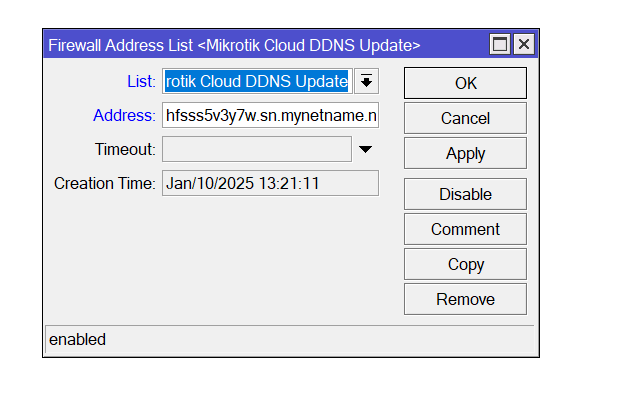
Where I went wrong and what prompted this post was that I misunderstood what was to go in the “address” field of the address list. The post I quoted was a little confusing. I thought I was to put the ADDRESS that the query gave me in there. But it is actually the query itself that is needed . Hopefully my screen shot came through and this simple explanation will help someone else.
I’m all good, now. Thanks all.
The address in the screenshot has been altered.