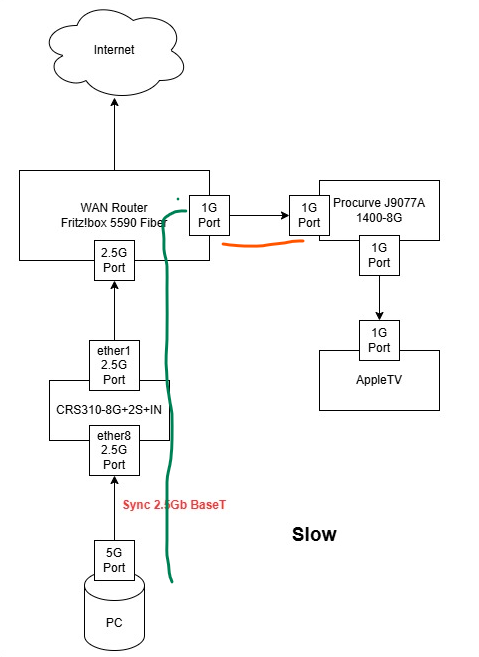
Did you try enabling flow control on the ethernet ports of the CRS310 (at least on ether1 and ether8 according to your diagram)? Looking at this:
Ethernet frames travelling along the green path might reach a rate of 2.5Gbps to arrive at the Fritz!box. From there the orange path can only deliver 1Gbps which means the frames are kept in a queue on the Fritz!box until its buffers are completely full. Usually, with flow control enabled, the Fritz!box would generate pause frames and send them back to the CRS310 to tell it to slow down. If flow control is enabled on the CRS, it will in turn send pause frames to your PC. And if flow control is enabled on the PC’s network adapter, then the PC will reduce the rate (if everything works well, to below 1Gbps).
If flow control is disabled, the pause frames are ignored, the ethernet frames keep arriving at the Fritz!box at up to 2.5Gbps and when the buffers are full, the Fritz!box drops the frames. On MikroTik devices flow control on the ports is off by default.
That might explain why things work when the connection between PC and CRS is only 1Gbps (the Fritz!box can forward them at the same rate to the Procurve without overfilling the buffers). Or when the PC is connected directly to the Fritz!box, if both of them support flow control.