EC25-xx(whatever) has a USB2 minipcie interface and will work in the LtAP with out hardware issue as LtAP’s chipet is USB2/MiniPCIe cpu based board.
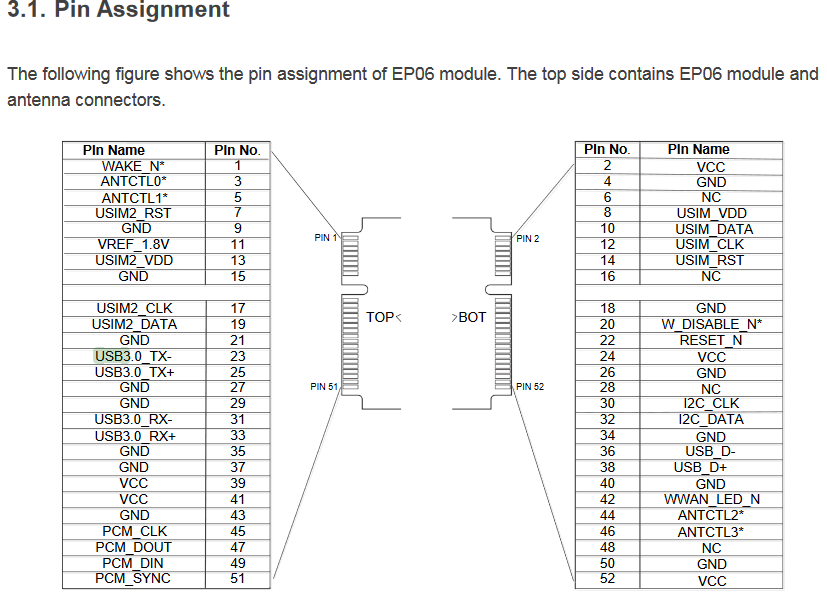
EP06-xx IS USB 3.0 interfaced card on the hardware interface and will require you to tape/glue or cut pins on the card to get it to work in USB 2 mode(minipcie) on the LtAP.
See : https://wiki.mikrotik.com/wiki/Cellular_Quectel_modems_01
My experience is the internal antenna on the LtAP-mini for 4G/LTE is poor unless your sitting near a cell tower for it to be ‘good!’.
Ideally you will need to drill and install u.FL → SMA patch lead adapters(5-10cm, quite cheap on ebay or tech stores) internally in the plastic lid and connect the card’s u.FL sockets.
You should also add a 3rd u.FL -->SMA to connect to the MT boards GPS u.FL socket. Up to you if you use that later, but be warned you will need to buy an active phantom powered GPS antenna to go with it.
Have a look at this for antenna installation : https://www.youtube.com/watch?v=qKqCHfS-SeU
See MiniPCIe PINs : https://pinoutguide.com/Slots/mini_pcie_pinout.shtml
EP06-xx will work natively(usb3) with NEWER chipsets like the IPQ-4018 & ipq-4019(https://www.qualcomm.com/products/ipq4018), as found in the RBwAPGR-5HacD2HnD and newer models.
See my post : http://forum.mikrotik.com/t/quectel-ep06-e-and-wap-r-ac-rbwapgr-5hacd2hnd/131724/1
EC25-xx is a good CAT4 modem, EP06 is a CAT6 modem, and supports Carrier Aggregation(e.g use a secondary band, or same band, different cell) for b/w increase.
Where possible always use 2x antennas, yes you can get away with the main, but the secondary antenna assists in noisy areas /diversity setups.)
To note R11e-LTE6 is a CAT6 modem and will outperform R11E-LTE speed wise. You should make sure whatever card you get supports the frequency/bands of your preferred SIM card-supplier. Be sure to check if the LTE6 will work without the usb2/3 mod in the ltap-mini, the biger mikrotik ‘ltap’ uses a different CPU(usb 3 compatible / https://www.mediatek.com/products/homeNetworking/mt7621)