I need create a script that satures the channel "Bandwith test" daily for 1 minute and this result save in a plane file during 1 mounth, and this file send to mail the last day of month,
I create a schelude with this script "/tool bandwidth-test address=207.32.195.2 user=btest password=btest duration=60 file=resultado" but generate this file with this information
"# mar/21/2018 10: 7: 7 by RouterOS 6.40.4
Hi! I am interested exactly in the same, to make some kind of script to schedule a Bandwith Test at night and save results in a text file to compare the available speed of a connection. Did you have any progress with this issue?
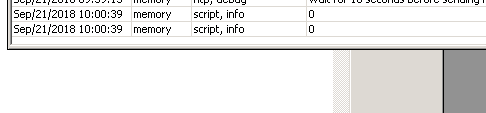
I have tested your script, and apparently the bandwith test is running correctly (I see the traffic in the interface) but in the log, the displayed values are “0” and “0”. Do you know what can be wrong?
Thanks, it seems that it did not work the first time but the next ones is working properly!
I think that I will modify it to divide into 2 parts so the test is performed separately in TX and RX (don´t like the “both” results), and so the results are recorded into a text file and stored in the Mikrotik.
I have modified the script from Adahi so it stores the results in a text file, so the script can be scheduled daily to analyze the BW-test result on different days. I have added comments too. I share with the community, just in case!
:log info "------------ BW-TEST Starts--------------";

:local luser "BW Test Server USER";
:local lpass "BW TEST Server PASSWORD";
:local Addr  "BW TEST Server IP ADDRESS";

:local avrRX 0;
:local avrTX 0;


# DOWNLOAD TEST
:log info "----> Measuring RX (30 seg)........";
:do {/tool
   bandwidth-test duration=30s user=$luser password=$lpass protocol=tcp address=$Addr direction=receive do={
     :set $avrRX ("rx-total-average: " . ($"rx-total-average" / 1048576) . "." . ($"rx-total-average" % (1048576) / 1024) . " Mbps" );
   }
} on-error={:log error message="RX script failed"}

:delay 2s;

# UPLOAD TEST
:log info "----> Measuring TX (30 seg) ........";
:do {/tool
  bandwidth-test duration=30s user=$luser password=$lpass protocol=tcp address=$Addr direction=transmit do={
     :set $avrTX ("tx-total-average: " . ($"tx-total-average" / 1048576) . "." . ($"tx-total-average" % (1048576) / 1024) . " Mbps" );
  }
} on-error={:log error message="TX script failed"}

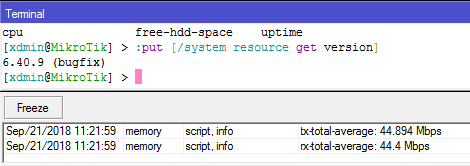
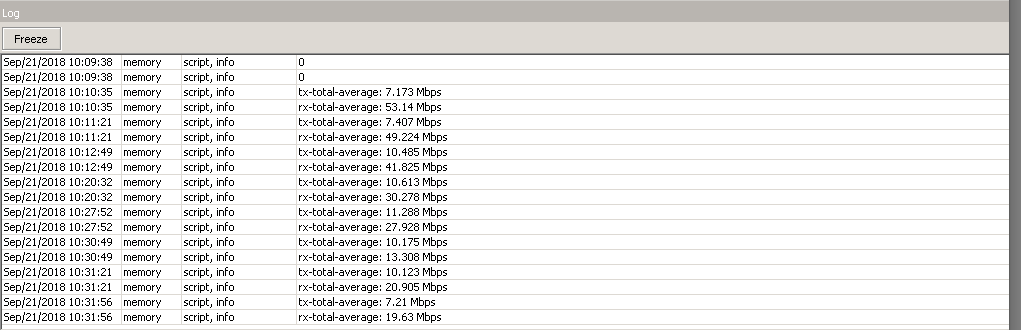
:log info message=$avrRX;
:log info message=$avrTX;
:log info "-------- End of  BW-TEST------------";


################# SAVING RESULTS WITH DATE ######################
:local filename2 "LOG_BW_TEST.txt"
:local ds [/system clock get date];
:local months ("jan","feb","mar","apr","may","jun","jul","aug","sep","oct","nov","dec");
:local month [ :pick $ds 0 3 ];
:local mm ([ :find $months $month -1 ] + 1);
:if ($mm < 10) do={ :set mm ("0" . $mm); };
:set ds ([:pick $ds 7 11] . $mm . [:pick $ds 4 6]);

:if  ( [:len [/file find name=$filename2]] = 0) do={
:log info "Log file does not exist. Creating a new one.....";
/file print file=$filename2 where name="";
}

:log info "Adding result to the end of the lof file......";
/file set $filename2 contents=([get $filename2 contents]  ."\n".$ds."-->" . $avrRX);
/file set $filename2 contents=([get $filename2 contents] ."    ". $avrTX);
}
I need to collect datas from speedtest, or ping and bandwithtest.
While googlize it, I found this thread.
My skills in routeros scripting are low but the Punkaker script with comment is clear to but understable.
Now I’ d like to understand this line : :set $avrRX (“rx-total-average: " . ($“rx-total-average” / 1048576) . “.” . ($“rx-total-average” % (1048576) / 1024) . " Mbps” );
Specifically, why we need to divide by 1048576 or 1024.
The results are on bps, bit-per-second, if Mega-bit-per-second is wanted, must be something like this (ignoring if is coded right and is the other parts are correct):
:set $avrRX (“rx-total-average: " . ($“rx-total-average” / 1000000) . “.” . ($“rx-total-average” % (1000000) / 1000) . " Mbps” );
For speed point of view, everityme bit is used.
As ISP I everytime talk about bit-per-second when I sell 100M (100Mbit/s) = 100.000.000
From storage point of view, MiB are used, 1TB SSD give different space if TiB or TB are really intended…
1.099.511.627.776 or 1.000.000.000.000 is near “100GB” less
Usually when bit is involved 1000x are used, and 1024x if bytes is used
For speed point of view, everityme bit is used. As ISP I everytime talk about bit-per-second when I sell 100M (100Mbit/s) = 100.000.000
Concur.
From storage point of view, MiB are used, 1TB SSD give different space if TiB or TB are really intended…1.099.511.627.776 or 1.000.000.000.000 is near “100GB” less Usually when bit is involved 1000x are used, and 1024x if bytes is used
Yeah, and according to IEC (1984) we should also use Kibibit, Mebibyte and Gibibyte to be more precise but I’ve never managed to get used to that concept so I still mix up the notations.