Hi ;
what i am doing with my wireless mini pci card is i defined the tx power and i am using 20 dbm fix for all rate .
you could check your current tx power and start increasing the power one db each time and checking the tx CCQ value , will it improve or not .
also you should check reducing the power as well , you could start from 5 dbm and increase by one db each time .
there is a thing we have in the VSAT systems .
when you send signal to the satellite with weak power some times it cause the drop of the service because the HUB not seeing the terminal transmitting . and when we exceed the tx power the service become slow as well because we are in saturation point and what we are doing is transmitting a lot of power for no thing .
thus some of the isp asking for lineup process to check the best tx power level and the isolation .
later i saw that we have to do lineup for the wireless as well because we are using amplifiers to boost the signal and when the client start point his grid to us he get high level signal received in his site while he is transmitting low level signal .
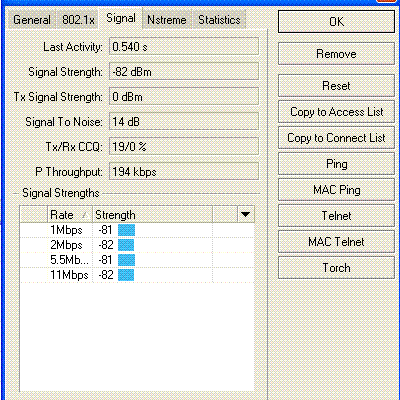
but the problem now there are many numbers i could see in the signal window , which one of them i should consider to improve the client tx level , we need an unswear from MikroTik staff for it .
i am attaching a photo to one of my wireless clients .
with best regards .
Hi; ahmedsaffar76
I did the tx-power just like you said and didn’t help.
I wanted to ask you something about Freq.. Can be the problem I’m using 4900 freq channel.
Can this channel make it this problem, because each panel antenna has label behind write the range of freq.. from 5.1
5.8 Ghz. Cuz here in my town a lots freq.. people using. here the print of my wireless..
Flags: X - disabled, R - running
0 R name=“5.8Ghz” mtu=1500 mac-address=00:0C:42:05:CE:30 arp=enabled disable-running-check=no
interface-type=Atheros AR5413 radio-name=“000C4205CE30” mode=ap-bridge ssid=“southchapel” area=“”
frequency-mode=superchannel country=no_country_set antenna-gain=13 frequency=4920 band=5ghz-turbo
scan-list=default rate-set=default supported-rates-b=1Mbps,2Mbps,5.5Mbps,11Mbps
supported-rates-a/g=6Mbps,9Mbps,12Mbps,18Mbps,24Mbps,36Mbps,48Mbps,54Mbps basic-rates-b=1Mbps
basic-rates-a/g=6Mbps max-station-count=2007 ack-timeout=dynamic tx-power=20
tx-power-mode=all-rates-fixed noise-floor-threshold=default periodic-calibration=default
periodic-calibration-interval=60 burst-time=disabled dfs-mode=none antenna-mode=ant-a wds-mode=disabled
wds-default-bridge=none wds-default-cost=100 wds-cost-range=50-150 wds-ignore-ssid=no
update-stats-interval=disabled default-authentication=yes default-forwarding=yes default-ap-tx-limit=0
default-client-tx-limit=0 proprietary-extensions=post-2.9.25 wmm-support=disabled hide-ssid=yes
security-profile=default disconnect-timeout=3s on-fail-retry-time=100ms preamble-mode=both
compression=no allow-sharedkey=no station-bridge-clone-mac=00:00:00:00:00:00 hw-retries=4
frame-lifetime=0 adaptive-noise-immunity=yes
and here the reg talbe also..
0 5.8Ghz 2BLD2180-C 00:0C:42:05:CE:1B no -61dBm@6Mbps 36Mb… 8m24s
1 5.8Ghz BLD2240-C 00:0C:42:05:83:58 no -57dBm@36Mbps 36Mb… 8m24s
2 5.8Ghz BLD2270-B 00:0C:42:1B:DD:69 no -65dBm@6Mbps 36Mb… 8m24s
3 5.8Ghz BLD2200-D 00:0C:42:05:CE:4E no -56dBm@6Mbps 18Mb… 8m24s
4 5.8Ghz Polish1 00:0C:42:0C:00:C4 no -66dBm@36Mbps 36Mb… 8m23s
5 5.8Ghz BLD2230-B 00:0C:42:05:83:07 no -70dBm@6Mbps 36Mb… 8m23s
6 5.8Ghz BLD2250-A 00:0C:42:1B:DD:A6 no -75dBm@6Mbps 36Mb… 8m23s
7 5.8Ghz BLD2260-B 00:0C:42:05:CE:3B no -64dBm@6Mbps 36Mb… 8m23
here also the wireless interface monitor…
status: running-ap
band: 5ghz-turbo
frequency: 4920MHz
noise-floor: -104dBm
overall-tx-ccq: 77%
registered-clients: 8
authenticated-clients: 8
current-ack-timeout: 25
nstreme: no
current-tx-powers: 6Mbps:19(19),9Mbps:19(19),12Mbps:19(19),18Mbps:19(19),24Mbps:19(19),36Mbps:19(19),
48Mbps:19(19),54Mbps:19(19)
notify-external-fdb: no
Cable,pigtail, wireless cars, and antennas are changed and seems the problem won’t go away.
thx for your help.
Selim
Hi miles ;
as i am reading what you wrote .
yes while you are using 5.8 GHz for your wireless you should use 5xxx for freq. you now using freq. below 5.8 GHz .
also i see that the disable-check is off , that mean the AP broadcast only when i client connect to it and you hide your ssid from the sky .
what i am seeing is the b mode , you are using a mode so why it talking about b mode ?
change the freq. and let us know what you will get .
with best regards.
Hi; ahmedsaffar76
Hey body , I just wanted to let you konw the problem is fixed.
How we did fixed is strange which you will meaby never belive. We did enable nstream on 5.8Ghz and the ping gets down.
and now the internet is flying, my man.
But thanks for all your repalys and your time for posting me.
Thx
Selim
Hi miles
glad to hear that you fixed the problem 
but there will be questions for you now .
as i know that when you use nstream you will use two antenna one for transmit and the second for receive .
and here is the question , your end user should use nstream or not ? .
as i know most of users using pci wireless lan card with only one antenna .
waiting your feedback to add other comments .
with best regards .

Hi; ahmedsaffar76
How the things going.
Ok let me try to answer to your question as clear as I can..
You can enable the n stream without using two antenna one for rx and tx . But we did enable the nstream on wireless interface. like this go to
interface wireless nstream> set "what ever your wireless interface is enable-nstream=yes .
We did to all AP and on the end we did on GW all AP comes back and now is working.
All my user all connected to AP via UTP cable. They don’t use the wireless.
ahmedsaffar76 ; here is my msn: seli_gl@hotmail.com
We can talk more and I will try to help u more.
thx selim …
Hi Miles ;
I added you to the MSN .
as you wrote , your end user should use MT to get the signal from you .
anyone will use ordinary AP like D-link , Senao etc or if he use wireless lan will not be able to connect with you and he only should use MT .
this is not good for us because the routerboard is more expensive than using wireless lan .
with best regards .
Hi Selim,
saw your post here only yet, but we solved the problem already, so this post is too late… 
Greetings to Kosovo and the other guys!
Hi Cmit ;
assum Miles didn’t solve the problem yet , what are going to do to solve such case ?
are you going to use nstream as well ? or you will use another method ?
with best regards .
Actually I worked with Selim on the exact case he was asking about above
The problem was the classical “hidden-station-problem”. One way to overcome this is using a time-slot technique, which is one of the features of MikroTik’s NStreme protocol.
(If you want to read up on the hidden station problem, you can find some explanation here: http://en.wikipedia.org/wiki/Hidden_station_problem).
But it’s hard to give a general rule what to do in such situations. It depends on a lot of factors, and you always have to take into account the whole network and surroundings.
Hi Chris..
Hello man I yes we did fixed.
Hi Ahmed I got you to ..
thx Selim ..