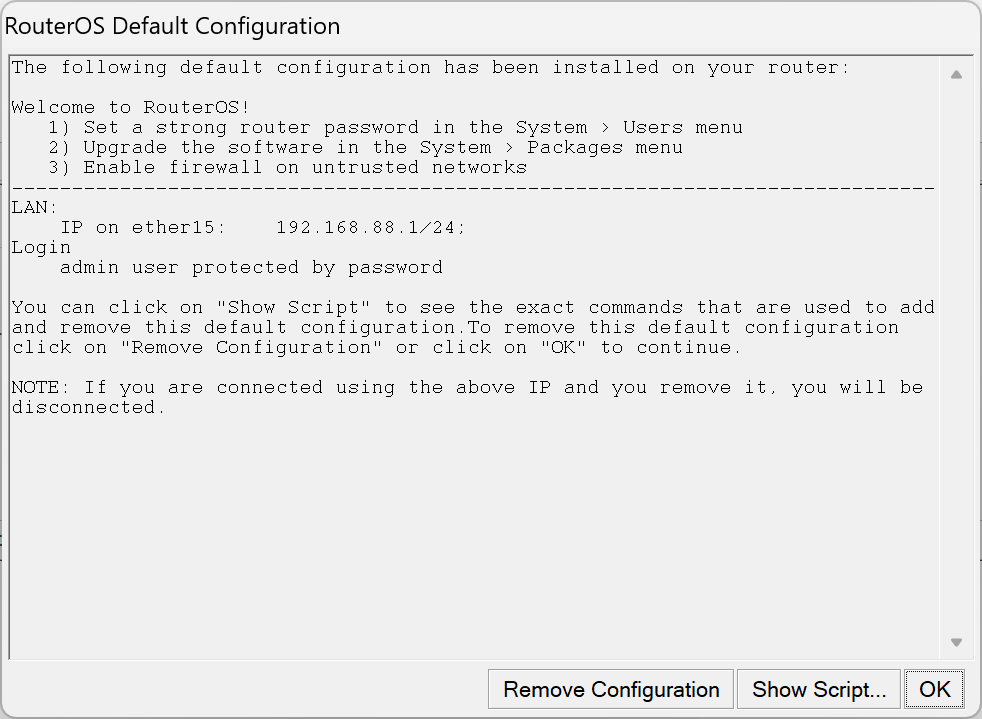
I decide to take a look at the exact commands that default configuration and pre the show script:
#| Welcome to RouterOS!
#|    1) Set a strong router password in the System > Users menu
#|    2) Upgrade the software in the System > Packages menu
#|    3) Enable firewall on untrusted networks
#| -----------------------------------------------------------------------------
#| LAN:
#|     IP on ether15:    192.168.88.1/24;
#| Login
#|     admin user protected by password

:global defconfMode;
:log info "Starting defconf script";
#-------------------------------------------------------------------------------
# Apply configuration.
# these commands are executed after installation or configuration reset
#-------------------------------------------------------------------------------
:if ($action = "apply") do={
  # wait for interfaces
  :local count 0;
  :while ([/interface ethernet find] = "") do={
    :if ($count = 30) do={
      :log warning "DefConf: Unable to find ethernet interfaces";
      /quit;
    }
    :delay 1s; :set count ($count +1);
  };
/ip address add address=192.168.88.1/24 interface=ether15 comment="defconf";
 :if (!($keepUsers = "yes")) do={
   :if (!($defconfPassword = "" || $defconfPassword = nil)) do={
     /user set admin password=$defconfPassword
     :delay 0.5
     /user expire-password admin
   }
 }
}
#-------------------------------------------------------------------------------
# Revert configuration.
# these commands are executed if user requests to remove default configuration
#-------------------------------------------------------------------------------
:if ($action = "revert") do={
 :if (!($keepUsers = "yes")) do={
   /user set admin password=""
   :delay 0.5
   /user expire-password admin
 }
 /ip firewall filter remove [find comment~"defconf"]
 /ipv6 firewall filter remove [find comment~"defconf"]
 /ipv6 firewall address-list remove [find comment~"defconf"]
 /ip firewall nat remove [find comment~"defconf"]
 /interface list member remove [find comment~"defconf"]
 /interface detect-internet set detect-interface-list=none
 /interface detect-internet set lan-interface-list=none
 /interface detect-internet set wan-interface-list=none
 /interface detect-internet set internet-interface-list=none
 /interface list remove [find comment~"defconf"]
 /tool mac-server set allowed-interface-list=all
 /tool mac-server mac-winbox set allowed-interface-list=all
 /ip neighbor discovery-settings set discover-interface-list=!dynamic
   :local o [/ip dhcp-server network find comment="defconf"]
   :if ([:len $o] != 0) do={ /ip dhcp-server network remove $o }
   :local o [/ip dhcp-server find name="defconf" !disabled]
   :if ([:len $o] != 0) do={ /ip dhcp-server remove $o }
   /ip pool {
     :local o [find name="default-dhcp" ranges=192.168.88.10-192.168.88.254]
     :if ([:len $o] != 0) do={ remove $o }
   }
   :local o [/ip dhcp-client find comment="defconf"]
   :if ([:len $o] != 0) do={ /ip dhcp-client remove $o }
 /ip dns {
   set allow-remote-requests=no
   :local o [static find comment="defconf"]
   :if ([:len $o] != 0) do={ static remove $o }
 }
 /ip address {
   :local o [find comment="defconf"]
   :if ([:len $o] != 0) do={ remove $o }
 }
 :foreach iface in=[/interface ethernet find] do={
   /interface ethernet set $iface name=[get $iface default-name]
 }
 /interface bridge port remove [find comment="defconf"]
 /interface bridge remove [find comment="defconf"]
 /interface bonding remove [find comment="defconf"]
}
:log info Defconf_script_finished;
:set defconfMode;
Now, in the revert section the script appears to be undefining a whole lot more parameters than it claims to have set up. What the hell is going on here..?
Here is my config:
# 2025-07-27 10:15:53 by RouterOS 7.19.4
# software id = 3GS7-DHE2
#
# model = CCR2004-16G-2S+
# serial number =
/port
set 0 name=serial0
/ip address
add address=192.168.88.1/24 comment=defconf interface=ether15 network=\
    192.168.88.0
/system routerboard settings
set enter-setup-on=delete-key
The ONLY thing I've done is power it up according to the instructions in the manual. Am I missing something here...?
But...
What's the question and purpose of this topic?
You didn't buy a "home" device, but an advanced device that the seller expects the buyer to (already) know how to use...
Sort of what @rextended said. Other devices meant for home (here meaning typical) use cases have a much longer "apply" script. Yours has a minimal one. While the application of the config is custom per device, the removal is generic.
You can see that the removal mostly targets things marked "defconf" selectively - so even if they were never added, no real harm is done.
When a "remove find where" type command is issued, if there's nothing to find, nothing is done.
Mikrotik line of products is divided by a (sometimes difficult to see) line between the "SoHo" devices and the "Pro" ones.
The CCR2004 is a "Pro" one and has an almost empty default configuration, in practice only an IP address assigned to ether15.
But different versions of RouterOS and different devices may have much more, the "revert" is more like "remove default" as it removes anything with comment like "defconf" which is the usual tag assigned to default configuration settings. (and another reason why when you edit a "defconf" entry you should change the comment to "newconf" or similar).
Essentially the "Apply configuration" is "device specific" while the "Revert configuration" is "generic/universal"
See, that's something new to me. I've learned to expect some form of precise data. But all good tho, I'm gonna take this into consideration going further
That is understandable and makes perfect sense, however, I guess it's fair for a newcomer to expect a bit more truthful information given by the system, no..?
If you have the patience to wait an hour (I'm at work) I can prepare a script for you to convert it, provided that the current configuration is identical to the one written on first post.
Thank you for the offer, I do believe that script has to be floating online somewhere - I will dig it up. Besides, people posting their scripts - I am already reconstructing the missing pieces:)
I would provide you with a correct script, with all the necessary defaults in MikroTik standard,
not a customized base by someone, to which the forum members then have to adapt....
Thank you very much. Your script gives good insights into the setup essentials
I did also notice the helpful "Quick Set" option that generated a barebones config, however, without the firewall rules (my most hated part)
Quickset is a function that should be:
a. ignored completely
OR
b. used once and then ignored completely
(ex. To change the basic or default mode setting depending upon options available, mostly about wifi settings "Home AP Dual" etc. )
@rextended, feeling particularly generous today! Someone must have given you clean water, some fresh fish and cleaned the litter box.
Remember that script is for setting the default configuration of that RouterBOARD model to the default configuration of "normal" MikroTik routers; nothing I've added on my own initiative (except full unlocking the horrendous device-mode as is done today...)
Whoever you ask for help, they expect that to be there.
I've only changed ether1 to sfp-sfpplus1 for the WAN duty (didn't forget add ether1 to the LAN pool) and ran everything as is. Smooth sailing so far:) I'm greatful for your help - saved me a ton of time for sure
The 12 steps, I mean, 12 rules make sense for the most part and the remaining part I have just met lol - that being Quickset and detect-internet. Good warning abt VLAN1: my plan is to use it alongside a Ruckus switch and AP - and the default VLAN is the 1 on those. Gonna have to play around with that part...