Beginner - Routing 2 DHCP / Network

Hi,

I’m having some trouble with routing between two networks (sub to main).

My configuration :

  • Network A 192.168.1.0/24 from my ISP (with DHCP)
  • Network B 192.168.51.0/24 from Mikrotik CRS326 (DHCP server on Bridge)
  • Network B plugged to Network A on port Eth1 (acquire from DHCP Network A)
  • All (A and B) are set to Router

I don’t have any problem with device on Network A to acces device on Network (i need add route manually from my device, cannot set on router A).

I cannot acces with devince on Network B to Network A (and also Internet).

My Mikrotik configuration are simple (quick set)

/interface bridge
add admin-mac=XX auto-mac=no comment=defconf name=bridge
/interface list
add name=WAN
add name=LAN
/ip pool
add name=dhcp ranges=192.168.51.10-192.168.51.254
/ip dhcp-server
add address-pool=dhcp interface=bridge name=dhcp1
/interface bridge port
add bridge=bridge comment=defconf disabled=yes interface=ether1
add bridge=bridge comment=defconf interface=ether2
add bridge=bridge comment=defconf interface=ether3
add bridge=bridge comment=defconf interface=ether4
add bridge=bridge comment=defconf interface=ether5
add bridge=bridge comment=defconf interface=ether6
add bridge=bridge comment=defconf interface=ether7
add bridge=bridge comment=defconf interface=ether8
add bridge=bridge comment=defconf interface=ether9
add bridge=bridge comment=defconf interface=ether10
add bridge=bridge comment=defconf interface=ether11
add bridge=bridge comment=defconf interface=ether12
add bridge=bridge comment=defconf interface=ether13
add bridge=bridge comment=defconf interface=ether14
add bridge=bridge comment=defconf interface=ether15
add bridge=bridge comment=defconf interface=ether16
add bridge=bridge comment=defconf interface=ether17
add bridge=bridge comment=defconf interface=ether18
add bridge=bridge comment=defconf interface=ether19
add bridge=bridge comment=defconf interface=ether20
add bridge=bridge comment=defconf interface=ether21
add bridge=bridge comment=defconf interface=ether22
add bridge=bridge comment=defconf interface=ether23
add bridge=bridge comment=defconf interface=ether24
add bridge=bridge comment=defconf interface=sfp-sfpplus1
add bridge=bridge comment=defconf interface=sfp-sfpplus2
/interface list member
add interface=ether1 list=WAN
add interface=bridge list=LAN
/ip address
add address=192.168.51.1/24 interface=bridge network=192.168.51.0
/ip dhcp-client
add interface=ether1
/ip dhcp-server network
add address=192.168.51.0/24 dns-server=192.168.51.1 domain=house.local
gateway=192.168.51.1 netmask=24

Default route
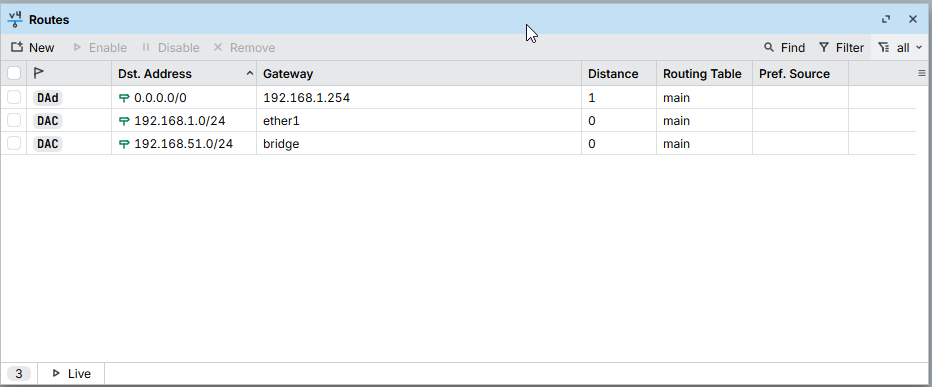
I think it’s ‘just’ a missing route, but i don’t understand. How can achieve this ?

Thanks for your help !

Okay lets get the information straight.
You have one router the ISP modem router, that provides a single LAN of 192.168.1.0/24
You have a switch which you would like to use as a router ( incoming wanip of 192.168.1.X - using IP DHCP client on the port connected to the ISP router.

On the MT Device, you have created a LAN so far with one subnet 192.168.51.0/24.

This is a fairly normal double NAT scenario.
All the devices behind the switch can access device connected to the LAN ports of the ISP modem/router.
Assuming you have applied NAT rules, all traffic coming from the MT device will have a a source IP address of 192.168.1.x and thus all return traffic from the ISP internet connection, or from devices on the ISP lan, will be sent by the ISP router to the wan port of the MT, and will unsourcenatted to the correct device.

The reverse is not true. Traffic from devices behind the ISP router cannot reach devices behind the MT, unless you are able to make static routes on the ISP modem. router, pointing to the WANIP of the MT device (LANIP on ISP LAN), for the required destination address or the MT LAN 192.168.51.0/24).

So would she be able to fix up your issue by looking at the config……..

Just because you have a switch acting as a router, you still need a minimum of setup so additional is provided for your setup to work.


/interface bridge
add admin-mac=XX auto-mac=no comment=defconf name=bridge
/interface list
add name=WAN
add name=LAN
/ip pool
add name=dhcp ranges=192.168.51.10-192.168.51.254
/ip dhcp-server
add address-pool=dhcp interface=bridge name=dhcp1
/ip neighbor discovery-settings
set discover-interface-list=LAN
/interface bridge port
add bridge=bridge comment=defconf disabled=yes interface=ether1
add bridge=bridge comment=defconf interface=ether2
add bridge=bridge comment=defconf interface=ether3
add bridge=bridge comment=defconf interface=ether4
add bridge=bridge comment=defconf interface=ether5
add bridge=bridge comment=defconf interface=ether6
add bridge=bridge comment=defconf interface=ether7
add bridge=bridge comment=defconf interface=ether8
add bridge=bridge comment=defconf interface=ether9
add bridge=bridge comment=defconf interface=ether10
add bridge=bridge comment=defconf interface=ether11
add bridge=bridge comment=defconf interface=ether12
add bridge=bridge comment=defconf interface=ether13
add bridge=bridge comment=defconf interface=ether14
add bridge=bridge comment=defconf interface=ether15
add bridge=bridge comment=defconf interface=ether16
add bridge=bridge comment=defconf interface=ether17
add bridge=bridge comment=defconf interface=ether18
add bridge=bridge comment=defconf interface=ether19
add bridge=bridge comment=defconf interface=ether20
add bridge=bridge comment=defconf interface=ether21
add bridge=bridge comment=defconf interface=ether22
add bridge=bridge comment=defconf interface=ether23
add bridge=bridge comment=defconf interface=ether24
add bridge=bridge comment=defconf interface=sfp-sfpplus1
add bridge=bridge comment=defconf interface=sfp-sfpplus2
/interface list member
add interface=ether1 list=WAN
add interface=bridge list=LAN
/ip firewall filter
add action=accept chain=input connection-state=established,related,untracked
add action=drop chain=input connection-state=invalid
add action=accept chain=input comment="defconf: accept ICMP" protocol=icmp
add action=accept chain=input in-interface=lo dst-address=127.0.0.1 src-address=127.0.0.1
add action=accept chain=input in-interface-list=LAN
add action=drop chain=input comment="drop all else"
+++++++++++++++++++++++++++++++++++++++++++++++++++++++++++++++++++
add action=fasttrack-connection chain=forward connection-state=established,related
add action=accept chain=forward connection-state=established,related,untracked
add action=drop chain=forward connection-state=invalid
add action=accept chain=forward comment="internet" in-interface-list=LAN out-interface-list=WAN
add action=drop chain=forward comment="drop all else"
/ip firewall nat
add action=masquerade chain=srcnat out-interface-list=WAN
/ip address
add address=192.168.51.1/24 interface=bridge network=192.168.51.0
/ip dhcp-client
add interface=ether1
/ip dhcp-server network
add address=192.168.51.0/24 dns-server=192.168.51.1 domain=house.local
gateway=192.168.51.1 netmask=24
/tool mac-server
set allowed-interface-list=none
/tool mac-server mac-winbox
set allowed-interface-list=LAN

Now the only comment I would add is that this allows anyone on MT subnet to access the router itself, a more secure approach is only to provide services required and limit access to you the admin like so.

/ip firewall address-list
add address=192.168.51.X list=TRUSTED comment=”admin PC”
add address=192.168.51.Y list=TRUSTED comment=”admin smartphone”
add address=192.168.51.Z list=TRUSTED comment=”admin tablet-ipad”

AND replace input chain rules like so:


/ip firewall
add action=accept chain=input connection-state=established,related,untracked
add action=drop chain=input connection-state=invalid
add action=accept chain=input comment="defconf: accept ICMP" protocol=icmp
add action=accept chain=input in-interface=lo dst-address=127.0.0.1 src-address=127.0.0.1
add action=accept chain=input in-interface-list=LAN src-address-list=TRUSTED
add action=accept chain=input in-interface-list=LAN dst-port=53 protocol=udp \
comment=”users to services”
add action=accept chain=input in-interface-list=LAN dst-port=53 protocol=tcp \
comment=”users to services”
add action=drop chain=input comment="drop all else"

@anav NAT is not required between Routers A and B in this scenario. NAT is only required to connect privately addressed networks according to RFC1918 to the public internet. NAT is not required to route between privately addressed networks.

@Paulska10 Do you actually require 2 separate subnets, or could you do what you need to do with 1 subnet if you had enough ports on Router A? This might be a useful video https://www.youtube.com/watch?v=s5am82iw2vM. Sometimes, people just fall into thinking that because Router B is a router, it can only be used as a router.

If you could run your network as a single subnet, just connect from Router A to any port on Router B except ether 1 and use Router B as a switch. Turn off DHCP on Router B as the DHCP on Router A will serve the whole subnet

I dont presume to change the structure the OP stated as his intention, which is the MAIN ISP router providing WAN input for the MT device. Specifically it would appear he wants to work from two subnets vice one.

If he wants one contiguous network thats a different matter.

Well, let's establish what OP needs. At the moment, we don't know whether connection at Layer 2 or Layer 3 is required, so diving into configuration is premature.

Well, of course, knowing requirements is best. However, if he wants one network, I will send him my tplink dumb switch and gladly take the CRS326 albatross out of his/her hands, and the gentleman that I am, I will pay postage in both directions.

Can you expand a bit on this with actual details?

It seems you are saying that a device (let's call it clientA) on 192.168.1.0/24 that has recieved an IP address and gateway from the ISP router can access the internet. After you manually add a route to clientA's routing table, it can also access devices on the 192.168.51.0/24 network. If that's the case, what did you use as the next hop address for the 192.168.51.0/24 route? For it to work, you would need to know the ip address that the CRS326 obtained via DHCP.

But without knowing more about the ISP router, and what it will do, it is hard to say what will or won't work when you want to access the internet. It's possible the ISP router will just drop traffic with source address that isn't in 192.168.1.0/24, and it is also possible it won't NAT masquerade traffic from other RFC1918 address ranges that (other than 192.168.1.0/24)

What is the ISP router?

Why does it matter? Here's an example:

I have ATT fiber 300 at home, and the "mandatory" ISP router ATT supplies is the BGW320-505, and it is quite limited in what it will allow you to configure. For example, it doesn't allow you to create routes (other than a very crude "cascaded router" setting, but it only allows for a single subnet/mask to route to the "network" behind the cascaded router). So trying to configure it to work without a second layer of nat masquerade (as suggested by anav) would not easily be possible, especially if you had multiple private subnets behind the cascaded router, and those subnets were in more than one of the rfc1918 address blocks.

I have my BGW320-505 set into ip passthrough mode, which the the closest possible to a modem (ONT) as possible, but it isn't a simple bridge like an ONT, it first converts everthing to a private network, then if you have "IP Passthrough" set, you can specify the mac address of your router's WAN interface, and it will then re-apply destination nat so your internal router will see the "global ip leased". But to access the BGW320-505, you still have to use its "LAN" address (which you can change from its default 192.168.1.254)

Let's start with what your needs are. Do you just want to increase the number of wired ethernet ports you can connect wired devies to? If that's the case, then just using the CRS326 in its intended purpose as a switch would be the "solution".

If you really want two different subnets, can you explain what the purpose of the second subnet is?

Edit: the CRS326 spec says dual core mipsbe 32 bit. Not single core as I first wrote.

And a side note, which anav also hinted at.

While the CRS326 does have the ability to act as a software router, that isn't what it is designed for. It is designed as a switch; the cpu (dual core 800Mhz) and flash (16MB) are quite limited for use other than the intended "management" functionality. Ram 512MB shouldn't be a problem, as think the CPU would be a bottleneck before memory (of couse that depends on what it is used for). As a switch, the CPU will be idle most of the time, it will do maintenance operations (NTP, RSTP, SNMP, and any management traffic). The "heavy lifting" of Layer 2 frame forwarding, will be done by the integrated 98DX3236 switch chip, which is also capable of running in vlan-aware (vlan-filtering=yes) mode, and then it can process vlans in dedicated swith circuitry (not the CPU) which will allow "wire-speed" processing including tagging and untagging of vlan headers.

Hi,

Thanks for your reply !

Currently, all of my devices are on network A (ISP DHCP).

The goal is using the MK wth DHCP server and switch all my devices to this network (Network B) without modifying IS router.
This way, if I change ISP, I won't have to reconfigure the DHCP settings.

So i need to have 2 networks :wink:

@anav Thanks for your proposition switching my MK to TPLINK but … no, sorry :wink:

OK, now it is all clear. If you can't access Router A, then you will need NAT on Router B.

When it comes to changing ISP, if you can't use your own router or you can't set the supplied router to modem mode, it is time to change ISP.

Concur, but ot everyone one has those options Ductview.
What is bothersome is that most ISP modem/routers allow port forwarding but NOT static routes.

@Paulska10
Which kind of internet speed do you get from your ISP?

Generally speaking using a switch as a router you create a bottleneck, the CPU of the switch is usually too weak to route at high speeds, particularly if - as anav suggested - you use a firewall on the connection.

I don’t want changer my ISP router mode to bridge.

@jaclaz 1Gb up/down

Speculative jaclaz. Let the op run with the setup provided. It will work.
If there are performance issue we can then adjust. Get the network working, then refine IF IF necessary.

Well, the usual metrics used to have an idea of the routing speed of a device is routing, 512 byte packet, 25 firewall rules in ethernet product tests.

For the CRS326 it is 269.9 Mbps.

The corresponding value for a Hex RB750GR3 is 265.2 Mbps.

And the same for a L009 is 323.6 Mbps.

Both these latter devices are usually considered not capable of routing at 1 Gbps, even with fastrack/whatever enabled.

@anav
Of course if by "adjust" you mean "buy a hAP Ax2, Ax3 or possibly a hex S (2025)", it's allright. :wink:

??? It looks like you are making this harder than it has to be. Do you have access to the logon credentials for your service? If so, use your own router and put the ISP router back in its box, to be used only for diagnostics if the ISP service requires tech support.

If you can't set a route on the ISP router nor set it to bridge mode, then you are stuck with double NAT and there is no way I would put up with that from an ISP.

@DuctView

I cannot set route on my ISP router (not possible).

If seems you don’t want to change anything. What isn’t working that you expect to work? Please provide details.

If all you want is for devices in 192.168.51.0/24 to be able to establish connections to devices in 192.168.1.0/24 as well as the internet, and have those devices be able to return traffic, then the solution to that problem was provided by anav. specifcally, enable nat masquerade on the CRS326’s WAN interface.

/ip firewall nat
add action=masquerade chain=srcnat out-interface-list=WAN

That will make it appear that all traffic coming from the 192.168.51.0/24 subnet is really coming from the CRS326's WAN (ether1) interface with whatever ip address the CRS326 received from the ISP router's DHCP server. The return traffic will appear to devices on subnet A as being on the local network, so the traffic won't be forwarded to the ISP router (via default gateway). When the return traffic is received by the CRS326, it will "undo the NAT" and then send the traffic back to the device on 192.168.51.0/24 that originally established the connection. See this old youtube video for a good simple explanation of How Network Address Translation Works by PieterExplainsTech

Then traffic to the internet will also be able to find its way back to the 192.168.51.0/24 subnet (because the ISP router is also doing NAT (that't the double NAT that anav and Ductview mentioned) and the ISP router will just think the traffic is coming from 192.168.51.0/24 is coming from a host on the 192.168.1.0/24 subnet, and it will deliver the return traffic (originally originated from a device on the 192.168.51.0/24 subnet) to the CRS326's ether1 interface. Then the CRS326 will recognize this as traffic that was NATed and it will "undo the NAT" and forward to the host on the CRS326's LAN side.

Don't ask how to allow devices on 192.168.1.0/24 to initiate traffic to arbitrary hosts on 192.168.51.0/24, that's out of scope if you enable nat masquerade. You are essentially configuring the CRS326 to consider the ISP router as its internet service provider. If you need to establish connections from network A to network B, consider installing tailscale on the devices that need to communicate.

The rest of anav's config is to tighten things up.

Can you ask your ISP (nicely) if they can add a static route to their router for you?

The CRS326 will do BASIC hardware L3 offload, (no nat, firewall etc)
So with a bit of help from the ISP router, you might be able to get good performance
with little CPU usage on the CRS.