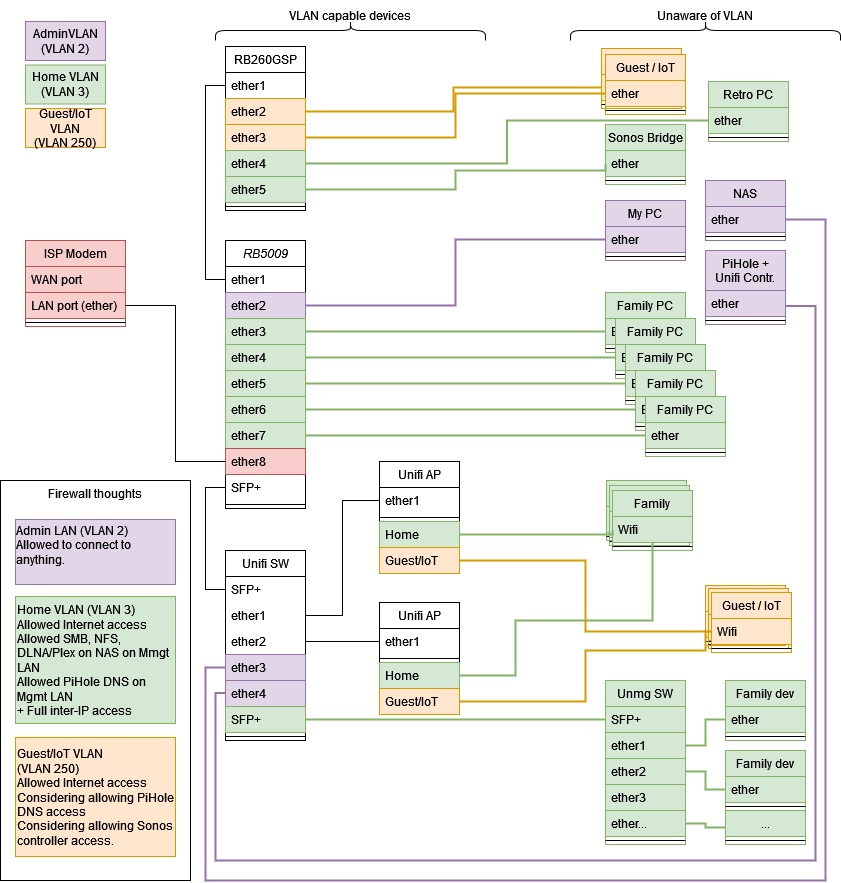
Ok. I feel really stupid here. I think I grasp the concepts fairly OK now. So the new target drawing looks like the first, but it has the admin VLAN as VLAN 2 instead of the basic VLAN 1. It’s the same drawing, but I attached it for good measure, and so you can facepalm if it’s not what you meant 
Technically there is something I am missing. Maybe it’s just the way I’m trying to do things slowly.
So the network here at home is always busy. So I’m doing a trial and error configuration and trying to “move to a VLAN setup” in small steps, as to not interrupt anyone’s online gaming or streaming. When I’m confident that I can get things working, I can call for a 10 minute break and reconfigure everything, but I like to test things in small steps first.
So the situation is:
- The current config is just a bridge with a DHCP attached (like an old-school no-VLAN LAN).
- I added VLANs 2,3 and 250 to the bridge
- Now I want to switch devices one by one to the correct VLAN of my target drawing, starting with the Family PC on ether6
So using Winbox I set PVID to 3 under bridge ports ether6.
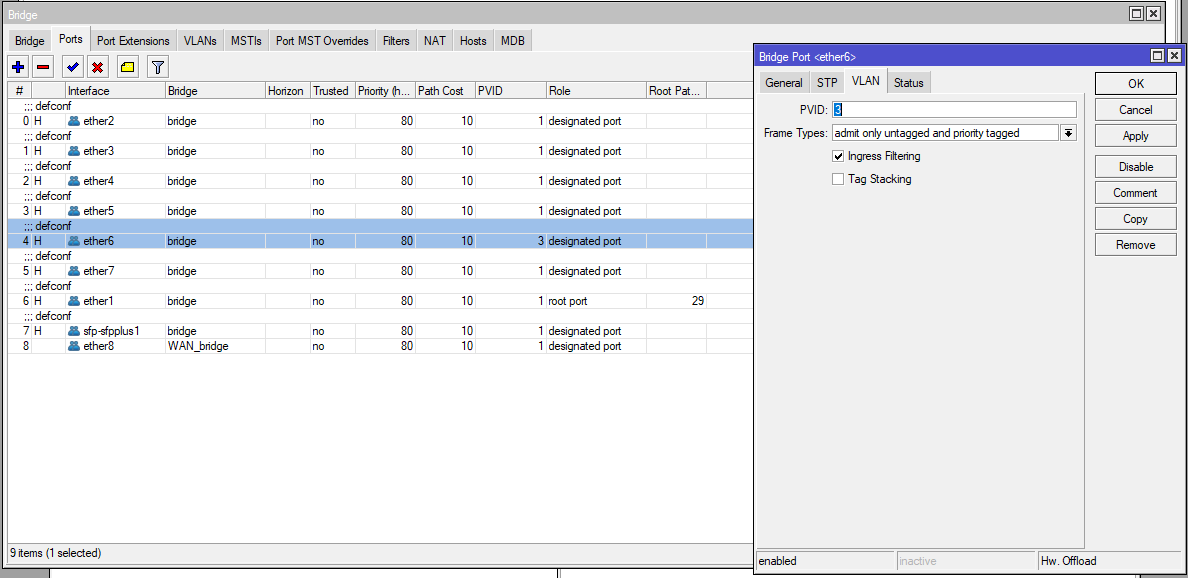
- My understanding is that you want to do this for access ports: It will add VLAN 3 to packets comming from that interface (and strip them off when replying on that interface).
However, the PC when renewing IP, keeps getting an IP from the no-VLAN LAN (I setup a dhcp server on the bridge itself).
When I set VLAN filtering on on the Bridge, there is no connection at all (and my wife’s streaming on the TV stops).
So
- What am I missing on ether 6?
I tried configuring the bridge with tagged=ether6 vland-ids=3, no difference - Is what I’m doing simply not feasible… maybe I should make one big VLAN first and then go from there, if I want to go with small steps?
A picture of what I’m trying to do:
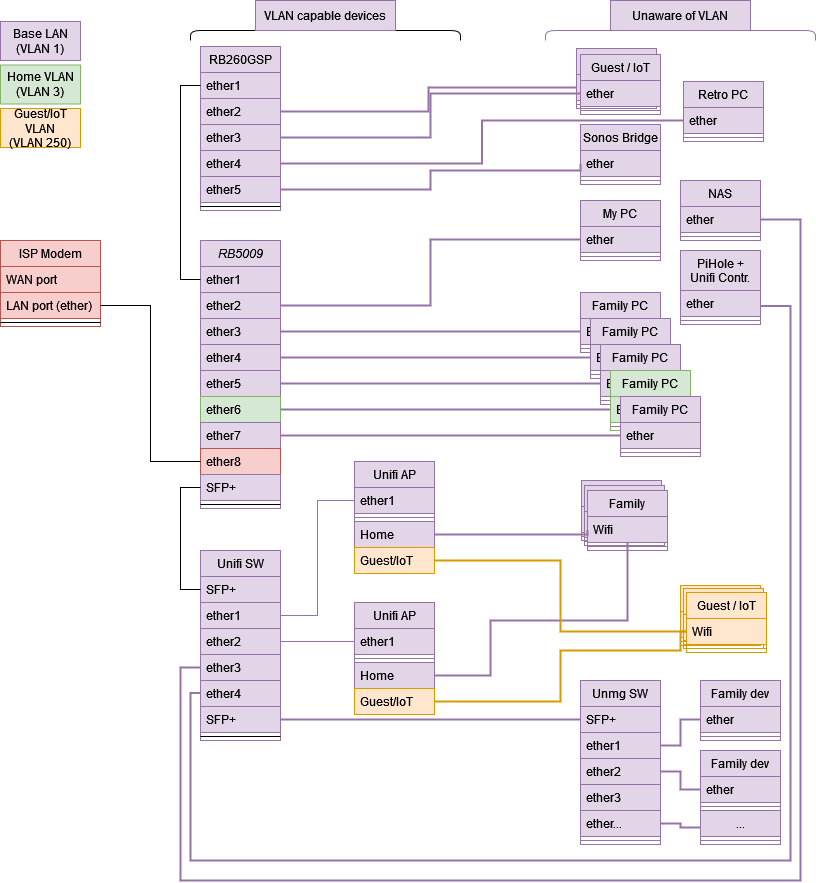
So my problem with the guide here http://forum.mikrotik.com/t/using-routeros-to-vlan-your-network/126489/1 and the attached examples, is that I’m in a hybrid setup between the two first examples. My RB5009 both needs to have trunk ports and access ports (maybe a hybrid port as well, per suggestions), and I don’t know if I misunderstood what the post says, or if the real problem is that I just can’t migrate from LAN to VLAN setup port by port, due to the inherent “omnipresence” of VLAN 1 or something…
Thanks again.
Config
# apr/08/2023 00:28:42 by RouterOS 7.8
# software id = XXXXXXXX
#
# model = RB5009UPr+S+
# serial number = XXXXXXXXXXX
/interface bridge
add admin-mac=48:A9:8A:34:6F:80 auto-mac=no comment="defconf was ether1 now it\
    's the WAN bridge (containing ether8 and using a fake mac address)" name=\
    WAN_bridge
add admin-mac=48:A9:8A:34:6F:81 auto-mac=no comment=defconf name=bridge
/interface ethernet
set [ find default-name=ether8 ] comment="Original mac: 48:A9:8A:34:6F:87"
/interface vlan
add interface=bridge name=GuestIoT vlan-id=250
add interface=bridge name=Home vlan-id=3
add interface=bridge name=HomeAdmin vlan-id=1
/interface list
add comment=defconf name=WAN
add comment=defconf name=LAN
/interface wireless security-profiles
set [ find default=yes ] supplicant-identity=MikroTik
/ip pool
add name=dhcp_pool2 ranges=192.168.2.2-192.168.2.254
add name=dhcp_pool250 ranges=192.168.250.2-192.168.250.254
add name=dhcp_pool3 ranges=192.168.3.2-192.168.3.254
add name=dhcp_pool1 ranges=192.168.1.2-192.168.1.254
/ip dhcp-server
add address-pool=dhcp_pool2 interface=bridge name=dhcp2
add address-pool=dhcp_pool250 interface=GuestIoT name=dhcp250
add address-pool=dhcp_pool3 interface=Home name=dhcp3
add address-pool=dhcp_pool1 interface=HomeAdmin name=dhcp1
/interface bridge port
add bridge=bridge comment=defconf interface=ether2
add bridge=bridge comment=defconf interface=ether3
add bridge=bridge comment=defconf interface=ether4
add bridge=bridge comment=defconf interface=ether5
add bridge=bridge comment=defconf frame-types=\
    admit-only-untagged-and-priority-tagged interface=ether6 pvid=3
add bridge=bridge comment=defconf interface=ether7
add bridge=bridge comment=defconf interface=ether1
add bridge=bridge comment=defconf interface=sfp-sfpplus1
add bridge=WAN_bridge interface=ether8
/ip neighbor discovery-settings
set discover-interface-list=LAN
/interface bridge vlan
add bridge=bridge disabled=yes tagged=ether6 vlan-ids=3
/interface list member
add comment=defconf interface=bridge list=LAN
add comment="defconf was ether1 now it's the WAN bridge (containing ether8 and\
    \_having a fake MAC address)" interface=WAN_bridge list=WAN
/ip address
add address=192.168.2.1/24 comment="defconf (LAN)" interface=bridge network=\
    192.168.2.0
add address=192.168.250.1/24 interface=GuestIoT network=192.168.250.0
add address=192.168.3.1/24 interface=Home network=192.168.3.0
add address=192.168.1.1/24 interface=HomeAdmin network=192.168.1.0
/ip dhcp-client
add comment=defconf interface=WAN_bridge
/ip dhcp-server network
add address=192.168.1.0/24 gateway=192.168.1.1
add address=192.168.2.0/24 dns-server=192.168.2.100,192.168.2.1 gateway=\
    192.168.2.1 netmask=24
add address=192.168.3.0/24 dns-server=192.168.2.100,192.168.2.1 gateway=\
    192.168.3.1
add address=192.168.250.0/24 dns-server=8.8.8.8,194.239.134.83 gateway=\
    192.168.250.1
/ip dns
set allow-remote-requests=yes
/ip dns static
add address=192.168.2.1 comment=defconf name=router.lan
/ip firewall filter
add action=accept chain=input comment=\
    "defconf: accept established,related,untracked" connection-state=\
    established,related,untracked
add action=drop chain=input comment="defconf: drop invalid" connection-state=\
    invalid
add action=accept chain=input comment="defconf: accept ICMP" protocol=icmp
add action=accept chain=input comment=\
    "defconf: accept to local loopback (for CAPsMAN)" dst-address=127.0.0.1
add action=drop chain=input comment="defconf: drop all not coming from LAN" \
    in-interface-list=!LAN
add action=accept chain=forward comment="defconf: accept in ipsec policy" \
    ipsec-policy=in,ipsec
add action=accept chain=forward comment="defconf: accept out ipsec policy" \
    ipsec-policy=out,ipsec
add action=fasttrack-connection chain=forward comment="defconf: fasttrack" \
    connection-state=established,related hw-offload=yes
add action=accept chain=forward comment=\
    "defconf: accept established,related, untracked" connection-state=\
    established,related,untracked
add action=drop chain=forward comment="defconf: drop invalid" \
    connection-state=invalid
add action=drop chain=forward comment=\
    "defconf: drop all from WAN not DSTNATed" connection-nat-state=!dstnat \
    connection-state=new in-interface-list=WAN
/ip firewall nat
add action=masquerade chain=srcnat comment="defconf: masquerade" \
    ipsec-policy=out,none out-interface-list=WAN
add action=dst-nat chain=dstnat dst-port=5001 in-interface-list=WAN protocol=\
    tcp to-addresses=192.168.2.40 to-ports=5001
/ipv6 firewall address-list
add address=::/128 comment="defconf: unspecified address" list=bad_ipv6
add address=::1/128 comment="defconf: lo" list=bad_ipv6
add address=fec0::/10 comment="defconf: site-local" list=bad_ipv6
add address=::ffff:0.0.0.0/96 comment="defconf: ipv4-mapped" list=bad_ipv6
add address=::/96 comment="defconf: ipv4 compat" list=bad_ipv6
add address=100::/64 comment="defconf: discard only " list=bad_ipv6
add address=2001:db8::/32 comment="defconf: documentation" list=bad_ipv6
add address=2001:10::/28 comment="defconf: ORCHID" list=bad_ipv6
add address=3ffe::/16 comment="defconf: 6bone" list=bad_ipv6
/ipv6 firewall filter
add action=accept chain=input comment=\
    "defconf: accept established,related,untracked" connection-state=\
    established,related,untracked
add action=drop chain=input comment="defconf: drop invalid" connection-state=\
    invalid
add action=accept chain=input comment="defconf: accept ICMPv6" protocol=\
    icmpv6
add action=accept chain=input comment="defconf: accept UDP traceroute" port=\
    33434-33534 protocol=udp
add action=accept chain=input comment=\
    "defconf: accept DHCPv6-Client prefix delegation." dst-port=546 protocol=\
    udp src-address=fe80::/10
add action=accept chain=input comment="defconf: accept IKE" dst-port=500,4500 \
    protocol=udp
add action=accept chain=input comment="defconf: accept ipsec AH" protocol=\
    ipsec-ah
add action=accept chain=input comment="defconf: accept ipsec ESP" protocol=\
    ipsec-esp
add action=accept chain=input comment=\
    "defconf: accept all that matches ipsec policy" ipsec-policy=in,ipsec
add action=drop chain=input comment=\
    "defconf: drop everything else not coming from LAN" in-interface-list=\
    !LAN
add action=accept chain=forward comment=\
    "defconf: accept established,related,untracked" connection-state=\
    established,related,untracked
add action=drop chain=forward comment="defconf: drop invalid" \
    connection-state=invalid
add action=drop chain=forward comment=\
    "defconf: drop packets with bad src ipv6" src-address-list=bad_ipv6
add action=drop chain=forward comment=\
    "defconf: drop packets with bad dst ipv6" dst-address-list=bad_ipv6
add action=drop chain=forward comment="defconf: rfc4890 drop hop-limit=1" \
    hop-limit=equal:1 protocol=icmpv6
add action=accept chain=forward comment="defconf: accept ICMPv6" protocol=\
    icmpv6
add action=accept chain=forward comment="defconf: accept HIP" protocol=139
add action=accept chain=forward comment="defconf: accept IKE" dst-port=\
    500,4500 protocol=udp
add action=accept chain=forward comment="defconf: accept ipsec AH" protocol=\
    ipsec-ah
add action=accept chain=forward comment="defconf: accept ipsec ESP" protocol=\
    ipsec-esp
add action=accept chain=forward comment=\
    "defconf: accept all that matches ipsec policy" ipsec-policy=in,ipsec
add action=drop chain=forward comment=\
    "defconf: drop everything else not coming from LAN" in-interface-list=\
    !LAN
/system clock
set time-zone-name=Europe/Copenhagen
/system identity
set name="MikroTik RB5009"
/tool mac-server
set allowed-interface-list=LAN
/tool mac-server mac-winbox
set allowed-interface-list=LAN