Beginner VLAN setup question(s)

Hello

Moving from a single LAN setup into the Mikrotik (and Ubiquiti Unifi) world, I haven’t quite figured out how to correctly setup VLANs. I hope someone here can help.
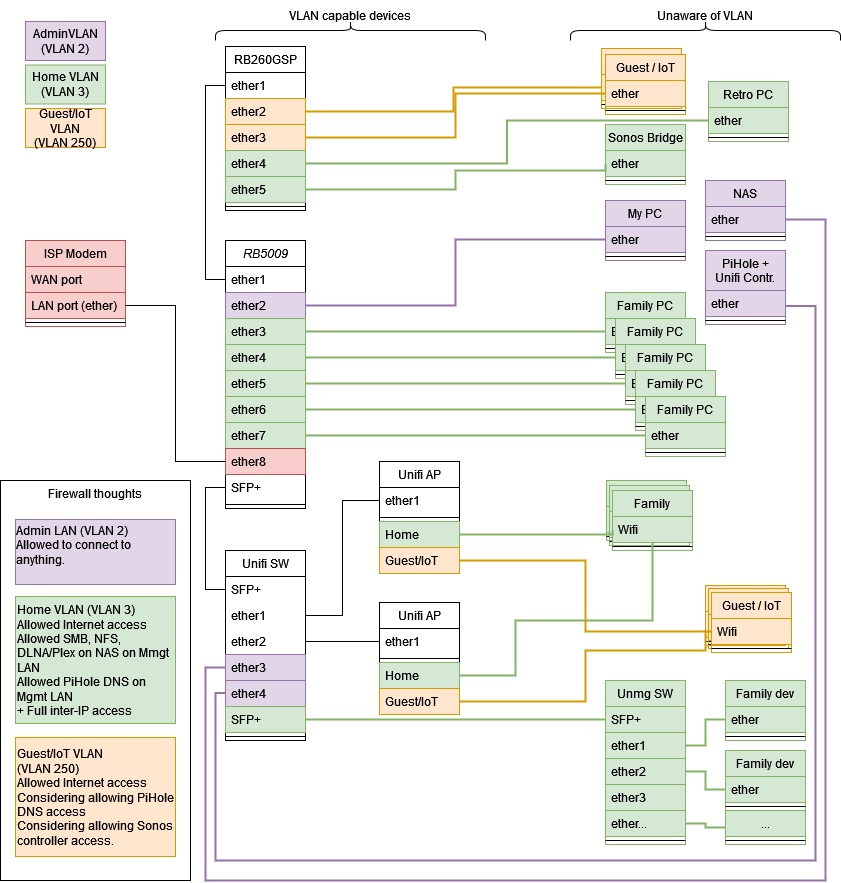
I have attached a diagram, trying to show the imagined setup:
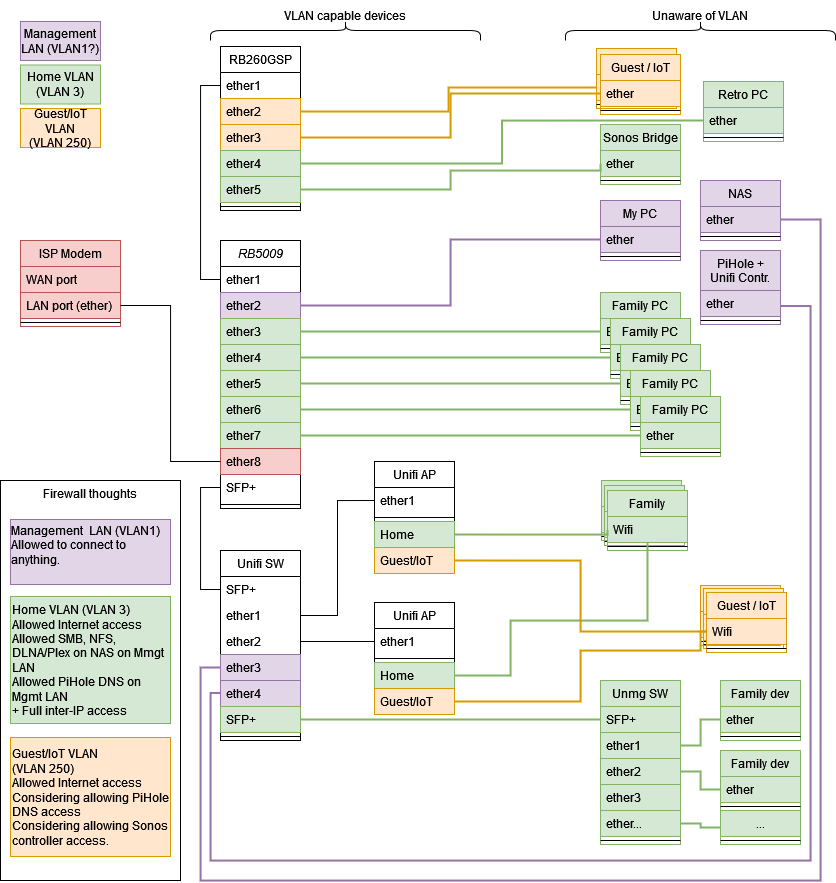
Network-Target.png
My immediate questions are:
On the RB5009

  • ether3-7 (green) are access ports. They should all be VLAN 3. What would be the correct / recommended RouterOS 7.8 way to do this? (considering next questions)
  • ether1 (white) and SFP+ should carry both VLAN 1, 3 and 250 and allow downstream devices to handle these, what would be correct for this? (I believe they are trunk ports?)
  • ether2 (purple) is my PC to be used for management of the whole LAN, anything to take into account here?
    Notes:
  • I’m aware that VLAN 1 can be a bad practice. I would use it for management to avoid trouble with the unifi controller. I’m willing to change it, if it’s recommended, but right now I’m struggling with just “enforcing” VLAN 3 on all “green ports”
  • I’m able to carry VLAN 250 to the Unifi APs and “advertise” them on a separate IoT/Guest SSID. When I check “VLAN filtering” on the bridge containing (in WinBox) all ports except ether 8, which is the WAN, it seems that the unifi APs are not able to deliver an IP on VLAN 250 (maybe it’s due to another misconfiguration.

I appreciate any help, including links to previous posts. I’m probably asking the same question as many others, but I haven’t found the answer or I found it and didn’t understand it :slight_smile:

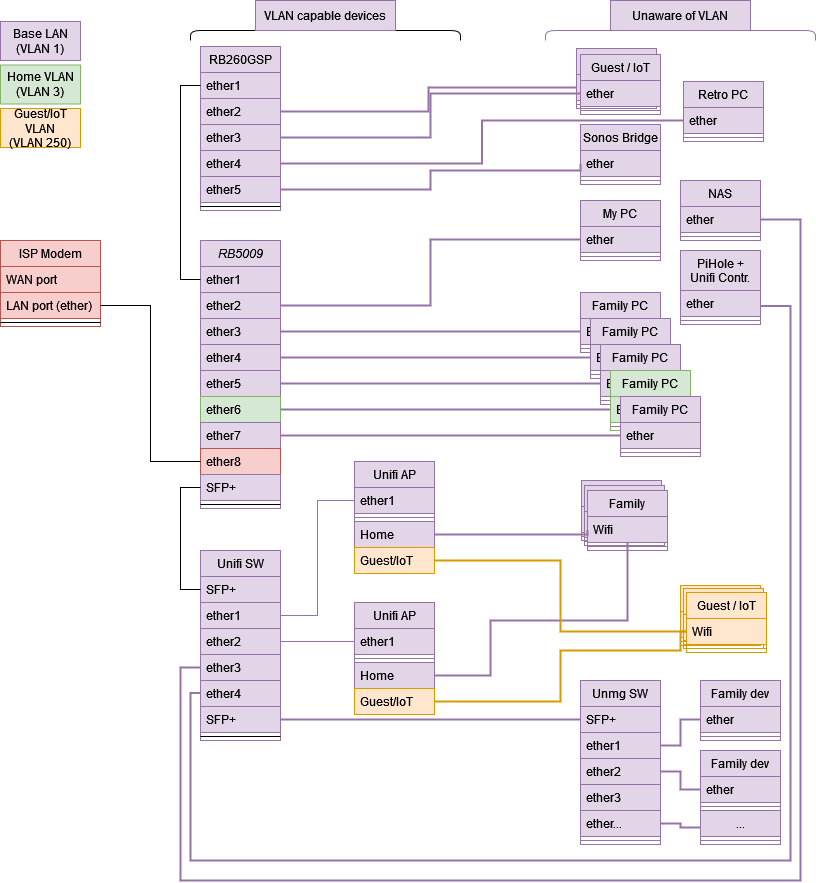
There is how my current setup looks (I think):
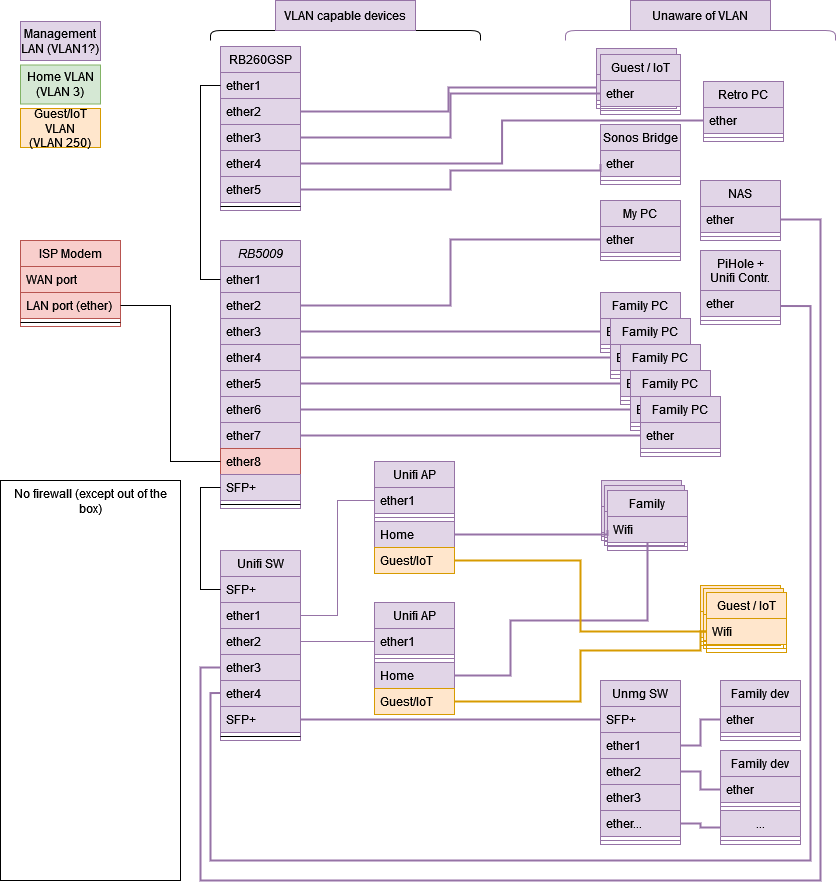
Network-Current.png
And here is my configuration with secrets removed. There is a bit of trash lying around as well, including an extra dhcp and a disabled VLAN. I also have a lot of static DHCP-leases, which I removed to make a better overview. One important static lease is my pi-hole being at 192.168.2.100. Others include my NAS and some family PCs.

# apr/07/2023 13:17:54 by RouterOS 7.8
# software id = XXXX
#
# model = RB5009UPr+S+
# serial number = XXXXXXXXXXX
/interface bridge
add admin-mac=48:A9:8A:34:6F:80 auto-mac=no name=WAN_bridge
add admin-mac=48:A9:8A:34:6F:81 auto-mac=no comment=defconf name=bridge
/interface ethernet
set [ find default-name=ether8 ] comment=ISP
/interface vlan
add interface=bridge name=GuestIoT vlan-id=250
add interface=bridge name=Home vlan-id=3
add disabled=yes interface=bridge name=MgmtMaybe vlan-id=2
/interface list
add comment=defconf name=WAN
add comment=defconf name=LAN
/interface wireless security-profiles
set [ find default=yes ] supplicant-identity=MikroTik
/ip pool
add name=dhcp_pool2 ranges=192.168.2.2-192.168.2.254
add name=dhcp_pool250 ranges=192.168.250.2-192.168.250.254
add name=dhcp_pool3 ranges=192.168.3.2-192.168.3.254
add name=dhcp_pool1 ranges=192.168.1.2-192.168.1.254
/ip dhcp-server
add address-pool=dhcp_pool2 interface=bridge name=dhcp2b
add address-pool=dhcp_pool250 interface=GuestIoT name=dhcp250
add address-pool=dhcp_pool3 interface=Home name=dhcp3
add address-pool=dhcp_pool2 disabled=yes interface=MgmtMaybe name=dhcp2
/interface bridge port
add bridge=bridge comment=defconf interface=ether2
add bridge=bridge comment=defconf interface=ether3
add bridge=bridge comment=defconf interface=ether4
add bridge=bridge comment=defconf interface=ether5
add bridge=bridge comment=defconf interface=ether6
add bridge=bridge comment=defconf interface=ether7
add bridge=bridge comment="defconf was ether8" interface=ether1
add bridge=bridge comment=defconf interface=sfp-sfpplus1
add bridge=WAN_bridge interface=ether8
/ip neighbor discovery-settings
set discover-interface-list=LAN
/interface detect-internet
set detect-interface-list=WAN internet-interface-list=WAN lan-interface-list=\
    LAN wan-interface-list=WAN
/interface list member
add comment=defconf interface=bridge list=LAN
add comment="defconf was ether1 now it's the WAN bridge (containing ether8 and\
    \_using a fake mac address)" interface=WAN_bridge list=WAN
/ip address
add address=192.168.2.1/24 comment=defconf interface=bridge network=\
    192.168.2.0
add address=192.168.250.1/24 interface=GuestIoT network=192.168.250.0
add address=192.168.3.1/24 interface=Home network=192.168.3.0
add address=192.168.2.1/24 disabled=yes interface=MgmtMaybe network=\
    192.168.2.0
/ip dhcp-client
add comment="defconf was ether1 - now WAN_bridge with fake MAC-address equal t\
    o ether1's MAC address, to fool ISP into giving me an IP address" \
    interface=WAN_bridge
/ip dhcp-server network
add address=192.168.2.0/24 dns-server=192.168.2.100,192.168.2.1 gateway=\
    192.168.2.1 netmask=24
add address=192.168.3.0/24 dns-server=192.168.2.100,192.168.2.1 gateway=\
    192.168.3.1
add address=192.168.250.0/24 dns-server=8.8.8.8,194.239.134.83 gateway=\
    192.168.250.1
/ip dns
set allow-remote-requests=yes
/ip dns static
add address=192.168.2.1 comment=defconf name=router.lan
/ip firewall filter
add action=accept chain=input comment=\
    "defconf: accept established,related,untracked" connection-state=\
    established,related,untracked
add action=drop chain=input comment="defconf: drop invalid" connection-state=\
    invalid
add action=accept chain=input comment="defconf: accept ICMP" protocol=icmp
add action=accept chain=input comment=\
    "defconf: accept to local loopback (for CAPsMAN)" dst-address=127.0.0.1
add action=drop chain=input comment="defconf: drop all not coming from LAN" \
    in-interface-list=!LAN
add action=accept chain=forward comment="defconf: accept in ipsec policy" \
    ipsec-policy=in,ipsec
add action=accept chain=forward comment="defconf: accept out ipsec policy" \
    ipsec-policy=out,ipsec
add action=fasttrack-connection chain=forward comment="defconf: fasttrack" \
    connection-state=established,related hw-offload=yes
add action=accept chain=forward comment=\
    "defconf: accept established,related, untracked" connection-state=\
    established,related,untracked
add action=drop chain=forward comment="defconf: drop invalid" \
    connection-state=invalid
add action=drop chain=forward comment=\
    "defconf: drop all from WAN not DSTNATed" connection-nat-state=!dstnat \
    connection-state=new in-interface-list=WAN
/ip firewall nat
add action=masquerade chain=srcnat comment="defconf: masquerade" \
    ipsec-policy=out,none out-interface-list=WAN
add action=dst-nat chain=dstnat dst-port=5001 in-interface-list=WAN protocol=\
    tcp to-addresses=192.168.2.40 to-ports=5001
/ipv6 firewall address-list
add address=::/128 comment="defconf: unspecified address" list=bad_ipv6
add address=::1/128 comment="defconf: lo" list=bad_ipv6
add address=fec0::/10 comment="defconf: site-local" list=bad_ipv6
add address=::ffff:0.0.0.0/96 comment="defconf: ipv4-mapped" list=bad_ipv6
add address=::/96 comment="defconf: ipv4 compat" list=bad_ipv6
add address=100::/64 comment="defconf: discard only " list=bad_ipv6
add address=2001:db8::/32 comment="defconf: documentation" list=bad_ipv6
add address=2001:10::/28 comment="defconf: ORCHID" list=bad_ipv6
add address=3ffe::/16 comment="defconf: 6bone" list=bad_ipv6
/ipv6 firewall filter
add action=accept chain=input comment=\
    "defconf: accept established,related,untracked" connection-state=\
    established,related,untracked
add action=drop chain=input comment="defconf: drop invalid" connection-state=\
    invalid
add action=accept chain=input comment="defconf: accept ICMPv6" protocol=\
    icmpv6
add action=accept chain=input comment="defconf: accept UDP traceroute" port=\
    33434-33534 protocol=udp
add action=accept chain=input comment=\
    "defconf: accept DHCPv6-Client prefix delegation." dst-port=546 protocol=\
    udp src-address=fe80::/10
add action=accept chain=input comment="defconf: accept IKE" dst-port=500,4500 \
    protocol=udp
add action=accept chain=input comment="defconf: accept ipsec AH" protocol=\
    ipsec-ah
add action=accept chain=input comment="defconf: accept ipsec ESP" protocol=\
    ipsec-esp
add action=accept chain=input comment=\
    "defconf: accept all that matches ipsec policy" ipsec-policy=in,ipsec
add action=drop chain=input comment=\
    "defconf: drop everything else not coming from LAN" in-interface-list=\
    !LAN
add action=accept chain=forward comment=\
    "defconf: accept established,related,untracked" connection-state=\
    established,related,untracked
add action=drop chain=forward comment="defconf: drop invalid" \
    connection-state=invalid
add action=drop chain=forward comment=\
    "defconf: drop packets with bad src ipv6" src-address-list=bad_ipv6
add action=drop chain=forward comment=\
    "defconf: drop packets with bad dst ipv6" dst-address-list=bad_ipv6
add action=drop chain=forward comment="defconf: rfc4890 drop hop-limit=1" \
    hop-limit=equal:1 protocol=icmpv6
add action=accept chain=forward comment="defconf: accept ICMPv6" protocol=\
    icmpv6
add action=accept chain=forward comment="defconf: accept HIP" protocol=139
add action=accept chain=forward comment="defconf: accept IKE" dst-port=\
    500,4500 protocol=udp
add action=accept chain=forward comment="defconf: accept ipsec AH" protocol=\
    ipsec-ah
add action=accept chain=forward comment="defconf: accept ipsec ESP" protocol=\
    ipsec-esp
add action=accept chain=forward comment=\
    "defconf: accept all that matches ipsec policy" ipsec-policy=in,ipsec
add action=drop chain=forward comment=\
    "defconf: drop everything else not coming from LAN" in-interface-list=\
    !LAN
/system clock
set time-zone-name=Europe/Copenhagen
/system identity
set name="MikroTik RB5009"
/tool mac-server
set allowed-interface-list=LAN
/tool mac-server mac-winbox
set allowed-interface-list=LAN

More notes:

  • I’m not remotely close to setting up firewalls yet, but I added my thoughts on firewalls to the first diagram as well.
  • The WAN interface (ether 8 ) is “replaced” by a VLAN. That way I could fake the mac-address towards the ISP fiber modem. Otherwise it wouldn’t give me an IP address (probably mac-locked). It works fine.

Thanks in advance :slight_smile:

http://forum.mikrotik.com/t/using-routeros-to-vlan-your-network/126489/1

BTW … why people tend to complicate their LAN so much?

First I would not use vlan-id=1 its a default vlan that is behind the scenes and should be left alone.

Second, the management vlan is for the devices management so all smart devices should be on this subnet. Also to state the management vlan should not have access to all other vlans.

You are confusing purposes. One is to ensure all smart devices are on an isolated vlan for management purposes.
The access to all vlans is required for the admin only

The admin has several options, have a small managed switch at ones desk so one can plug in to the managment network or the trusted working network for work.
If one doesnt have the option to play musical ports, simply give the admin access to all vlans DONE.
Typically this is firewall list covering all admin devices (laptop, desktop, iphone-ipad, etc.) and any remote wireguard vpn access as well.

On your input chain looks like
add chain=input action=accept in-interface-list=MGMT src-address-list=Authorized

Where MGMT interface list comprised of Trusted work vlan, VPN remote interface admin uses, and management vlan
ip neighbours discovery interface-list=MGMT
ip tools mac-server winmac-server interface-list=MGMT

One bridge, the rest VLANs.
Depending upon how you setup your unifi controller, it could by a hybrid port from 5009 or a trunk port.

Personally I would put your PC, the NAS and the PIHOLE on a separate trusted vlan, with the management vlan just for smart device IP assignment and isolation.

One bridge, bridge does just bridging. NO subnets attached to it.

Bartoz, how have you survived so long if you think thats complicated. I see beautiful simplicity and clarity.
@OP Read the link provided.

/interface bridge ports
Access ports - bridge=bridge ingress-filtering=yes frame-types=admit-only-untagged-and-priority-tagged interface=etherX/wlanY pvid=AA
Trunk ports - bridge=bridge ingress-filtering=yes frame-types=admit-only-tagged-vlans interface=etherX
Hybrid ports - bridge=bridge interface=etherS pvid=BB

/interface bridge vlans ( line on a per vlan basis )
add bridge=bridge tagged=bridge,trunkport(s) untagged=access ports/hybrid port vlan-ids=X
add bridge=bridge tagged=bridge,trunkport(s) untagged=access ports/hybrid port vlan-ids=Y
etc…

Well, until you try to print the beautiful diagram from the guest VLAN. Maybe not a need, but VLAN block multicast/broadcast discovery :wink:

One thing to look for designing the VLANs is what needs to be “discoverable” using stuff like mDNS/SSDP/etc*. Maybe the SONOS don’t need to be on the same LAN as their app, but that be the one worry I’d have on this point.

(*since there is UBNT stuff, it’s may be possible to do any potential mDNS repeating on that side… but RouterOS does not have that feature)

I’ll leave the config to those that understand bridges in RouterOS, but I gotta say that is one of the most detailed network drawings I have ever seen here. Especially impressive that it was in your first forum post. Good job there…

Concur and I am a sucker to answer someone who makes such an initial effort!!!

Concur Ammo, but no L2 discovery stuff was mentioned. So the OP should detail user requirements for traffic, including admin, in full detail without mention of any config.

Hi guys

Thanks for the responses, very nice.
@Bartosz: Physical hardware and location makes this the simplest setup for me. If the RB5009 had around 17 ports instead of 9 it would be alone in my wiring closet without the unifi switch and the unmanaged switch. The RB260GSP is in the Home office / play room, where I would sometimes connect an unmanaged switch when the children have a mini LAN party (guest network) or use my work laptop (also guest). Or use my own equipment which is welcome on the Home VLAN. Hence the requirement for both Home and Guest lan on that switch (~same argument for why the Wifi APs have Home and Guest VLANs). I will re-read the page you linked, it’s one of the things that I probably didn’t understood correctly and completely

@anav: Ok, so I misunderstood the word “management vlan” as it meant “from where you manage everything”. I will create a real VLAN for the purple part of the network (Pihole, PC, NAS). I’ll dig into the firewall stuff, when I have (wide open) VLANs up and running, but I see your point with a list of Authorized devices. And I’ll re-read the link. :slight_smile:

@Amm0: Good point. Maybe I didn’t think of everything, but the “Home” VLAN was supposed to cover this, by being where most things are, including Sonos and the printer and various chrome casts. The NAS is referenced directly by Sonos, the Home PCs, Android TV’s, so as long as the correct ports are accessible from the Home LAN to the NAS, it should be safe (I think). The small “maybe”, that I might allow guests to control my Sonos or access some other internal “Home” service, is not insanely important.

@k6ccc, anav: Thanks for the kind words. :slight_smile:

I’ll get back to you after studying the rsc-files in the link as well, I guess they collectively fit my scenario (router with trunk ports and router with access ports), if I can gather the tecnical understanding and mix and match the elements.

Yeah the discovery thing is a pain in the ass.
I wish I knew how to work IGMP ir IGMP proxy ??? between vlans so as to enable discovery…
For the moment put all devices that need to discover in same vlan is the only thing I can think of.

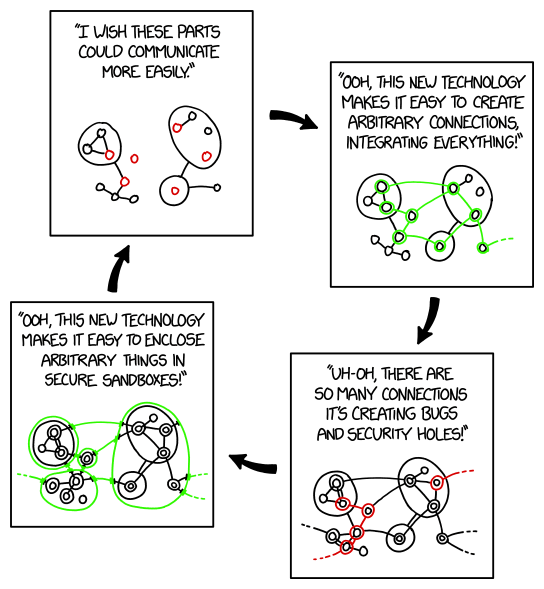
This xkcd comic #2044 Sandboxing Cycle, although about sandboxing servers/services, the same problems arise when someone reads/hears that they should segment their network to protect against “untrusted IoT devices”. But then they realize that real separation isn’t what they wanted. But they normally start at the bottom right.

LUV IT!!!
So what are the easy and quick IGMP or IGMP proxy commands, if this is the answer LOL.

Okay so what else?
I know lets add zerotier to connect the vlans on the same router… out to the cloud and back LOL

Ok. I feel really stupid here. I think I grasp the concepts fairly OK now. So the new target drawing looks like the first, but it has the admin VLAN as VLAN 2 instead of the basic VLAN 1. It’s the same drawing, but I attached it for good measure, and so you can facepalm if it’s not what you meant :wink:
Network-Targetv2.png
Technically there is something I am missing. Maybe it’s just the way I’m trying to do things slowly.

So the network here at home is always busy. So I’m doing a trial and error configuration and trying to “move to a VLAN setup” in small steps, as to not interrupt anyone’s online gaming or streaming. When I’m confident that I can get things working, I can call for a 10 minute break and reconfigure everything, but I like to test things in small steps first.

So the situation is:

  • The current config is just a bridge with a DHCP attached (like an old-school no-VLAN LAN).
  • I added VLANs 2,3 and 250 to the bridge
  • Now I want to switch devices one by one to the correct VLAN of my target drawing, starting with the Family PC on ether6

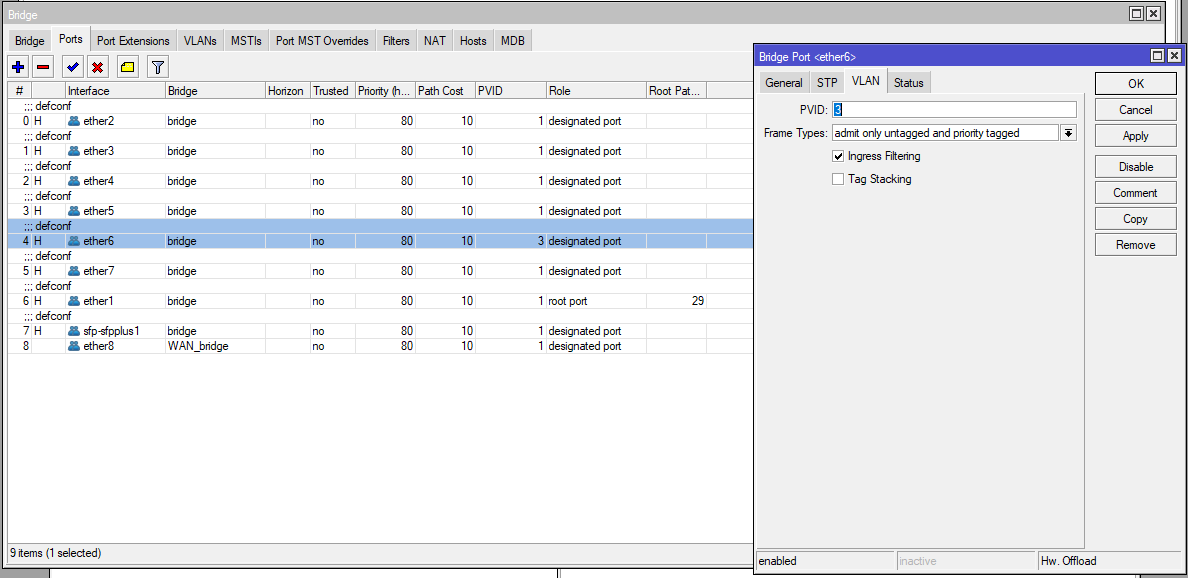
So using Winbox I set PVID to 3 under bridge ports ether6.
PVIDether6.png

  • My understanding is that you want to do this for access ports: It will add VLAN 3 to packets comming from that interface (and strip them off when replying on that interface).

However, the PC when renewing IP, keeps getting an IP from the no-VLAN LAN (I setup a dhcp server on the bridge itself).
When I set VLAN filtering on on the Bridge, there is no connection at all (and my wife’s streaming on the TV stops).

So

  1. What am I missing on ether 6?
    I tried configuring the bridge with tagged=ether6 vland-ids=3, no difference
  2. Is what I’m doing simply not feasible… maybe I should make one big VLAN first and then go from there, if I want to go with small steps?

A picture of what I’m trying to do:
Network-Currentv2.png
So my problem with the guide here http://forum.mikrotik.com/t/using-routeros-to-vlan-your-network/126489/1 and the attached examples, is that I’m in a hybrid setup between the two first examples. My RB5009 both needs to have trunk ports and access ports (maybe a hybrid port as well, per suggestions), and I don’t know if I misunderstood what the post says, or if the real problem is that I just can’t migrate from LAN to VLAN setup port by port, due to the inherent “omnipresence” of VLAN 1 or something…

Thanks again.

Config

# apr/08/2023 00:28:42 by RouterOS 7.8
# software id = XXXXXXXX
#
# model = RB5009UPr+S+
# serial number = XXXXXXXXXXX
/interface bridge
add admin-mac=48:A9:8A:34:6F:80 auto-mac=no comment="defconf was ether1 now it\
    's the WAN bridge (containing ether8 and using a fake mac address)" name=\
    WAN_bridge
add admin-mac=48:A9:8A:34:6F:81 auto-mac=no comment=defconf name=bridge
/interface ethernet
set [ find default-name=ether8 ] comment="Original mac: 48:A9:8A:34:6F:87"
/interface vlan
add interface=bridge name=GuestIoT vlan-id=250
add interface=bridge name=Home vlan-id=3
add interface=bridge name=HomeAdmin vlan-id=1
/interface list
add comment=defconf name=WAN
add comment=defconf name=LAN
/interface wireless security-profiles
set [ find default=yes ] supplicant-identity=MikroTik
/ip pool
add name=dhcp_pool2 ranges=192.168.2.2-192.168.2.254
add name=dhcp_pool250 ranges=192.168.250.2-192.168.250.254
add name=dhcp_pool3 ranges=192.168.3.2-192.168.3.254
add name=dhcp_pool1 ranges=192.168.1.2-192.168.1.254
/ip dhcp-server
add address-pool=dhcp_pool2 interface=bridge name=dhcp2
add address-pool=dhcp_pool250 interface=GuestIoT name=dhcp250
add address-pool=dhcp_pool3 interface=Home name=dhcp3
add address-pool=dhcp_pool1 interface=HomeAdmin name=dhcp1
/interface bridge port
add bridge=bridge comment=defconf interface=ether2
add bridge=bridge comment=defconf interface=ether3
add bridge=bridge comment=defconf interface=ether4
add bridge=bridge comment=defconf interface=ether5
add bridge=bridge comment=defconf frame-types=\
    admit-only-untagged-and-priority-tagged interface=ether6 pvid=3
add bridge=bridge comment=defconf interface=ether7
add bridge=bridge comment=defconf interface=ether1
add bridge=bridge comment=defconf interface=sfp-sfpplus1
add bridge=WAN_bridge interface=ether8
/ip neighbor discovery-settings
set discover-interface-list=LAN
/interface bridge vlan
add bridge=bridge disabled=yes tagged=ether6 vlan-ids=3
/interface list member
add comment=defconf interface=bridge list=LAN
add comment="defconf was ether1 now it's the WAN bridge (containing ether8 and\
    \_having a fake MAC address)" interface=WAN_bridge list=WAN
/ip address
add address=192.168.2.1/24 comment="defconf (LAN)" interface=bridge network=\
    192.168.2.0
add address=192.168.250.1/24 interface=GuestIoT network=192.168.250.0
add address=192.168.3.1/24 interface=Home network=192.168.3.0
add address=192.168.1.1/24 interface=HomeAdmin network=192.168.1.0
/ip dhcp-client
add comment=defconf interface=WAN_bridge
/ip dhcp-server network
add address=192.168.1.0/24 gateway=192.168.1.1
add address=192.168.2.0/24 dns-server=192.168.2.100,192.168.2.1 gateway=\
    192.168.2.1 netmask=24
add address=192.168.3.0/24 dns-server=192.168.2.100,192.168.2.1 gateway=\
    192.168.3.1
add address=192.168.250.0/24 dns-server=8.8.8.8,194.239.134.83 gateway=\
    192.168.250.1
/ip dns
set allow-remote-requests=yes
/ip dns static
add address=192.168.2.1 comment=defconf name=router.lan
/ip firewall filter
add action=accept chain=input comment=\
    "defconf: accept established,related,untracked" connection-state=\
    established,related,untracked
add action=drop chain=input comment="defconf: drop invalid" connection-state=\
    invalid
add action=accept chain=input comment="defconf: accept ICMP" protocol=icmp
add action=accept chain=input comment=\
    "defconf: accept to local loopback (for CAPsMAN)" dst-address=127.0.0.1
add action=drop chain=input comment="defconf: drop all not coming from LAN" \
    in-interface-list=!LAN
add action=accept chain=forward comment="defconf: accept in ipsec policy" \
    ipsec-policy=in,ipsec
add action=accept chain=forward comment="defconf: accept out ipsec policy" \
    ipsec-policy=out,ipsec
add action=fasttrack-connection chain=forward comment="defconf: fasttrack" \
    connection-state=established,related hw-offload=yes
add action=accept chain=forward comment=\
    "defconf: accept established,related, untracked" connection-state=\
    established,related,untracked
add action=drop chain=forward comment="defconf: drop invalid" \
    connection-state=invalid
add action=drop chain=forward comment=\
    "defconf: drop all from WAN not DSTNATed" connection-nat-state=!dstnat \
    connection-state=new in-interface-list=WAN
/ip firewall nat
add action=masquerade chain=srcnat comment="defconf: masquerade" \
    ipsec-policy=out,none out-interface-list=WAN
add action=dst-nat chain=dstnat dst-port=5001 in-interface-list=WAN protocol=\
    tcp to-addresses=192.168.2.40 to-ports=5001
/ipv6 firewall address-list
add address=::/128 comment="defconf: unspecified address" list=bad_ipv6
add address=::1/128 comment="defconf: lo" list=bad_ipv6
add address=fec0::/10 comment="defconf: site-local" list=bad_ipv6
add address=::ffff:0.0.0.0/96 comment="defconf: ipv4-mapped" list=bad_ipv6
add address=::/96 comment="defconf: ipv4 compat" list=bad_ipv6
add address=100::/64 comment="defconf: discard only " list=bad_ipv6
add address=2001:db8::/32 comment="defconf: documentation" list=bad_ipv6
add address=2001:10::/28 comment="defconf: ORCHID" list=bad_ipv6
add address=3ffe::/16 comment="defconf: 6bone" list=bad_ipv6
/ipv6 firewall filter
add action=accept chain=input comment=\
    "defconf: accept established,related,untracked" connection-state=\
    established,related,untracked
add action=drop chain=input comment="defconf: drop invalid" connection-state=\
    invalid
add action=accept chain=input comment="defconf: accept ICMPv6" protocol=\
    icmpv6
add action=accept chain=input comment="defconf: accept UDP traceroute" port=\
    33434-33534 protocol=udp
add action=accept chain=input comment=\
    "defconf: accept DHCPv6-Client prefix delegation." dst-port=546 protocol=\
    udp src-address=fe80::/10
add action=accept chain=input comment="defconf: accept IKE" dst-port=500,4500 \
    protocol=udp
add action=accept chain=input comment="defconf: accept ipsec AH" protocol=\
    ipsec-ah
add action=accept chain=input comment="defconf: accept ipsec ESP" protocol=\
    ipsec-esp
add action=accept chain=input comment=\
    "defconf: accept all that matches ipsec policy" ipsec-policy=in,ipsec
add action=drop chain=input comment=\
    "defconf: drop everything else not coming from LAN" in-interface-list=\
    !LAN
add action=accept chain=forward comment=\
    "defconf: accept established,related,untracked" connection-state=\
    established,related,untracked
add action=drop chain=forward comment="defconf: drop invalid" \
    connection-state=invalid
add action=drop chain=forward comment=\
    "defconf: drop packets with bad src ipv6" src-address-list=bad_ipv6
add action=drop chain=forward comment=\
    "defconf: drop packets with bad dst ipv6" dst-address-list=bad_ipv6
add action=drop chain=forward comment="defconf: rfc4890 drop hop-limit=1" \
    hop-limit=equal:1 protocol=icmpv6
add action=accept chain=forward comment="defconf: accept ICMPv6" protocol=\
    icmpv6
add action=accept chain=forward comment="defconf: accept HIP" protocol=139
add action=accept chain=forward comment="defconf: accept IKE" dst-port=\
    500,4500 protocol=udp
add action=accept chain=forward comment="defconf: accept ipsec AH" protocol=\
    ipsec-ah
add action=accept chain=forward comment="defconf: accept ipsec ESP" protocol=\
    ipsec-esp
add action=accept chain=forward comment=\
    "defconf: accept all that matches ipsec policy" ipsec-policy=in,ipsec
add action=drop chain=forward comment=\
    "defconf: drop everything else not coming from LAN" in-interface-list=\
    !LAN
/system clock
set time-zone-name=Europe/Copenhagen
/system identity
set name="MikroTik RB5009"
/tool mac-server
set allowed-interface-list=LAN
/tool mac-server mac-winbox
set allowed-interface-list=LAN

@GrasDK well done on an initial post. I see you have new post since I started this. I will respond to it in another post, but these are some refernces to look at.

Just a comment about your new post: You have 3 switches that you will need to reconfigure, and they all use a different configuration “language”. If this is your first time, you are overly optimistic to think that 10 minutes will be enough time. It doesn’t help that the RB5009 is your main internet router, and that you can’t test things in a lab environment. Working around family members is in many ways harder than in a work environment, where you can often schedule things for off hours.

Having a good plan will minimize the chance of screwing things up. And make backups of everything before you start making changes, and have a good fall back plan.

What were you using as a router before the RB5009? Is it still available? Just in case you need to access the internet if things don’t go as planed.

Several questions.

You state you are moving from single lan to multiple lans. Is this your first experience with vlans? If not what type of equipment have you configured vlans on before?

Where is your UniFi controller? Which vlan? Have you asked any questions on the UI forum?

Have you already adopted the UniFi APs into the controller? Are you using the default of untagged “management” access to the UAPs? That can be changed to a tagged vlan, but unless you are a purist that want only tagged vlans on a trunk link, all the equipment you have should allow you to have a “native” vlan that is untagged going to the UAP. MikroTik terminology for a trunk port that has traffic using an untagged vlan is a “Hybrid” port.

Here’s another thread worth reading: RouterOS bridge mysteries explained, but it presumes you understand vlans and how to configure an external switch. It is essentially trying to explain how to wrap your head around the MikroTik bridge “combination” device. These are two comments I made about the post that explained some thing I learned when playing with my hEX S post 18 and post 19

And the Mikrotik documentation is worth reading as well. The RB260 configuration is quite different (SwOS) than the RB5009 (ROS) or the UniFi switch. When you get done you will know much more about vlans and configuring them than you did when you started. Here’s the ROS help Bridging and Switching and this section Bridge VLAN Table For the RB260 see this SwOS/RB250-RB260-VLAN-Example

If you need assistance with SwitchOS for the RB260, just ask. I have several of them and all have VLANs in use.

@Buckeye:
Thank you for the reply.
@k6ccc:
Thanks, I will keep that in mind :wink:

@Buckeye
Yeah I agree, and I could reinsert my previous router still: An Asus RT-AX89X, though I have it up for sale. I was annoyed with it being too simple in its features and was recommended (and warned) about Mikrotik :slight_smile: But I’m not afraid of learning new things even if it is a steep learning curve. As you can infer I’m up and running at least as well as I was with the consumer-grade Asus router using a basic LAN.

The Unifi Switch and the two AP’s are adopted and the unifi controller is running on a Raspberry PI, which also runs PiHole. I haven’t messed around with the RB260. It is just “plain” switching for now.

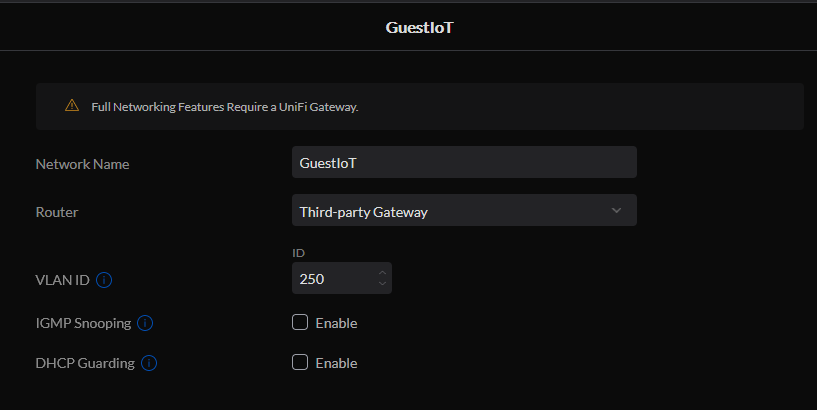
I did setup the Unifi APs to host a Guest SSID using VLAN 250 using the unifi controller:
Unifi.png
and the RB5009 does the dhcp’ing because the unifi switch (or the APs or both) are VLAN aware:
leases.png
This is my first first-hand meeting with VLANs. I did know about them up front and the basic idea behind them, and got to learn more on these forums. I’m very much into starting small and building and learning from there, but my problem is that I haven’t found out how to “start small”. Maybe adding a VLAN to a single machine on ether6 isn’t the way to go.

My plan was

  • single out a port on the RB5009, make it an access port for a PC to the Home VLAN",
  • Then add more ports.
  • Then make the HomeAdmin VLAN and an access port to use it…
  • Then expand onto the trunk ports that connect to the other swithces and begin the setup there.I suspect the Unifi will be quite different to setup, but I haven’t gotten to that yet and haven’t asked anything on the UI forums.

As mentioned in the earlier post, I got stuck at the first step. The PC on ether6 sticks with the old setup when VLAN filtering on the bridge is disabled. When VLAN filtering is enabled, everything on the basic LAN loses internet connection and the PC on ether6 can’t negotiate for a new IP.

This kind of problem tickles my “I have a wrong assumption”-sense. There is something basic that I’m missing. Is it that you cannot have a working LAN setup and gradually switch to a VLAN setup in small steps?

Or is it something I read and overlooked about access ports?

Access ports are configured in a way that means ingress (incoming) packets must not have tags and thus will get a tag applied. The egress (outgoing) packets (that are replying back to whatever was plugged in) get tags removed.

. The switch.rsc file attached to the follow-up post makes me believe that achieving what is in the quote, in Mikrotik language, is adding pvid to the bridge ports (as I did with my ether6). However the example #1 here: https://wiki.mikrotik.com/wiki/Manual:Interface/Bridge#Bridge_VLAN_Filtering indicates that you also need to set “tagged” and “untagged” correctly, and perhaps this is where my problem is.

So what do you think / know? Bad / infeasible approach or just newbie-problems of not being able to map concepts to the proper commands / winbox gui clicks?

email me tomorrow, check profile, i have a suggestion

That’s one way to “imagine it”, but what happens inside the switch is probably different in reality, the IEEE 802.1Q spec says nothing about how a switch works internally, it just describes a “bridge” as a black box that must behave in a specific way externally. I like to use the word “classify” instead of “tag”, because tags are something that are used on the wire to keep ethernet frames for different vlans distinct from each other. All the switch does internally is to keep vlans separate from each other, you can think of it as 4094 lanes that only allow traffic for a single vlan each. Many implementation also limit the number of vlans that can be used at the same time, for example up to 64 unique vlans chosen from the 4094 possible choices (1-4094), 0 and 4095 are reserved for special uses. The PVID just specifies what vlan untagged packets received on a port will be associated with. Usually the PVID is also a clue to the switch that when it transmits an ethernet frame for that vlan, the frame will be transmitted from the port as a standard untagged ethernet frame.

Were you hoping only the ether6 port would be affected?

Turning on vlan-filtering changes the way the bridge/switch works.

Until you enable VLAN filtering, the PVID and other vlan stuff is ignored. It’s like a port being connected to a dumb switch. The bridge operates in vlan-transparent mode, it doesn’t examine the ethertype field in the ethernet frame (the 2 octet field that follows the src mac address in the ethernet header); it just passes the frames through unchanged, so you can still have tagged packets pass through the bridge to be interpreted by an external vlan aware device like the UAP, or a vlan-aware switch. Internally in the non-vlan-filtering switch all frames are in a single lane (broadcast domain).

When vlan-filtering is enabled, the switch starts to pay attention to the ethertype in addition the mac addresses, and if the ethertype matches 0x8100 (the tag protocol id), then it knows that this is a tagged ethernet frame, and that it will find the vlan id and priority info in the next two octets, and then the original ethertype in the following two octets.

But once vlan-filtering is activated, then only those vlans explicitly allowed will egress through a bridge port.
Was the TV streaming over wireless? If it was using a vlan interface, once you turned on vlan-filtering, any frame with vlans not explicitly allowed will be dropped (filtered out).

BTW, you should be able to set the ethernet address of ether8 without making it a separate bridge. Unless your ISP is providing you with multiple vlans on the Internet side (each with a different service like VoIP, IPTV etc), then I would remove ether 8 from the bridge and just use it as a dedicated ethernet port. See this @normis post about how to achieve this.

Learning new things is good! And having a mix of different devices, each with a different way to configure will lead to a much better understanding, but it will take more effort.

The SwOS is pretty easy to setup, and the examples are pretty clear in the documentation, given you understand the difference between an untagged (implicit) vlan and a tagged (explicit) vlan.

I think you can get it to work, but you will need to at a minimum, configure the the RB5009 SFP+ port so it will pass the vlans to the switch in the same manner they are currently being sent, the base vlan untagged and the GuestIoT tagged. As long as you have the trunk ports sending the same vlans tagged and untagged, then things should work the same when vlan-filtering is enabled. You may want to remove a port from the switch (perhaps one of the family pc’s and then you will have access to the RB5009 and not get locked out. Next setup trunk on eth1 to the RB260 switch.

Also, I think you need to add your vlan interfaces to the LAN list as members.

@anav has helped many people, he will probably have some suggestions about your firewall as well.

Good luck in you learning journey.

I went back and made copies of your two configs, and they were different (I removed the section in my previous post saying they looked the same).

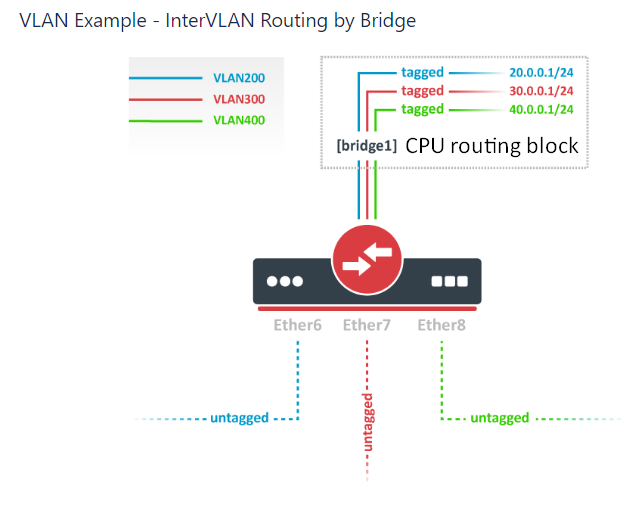
Here is a section of the documentation that has an example worth study: VLAN Example - InterVLAN Routing by Bridge

Note that in my opinion, the graphic is a bit confusing as it does not show what bridge1 is connected to when /interface bridge vlan add bridge=bridge1 tagged=bridge1 vlan-ids=200 is specified. This is the connection from the CPU’s routing engine through /interface vlan add interface=bridge1 name=VLAN200 vlan-id=200 and the “internal trunk link” of bridge1) to vlan 200 in the switch block (which is a hardware switch ASIC in the RB5009). Here I have added text “CPU routing block”.
Bridge for inter-vlan routing.png
To get it to work with your existing switch config, you are going to need to use Hybrid trunk links (if you don’t want to change the other switches at stage one). @anav will disagree with me here, and tell you that all trunk links should be pure tagged links, and there are good reasons for having trunk links use only tagged traffic, as it makes vlan mismatches impossible. But since you want to do this in small steps, it can be done with no changes to the existing switches (the UniFi and the RB260) if you use Hybrid links (I have no UniFi switches (or any Ubiquiti switches other than what is in the EdgeRouter X), but I think they do all their management using untagged ethernet, at least by default). So to use hybrid links on SFP+ and ether1 see this section in the documentation. Note however that you will need to include the bridge device as tagged in the /interface bridge vlan section for every vlan (other than the untagged pvid 1 (which is the implicit default pvid when not specified). To see what I mean, compare the /interface bridge vlan sections in VLAN Example - Trunk and Access Ports (where it is configured as a switch with no connection to the CPU’s routing engine) and VLAN Example - InterVLAN Routing by Bridge (where it is configured as a router and the trunk link would be going to an external switch, similar to what you are doing, except this example uses a “pure tagged trunk” connection.)

I actually prefer the example configs in the v6 documentation, where they explicitly list the untagged vlan corresponding to the PVID. Although it will be “automatically configured” by ROS, putting it in the config makes your intentions clear and in my opinion makes it easier to understand, because everything is explicit in the configuration, you don’t need to reference the /interface bridge port to see what the PVID is. On the other hand, if you change one, then you must change both, so in that way leaving it out makes it “easier” to change in one place. It is a preference thing.

Compare the /interface bridge vlan section of the v6 documentation example VLAN Example #3 (InterVLAN Routing by Bridge) to the v7 documentation example VLAN Example - InterVLAN Routing by Bridge

@GrasDK if you haven’t ever seen Ed Harmoush’s free vlan info, I think it is one of the most clear explanations of vlans. He uses Cisco terminology, so whenever he mentions “the native vlan”, that is equivalent to the PVID (port vlan id), or the single vlan that untagged ethernet frames will be classified into when received on that port. This makes it important that if you are using vlan aware devices connected with a hybrid link, that the pvid is the same on both ends of the link, otherwise what one device thinks the vlan used for untagged traffic will be different than the device at the other end of the link. This is described the following, in the “Native VLAN” section.

Virtual Local Area Networks (VLANs)

He also has good videos on youtube on many networking topics including vlans.

It’s wasn’t about complexity of this particular planned network “per se” but more a rethotical question “Do & why I really need so many VLANS at home?”
Kid’s LAN, IoT’s LAN, Office LAN, game LAN …

P.S.
You tend to omit “s” in my name … no problem but in Polish both letters “sz” make sound like “sh” in a “wish” so it makes a difference :slight_smile: