Beginners journey into VLANs

Hi everyone,

I'm converting my Ubiquiti network to a Mikrotik network and having a look at the first VLANs to get sorted out. However, I'm really struggling with it. I generally understand how VLANs work, but I'm completely lost; should the VLAN be on the interface or the bridge? Etc. I'm fairly new to this type of network hardware, but despite an having a MTCNA and MTCRE certificate, I can't figure this out straight away.

Situation
The current setup is as follows:

  • A CR328-24P-4S+, hereinafter referred to as the CR328. This has a bridge, bridge_LAN, with ports 3 through 24. (I want to use ports 1 and 2 for the WAN side later.)
  • A hAP AC3, hereinafter referred to as the hAP. This has all its ports in a single bridge, also called bridge_LAN. - Port 1 of the hAP is connected to port 24 on the CR328
  • Default VLAN 1: 192.168.1.0/24
  • VLAN 3: 192.168.3.0/24, this will be my test network.

Everything is currently connected on the CR328 without VLANs, and that works (of course) fine. Everything is in the default VLAN, and that works fine as well, of course.
The CR328 handles DHCP and is connected to the router to the internet. I want to do the routing between the subnets on the CR328, because it will soon take over as a router (for home use, it will probably be able to route well enough as an L3 switch).

Objective:

I have some satellite switches around the CR328, like the hAP currently is. I want to connect several ports to a VLAN and have these ports communicate with each other within a single VLAN, and do some routing on the CR328. In the end, my IoT equipment will be on that, for example.

How do I do this?

Now, I want to create a tagged port on port 5 of the hAP with VLAN 3 and advertise it via a trunk on port 1 (of the hAP) to (port 24 of the) CR328. The CR328 should then have a virtual interface (?) and offer DHCP on it.

I'd like the other ports on the hAP to use the default VLAN.

I read this page:

My current config of the hAP:

```

/interface bridgeadd name=bridge_LAN vlan-filtering=yes
/interface vlan
add interface=ether5 name="iot vlan" vlan-id=3
/interface ethernet switch port
set 0 vlan-mode=secureset 4 default-vlan-id=3 vlan-header=add-if-missing vlan-mode=secure
set 5 vlan-mode=secure
/interface bridge portadd bridge=bridge_LAN interface=ether1
add bridge=bridge_LAN interface=ether2
add bridge=bridge_LAN interface=ether3
add bridge=bridge_LAN interface=ether4
add bridge=bridge_LAN interface=ether5

/ip neighbor discovery-settings
set discover-interface-list=!dynamic/ipv6 settings
set disable-ipv6=yes/interface ethernet switch vlan
add independent-learning=no ports=ether5,ether1 switch=switch1 vlan-id=3
add independent-learning=yes ports=ether1,ether2,ether3,ether4,ether5,switch1-cpu switch=switch1 vlan-id=1
/ip address
add address=192.168.3.11/24 interface=*C network=192.168.3.0
add address=192.168.4.11/24 interface=*D network=192.168.4.0
/ip dhcp-client
add interface=bridge_LAN


```

If I do this now, I no longer have a connection on the hAP, I suspect because of the

[code]set 0 vlan-mode=secure[/] rule.

Of course, I still have nothing on the CR328 either.

What should I do next?

  1. I suspect I need to create a virtual interface on the CR328 to run the DHCP server on.
  2. Should it be connected to a port or to the bridge?
  3. How do I properly connect the trunk between the two devices?

Can someone please help me get onto the right track with this?

Thanks!

Here's a quick sketch of the network (sketch is in dutch, ā€œpoortā€ means ā€œportā€, surprise :wink: )

First, you should change your plan, and use the hAP ac³ as your internet gateway and DHCP server instead. It has a much better CPU than the CRS, with over 3x the routing performance with firewall and NAT. You should make it the router.

Second is that on the hAP ac³, you currently configure VLAN according to the method recommended for that device (to have hardware offload), that use the /interface ethernet switch menu and submenus. However, on the CRS328, VLAN will be configured using a different way, the "newer" Bridge VLAN Filtering way. You should study the documentations here:

including all the examples. Please note that VLAN on the hAP ac³ can be configured that way too, and it will be easier than using /interface ethernet switch, however doing so will disable hardware offload on the bridge of the hAP ac³, and switching and VLAN filtering will be done in software using the CPU.

You will mostly use the CRS328 as a switch. Once you have everything working, you can extend your configuration: The CRS328 can also do hardware offload for routing between VLAN. But not for firewall and NAT: L3 Hardware Offloading - RouterOS - MikroTik Documentation. You can use it for inter-VLAN routing, but L3 HW-Offload is not supported if you want to use it as router to the internet.

CGG is bang on!
Use this document for both router and switch as a guide for vlans.....

Video for switch .........
https://www.youtube.com/watch?v=YLtGQAQ8iS0&t=1366s

Thanks, I’l delve into this one as well.

Thank you for pointing this out. I’ll have a look at that part of the documentation.

Currently, I’m still using the Ubiquiti gateway as a router. For now it will stay in place and do the NAT/firewalling, so the switch only has to do the inter-VLAN routing stuff.

@vlan_newbie
Second ... please change formatting for code in the post. It would make reading easier.
Use code tag < / > from the menu or just put three backticks (usually the key left to the "1" on the US keyboard) to mark the beginning and next three ones the end of block of code. You can append RouterOS after the first backiticks to help the forum engine format the text.

1 Like

Just did so, thank you for mentioning.

You can use the hap as a switch as well, exact same setup as for the CRS328 ( access point/switch vice just switch).

I know, but I need at least ~15 ports in my home rack (where the CRS328 is located). On my desk the hAP functions as a switch (1 port to the rack, 2 for desktops and 2 for fiddling).

Since my Ubiquiti setup can’t really change the default VLAN, I bought a Mikrotik router. I’ll wait for it to arrive, before continuing messing the the default VLAN.

Edit:

Tonight I’ll try to config the switch on my desk (the hAP) and the CRS. Let’s have a look into it.

Note: this post is both my own braindump and a question as well. I currently think I understand the trunks and access ports on switches but I’m still doubting about where to implement what. And this document forces me to split the large task at hand into multiple small ones. Of course any suggestions will be appreciated sincerely.

Yay, the new router (CCR2004-16G-2S+) arrived today. I’ve hardened and configured it today, and added some wg configuration. Right now I’m using a flat network having just a single VLAN (default VLAN) running a 192.168.1.0/24 network. The worst iot stuff is not connected anymore :wink:

I bought it because I think configuring just MT hardware should be much easier than configuring MT hardware and configuring Ubiquiti hardware as well to cooperate with MT. Furthermore the Ubiquiti’s L2TP performance was quite underwhelming while my new router’s Wireguard performance is much better :slight_smile:

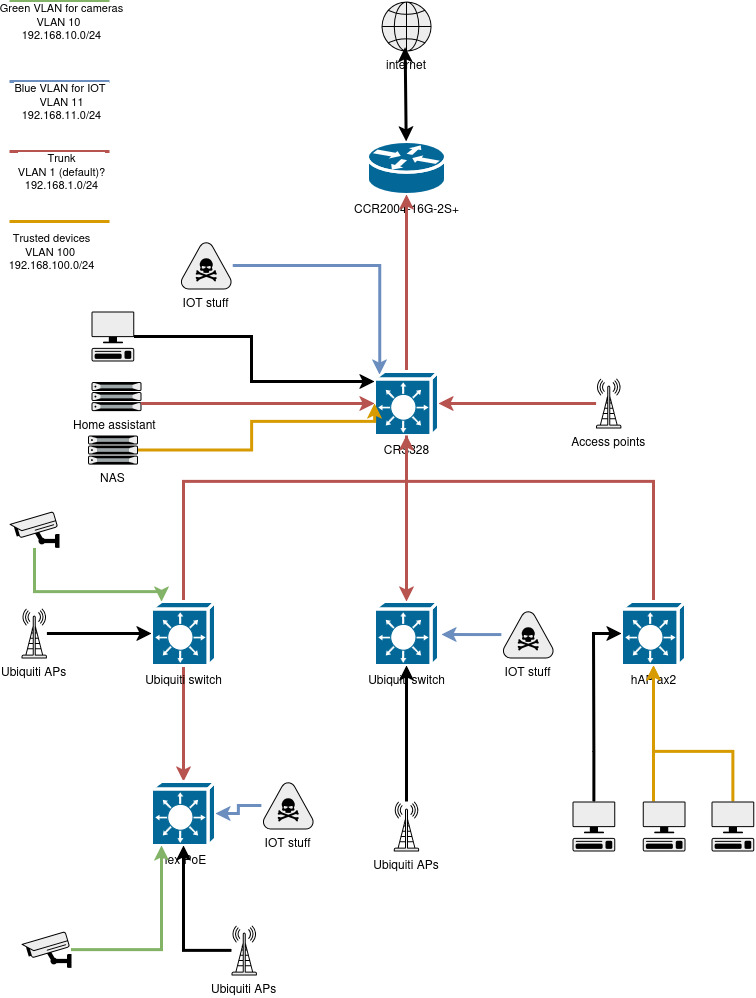
I’ve also updated my network map a bit:

This will make it easier to discuss my questions. Please note that there’s quite a lot more (there’s about 60 ethernet/wifi devices living in my home network), but all routing/switching hardware is on the map (there’s just much more clients on the switches and APs). The good part is I’ve been creating a list for all tagged and trunk ports on my switches. (the APs should be on a trunk I assume since they’re in multiple VLANs, am I correct? I now see that I’ve left their arrows black in the diagram)

Next weekend I’ll try to start on the VLANs, my end goals are:

  • Have 5 VLANs (management, trusted-devices, iot, camera, guest-wifi) each having it’s own VLAN ID and a subnet living on each.
  • Have various of those on the wifi (trusted-devices, iot, camera and guest).
  • Deny all traffic between those subnets except for some exceptions. The CCR2004 will handle this.
  • Make sure there are some devices which are on multiple networks such as Home assistant (in iot, iot-camera and trusted network).

Since I don’t want to break too much stuff while trying to get this set up I’ll focus on creating the camera subnet first.

My current plan:

  • Create a VLAN on the router, and run a DHCP server on it. It shall not be able to communicatie with the internet.
  • Create a tagged port on the CRS and on the hex PoE. On both there’s a wired camera connected directly. Later on: Create another one on the ubiquiti devices since there’s cameras living over there as well. These will be tagged ports.
  • Make the links between switches trunks (all switches use port1 for upstream) because both the default VLAN and the camera VLAN will be on there.
  • On the hAP ac there’s wired interface with a computer used for management. For now it can be in the trusted VLAN and the camera VLAN. Later on it should move to a management VLAN
  • On the CRS there’s an NVR, which will live on the trusted network, but be available from the camera network as well. I don’t think I can create some virtual interfaces on it.

Using RouterOS to VLAN your network - #2 by pcunite will be my guide for this.

As I often recommend, I always setup a port off the bridge, and I do all the configuring from that safe spot.

Hey guys I’m sorry for being such a newbie, and I hope somebody will bump me in the right direction.

Since I really want to understand VLANs I’ve been reading quite a lot but still can’t get it to work. I’m not a very experienced network admin as you can see. Although I spent quite some time reading up on:

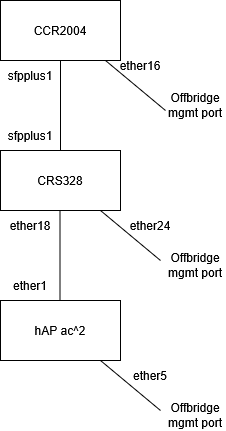
So back to the drawing board, let’s dumb down. My current setup:

This works fine without any VLAN setup (so all just native VLAN which is 1, am I correct?). I’ve added the offbridge port on all devices so I will not lock myself out of the device. Great advice :slight_smile:

Now I’d like to add my first real VLAN. I’d like to a machine to be on the CRS, and one on the HAP. The hAP will serve some DHCP addresses, just for the new VLAN. Both machines should be in their own network, not being the ā€œmain networkā€.

Am I correct to assume that I need to:

  • Create a vlan with ID 10 (on both the hAP and the CRS) and add:
    • Port 16 on the CRS328
    • Port 2 on the hAP ac^2
  • Which means I need to create:
    • On the hAP: ether1 in a trunk, ether2 in an access port (pvid = 10)
    • On the CRS: ether18 in an trunk, ether16 in an access port (pvid = 10)

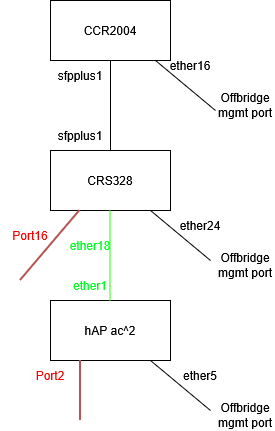
So it looks like this:

Where red = access port, green = trunk.

Am I still correct? Okay the hAPs current config (I used the ā€˜switch’ config from Using RouterOS to VLAN your network) and removed all ports/vlans except for ether2 and vlan10.:

/interface bridge

add name=bridge_LAN

/interface vlan

add interface=bridge_LAN name=VLAN10 vlan-id=10

add interface=bridge_LAN name=vlan-mgmt vlan-id=999

/interface list

add comment="management only" name=MGMT

add comment=LAN name=LAN

add comment="management and LAN" include=LAN,MGMT name=MGMTandLAN

/ip pool

add name=vlan10-pool ranges=192.168.10.200-192.168.10.220

add name=Offbridge-dhcp-pool ranges=10.10.10.1-10.10.10.254

/ip dhcp-server

add address-pool=vlan10-pool interface=VLAN10 name=dhcp-vlan10

# Interface not running

add address-pool=Offbridge-dhcp-pool interface=ether5 name=Offbridge-dhcp-server

/interface bridge port

add bridge=bridge_LAN interface=ether1

add bridge=bridge_LAN interface=ether3

add bridge=bridge_LAN interface=ether4

add bridge=bridge_LAN frame-types=admit-only-untagged-and-priority-tagged interface=ether2 pvid=10

/ip neighbor discovery-settings

set discover-interface-list=!dynamic

/interface bridge vlan

add bridge=bridge_LAN tagged=ether1,bridge_LAN vlan-ids=1

add bridge=bridge_LAN tagged=ether2 vlan-ids=10

/interface list member

add comment=OffBridge interface=ether5 list=MGMT

add comment=LAN interface=ether4 list=LAN

add comment=LAN interface=ether1 list=LAN

add comment=LAN interface=ether2 list=LAN

add comment=LAN interface=ether3 list=LAN

/ip address

add address=192.168.10.11/24 interface=VLAN10 network=192.168.10.0

add address=10.10.10.11/24 interface=ether5 network=10.10.10.0

/ip dhcp-client

add interface=bridge_LAN

/ip dhcp-server network

add address=10.10.10.0/24 dns-server=10.10.10.1,10.10.10.1 gateway=10.10.10.1

add address=192.168.10.0/24 dns-server=192.168.10.11 gateway=192.168.10.1

/interface bridge

add name=bridge_LAN vlan-filtering=yes

Right now I’ve connected a laptop to port2 of the hAP and I expected the laptop get a DHCP lease from the vlan10. No such thing. When setting the laptop’s IP manually, there’s layer3 connectivity either. The routing table seems to be fine on the hAP:

[john@sw-bureau] /ip/route> print
Flags: D - DYNAMIC; I - INACTIVE, A - ACTIVE; c - CONNECT, d - DHCP
Columns: DST-ADDRESS, GATEWAY, ROUTING-TABLE, DISTANCE
DST-ADDRESS GATEWAY ROUTING-TABLE DISTANCE
DAd 0.0.0.0/0 192.168.1.1 main 1
DIc 10.10.10.0/24 ether5 main 0
DAc 192.168.1.0/24 bridge_LAN main 0
DAc 192.168.10.0/24 VLAN10 main 0

But when tcpdumping on the laptop (on the interface connected to the hAP) there’s just ARP requests, no replies.If I torch the VLAN10 interface on the hAP while pinging the hAPs IP (192.168.10.11) there’s not much happening either, just some ARP packets.

Can somebody please point out where my mistake is? If I can get this to work, I’ll add the CRS into the mix :wink:

I would start with re-reading the first two Rules of the Mikrotik Club, this :
/interface bridge vlan

add bridge=bridge_LAN tagged=ether1,bridge_LAN vlan-ids=1

seems to me a blatant violation of them.

Thank you for the kind reply. That’s indeed quite a violation, thank you for pointing that out.

If I’m going to change it to some other value, I assume I need to change the vlan-id of the rest of my network too. Since I did not configure any VLANs yet on my core switch or router, I should create the VLAN over there as well.

Am I correct in assuming so?

(for instance, my routers redacted config. The vlan 300 is required on the WAN side by my ISP ):

/interface bridge

add name=bridge_LAN protocol-mode=none

add name=bridge_WAN

/interface wireguard

add listen-port=13231 mtu=1420 name=wireguard1

/interface vlan

add interface=ether1 name=vlan-internet vlan-id=300

/interface list

add comment=defconf name=WAN

add comment=defconf name=LAN

add comment="Management only" name=MGMT

add comment="Management and LAN" include=LAN,MGMT name=MGMTandLAN

/ip pool

add comment=dhcp-lan-pool name=dhcp-lan ranges=192.168.1.100-192.168.1.200

add name=Offbridge-dhcp-pool ranges=10.13.37.1-10.13.37.254

/ip dhcp-server

add address-pool=dhcp-lan interface=bridge_LAN lease-time=5m name=dhcp-lan

# Interface not running

add address-pool=Offbridge-dhcp-pool interface=ether16 name=\

Offbridge-dhcp-server

/interface bridge port

add bridge=bridge_WAN interface=ether1

add bridge=bridge_LAN interface=ether13

add bridge=bridge_LAN interface=ether14

add bridge=bridge_LAN interface=ether15

add bridge=bridge_WAN interface=ether2

add bridge=bridge_LAN interface=sfp-sfpplus1

/ip neighbor discovery-settings

set discover-interface-list=MGMTandLAN

/ipv6 settings

set disable-ipv6=yes

/interface list member

add comment=WAN interface=ether1 list=WAN

add interface=ether2 list=WAN

add interface=ether15 list=LAN

add interface=ether14 list=LAN

add interface=ether13 list=LAN

add comment=OffBridge interface=ether16 list=MGMT

/ip address

add address=192.168.1.1/24 interface=bridge_LAN network=192.168.1.0

add address=10.0.0.1/24 comment=Wireguard interface=wireguard1 network=10.0.0.0

add address=10.13.37.1/24 interface=ether16 network=10.13.37.0

/ip cloud

set ddns-enabled=yes

/ip dhcp-client

add interface=vlan-internet

/ip dhcp-server network

add address=10.13.37.0/24 dns-server=8.8.8.8 gateway=10.13.37.1

add address=192.168.1.0/24 dns-server=192.168.1.2 gateway=192.168.1.1 netmask=24

/ip dns

set servers=86.54.11.1

I doubt you will get many responses since this topic is marked "solved".

You diagram has no information about what subnets are configured on what vlans on your internal network.

If I understand, you want the hap ac2 to be only a switch. If that's the case why would you want a dhcp server on it (instead of letting the CCR2004 be a dhcp server for the vlan). A vlan is a broadcast domain (when a host transmits an ethernet broadcast, all other hosts on the lan will receive a copy; routers are considered a host too). It is just like a normal lan, but separate vlans are kept separated from each other, and the only way that traffic will flow between vlans is a router (or link misconfigured with mismatched pvids). The vlan interface is just a way for the router to "connect" to one of the virtual lans, and all traffic from a vlan interface will have IEEE 802.1Q tags inserted, i.e. the ethernet frames will have explicit tags.

Why do you have ether1 in a second bridge "bridge_WAN" ?

You have the vlan directly attached to ether1 (as you probably should)

/interface vlan
add interface=ether1 name=vlan-internet vlan-id=300

What that does is create another interface that can have Layer 3 attributes (like ip address) attached. But the ethernet frames without a vlan tag will be received by the ether1 interface, frames with vlan tag 300 will be delivered to the the vlan-internet interface.

In your OP you said

The key to confidence is understanding, so start there. If you can explain how vlans work, then maybe you are past this point. If not, my recommendation for vlan background info (mostly vendor agnostic) is Ed Harmoush's free Virtual Local Area Networks (VLANs) which has a link to a youtube video. He also has a very good "Networking Fundamentals" youtube playlist.

Just curious, did you set up the Ubiquiti network you are moving away from? Or just inherit it? Was it edgerouter based or Unifi based? Unifi hides a lot more of the details than EdgeOS, and EdgeOS hides a lot more details than ROS. Sort of like the difference between python, C, and assembler.

1 Like

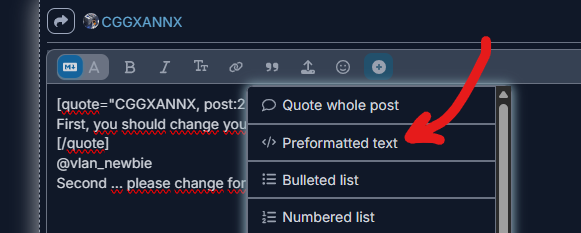
When posting your configs, please click the "preformatted text" icon in the ribbon before pasting your config.

image

Also include at least the first line that has timestamp, and ROS version and the model

[demo@MikroTik] > export
# 2025-11-26 20:18:32 by RouterOS 7.19.6
# model = RB760iGS

It makes it much easier to keep track of the what the export refers to.

Nickel and dimed to death is this approach and could drag on and on!! Before creating a config,
a. identify all the user(s)/devices(s) including the admin
b. identify all the traffic they need.

detail any special requirements about the WAN, dual single etc.

+++++++++++++++++++++++++++++++++++++++

Design the network knowing the entirety of the requirements otherwise it could be a patchwork of conflicting issues and you will get very confused. One also avoids arbitrary decisions like I want the hapac to serve some address,
What the F, for? Its a very premature solution to a problem not yet found or explained. Typically in this type of setup is strictly acting as an AP/Switch and one only need to do basically the same thing for it and the CRS which is tag and untag vlans on the bridge for the most part.

Thank you for the kind suggestions. At first I tried to create a nice all-solving solution for implementing the VLANs. After finding out that does not work, and is quite a lot of work I decided to scale down a lot. Instead of ā€˜trying out’ (or in my case screwing up) stuff on my main network, I decided to try to move just 1-2 devices into a VLAN while trying not to break the functionality of the rest.

I got the hAP a^c for free and it’s sitting on my desk acting as a switch/testbed. The CRS and CCR are required for having a network/internet at home. I can play with those, but if I mess up my home network ceases to function (which is really inconvenient). If the hAP a^c stops functioning because I’m fiddling with it, it’s not much of a problem.
That’s why I decided to start very small and make sure I understand what I’m doing, instead of doing everything at once.

Thanks for letting me know. I’ll use the code-tags from now on.

I doubt you will get many responses since this topic is marked "solved".

Oh well I wasn’t aware of this. Can I unmark it? Or since it has become quite a messy topic, should I start a fresh one (and maybe have this one trashed)?

If I understand, you want the hap ac2 to be only a switch. If that's the case why would you want a dhcp server on it (instead of letting the CCR2004 be a dhcp server for the vlan). A vlan is a broadcast domain (when a host transmits an ethernet broadcast, all other hosts on the lan will receive a copy; routers are considered a host too). It is just like a normal lan, but separate vlans are kept separated from each other, and the only way that traffic will flow between vlans is a router (or link misconfigured with mismatched pvids). The vlan interface is just a way for the router to "connect" to one of the virtual lans, and all traffic from a vlan interface will have IEEE 802.1Q tags inserted, i.e. the ethernet frames will have explicit tags.

That’s correct. The hap ac2 is just functioning as a switch on my desk. I got it for free, I needed a desk-switch and it’s okay to play with it. If I misconfigure it, it will only hurt the devices on my desk.

The second code snippet is from the CCR, which is functioning as the the router between my network and my ISP. That’s where the bridge_WAN on eth1 comes from. I think I get why I should include the device type etc on my config snippets, point taken :wink: . This is causing quite some confusion, my bad. Sorry for that.

(Odido (= T-Mobile in the Netherlands) requires customers to have VLAN300 configured on their WAN ports)

Just curious, did you set up the Ubiquiti network you are moving away from? Or just inherit it? Was it edgerouter based or Unifi based? Unifi hides a lot more of the details than EdgeOS, and EdgeOS hides a lot more details than ROS. Sort of like the difference between python, C, and assembler.

Yes I did set it up, but it was indeed Unifi based. For your information, I have master’s degree in CS but focused on software engineering, so I never did much networking stuff (except for the standard theoretical stuff about OSI/ethernet). About 2 months ago I got my MTCNA/MTCRE/MTCSE certification (because I was going to do some work on Mikrotik devices at the office), and at about the same time my 5y old ubiquiti switch had hardware failures (electrical failure on the power supply PCB). Because I want to learn more about networking I decided to get some Mikrotik stuff for usage at home instead of just buying a new Ubiquiti switch. The Ubiquiti router also only routed about 400Mbit/s, while I have a 1GBit/s ISP subscription, so I decided to get a new router as well instead of just a switch.

I thought having the certification, and the CS background I would do quite well implementing these VLANs. Well that was quite a disappointment :wink: . Especially since in Unifi it’s really a 10 minute point-and-click job, which hides al technicalities from me. I really underestimated that, and now I’ve got a broken network at home and feel pressure to get stuff up and running again.

Regarding the way ahead: I will create a new map of how the network should become. Is it okay to start a fresh topic on this?