Hey guys I’m sorry for being such a newbie, and I hope somebody will bump me in the right direction.
Since I really want to understand VLANs I’ve been reading quite a lot but still can’t get it to work. I’m not a very experienced network admin as you can see. Although I spent quite some time reading up on:
- The 12 rules of Mikrotik
- Offbridge port setup (thanks @anav for pointing this out)
- This beautiful explanation: Using RouterOS to VLAN your network
So back to the drawing board, let’s dumb down. My current setup:
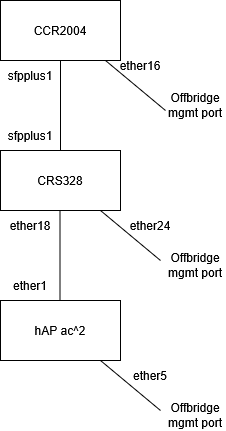
This works fine without any VLAN setup (so all just native VLAN which is 1, am I correct?). I’ve added the offbridge port on all devices so I will not lock myself out of the device. Great advice 
Now I’d like to add my first real VLAN. I’d like to a machine to be on the CRS, and one on the HAP. The hAP will serve some DHCP addresses, just for the new VLAN. Both machines should be in their own network, not being the “main network”.
Am I correct to assume that I need to:
- Create a vlan with ID 10 (on both the hAP and the CRS) and add:
- Port 16 on the CRS328
- Port 2 on the hAP ac^2
- Which means I need to create:
- On the hAP: ether1 in a trunk, ether2 in an access port (pvid = 10)
- On the CRS: ether18 in an trunk, ether16 in an access port (pvid = 10)
So it looks like this:
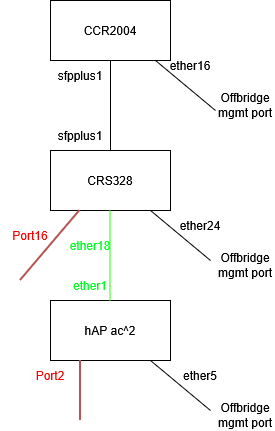
Where red = access port, green = trunk.
Am I still correct? Okay the hAPs current config (I used the ‘switch’ config from Using RouterOS to VLAN your network) and removed all ports/vlans except for ether2 and vlan10.:
/interface bridge
add name=bridge_LAN
/interface vlan
add interface=bridge_LAN name=VLAN10 vlan-id=10
add interface=bridge_LAN name=vlan-mgmt vlan-id=999
/interface list
add comment="management only" name=MGMT
add comment=LAN name=LAN
add comment="management and LAN" include=LAN,MGMT name=MGMTandLAN
/ip pool
add name=vlan10-pool ranges=192.168.10.200-192.168.10.220
add name=Offbridge-dhcp-pool ranges=10.10.10.1-10.10.10.254
/ip dhcp-server
add address-pool=vlan10-pool interface=VLAN10 name=dhcp-vlan10
# Interface not running
add address-pool=Offbridge-dhcp-pool interface=ether5 name=Offbridge-dhcp-server
/interface bridge port
add bridge=bridge_LAN interface=ether1
add bridge=bridge_LAN interface=ether3
add bridge=bridge_LAN interface=ether4
add bridge=bridge_LAN frame-types=admit-only-untagged-and-priority-tagged interface=ether2 pvid=10
/ip neighbor discovery-settings
set discover-interface-list=!dynamic
/interface bridge vlan
add bridge=bridge_LAN tagged=ether1,bridge_LAN vlan-ids=1
add bridge=bridge_LAN tagged=ether2 vlan-ids=10
/interface list member
add comment=OffBridge interface=ether5 list=MGMT
add comment=LAN interface=ether4 list=LAN
add comment=LAN interface=ether1 list=LAN
add comment=LAN interface=ether2 list=LAN
add comment=LAN interface=ether3 list=LAN
/ip address
add address=192.168.10.11/24 interface=VLAN10 network=192.168.10.0
add address=10.10.10.11/24 interface=ether5 network=10.10.10.0
/ip dhcp-client
add interface=bridge_LAN
/ip dhcp-server network
add address=10.10.10.0/24 dns-server=10.10.10.1,10.10.10.1 gateway=10.10.10.1
add address=192.168.10.0/24 dns-server=192.168.10.11 gateway=192.168.10.1
/interface bridge
add name=bridge_LAN vlan-filtering=yes
Right now I’ve connected a laptop to port2 of the hAP and I expected the laptop get a DHCP lease from the vlan10. No such thing. When setting the laptop’s IP manually, there’s layer3 connectivity either. The routing table seems to be fine on the hAP:
[john@sw-bureau] /ip/route> print
Flags: D - DYNAMIC; I - INACTIVE, A - ACTIVE; c - CONNECT, d - DHCP
Columns: DST-ADDRESS, GATEWAY, ROUTING-TABLE, DISTANCE
DST-ADDRESS GATEWAY ROUTING-TABLE DISTANCE
DAd 0.0.0.0/0 192.168.1.1 main 1
DIc 10.10.10.0/24 ether5 main 0
DAc 192.168.1.0/24 bridge_LAN main 0
DAc 192.168.10.0/24 VLAN10 main 0
But when tcpdumping on the laptop (on the interface connected to the hAP) there’s just ARP requests, no replies.If I torch the VLAN10 interface on the hAP while pinging the hAPs IP (192.168.10.11) there’s not much happening either, just some ARP packets.
Can somebody please point out where my mistake is? If I can get this to work, I’ll add the CRS into the mix 