Yes, after you disabled the route (strike through in red down below):
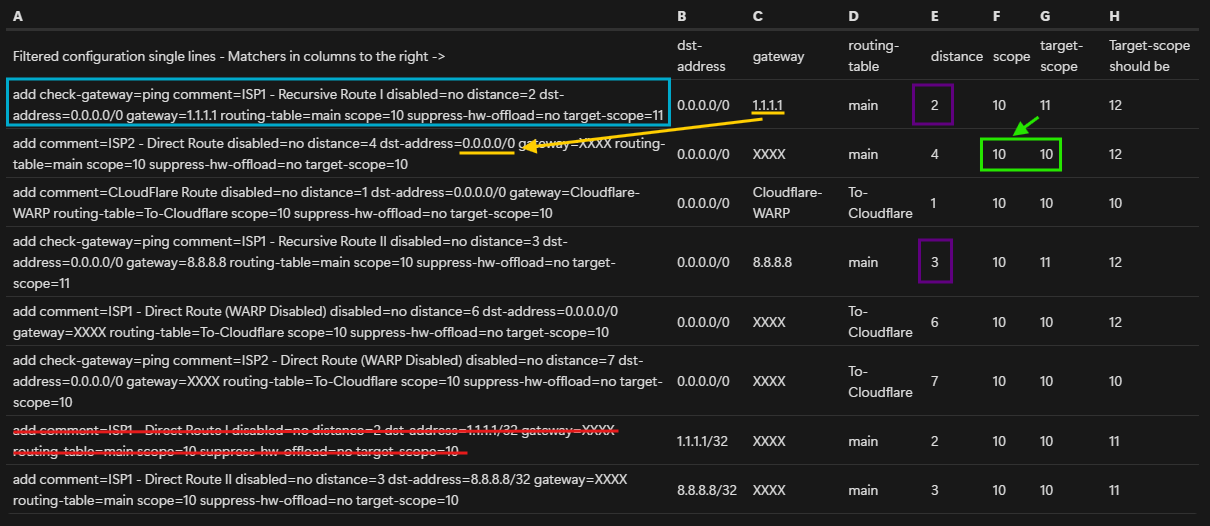
let's look at the state of the route. In this situation we only look at the main table and currently both ISP1 and ISP2 are working.
Look at the blue route at the top. Is this route (with check-gateway=ping) working and reachable? At first glance, it has gateway=1.1.1.1 and we have disabled the direct route with dst-address=1.1.1.1/32 (the red route), so this one should be unreachable, right?
Wrong, because of how RouterOS determine the next hop. The gateway is 1.1.1.1 so the router will now look for other routes that can satisfy this 1.1.1.1 destination. In this search, the value target-scope=11 limits the available candidate routes. Only routes with scope <= 11 will be used as candidate.
But because @jaclaz has put scope=10 everywhere, let's look at the 2nd route in the table. It has target-scope=10 and scope=10 listed (green box). In reality, RouterOS will silently increase scope to be at least target-scope + 1, so this route actually has a scope=11. This route has dst-address=0.0.0.0/0 which means it can be used for 1.1.1.1 (yellow arrow), and the scope=11, so it satisfies the target-scope=11 condition of the blue route (green arrow). This 2nd route can be used as next hop for the blue route!
If we look further, in the main table there is no other routes with scope <= 11 and dst-address usable for 1.1.1.1. There is one with scope=11 but dst-address=8.8.8.8/32, and one with dst-address=0.0.0.0/0 but scope=12 (again, here you can see why writing scope=10 obstruct the real scope=12 and scope=11 values and make debugging harder).
As a result, the blue route will use the 2nd route in the check for whether 1.1.1.1 is pingable or not. It is because ISP2 is working, and the gateway of the 2nd route will be used as immediate gateway! Which mean the blue route will be in reachable state.
And because it has distance=2, which is smaller than the other route which use ISP1 (the one with gateway=8.8.8.8, see the purple boxes), this route will be the active route for 0.0.0.0/0.
=> Which means ISP2 is now the default gateway.
You can look at this post [Solved] Dual WAN set-up, just need final piece of guidance - #29 by KiwiGuy from the previously linked thread to see the screenshot of a situation where all immediate gateways are pointing to lte1 (which is like ISP2) although the canary gateways are setup for ISP1. In that thread all have scope=30 written though, but then having target-scope > 30, so it's similar to your situation with scope=10 written everywhere and having target-scope > 10.
Now let's look at the routes from my post, also with the striked-through route having been disabled:
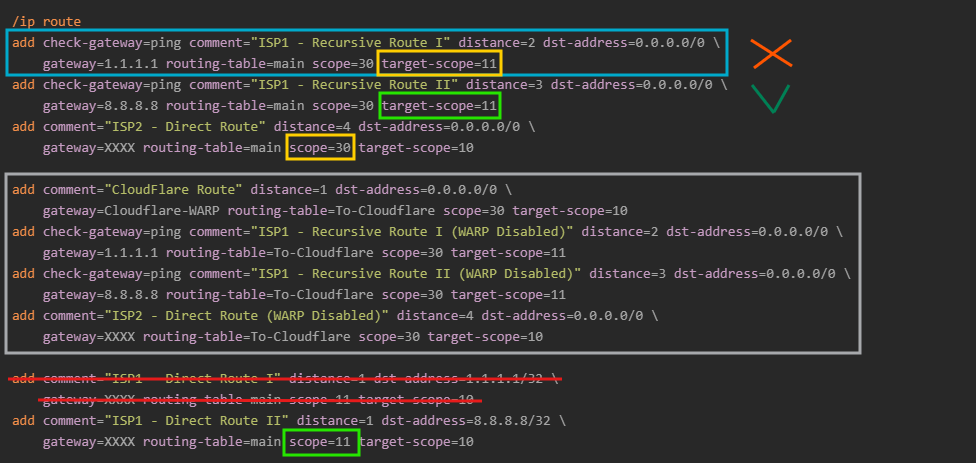
We only look at main so we can ignore the routes in the gray box, because they are for To-Cloudflare.
Now, let's see again whether the 1st blue route is reachable. The gateway is 1.1.1.1 and target-scope=11. The router now looks for candidates that can satisfy this, but now there is none. The 3rd route using ISP2 now has scope explicitly set to 30 and is out of the range of target-scope=11 and will not be used (yellow boxes). The only other reachable route with scope <= 11 is the one having dst-address=8.8.8.8/32 at the bottom and cannot be used for 1.1.1.1.
=> The blue route will be unreachable and invalid, probably have flag USI.
The 2nd route which uses gateway=8.8.8.8 however, will be reachable, because 8.8.8.8 can be resolved using the route at the bottom, which has suitable scope=11 (green boxes) and dst-address=8.8.8.8/32. The ping check will work, and this route will be marked as reachable.
The 3rd route which uses ISP 2 is also reachable. However, because it has distance=4 and the 2nd route has distance=3, the 2nd route will be marked as active and used instead (has flag AS) and the 3rd route will only have flag S and will be displayed as blue.
Which means ISP 1 will be used for the default route, as expected.