Beginner's question about config dual wan failover + warp

Thank you for pointing it out!

  1. For manually set admin-mac= and auto-mac=no on bridge(s)., I have not set these manually.
  2. For the several orphaned references, I intend to do the cleaning once my whole config is ready to rock :slight_smile:
  3. target scope of routes, I completely missed it!

I think that instead of needing this column, we should stop putting scope=10 everywhere and use the correct scope values when writing the commands generating the routes.

Currently RouterOS does the "magic" of automatically increasing the value of scope to be at least 1 above the value of target-scope in the routes. That's why you could get away with using scope=10 everywhere. But this obstructs the real value of scope. When you do a /ip route print or look at the IP -> Routes table (having made the Scope and Target Scope columns visible) you don't see at first glance that your route might not work because target-scope is too low for the intended recursive route to be usable.

It's better to do the right thing™ and put in proper values for scope.

So, when you have a recursive route with target-scope=10, make sure to put at least 11 in scope. It will be then clear that the route that tries to use this route destination as gateway will need to have at least target-scope=11 to be able to reference the original route.

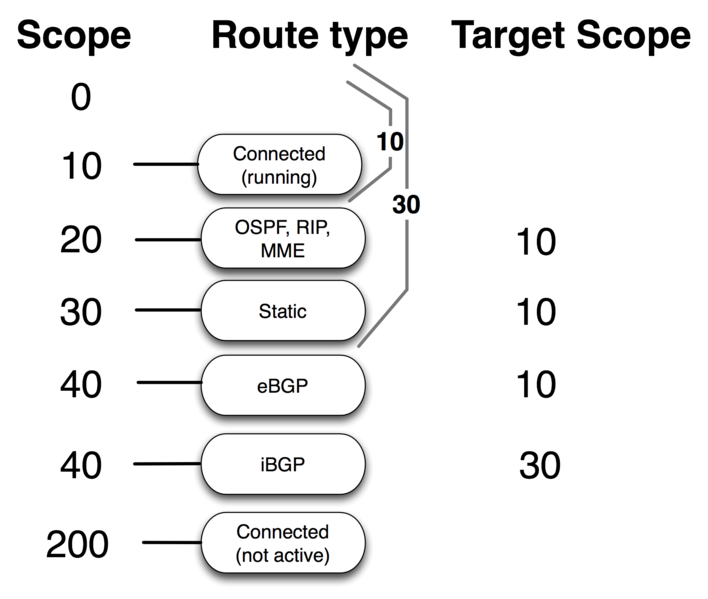
And using this https://help.mikrotik.com/docs/download/attachments/328084/scope_and_target_scope.png?version=1&modificationDate=1570784336566&api=v2 as guide, the final default static routes (those with dst-address=0.0.0.0/0) should have scope=30.

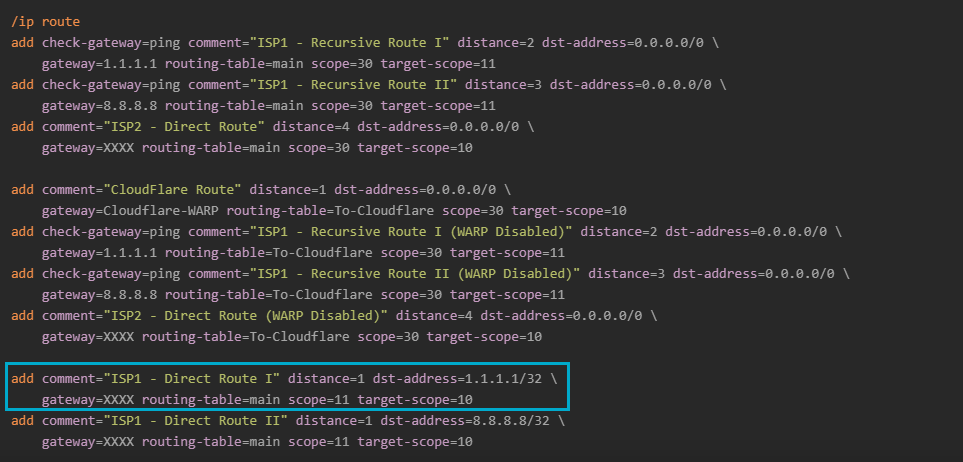
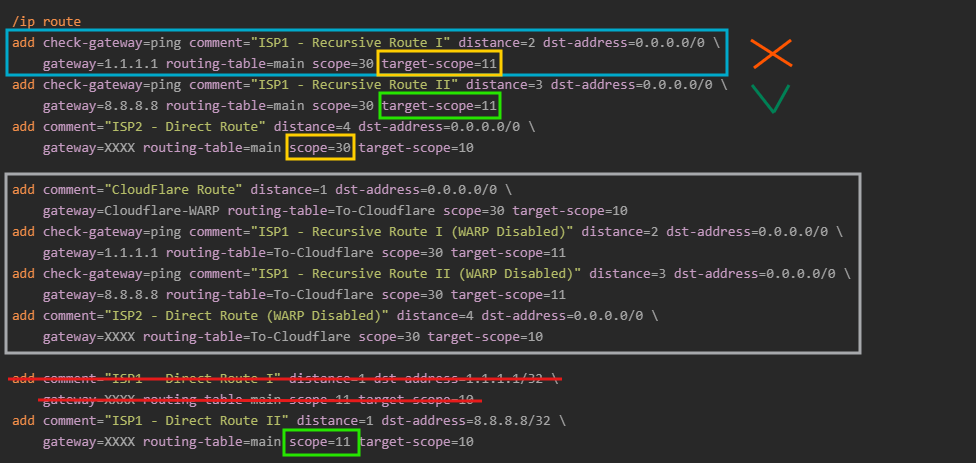
Your routes should look like this:

/ip route
add check-gateway=ping comment="ISP1 - Recursive Route I" distance=2 dst-address=0.0.0.0/0 \
    gateway=1.1.1.1 routing-table=main scope=30 target-scope=11
add check-gateway=ping comment="ISP1 - Recursive Route II" distance=3 dst-address=0.0.0.0/0 \
    gateway=8.8.8.8 routing-table=main scope=30 target-scope=11
add comment="ISP2 - Direct Route" distance=4 dst-address=0.0.0.0/0 \
    gateway=XXXX routing-table=main scope=30 target-scope=10

add comment="CloudFlare Route" distance=1 dst-address=0.0.0.0/0 \
    gateway=Cloudflare-WARP routing-table=To-Cloudflare scope=30 target-scope=10
add check-gateway=ping comment="ISP1 - Recursive Route I (WARP Disabled)" distance=2 dst-address=0.0.0.0/0 \
    gateway=1.1.1.1 routing-table=To-Cloudflare scope=30 target-scope=11
add check-gateway=ping comment="ISP1 - Recursive Route II (WARP Disabled)" distance=3 dst-address=0.0.0.0/0 \
    gateway=8.8.8.8 routing-table=To-Cloudflare scope=30 target-scope=11
add comment="ISP2 - Direct Route (WARP Disabled)" distance=4 dst-address=0.0.0.0/0 \
    gateway=XXXX routing-table=To-Cloudflare scope=30 target-scope=10

add comment="ISP1 - Direct Route I" distance=1 dst-address=1.1.1.1/32 \
    gateway=XXXX routing-table=main scope=11 target-scope=10
add comment="ISP1 - Direct Route II" distance=1 dst-address=8.8.8.8/32 \
    gateway=XXXX routing-table=main scope=11 target-scope=10

Well, you are - no matter if correctly or not - only confusing the OP (and myself).
The whole point of 10/11/12 mnemonics Is that It Is simple and It works.
As explained in the given link, It Is not 100% correct BUT It works.

People Is given the choice to use the more complex right method or the simple one.

Simple:
10. Both routes must have scope=10
11. The “narrow” (/32) route to the canary must have target-scope=11
12. The “wide” (0.0.0.0/0) route must have target-scope=12

More complex :
EITHER:
The "wide" (0.0.0.0/0) route must have scope=12 and target-scope=11
The "narrow" (/32) route to the canary must have scope=11 and target-scope=10

OR (correct, but more difficult to remember):
The "wide" (0.0.0.0/0) route must have scope=30 and target-scope=11
The "narrow" (/32) route to the canary must have scope=11 and target-scope=10

Well, recursive routing starts complex... since it requires users to know about scope/target-scope (not just distance) which typically are only used in very large networks and/or BGP.

MikroTik docs on failover, as usual, take a "minimalist" approach to config. So they take advantage of the default scope of 30... so in their scheme:

  • add canaries (to a WAN gateway) routes using scope=10
  • set default routes (to canary) to target-scope=11, using distance=1 for primary and distance=2 for backup, going up if more

So I tend to agree with this approach, verses explicitly changing scope everywhere. But that does not mean it's right.

But it be better if the docs were more complete on failover, since they do skip VPNs, DHCP WANs, and LTE/5G in their examples. Yet docs go on to what could be describe as an final exam question for certification to explain what this does (hint ECMP is involved):

/ip/route
add dst-address=208.67.222.222 gateway=10.111.0.1 scope=10
add dst-address=208.67.220.220 gateway=10.112.0.1 scope=10
add distance=1 gateway=208.67.222.222 target-scope=11 check-gateway=ping
add distance=2 gateway=208.67.220.220 target-scope=11 check-gateway=ping

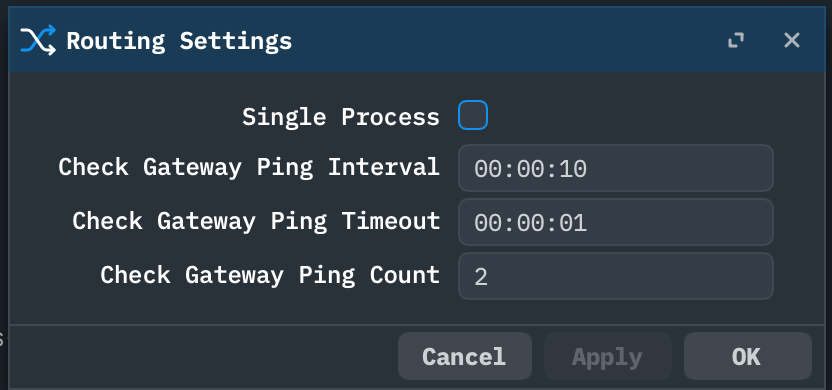
Side note, that is now customizable in /routing/settings:

I think that our goal should be to try to help people visiting the "Beginner Basics" section of the forum to not only memorize 10/11/12 like a robot, without any understanding, but to also understand why target-scope has to be 11. And no, the reason is not because the target-scope of this route must be greater than the target-scope of that other route, that condition is not enough! When you put scope=10 you hide important information that might have helped with the understanding of why the recursive routes are working or not.

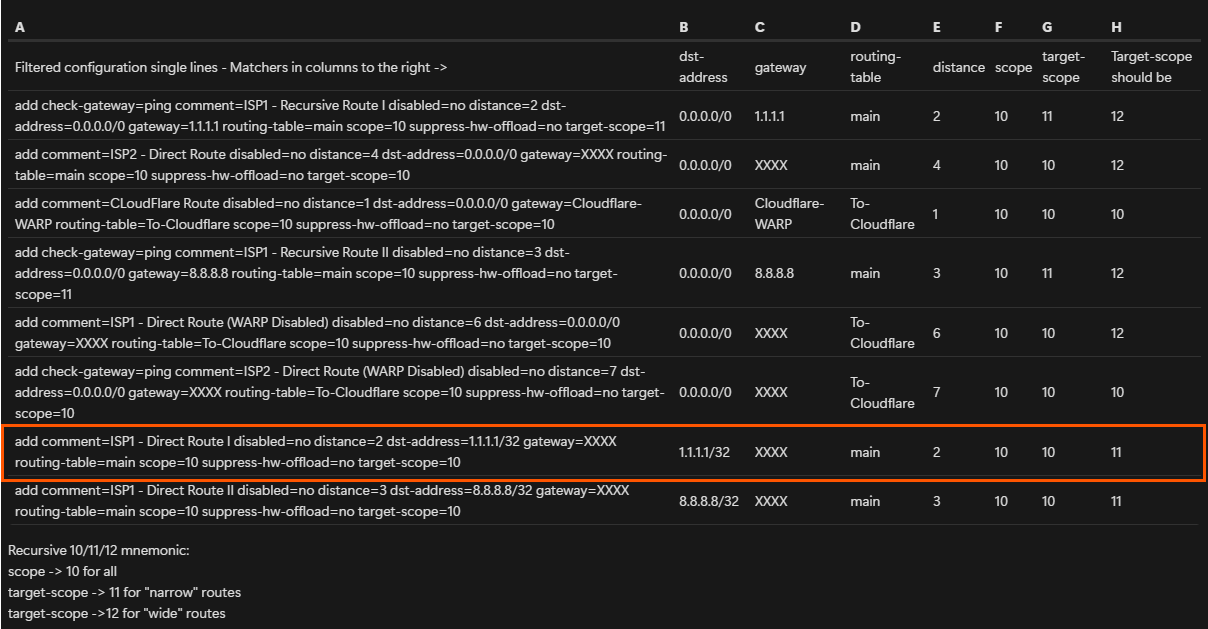
Let's take this route table from your post above: Beginner's question about config dual wan failover + warp - #21 by jaclaz. Let me ask you a question:

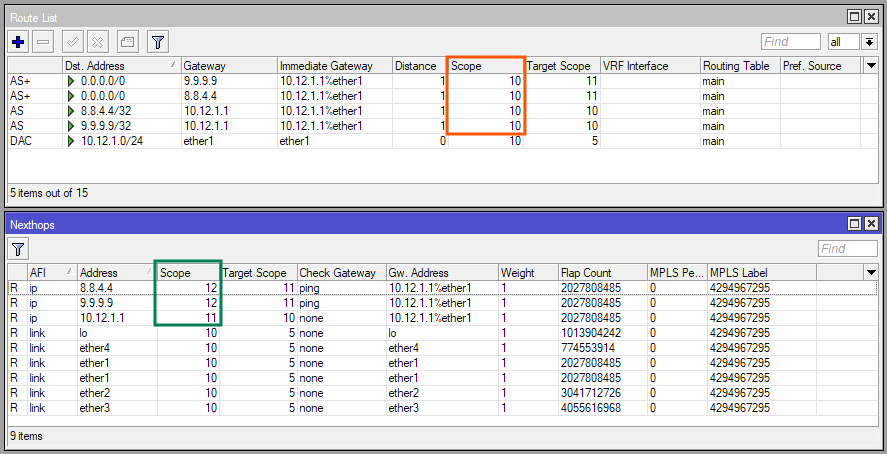
When both ISPs are working normally, which ISP (1 or 2) will be used as default in the main table when I disabled the specific route marked by the orange rectangle?

Answer: ISP 2 will be used.

Now try to understand why by using the values in your table. You'll see that those values do not help the investigation because they obscure informations.

Now let's do the same with the route in my post Beginner's question about config dual wan failover + warp - #23 by CGGXANNX and disable the route with the comment "ISP1 - Direct Route I"

Which ISP will be used as default for the main table? Answer: ISP 1 will be used as expected.

Look at this recent thread [Solved] Dual WAN set-up, just need final piece of guidance - #18 by KiwiGuy to see the similar scenario playing out when you don't pay attention to the value of scope.

Yep, AGAIN, I have no doubts whatsoever that yours is the right, correct way.

And the 10/11/12 is only a simplification, a sort of shortcut, that anyway works in most cases.

I hope that this has been written clearly enough here and in the referenced thread:

As you well know I am all for doing the "right" things, so, if we can find together a SIMPLE, unambiguous way to help people set the correct scopes and target-scopes, I can try putting together a SIMPLE post as a reference/tutorial.

But till now - and with all due respect :slight_smile: - the explanations by you (and others) on this recursive thingy are (IMHO) way too complex to be understandable by a beginner.

And BTW proposing two different (I understand both equally correct formally) schemes, the one with 12/11/11/10 and the one with 30/11/11/10 does not (still IMHO) help much in disambiguating the matter.

Honestly, I am very confused but grateful for the analysis! :sweat_smile:

Can you explain in your example here Beginner's question about config dual wan failover + warp - #28 by CGGXANNX why in @jaclaz table the next hop will be ISP 2- Direct Route, and in your table will be ISP1 Direct Route II?

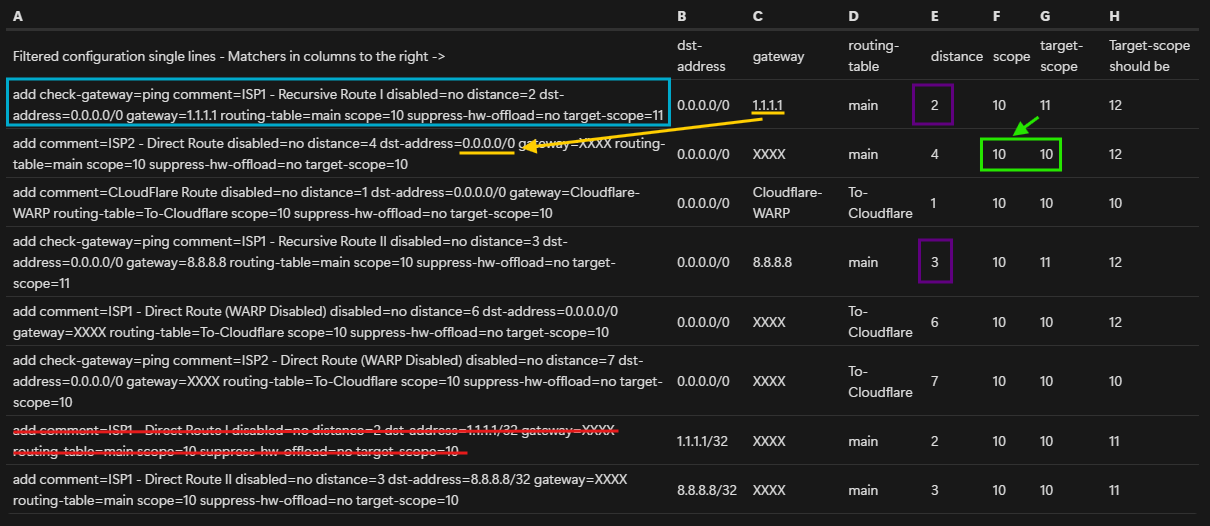
Yes, after you disabled the route (strike through in red down below):

let's look at the state of the route. In this situation we only look at the main table and currently both ISP1 and ISP2 are working.

Look at the blue route at the top. Is this route (with check-gateway=ping) working and reachable? At first glance, it has gateway=1.1.1.1 and we have disabled the direct route with dst-address=1.1.1.1/32 (the red route), so this one should be unreachable, right?

Wrong, because of how RouterOS determine the next hop. The gateway is 1.1.1.1 so the router will now look for other routes that can satisfy this 1.1.1.1 destination. In this search, the value target-scope=11 limits the available candidate routes. Only routes with scope <= 11 will be used as candidate.

But because @jaclaz has put scope=10 everywhere, let's look at the 2nd route in the table. It has target-scope=10 and scope=10 listed (green box). In reality, RouterOS will silently increase scope to be at least target-scope + 1, so this route actually has a scope=11. This route has dst-address=0.0.0.0/0 which means it can be used for 1.1.1.1 (yellow arrow), and the scope=11, so it satisfies the target-scope=11 condition of the blue route (green arrow). This 2nd route can be used as next hop for the blue route!

If we look further, in the main table there is no other routes with scope <= 11 and dst-address usable for 1.1.1.1. There is one with scope=11 but dst-address=8.8.8.8/32, and one with dst-address=0.0.0.0/0 but scope=12 (again, here you can see why writing scope=10 obstruct the real scope=12 and scope=11 values and make debugging harder).

As a result, the blue route will use the 2nd route in the check for whether 1.1.1.1 is pingable or not. It is because ISP2 is working, and the gateway of the 2nd route will be used as immediate gateway! Which mean the blue route will be in reachable state.

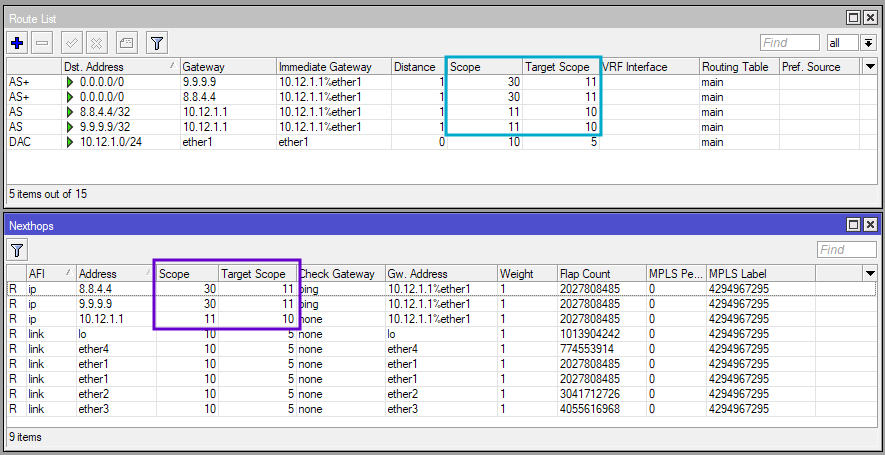
And because it has distance=2, which is smaller than the other route which use ISP1 (the one with gateway=8.8.8.8, see the purple boxes), this route will be the active route for 0.0.0.0/0.

=> Which means ISP2 is now the default gateway.

You can look at this post [Solved] Dual WAN set-up, just need final piece of guidance - #29 by KiwiGuy from the previously linked thread to see the screenshot of a situation where all immediate gateways are pointing to lte1 (which is like ISP2) although the canary gateways are setup for ISP1. In that thread all have scope=30 written though, but then having target-scope > 30, so it's similar to your situation with scope=10 written everywhere and having target-scope > 10.


Now let's look at the routes from my post, also with the striked-through route having been disabled:

We only look at main so we can ignore the routes in the gray box, because they are for To-Cloudflare.

Now, let's see again whether the 1st blue route is reachable. The gateway is 1.1.1.1 and target-scope=11. The router now looks for candidates that can satisfy this, but now there is none. The 3rd route using ISP2 now has scope explicitly set to 30 and is out of the range of target-scope=11 and will not be used (yellow boxes). The only other reachable route with scope <= 11 is the one having dst-address=8.8.8.8/32 at the bottom and cannot be used for 1.1.1.1.

=> The blue route will be unreachable and invalid, probably have flag USI.

The 2nd route which uses gateway=8.8.8.8 however, will be reachable, because 8.8.8.8 can be resolved using the route at the bottom, which has suitable scope=11 (green boxes) and dst-address=8.8.8.8/32. The ping check will work, and this route will be marked as reachable.

The 3rd route which uses ISP 2 is also reachable. However, because it has distance=4 and the 2nd route has distance=3, the 2nd route will be marked as active and used instead (has flag AS) and the 3rd route will only have flag S and will be displayed as blue.

Which means ISP 1 will be used for the default route, as expected.

And my post right below yours shows why this is a fallacy.


My recommendations for the manually added static routes would be:

  • Be explicit with the scope values, do not rely on the router doing the magic adjustment in the background. The scope values you see with print or in WinBox should be the real scope.

  • When choosing the value for target-scope make sure it's >= the (real, final) scope values of all the routes that can be used as next hop candidate.

  • When choosing the scope value, make it at least target-scope + 1 explicitly if you want to the route to be used as recursive next hop for other routes. But if you don't want the route to be used as immediate next hop for other routes, then set scope to 30 or higher (30 is the default scope for static routes). Especially your dst-address=0.0.0.0/0 manually added routes should have scope=30 (or higher), as the case with the ISP 2 route in the example above. This reduces the chance of the route being mistakenly used in the next hop look up of other routes.

These were applied to the routes in the post https://forum.mikrotik.com/t/beginners-question-about-config-dual-wan-failover-warp/266974/23:

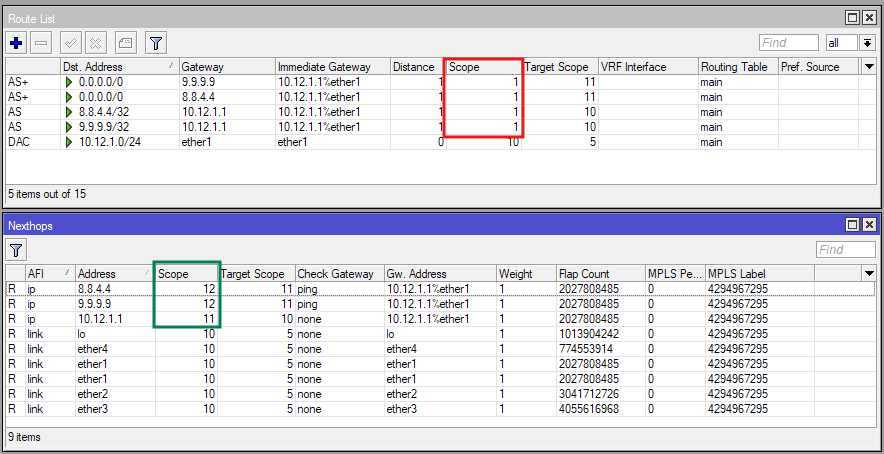
  • For the two "ISP1 - Direct Route I" and "ISP1 - Direct Route II" routes: they need the gateway address of ISP 1. This gateway is reachable through the connected route (installed by the /ip address entry). The connected routes normally have scope=10 (and target-scope=5 but it's not relevant here) (image). So the two routes should have target-scope=10. As for scope, because these two routes will be used later in the recursive next hop look up, we set scope = target-scope + 1 which makes scope=11.

  • For the route "ISP2 - Direct Route": This one also only need the ISP 2 gateway, a target satisfied by a connected route, so it only needs target-scope=10. But this route has dst-address=0.0.0.0/0 and we don't want it to be mistakenly used as next hop for other route, that's why we set scope=30.

  • For the two routes "ISP1 - Recursive Route I" and "ISP1 - Recursive Route II": because they rely on the two other routes with scope=11, they'll need to have at least target-scope=11. And because of dst-address=0.0.0.0/0 we apply scope=30.

  • We can also see how setting scope high enough helps with the routes in the To-Cloudflare routing table. This table also has the two "ISP1 - Recursive Route I (WARP Disabled)" and "ISP1 - Recursive Route II (WARP Disabled)" routes that has ping check exactly like in main. We can see that we don't need to repeat the two routes with dst-address=1.1.1.1/32 and dst-address=8.8.8.8/32 in this To-Cloudflare routing table.

    The two "ISP1 - Recursive Route I (WARP Disabled)" and "ISP1 - Recursive Route II (WARP Disabled)" have target-scope=11. No other routes in To-Cloudflare have scope that can satisfy the condition scope <= 11. The next hop lookup will fall back to main and use the two available routes with scope=11 there automatically.

IMO, there are so many considerations in MultiWAN to worry too much the specific target/target-scope... For example, flushing connection, tcp clamping on tunnel, avoiding ECMP in main, connection tracking settings, check-gateway timeouts/retires, correct chain=input/output handling, DNS canary vs DNS used by /ip/dns, etc, etc..

I'm a RTFM guy, so in MikroTik's doc/YouTube they use scope=10/target-scope=10(default) on the gateway, and scope=30(default)/target-scope=11(15 in videos) on canary routes, as the base principle. And this follows the Kafka-esque "IP Routing" docs on selection/next-hop/multi-hop: IP Routing - RouterOS - MikroTik Documentation which show:

Now if you want to "re-base" scope to explain the concept in an article does make totally sense, but critiquing "scoping schemes" when troubleshoot an actual problem is counter-productive.

Thanks to each and every one who assisted with their useful posts in shedding some light on how things work.

I believe this is what all beginners like me fail to understand and not fully comprehend how TS and Scope really work, as it is not mentioned clearly enough.

In my humble opinion, the two approaches are contrasted in their design, but both work as Jaclaz’s example defines routes flexibly, catering to beginners or those seeking a simple, working setup without deep technical understanding. In contrast, CGGXANNX’s method uses stricter RouterOS logic, optimized for complex configurations and users who wish to dive into RouterOS world.

To answer your question, the DNS provided by Cloudflare is 1.1.1.1 & 1.0.0.1

Which is also one of your canary address in /ip/route, thus the question. Since the route will always force 1.0.0.1 DNS out only one path, if that route is failed, DNS to 1.0.0.1 will not failover since you have a /32 specific route for 1.0.0.1 (which applies to all traffic not just the check-gateway=ping.

Now this not an issue if you always have two DNS servers listed in /ip/dns, since 1.1.1.1 could use either WAN path.

So more an FYI if say someone used just 1.1.1.1 in /ip/dns and also used that as canary in recursive routing – OP seems to use the "backup" DNS for Google and Cloudflare, so presumable the "main" one will have failover WAN, which is smart.

That's why we on this forum when trying to help other understanding recursive routing should stop writing scope=10 in the routes. You can see in the Nexthops table the real scope values that RouterOS assigns to the routes:

What do we achieve when telling people to use scope=10? We don't save any typing because the default value when not specifying anything is scope=30. We say "we write this so that the beginners don't have to worry about the value of scope". But then in the next sentence we have to advise them "put target-scope=11 in the referencing rule" anyway. That beginner person will ask in their head "WTF, why 11 here? what does 11 means?" and get no answer. He doesn't understand why it's sometime 11 and then sometime 12, and doesn't even gain any understanding on what connecting target-scope and scope at all.

As we can see in the screenshot above, scope=10 is a totally fake value that doesn't even reflect the reality. It's absolutely not the value of the real scope. And in the older post above I have shown that sometime using that blindly can cause a route to have a too low scope, that can make the route accidentally become an unwanted recursive route.

Instead, we should teach the beginner (what is written in the docs) that:

  1. A route can only use another route to lookup the gateway when it specifies a target-scope value that is at least as large as the other route's scope.
  2. When setting the value of scope make sure it's explicitly set greater than its target-scope.
  3. For the "wide" route (like those with dst-address=0.0.0.0/0) use the default scope=30 setting, because that's what normal static routes should use.

And write examples that do:

  • scope=11 and target-scope=10 for the intermediate routes. This satisfies 1. (because the gateway of this route uses a connected route with scope=10), and satisfies the 2. rule.

  • scope=30 and target-scope=11 for the default routes with check-gateway=ping. This satisfies all the 1., 2., 3. rules above.

And there is no ambiguity. What you see in IP -> Routes is what the reality is in Routing -> Nexthops:


EDIT: To show you how dumb it is to write scope=10 (which is wrong anyway, because it's intended only for connected routes): If you want to hide information from the user, so that they "don't have to worry about scope"™, then you should write your examples with scope=1, because it will have the exact same confusing effects, and even save you 1 character per route.

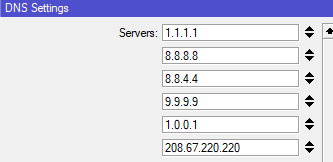
I have 6 DNS servers listed in ip/dns with this order

This was the concept…

I am a bit confused. So, actually change the DNS in the route list and leaveip/dnsas it is with that order?

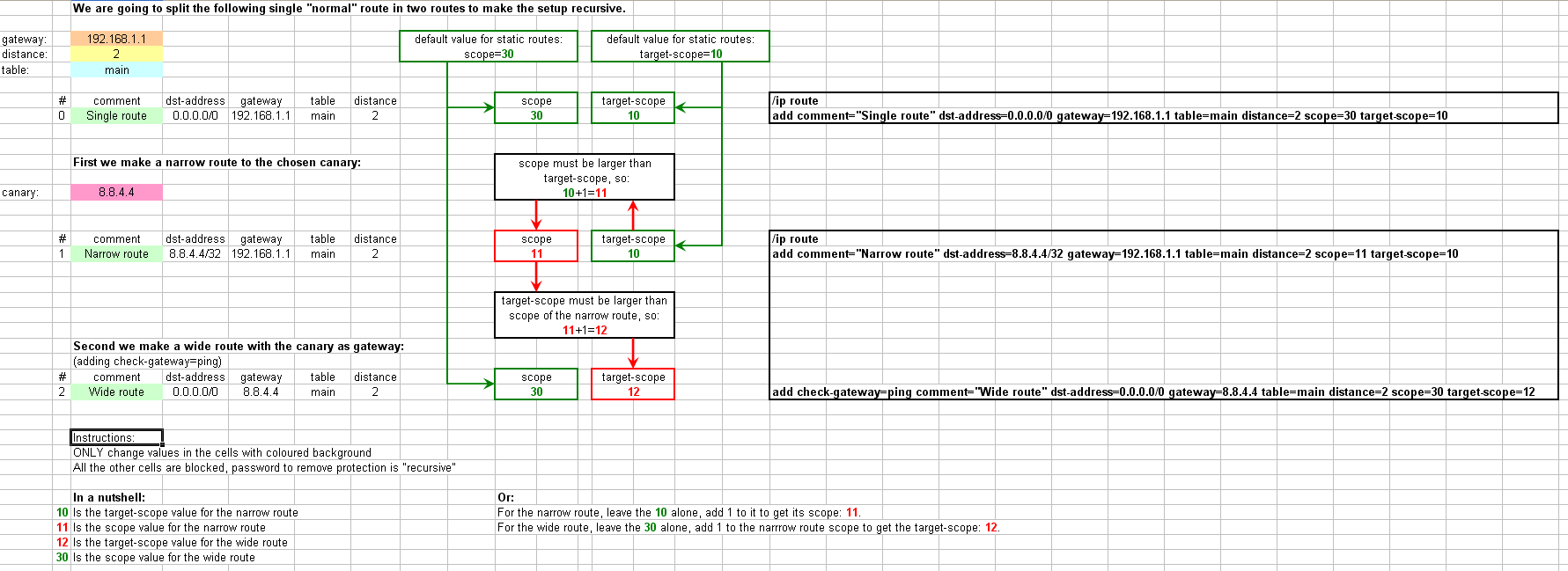
Let's see if this fits the bill.

If it roughly does, I will later make a new thread with it, open to suggestions, changes, etc.

EDIT: Removed old version of the spreadsheet, screenshot left for future memory,

DO NOT USE THIS IT IS AN OLD, DEPRECATED VERSION

That’s very insightful! I wish I had stumbled upon something like this!

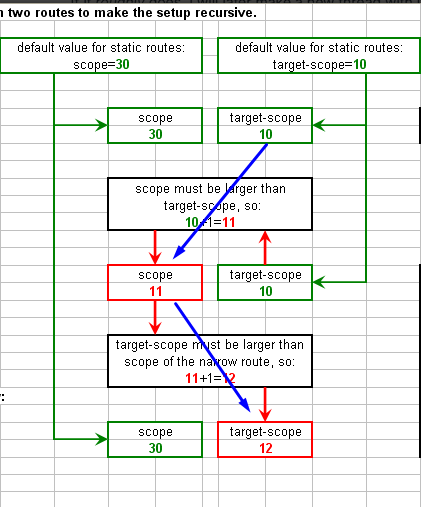
To make the diagram instantly clear for a beginner, I would suggest making the flow explicit by pointing the arrows exactly from Target Scope → Scope → Target Scope, highlighting the most important values.

There is no problem that @jaclaz cannot translate to Excel. :slight_smile:

FWIW, now "one" could export routes as CSV, and load as sheets in Excel to "audit" multiwan:

:serialize to=dsv delimiter=, [/ip/route print detail as-value] options=dsv.remap file-name=ipv4routes.csv                      
:serialize to=dsv delimiter=, [/routing/route print detail as-value] options=dsv.remap file-name=allroutes.csv
:serialize to=dsv delimiter=, [/routing/nexthop print detail as-value] options=dsv.remap file-name=nexthops.csv         

which be three CSV files (ipv4routes.csv, allroutes.csv, nexthops.csv) and then could PivotTable routes or colorized errors with VLOOKUPs/etc. Or, add a :put [:serialize ...] and remove the file-name= and could cut-and-paste CSV to Excel which should columnize it as alternative. I don't have modern Excel anymore, but imagine you could even invoke REST API to download the routes these days.

@Centarius

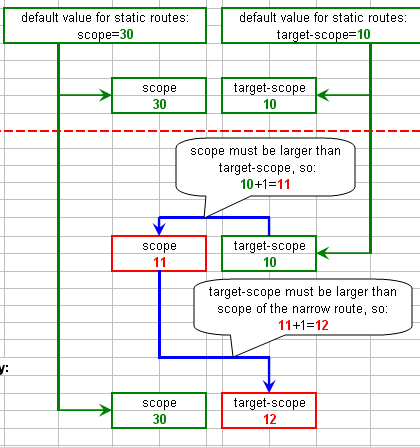
Your first (top) blue arrow is somehow "wrong", the point is that the scope must be 1 more than the target-scope of the SAME (self) route.

Maybe it should be a upside down U with the explaining text above it.

The bottom one is fine, I could make the text into a bubble crossed by the arrow, but it would not look "nice", better to follow the grid.

@Amm0

Which is good :slight_smile: as what I have (and I am using) is Excel XP (2002).

EDIT:
Something like this:

image

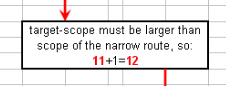
target-scope does not need to be "larger" than the scope of the intended intermediate route. It only need to be "equal or larger".

So, if the other route has scope=11, you only need target-scope=11.

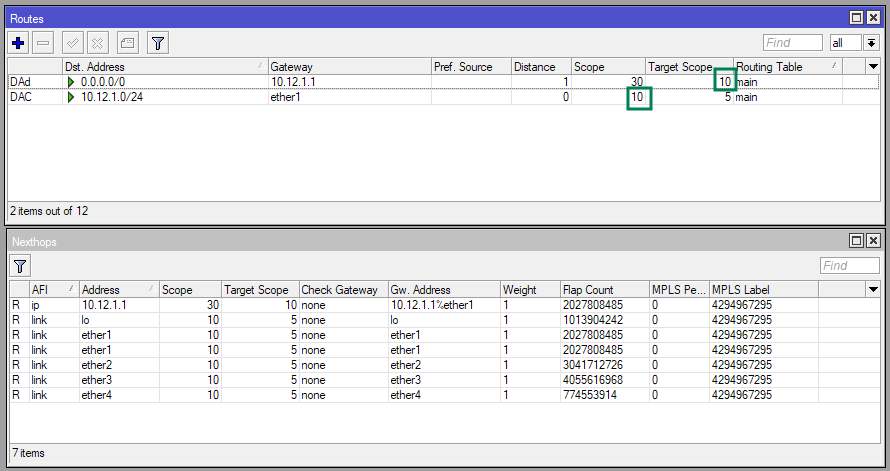
You can also see that normally, when you write normal routes with the default scope=30 target-scope=10, those routes can fully use the normal connected routes (like those attached to interfaces with scope=10 target-scope=5) because 10 >= 10.

Here is a default configuration where DHCP client is working on ether1.

The connected route is the one installed by putting 10.12.1.xxx/24 on ether1 under /ip address. This automatically creates the scope=10 target-scope=5 route.

Then the default route (in this case created by DHCP client) only needs target-scope=10 and the gateway 10.12.1.1 can be lookup using the 10.12.1.0/24 connected route.

So, in the diagram, you don't need target-scope=11+1, you only need target-scope=11.

But target-scope=12 or target-scope=15 of course also works, because it satisfies >= 11 too. However, I think that putting target-scope=11 is "neater" and shows the relationship to the scope value of the "nexthop" route.

And while target-scope can be larger, we don't want to make to too large. If we put target-scope=30 in the example of this thread for example, then suddenly when ISP 1 fails the two check-gateway=ping routes will still be active because they will use the other dst-address=0.0.0.0/0 scope=30 working routes for the gateway, like this screenshot [Solved] Dual WAN set-up, just need final piece of guidance - #29 by KiwiGuy.

In that screenshot 10.1.1.0/24 is dead (USI) but because target-scope is too high all the other route just use the lte1 route to lookup the gateway and they all become active.