As I allready said in the subject, it is about connecting 2 or more routers in one network. I am using PPTP to do this but in my configurations there is allways one main router that routes all trafic. What is this one fails??? Of course, whole network will be offline. I would like to ask now what is the best way to connect 2 or more routers and avoid problem mentioned above. Can it be done with PPTP or there is a better way for this? If it is necessary I can draw a siple network diagram and post it here.
Are you trying to provide more than one exit point router that is connected to the Internet to other routers in a large network? Use OSPF and have both introduce default routes. If you use type 1 metrics for this the other routers will send Internet traffic to the closest router. You can use type 2 metrics to statically prefer one of the two and the other is just failover.
Are you trying to provide failover gateways to clients on a directly connected network? Look into VRRP.
PPTP has absolutely nothing to do with this, at all. PPTP is a VPN/tunnel protocol.
All I need is communication between 2 or more remote local networks. That is why I used PPTP but as I described that is not stable. Also public addresses are dynamic.
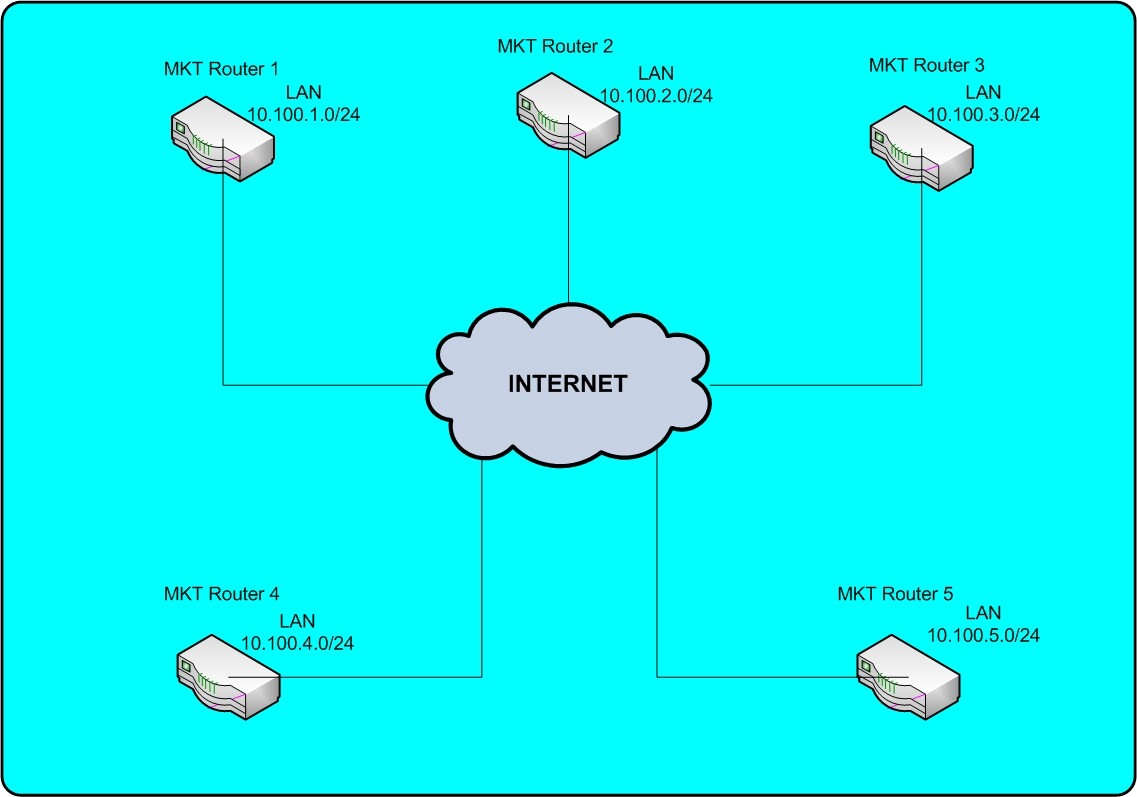
Here is a simple network diagram. On the picture You can see that every router is connected to the internet. They are connected via ADSL connection, and they are for their LAN subnets actualy gateways. I need all of them connected… For example:
On the MKT router 1 from the picture there is a PC connected behind it. I need access to that PC from another PC connected to MKT Router 2 from the picture.
It is a plastic explanation but I hope so that You will understand.
So far I used 4 PPTP connections to MKT Router 1 from other routers. In this case I have what I need but if this router fails all communication betwen other routers is down.
I guess you will need to configure a second router as a backup PPTP Server.
Then every other router should connect to the second. These second connections
should have a higher routing distance (for example 5) on the routing table, so when the first
pptp connection goes down, the second would be the gateway.
hmmm… interesting solution, but still I look for something to solve this in other way. In this case traffic pasess trough PPTP server router. Is there any solution to route it directly from one point to other in such network? A solution where any point has a connection to other, no mather is there any member (router) of this network down?
Is there any solution to route it directly from one point to other in such network? A solution where any point has a connection to other, no mather is there any member (router) of this network down?
Yeah. A full mesh. PPTP tunnels between all routers. You could also run EoIP or IPIP or GRE (preferred) across PPTP, and you can then run a routing protocol such as OSPF across the tunnels. That way if a link between two routers is up it’s the shortest path and traffic will go directly. If the link dies traffic will dynamically reroute across another spoke.
I don’t have any routers configured to do this. But the manual covers all of it. http://wiki.mikrotik.com/wiki/Manual:OSPF-examples
A quick search says multicast is working fine over PPTP on Mikrotik so all you’d have to do is establish PPTP tunnels between all routers and follow the config examples to enable OSPF on the PPTP links on all routers, and the LAN segments behind each router.