I am trying to create, in my home lab, a small scale version of an ISP. Specifically, I’m trying to create a BGP link between the “provider” router and “internal isp” that will allow me to pass traffic from inside the “internal isp” to the internet, so it will simulate a full ISP.
I have two hEX lites running the BGP link - both running ROS 6.49.18, the configurations are:
RB750 - “provider” router:
/interface ethernet
set [ find default-name=ether1 ] comment=internet
set [ find default-name=ether2 ] comment="link to ISP BGP router"
set [ find default-name=ether3 ] comment=local
set [ find default-name=ether4 ] comment=local
set [ find default-name=ether5 ] comment=mgmt
/routing bgp instance
set default disabled=yes
add as=65000 client-to-client-reflection=no name=to-ISP \
    redistribute-connected=yes redistribute-static=yes router-id=172.30.0.1
/ip neighbor discovery-settings
set discover-interface-list=!dynamic
/ip address
add address=172.31.0.1/24 comment=Management interface=ether5 network=\
    172.31.0.0
add address=192.168.5.254/24 comment="Home Network" interface=ether1 network=\
    192.168.5.0
add address=172.30.0.1/30 comment="Link to ISP Gateway" interface=ether2 \
    network=172.30.0.0
/ip dns
set servers=192.168.5.1
/ip route
add distance=1 gateway=192.168.5.1
add distance=1 dst-address=192.168.5.0/24 gateway=192.168.5.1
/routing bgp peer
add instance=to-ISP name=peer-to-isp remote-address=172.30.0.2 remote-as=\
    65010
And the RB750 “ISP gateway” router:
/interface bridge
add name=bridge-isp
/interface ethernet
set [ find default-name=ether1 ] comment="internet from Provider"
set [ find default-name=ether2 ] comment=local
set [ find default-name=ether3 ] comment=local
set [ find default-name=ether4 ] comment=local
set [ find default-name=ether5 ] comment=mgmt
/interface wireless security-profiles
set [ find default=yes ] supplicant-identity=MikroTik
/ip hotspot profile
set [ find default=yes ] html-directory=hotspot
/routing bgp instance
set default disabled=yes
add as=65010 client-to-client-reflection=no name=to-provider \
    redistribute-static=yes router-id=172.30.0.2
/ip neighbor discovery-settings
set discover-interface-list=!dynamic
/ip address
add address=172.31.0.2/24 comment=Management interface=ether5 network=\
    172.31.0.0
add address=172.30.0.2/30 comment="Link to Provider" interface=ether1 \
    network=172.30.0.0
add address=172.16.255.1/24 comment="Internal ISP Network" interface=\
    bridge-isp network=172.16.255.0
/ip route
add distance=1 gateway=172.30.0.1
/routing bgp network
add network=172.16.255.0/24 synchronize=no
/routing bgp peer
add instance=to-provider name=peer-to-provider remote-address=172.30.0.1 \
    remote-as=65000
In my home router, an RB5009, I have a static route from it to 172.16.255.0/24 - gw: 192.168.5.254, and I’m able to ping 172.16.255.1 (the “internal isp” router network) with no problems.
From the “provider” router, I can ping 8.8.8.8, and do DNS lookups with no issues - everything appears to work fine.
From the “internal isp” router, when I attempt to ping either my home router, 192.168.5.1, or 8.8.8.8 (or anything past 172.30.0.1), I get timeouts - note: I can ping 172.30.0.1 AND 192.168.5.254 as these are both the same “provider” router.
When I run a traceroute from the “internal isp” router, I see it hitting the 172.30.0.1 (the “provider” router), but then nothing past that.
I believe I have a route (or more) missing from that “provider” router to my main router, but I’m missing what I need to do to get this running.
My network diagram:
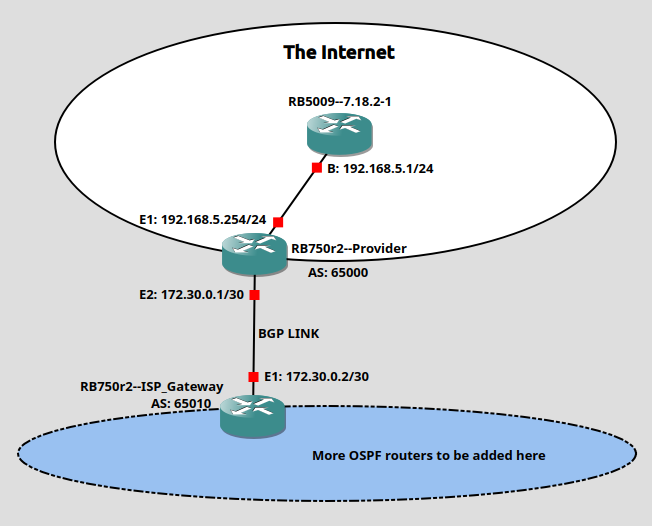
Any pointers as to how I can resolve this?