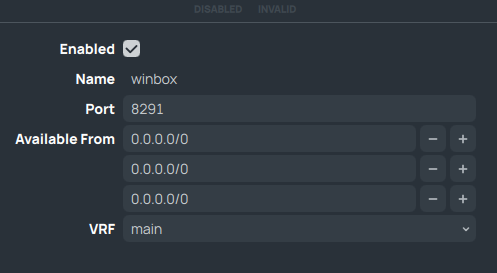
I have been trying for a few hours now with all sorts of tricks to configure RouterOS so that management services are no longer visible on the WAN side of life. What I ultimately want is for all /ip service services to be bound to a specific interface, in my case a dedicated management VLAN interface.
After a few hours of research and trial and error, I’m unfortunately not much the wiser. The best I’ve found are firewall rules. That’s nice, but actually I have absolutely no desire to run e.g. WinBox on the WAN interface. And the best I could achieve with firewall rules is nmap now showing me “filtered” instead of “open” for the SSH, HTTP, etc. ports, which is not really exciting, because I don’t want to SSH to show up at all.
Is there really no way to bind services to specific interfaces?
There are a couple of paths to achieve what you are looking for with regards to /ip/services.
Change the “available from” address to a vaild address range that corresponds with the interface you have that address tagged to. For example 192.168.1.1/24 or you can do other CIDR ranges that make sense to you.
Change the VRF that the service is available from, instead of the main vrf (assuming your WAN is in the main table) you can create a seperate routing table that only has specific routes/connectivity for specific interfaces.
For DEFAULT firewall rules nothing is available on WAN...
AFAIK you can't bind services to specific interfaces. Not, unless you use Docker (I assume).
But there is no real reason because the firewall is in place to specify which traffic is allowed.
Or use filters as @blacksnow is referring to.
Yes, I am awawre of available-from, but this still leaves the ports visible on WAN. However, the idea with VRF sounds promising, I’ll try and see if that brings me closer to what I want.
It is very much true what other folks explain that ROS “services” generally don’t let you bind-to-interface, and /expect/ you to use firewall/allowed-list/etc instead.
But this part caught my eye, it sounds a bit like you may not be understanding nmap output.
“Filtered” means “I have received absolutely no reply when I tried to connect there”.
It is the “most secure” result, it is also the default result.
If you’ll tell nmap to scan an IP address which has no-device on it (you need to include the -Pn flag so it scans even if it gets no ping reply), it will list you “filtered” for all ports scanned.
The other possible answers are “open” (the port accepted my handshake) and “closed” (there is a device on the other end, it replied to me saying I should f**k off).
No it does not.
You have not provided your config, so let me the first one to be clear, in calling your BS.
The only way ports are seen as open are
a. you have let the ports be open on the WAN side in the INPUT CHAIN, → this is actually normal for encrypted connections such as for vpn wireguard.
b. you have allowed port forwarding on the router and identified which ports.
(i) dstnat rules for port forwarding will show up on scans and will report being closed.
(ii) dstnat rules for port forwarding when limited by source address will NOT show up on scans.
So the onus is on you to show us what you have done in error to make ports open to the WWW.
/export file=anynameyouwish (minus router serial number, any public WANIP information, keys etc.)
hahaha no worries, I am gladly sharing my own BS with WAN
so here you go:
[admin@sim-RB5009] > /ip service export
# 2025-02-24 17:27:26 by RouterOS 7.17
# system id = MhwU8XFpmCJ
#
/ip service
set telnet disabled=yes
set ftp disabled=yes
set www-ssl address=10.10.98.0/24,172.17.101.0/24 disabled=no
set ssh address=10.10.98.0/24,172.17.101.0/24
set api disabled=yes
set winbox address=10.10.98.0/24,172.17.101.0/24
set api-ssl address=10.10.98.0/24,172.17.101.0/24

[admin@sim-RB5009] > /ip firewall export compact
# 2025-02-24 17:29:26 by RouterOS 7.17
# system id = MhwU8XFpmCJ
#
/ip firewall address-list
[ ... irrelevant ... ]
# vlan4000 is my WAN interface
/ip firewall filter
add action=drop chain=input in-interface=vlan4000 protocol=icmp
add action=drop chain=input comment="Drop management services from WAN" dst-port=22 in-interface=vlan4000 protocol=tcp
# also tried this, to no avail:
/ip firewall raw
add action=drop chain=prerouting dst-port=22 in-interface=vlan4000 protocol=tcp
add action=drop chain=input dst-port=22 in-interface=vlan4000 protocol=tcp
any finally the output from nmap from the WAN side:
$ nmap -sS -Pn -n --disable-arp-ping 10.218.191.237
Starting Nmap 7.93 ( https://nmap.org ) at 2025-02-24 17:23 UTC
Nmap scan report for 10.218.191.237
Host is up (0.00083s latency).
Not shown: 993 closed tcp ports (reset)
PORT     STATE    SERVICE
22/tcp   filtered ssh
53/tcp   open     domain
443/tcp  open     https
2000/tcp open     cisco-sccp
8291/tcp open     unknown
MAC Address: 0C:97:88:62:00:00 (Unknown)
You have no config to speak and quite frankly its a sad setup to connect to the internet.
This is why default settings are provided, so people do not hurt themselves.
Go back and reset your config to defaults is my advice and then gradually work in your requirements in a sane manner.
Yes, that’s a part of the setup I’m playing with in GNS3 with a number of VMs running MikroTik CHR and other vendors. It’s called learning and seeing how different network devices operate and can be exploited.
This is why I am deliberately not using any default config. If this makes you feel sad, then I am truly sorry for you.
I am not sad, I actually thought you had a real networking issue you were dealing with.
Go ahead play all you want, I will not waste my time on your musings and lack of seriousness in approaching a config.
you need a plan
a plan is based on a full set of requirements
a.. identify all users/devices ( internal,external, admin)
b. identify all the traffic needs for those users/devices
create a network diagrams of all the subnets required and ports being used on devices, router/switches/aps etc.
In 2, be detailed especially in multi-wan situations with ISP information public/private, static, dynamic, failover-backup, loadbalance, vpn, port forwarding etc.
Once you have a plan construct the config based on the plan
When its not working come back for assistance.
In the meantime, have fun.
So, to recap: asking questions is BS and the one who asks questions is a clown and wastes your precious time. That’s what I call professional and respectful behavior in a public forum! Congratulations!
Have a nice day and enjoy being so much more enlightened than the rest of us poor souls!
Sorry, but you were the first one who wasn’t clear.
You always have to be correct and specify what you’re doing,
whether you’re configuring a purchased peripheral or just fiddling around with GNS to waste time.
This way, users can choose whether to help you or not.
I gave you excellent advice on how to approach a config for whatever device or work you are doing.
I also said to come back when you have attemped to execute the plan and need further assistance.
Sorry I dont have a spoon if you need more! and if your in the US, that another 25% please.
Each service in “IP Services” could be disabled or enabled for all interfaces only. There is one setting to turn it on/off. To limit access for each service you can select VRF or define list of IP ranges that could access that particular service. It is up to you what interface these ranges belong to.
On the other hand you can use firewall to drop packets trying to use particular service.
You have decide what way gives you more flexibility, less work or goes in pair with your future configuration.