I setup a router firewall with a list of IPs to be blocked downloading a list of countries from one of those sites that make a mikrotik firewall configuration file for you.
I did this long time ago, on the router below in the screenshots, and forgot about it.
I have 2 questions.
First. I am testing to see if it actually works. I setup a manual IP address on that CountryIPBlocks list. It is not showing on the screenshot, but i set it up on top of the list.
It is an IP of a remote location i have access to for testing purposes in this case.
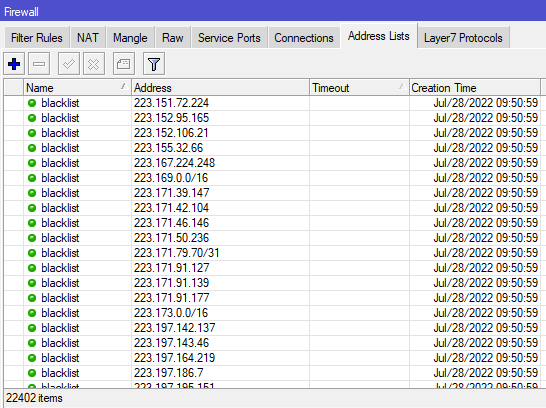
The list looks like this:
And this is how i am trying to make it work on the firewall:
So far, i am still able to login with WinBox from that specific IP i added to the block list, so the filter is not working. I watched a video in youtube and that seems to be the process to make it work, but in my case it does not. Do you know what am i doing wrong?
second question: Is about router performance with such a long list.
There are 27k+ IPs on that list.
In case the filter rule starts working if I fix the problem on question 1, will this affect the performance of the router with such a long list?
This is a very small office, with 4-6 computers working mostly on emails and opening websites, nothing super heavy for the network, and the Mikrotik router is CRS109-8G-1S-2HnD.
The idea/intention was to add an extra layer of security to the network, but maybe there are other solutions like banning any IP trying to bruteforce after x amount of tries or something lighter on the system than the list?
You are not giving us enough information. Screen captures are a horrible way to show us your configuration. Please export your configuration and post it. To export and paste your configuration (and I’m assuming you are using WebFig or Winbox), open a terminal window, and type (without the quotes) “/export hide-sensitive file=any-filename-you-wish”. Then open the files section and right click on the filename you created and select download in order to download the file to your computer. It will be a text file with whatever name you saved to with an extension of .rsc. Suggest you then open the .rsc file in your favorite text editor and redact any sensitive information. And in your case, please remove the 27K entries in the address list (we don’t need to wade through tens of thousands of lines of that. Then in your message here, click the code display icon in the toolbar above the text entry (the code display icon is the 7th one from the left and looks like a square with a blob in the middle). Then paste the text from the file in between the two code words in brackets.
With that said, restricting access to WinBox is via the Input Chain, not the Forward chain - hence the reason you can still access WinBox from your “blocked” address.
Country specific lists can be a red herring…
Bad actors and bots dont exactly leave calling cards…
Have you tried simply putting a block all rule at the bottom of your input chain and forward chain
and then seen if you have issues.
If its outgoing traffic worried about, I would personally not spend a minute of my precious time worrying about such things, nor as you have had years of an unknown quality of config on your router without any updates… complete waste of time.
So either have a simple effective config OR
use something like this which does all the work on a daily basis for you…for basically cups of coffee… https://itexpertoncall.com/additional_info/moabpre.html (no affiliation)
if you want content filtering then one can use free available DNS servers in the world,
or you could spend money on things…
Since OP is using stateful firewall, it’s still better to block in firewall filter rules. Only the order of rules needs to be modified.
Remember that firewall filter rules are executed in order from top to bottom and first one matching is then applied to packet, the rest are not executed anymore. Security comes first so one has to make sure that things that need to be blocked are actually blocked. But when it comes to performance, earliest rules have to be the ones matching the most passing packets. And the most frequent type of packets is the one matching connection type of established and related. Other packets types (new, untracked and invalid) are relatively rare and it’s good to deal with those later. (Ongoing connection can have high number of packets while blocking new connection only has to block one packet and connection never establishes.)
Dropping packets in raw can be more resource friendly because dropped packets don’t hit connection tracking machinery (which is very costly operation), but OTOH all packets need to be checked and if check is not trivial (matching against 27k IP addresses IMO doesn’t count as one) and if only a few packets match droping them in raw can even be more resource demanding than in filter.
There’s use case when droping packets in raw is definitely better: when dealing with DDoS attack … the rule there is most of times trivial (e.g. drop any udp packet with dst-port=53) making matching process a quick one and there are many packets that match due to nature of attack.
As chechito pointed out, the conclusions one could draw are the following:
RAW vs a long list is not necessarily efficient
DDOS is one occasion where RAW may make sense.
Dropping a few rules in Input chain makes more sense.
Knowing that in reality its the ISP that has the ability to handle DDOS and not the home owners router.
In summary there is nothing here that changes my view that
drop rules at the end of the forward chain and input chain are clean, simple and effective.
For outgoing traffic, segment traffic into vlans such that untrusted subnets dont pollute trusted vlans.
Use content filter based DNS services or those that try to filter out malicious content
Finally consider one of the available paid services for
stopping traffic to bad websites.
MOAB and AXIOM Shield come to mind.
A lot of great and detailed advice from all of you.
I will be experimenting and learning about the firewall in the upcoming weeks and use the advice here.
I sincerely thank you so much.


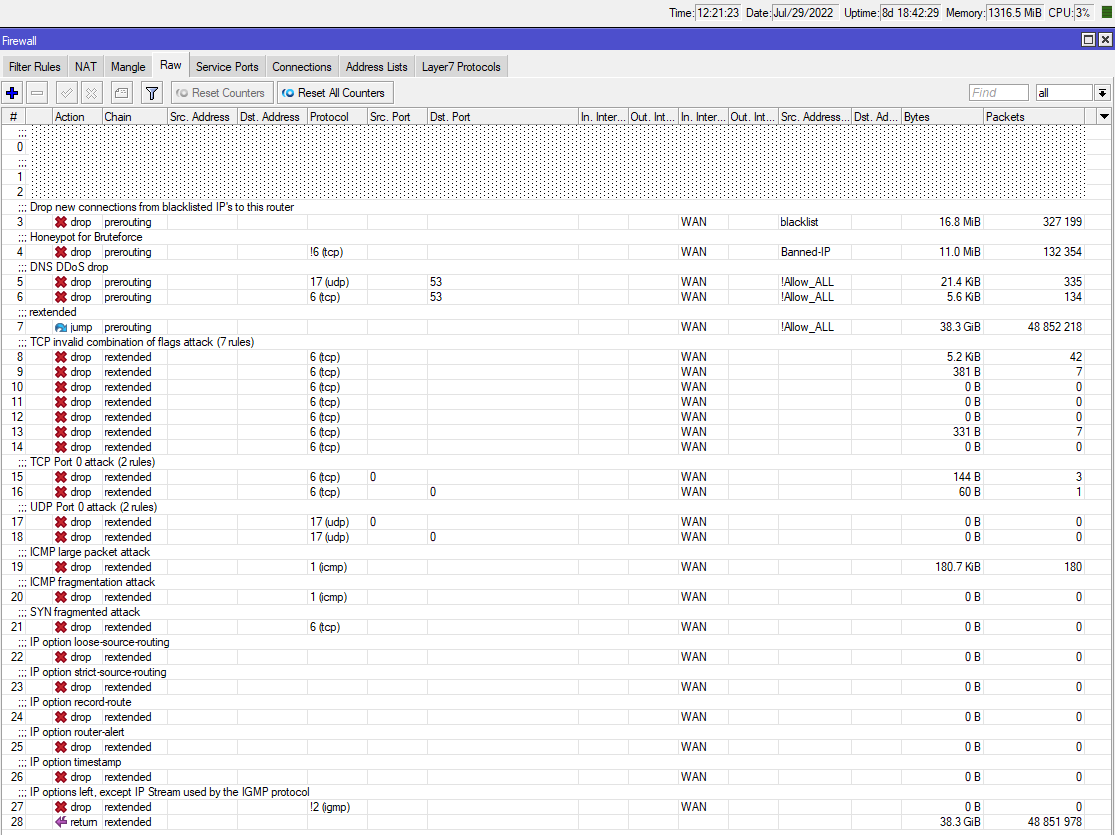

 I use it wherever I can. Therefore, I did not hide it, because there is an effect.