Block Torrents & p2p Traffic 100% working on all versions

Asume you want to block torrent & p2p traffic on 192.168.1.0/24
replace ip according to your need


/ip firewall layer7-protocol>
use winbox to copy paste name=torrentsites
regexp:
^.*(get|GET).+(torrent|

thepiratebay|isohunt|entertane|demonoid|btjunkie|mininova|flixflux|

torrentz|vertor|h33t|btscene|bitunity|bittoxic|thunderbytes|

entertane|zoozle|vcdq|bitnova|bitsoup|meganova|fulldls|btbot|

flixflux|seedpeer|fenopy|gpirate|commonbits).*$


/ip firewall filter>
add chain=forward src-address=192.168.1.0/24 layer7-protocol=torrentsites action=drop comment=torrentsites
add chain=forward src-address=192.168.1.0/24 protocol=17 dst-port=53 layer7-protocol=torrentsites action=drop comment=dropDNS
add chain=forward src-address=192.168.1.0/24 content=torrent action=drop comment=keyword_drop
add chain=forward src-address=192.168.1.0/24 content=tracker action=drop comment=trackers_drop
add chain=forward src-address=192.168.1.0/24 content=getpeers action=drop comment=get_peers_drop
add chain=forward src-address=192.168.1.0/24 content=info_hash action=drop comment=info_hash_drop
add chain=forward src-address=192.168.1.0/24 content=announce_peers action=drop comment=announce_peers_drop

& also use default rule to drop p2p traffic which alone is not working for me

add chain=forward src-address=192.168.1.0/24 p2p=all-p2p action=drop comment=p2p_drop


Enjoy :slight_smile:

Yup, works fine.. Cheers

/ip firewall filter
add action=drop chain=forward comment="P2P drop " disabled=no p2p=all-p2p
add action=drop chain=forward comment=“more connection closed” disabled=no

Hello
How to insert following commands ?
regexp:
^.(get|GET).+(torrent|

thepiratebay|isohunt|entertane|demonoid|btjunkie|mininova|flixflux|

torrentz|vertor|h33t|btscene|bitunity|bittoxic|thunderbytes|

entertane|zoozle|vcdq|bitnova|bitsoup|meganova|fulldls|btbot|

flixflux|seedpeer|fenopy|gpirate|commonbits).
$

Please help me guys

Go tp IP > Firewall > Layer7 Protocols, add a new one and paste it there

Regards

Thank you for replay.


Can you please teach me How to add new one ?

Best Regards

Battumur

Copy and paste the regexp into IP → Firewall → Layer 7 protocols, or use this export:

/ip firewall layer7-protocol
add name=torrentsites regexp="^.*(get|GET).+(torrent|\
    thepiratebay|isohunt|entertane|demonoid|btjunkie|mininova|flixflux|\
    torrentz|vertor|h33t|btscene|bitunity|bittoxic|thunderbytes|\
    entertane|zoozle|vcdq|bitnova|bitsoup|meganova|fulldls|btbot|\
    flixflux|seedpeer|fenopy|gpirate|commonbits).*\$\
    "

thanks for this info…It worked perfectly…

Hello and thank you for the information.

I have a question:
If they use it without the source-addresses it will work for the hole board if there are 3 wireless-client-cards with addresses 192.168.1.0, 192.168.2.0 and 192.168.3.0?

Or have I to write all the rules particular for each address?

Saludos

Uli

ulikroessin, that will depend on how you setup your firewall rules that use the layer7 protocol filter. You can specific specific addresses, or not and have everything filtered…

Thank you Zebble, but…well, more exactly my question:

I have a RB 333. Eth → modem → www, wlan1=192.168.1.0, wlan2=192.168.2.0, wlan3=192.168.3.0
At the wlans I have clients (hotspot/usermanager).

I want that the block-rules for p2p are working at all the 3 wlans.

I write this

name=torrentsites
regexp:
^.*(get|GET).+(torrent|

thepiratebay|isohunt|entertane|demonoid|btjunkie|mininova|flixflux|

torrentz|vertor|h33t|btscene|bitunity|bittoxic|thunderbytes|

entertane|zoozle|vcdq|bitnova|bitsoup|meganova|fulldls|btbot|

flixflux|seedpeer|fenopy|gpirate|commonbits).*$

in “ip firewall layer7-protocols”.

In “ip firewall filter” I have to wirte this:

add chain=forward src-address=192.168.1.0/24 layer7-protocol=torrentsites action=drop comment=torrentsites
add chain=forward src-address=192.168.1.0/24 protocol=17 dst-port=53 layer7-protocol=torrentsites action=drop comment=dropDNS
add chain=forward src-address=192.168.1.0/24 content=torrent action=drop comment=keyword_drop
add chain=forward src-address=192.168.1.0/24 content=tracker action=drop comment=trackers_drop
add chain=forward src-address=192.168.1.0/24 content=getpeers action=drop comment=get_peers_drop
add chain=forward src-address=192.168.1.0/24 content=info_hash action=drop comment=info_hash_drop
add chain=forward src-address=192.168.1.0/24 content=announce_peers action=drop comment=announce_peers_drop

add chain=forward src-address=192.168.1.0/24 p2p=all-p2p action=drop comment=p2p_drop

but 3 times (with the 3 src-addresses 192.168.1.0, 192.168.2.0 and 192.168.3.0)

or I can write it so (without the src-addresses) and it will work for all the 3 wlans:

add chain=forward layer7-protocol=torrentsites action=drop comment=torrentsites
add chain=forward protocol=17 dst-port=53 layer7-protocol=torrentsites action=drop comment=dropDNS
add chain=forward content=torrent action=drop comment=keyword_drop
add chain=forward content=tracker action=drop comment=trackers_drop
add chain=forward content=getpeers action=drop comment=get_peers_drop
add chain=forward content=info_hash action=drop comment=info_hash_drop
add chain=forward content=announce_peers action=drop comment=announce_peers_drop

add chain=forward p2p=all-p2p action=drop comment=p2p_drop


The last one (default rule) I´m using so since 1 year, without src-addresses, and hope it works. But I´m not sure…

Saludos

Uli

has someone tried it successfully

Hello again,

I try to test it and seems it works so, without addresses, but how I wrote - I´m not sure.
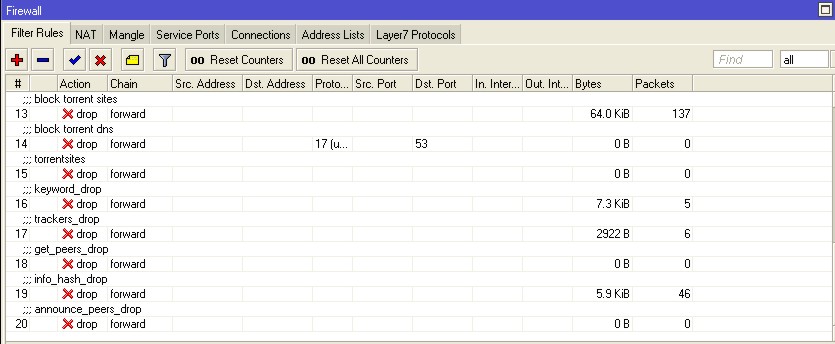
Here the config:

 > ip firewall filter print
Flags: X - disabled, I - invalid, D - dynamic 
 0   ;;; TCP Connection Limits
     chain=forward action=drop tcp-flags=syn protocol=tcp 
     src-address=1.......1.0/24 connection-limit=101,32 

 1   ;;; TCP Connection Limits
     chain=forward action=drop tcp-flags=syn protocol=tcp 
     src-address=1.......2.0/24 connection-limit=101,32 

 2   ;;; TCP Connection Limits
     chain=forward action=drop tcp-flags=syn protocol=tcp 
     src-address=1.......3.0/24 connection-limit=101,32 

 3   ;;; UDP Connection Limits
     chain=forward action=drop protocol=udp src-address=1.......1.0/24 
     connection-limit=71,32 

 4   ;;; UDP Connection Limits
     chain=forward action=drop protocol=udp src-address=1.......2.0/24 
     connection-limit=71,32 

 5   ;;; UDP Connection Limits
     chain=forward action=drop protocol=udp src-address=1.......3.0/24 
     connection-limit=71,32 

 6   ;;; Accept established connections
     chain=input action=accept connection-state=established 

 7   ;;; Accept related connections
     chain=input action=accept connection-state=related 

 8   ;;; Drop invalid connections
     chain=input action=drop connection-state=invalid 

 9   ;;; UDP
     chain=input action=accept protocol=udp 

10   ;;; p2p
     chain=forward action=drop p2p=all-p2p 

11   ;;; warez
     chain=forward action=drop p2p=warez 

12   ;;; kazaa
     chain=forward action=drop p2p=fasttrack 

13   ;;; block torrent sites
     chain=forward action=drop layer7-protocol=torrent-dns 

14   ;;; block torrent dns
     chain=forward action=drop protocol=udp layer7-protocol=torrent-dns 
     dst-port=53 

15   ;;; torrentsites
     chain=forward action=drop layer7-protocol=torrentsites 

16   ;;; keyword_drop
     chain=forward action=drop content=torrent 

17   ;;; trackers_drop
     chain=forward action=drop content=tracker 

18   ;;; get_peers_drop
     chain=forward action=drop content=getpeers 

19   ;;; info_hash_drop
     chain=forward action=drop content=info_hash 

20   ;;; announce_peers_drop
     chain=forward action=drop content=announce_peers

And here the screenshot from the last hours:
ip-fire-fi.jpg

Thanks Zebble

I would like to know how to bandwidth limit on torrent. Because my some users need to torrent.
I have 30Mb, So I wanna use 4mb to torrent .

Please help me

ok, but if you want to limit p2p traffic?

I think that some one provide internet access can’t “inspect” traffic that carry out but… bandwith cost lot of money so limit this type of traffic I’think is a good compromise!

So can you try to modify the solutions you have posted to a version that limit traffic instead of blocking?

Best regards!

I believe if you Layer 7 filter everything it will severely impact your routers CPU. So you want to make sure you have plenty of processing capacity before you do it. So with the smaller 400 series boards, I typically just filter selected users via IP address lists.

Eric

Yea this method is also working for me.

but in hotspot how can its possible for me to allow few clients to use torrent,p2p trafic. and block for remaining all others.

it is possible so?

This regxp in layer7 protocol works for me, but I set up round way through socks5 server for torrenting, and it’s excluded from that rule, I cannot do it to myself to block torrents to my people :slight_smile: Server used for socks5 is Dante :slight_smile:

Please do not use this rule in bad manner :slight_smile:

^(\x13bittorrent protocol|azver\x01$|get /scrape?info_hash=get /announce?info_hash=|get /client/bitcomet/|GET /data?fid=)|d1:ad2:id20:|\x08’7P)[RP]

http://forum.mikrotik.com/t/how-block-connection-of-p2p/18495/1

It seems that these rules don’t work anymore.