I’ve got my new setup…really new as I’m a total novice at this. I really want a killer LAN (951) with the groove pulling in wifi signals from wherever I can get free wifi. I’ve installed the groove to act as an outside antenna and the 951 for all my wifi devices to connect to.
I’ve read thru some of these boards but don’t really understand the in’s and out’s of what I need to do right out of the box.
About all I’ve been able to figure out is how to update both of the devices software to the latest version. From what else I’ve read, I can see that I need to put the groove in CPE mode and the 951 in home AP mode, but my limited knowledge ends there.
Any help for the less than tech savvy would be gratefully appreciated.
WAM, I have an identical challenge. I have the exact same hardware and am currently on a boat in Isla Mujeres Mexico and I cannot figure this system out as I install. Is there any way I could speak to you if you were able to resolve? Any help would be much appreciated. I have spent hours trying to configure this. Thanks --Ed
I have the identical set up to the original post, and was helped a lot by the post by Breizh. However, since his AP was not a Mikrotik the last section didn’t correspond exactly to what I’m seeing.
So I have a couple of questions:
On item 13. of his post he says to give the Groove an IP of 192.168.88.2. This would be same address as the PC and would leave the system with no 192.168.88.1 address. Should the Groove be addressed as 192.168.88.1 instead?
Under the AP setup section, when doing this for the Mikrotik router specified in the original post should it be set up as Wisp AP or Home AP?
Should the AP Internet section be static or automatic? Seems it should be static with the IP of the Groove …88.1. If this is the case what IP should be entered under the Local Network section?
What should be entered for the Firewall?
Is there anything else that should be set to keep the system secure other than a password under the Wireless Security Profile?
Breizh’s post above did not work for me but with some modification I did get my system to work. I have a Groove 52PHN and a RB951. On my boat I wanted the Groove to scan for hotspots . Once I select the hot spot I want the RB951 is used as an access point so my wireless devices can connect to the hotspot. Note - the steps listed do tend to change somewhat with different versions of the firmware but the basics stay the same. I am including some very basic steps for US that are new to all of this. Here is my step by step setup of the two -
NOTE : It is best to configure each device separately before connecting the Groove to the RB951. Initially Each device will need to be connected by an Ethernet cable to your laptop or desktop. The Groove will need to be powered with the included Y cable and AC adapter. Plugged the male end of the Y’s Ethernet cable into your home computer system and use a patch cable to connect the Groove. When setting up the RB951 The cable runs straight from the home computer to the device. I had no luck using Port #1 (I have no idea why) but Port #2 worked fine. Groove Router Setup: (Antenna) WebFig v6.35.2
Click on the top left menu option called ‘Quick Set’
Click on the small drop down menu on the top far right and choose CPE
Under the ‘Mode’ heading on the right select ‘Router’ mode.
Under ‘Wireless Network’ heading, the ‘Address Acquisition’ must be ‘Automatic’.
Under the ‘Local Network’ heading set the IP Address to
IP Address: 192.168.88.2 Subnet Mask: 255.255.255.0/24
Now configure the Router as a DHCP SERVER, use the following settings:
DHCP Server: Enable - Start IP Address: 192.168.88.10 End IP Address: 192.168.88.254 Enable NAT by selecting NAT option
Now we can press the ‘Apply Configuration’ button at bottom right
Now select the IP menu option halfway down on the far left and select DNS
Next to the Servers option click the little black down arrow and add the following address: 8.8.8.8
Add a second Server address by clicking the next little black down arrow and add the following address: 208.67.222.222
Place a tick in the option ‘Allow Remote Requests’ and then click the ‘apply’ button at the top
Now return to the ‘Quick Set’ menu option and select the WiFi hotspot from the list on the left side of the main page
You will now be asked for a password if one is required, enter this and then click the ‘connect’ button
You should now be connected an an IP address should appear after a few seconds or so on the right under the ‘Wireless Network’ heading.
AP setup: (RB951 Router) WebFig v6.35.4
Use a CAT5 cable to connect the AP (RB951) to your computer.
Enable the router/AP as a an Access Point (AP or WISP AP)
Set mode to Route
Set a STATIC IP address:
IP Address: 192.168.88.3/32 Netmask 255.255.255.0 Default Gateway: 192.168.88.2
Now set up the Wireless by giving a ‘Network Name’, (SSID) like - MikroTik RB951
LAN IP Address 192.168.88.3(/24)
Netmask 255.255.255.0(/24)
NO DHCP SERVER
Check NAT
Set WIFI password.
Shut down and attach Groove to RB951. For Groove to pull power from the RB951 the cable must be in Port 5 which supplies POE.
On your wireless device the new wireless AP should now show. Make a connection to that network.
Then in a browser on your wireless device type - 192.168.88.2 in the location bar. WebFig should open. It may take a moment to propagate but in the center left you should see a list of the available WIFI hotspots being “seen” by the Groove. Select the desired one and enter the password if needed. Press 'Connect’. After a moment you should see an IP address and other items appear in the upper right. The network should now be active.
If you want to see the configuration for the RB951 enter - 192.168.88.3 in the browser and enter WebFig for it.
Once everything is working go to WebFig for each device and look down the left menu and find ‘FILES’. Open it and save a copy of the configuration. These backups can be restored at a later date if a problem develops.
Hope this works for you. I spent hours and hours sorting through this but I am a total noob on this type of setup.
To raymacke:
I have a Linksys wireless dual band router. Can I connect this to the MikroTik Groove A52 AC Model?
Real newbie and any assistance much appreciated. Thanks
I have a Metal 52 AC and hap AC. I got them working with the above advice but the WiFi response was slow. I removed the hap and setup the Metal as station for receiving WiFi and also an AP from the same Metal and it is working fine. However, I can log into the Metal with Winfig but when I click the disconnect button, the program locks up and does not scan for new WiFi locations. The only way I have found to change the WiFi location I want to log into is to connect the Metal Ethernet cable into my computer and run Winbox. That does work. I am using a MacBook Pro and must boot into Bootcamp with windows 7 pro 64 bit. I am hoping to find a way to log into new campgrounds with our iPads from WiFi into Winfig and not necessarily have to bring my MacBook and run Windows. Any assistance would be appreciated.
I’m a complete novice so I’d appreciate your advice, and patience. I’m setting up my Groove with a TP-link archer c7 router to use the marina WiFi on my boat. I seemed to have done at least a couple of things right following a mix of the above directions, but I’m still a little lost.
I think I’ve managed to setup the archer c7 as an access point, and when I connect to it I can connect to the groove through Winbox and the MAC address.
However, when I select my marina’s WiFi network I still don’t have WiFi. My marina uses individualized codes that you enter in the browser after you connect to access their WiFi, and I’m guessing this has something to do with the problem? I can’t find any way to enter that code.
@ laservideo
Hi, a bit late I guess…
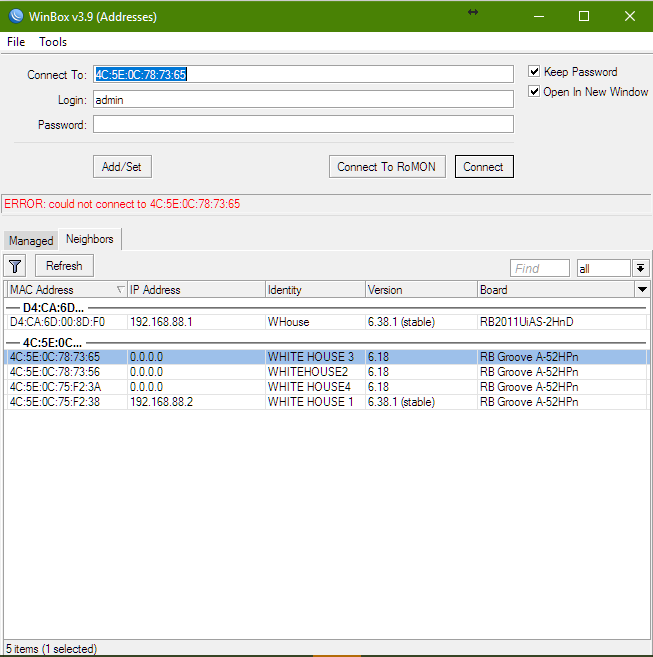
I have exactly the same problem with a RBGrooveA-52HPn. Once I disconnect, I loose the connection. As you do, I connect my macbook pro to get it work again. But there is a little prog that permit you to use Mac OSX without bootcamp, maybe wine? Anyhow you can open Safari to manage your device, you don’t have to use windows isn’t it?
Sorry I can’t check, my mac is not working currently. I found a way around. I connect the groove to an airport station, it makes the same as a mac. To save energy(I am in a boat)
I ordered last week a little router that runs on 5,5 volts, that will make the job(hAP Lite RB941)
I hope this helps a bit…
Hi sailors. I have similar setup (mikrotik groove + hap ac lite) on our boat.
I can help you with setting up your wifi system. Everything is pretty simple. Post questions here and i will try to help.
Yevpro, I finally created an account here just to take you up on your offer I’ve been messing with this for far too long long and am guessing that I’m missing some pretty simple points that will get everything working smoothly.
My set up is a Groove AC → Apple AirPort Extreme (broadcasting WiFi to boat). That said, I would love to even just get the Groove working directly plugged into my MacBook Pro as a proof of life.
So far, I’ve been able to follow the instructions in this thread and got the Groove to connect to an Xfinity SSID nearby. Even though I am able to get the Groove connected to the wifi network, I am not able to load any web pages on the laptop that is directly connected to the Groove. I am assuming that I should be able to. I was hoping to have that test working before moving on to setting up my Airport. Is that reasonable?
Your Groove will work when connected directly to your computer ethernet port if the Groove is correctly configured as a CPE. I have attached the default configuration file from a Groove 52ac with a level 3 license. This license only allows the Groove to act as a CPE so this type of Groove would work for you out of the box.
The configuration is from a Groove running routerOS v6.42.7 with the system->routerboard also updated. You should do these updates before installing the configuration. I have changed the default band to 2ghz-bgn so that the Groove will scan for 2.4ghz signals rather than 5ghz which is the default in the newer routerOS versions. I have also added a 15 second delay at the beginning of the file.
You should be able to use your Groove directly with your computer or plug it into the WAN port of your router and use it. Your router WAN should be set to get its internet settings automatically from the Groove.
If you aren’t already familiar with Winbox I would download it and learn to use it when working with a Mikrotik device. Other picking and connecting to access points you should not make changes on the Quick Set page. config.rsc (2.62 KB)
To install the configuratin:
file move it into the flash folder in files. If it is not in the flash folder it will be deleted during the reboot of the Groove and configuration will fail, On a PC running Winbox you can drag and drop the file into “flash”. That may work with a Mac but I’m not sure.
Go to System>Reset Configuration
check mark “No Default Configuration” and “Do Not backup”
Open the Run After Reset box and select “config.rsc” then click the Reset Configuration button. Allow 60 seconds for the process to complete.
The Groove should be accessible at 192.168.88.1. Make sure your computer is set to get its ethernet settings by DHCP
I just received my Groove AC and I’m struggling. What I want to do is simple. I want it connected directly to the ethernet port of my laptop (MacBook pro) and get a better signal from the marina. So far I have managed to mess around with all the different settings in the CPE and by changing the Ghz I end up seeing the network I want to connect to. However when I try to connect, it connects for a second then disconnects, then reconnects and so on and so forth. What I am missing ? Lots I can imagine.
If anyone can sort me out, I need to work and I need my connection !
However when I try to connect, it connects for a second then disconnects, then reconnects and so on and so forth. What I am missing ? Lots I can imagine.
If the Status line on the Quick Set page is oscillating between “Searching for Network” and “Connected to ESS” this is most commonly caused by an incorrect wifi password. Assuming your configuration is correct otherwise.
 I’ve been messing with this for far too long long and am guessing that I’m missing some pretty simple points that will get everything working smoothly.