I am trying to bond two PTP wireless links to a mountain site that I have and use to distribute broadband around the community, I have a MikroTik RB1100AHx4 ( soon to be replaced CCR 1009 ), one link uses two LHG 60G’s and the other uses two Ubiquiti Lightbeam AC GEN 2’s, this link is only used if the LHG’s go down and manually switched, which usually only happens in Snow, however with this Corona Virus lockdown we are maxing out the LHG link, at the mountain end of the link is a Ubiquiti Edgeswitch 16 waterproof pole mounted POE Switch, ( It would be a MikroTik if you made one ), all the examples seem to show bonding of two internet WAN connections or links between two MikroTik routers and I have tried a number of them without success, can anyone help.
Well, you could use LACP, 802.3ad protocol between the Mikrotik and the Edge switch, if the Ubiquiti supports the protocol as well, you will have to check that out…
Also my concern is that CCR1009 will not support the protocol in hardware level… It would be best to use the CCR as router and a CRS328 as a switch where the Antennas are connected on…
Another thought, if you had a Mikrotik on the other side of the link as well instead of the Ubiquiti, to use OSPF and configure in a way that one PTP Link will be used for the Download Traffic and the Second PTP link will be used for the Upload traffic… But you do not have a Mikrotik there… 
I Mikrotik made a 16 Port waterproof pole mounted switch I would have a one on the pole
The EdgeSwitch manual doesn’t mention any type of port aggregation, and the LHG60 has only got a single GE port whose bandwidth matches the available bandwidth of the radio link, so there is no margin left for any additional traffic, so it makes no sense to create an L2 tunnel between the two LHG60 via the Ubiquiti link and aggregate it with the direct link via the LGH60’s wireless interfaces.
Hence the only thing I can imagine is to use two VLANs on the EdgeSwitch, one per each radio link, and distribute the other devices on the mountain site into those two VLANs so that devices in each group would only share the bandwidth of that link. If done in the “properly wrong” way, i.e. if you just keep the EdgeSwitch port connected to the LHG an access port to the default VLAN 1, and the Edgeswitch port connected to the Ubiquiti radio an access port to some other one, whilst on the 1100 end both radios will be connected to the same (or none) VLAN, you won’t need to change anything in IP configuration of the other devices on the mountain site as both the VLANs will be interconnected at the 1100. So the traffic distribution among the radio links will be static and you can fine-tune it by moving the other devices between the VLANs.
Whether this will work or not depends on whether the EdgeSwitch supports independent MAC address learning per VLAN. If not, you’d have to do some dirty tricks using /interface bridge nat at the 1100 so that the IP addresses of anything in that subnet that is physically connected at the base camp site would resolve to different MAC addresses depening on from where the ARP request comes.
And, of course, the share of traffic among the other devices on the mountain site must be negligible, as it will flow through the base camp (and if the independent VLAN learning doesn’t work, such traffic will be impossible at all).
OH, this will not be easy to do on a very hot live link, I think I will have to split them manually by installing a PowerBox Pro connected to one link and some of the radios connected in to that.
What complexity can you see in a runtime reconfiguration? You say the Ubiquiti link is currently not in use, so let’s disconnect it at both ends.
Then, prepare an access port to VLAN 2 for it at the mountain site, and connect it to that port.
Remember that STP must be disabled everywhere, as spanning tree BPDUs are VLAN-agnostic (well, not in all modes, but those which live in independent VLANs are usually incompatible between vendors anyway). Next, connect the lower end of the Ubiquiti link at low traffic time - if doing so doesn’t cause a loop, it means that the separation of the two links at the mountain site by VLAN IDs works, and the basic job is done by this, although all client traffic remains on the LHG60 link. If it causes a loop, which you notice by loss of ping to one of the client devices, you just disconnect the Ubiquiti radio from the 1100 again and that’s it.
Then, to make a client device on the EdgeSwitch use the Ubiquiti link, it is enough to change the PVID of the port to which it is connected 1 to 2. Just a few packets may get dropped as the port will change mode. So the effective result will be the same as if you added the PowerBox Pro, except that you won’t need to install the PowerBox Pro.
Thanks, everytime I have played with VLAN’s live, ( they seem to work on the bench ) I end up getting in a mess and locked out, so I have a couple of questions.
Do I have to add VLAN’s to the AP Radios that are connecting to the Edgeswitch and the customers CPE’s connecting to those AP’s or just create the VLAN’s in the EdgeSwitch itself
No changes anywhere but on the edgeswitch. The whole exercise is just to partition the edgeswitch into two virtual switches using the vlan 2 which will imitate the powerbox.
Just trying this at the moment, I have created a VLAN ID 100 on the EdgeSwitch, excluded the link from VLAN ID 1 and added Untagged to the port the link radio is connected too and as the MicroTik end is disconnected I cannot access the top end of the link which is to be expected, after connecting to MicroTik end of link to to the 1100 I can now get to the top of the link
Now I am a little bit stuck, do I assign the the ports connected to the AP radios to the new VLAN, I assume I do.
S**t, I think it is working, just tried it with one radio with just a couple of users on, MikroTik end disconnected, no access to radio, connect MikroTik end access to only that one Radio
***** A massive thank you
I turned off my simple QoS queue so I could get fast track back on. I thought that would help.
@sindy i said LACP between Mikrotik and Ubiquiti in case the later supports it… This makes us 4 Antennas and not 2 as you said… And the antennas would not play any role in the actual LACP process except the ptp connection of sites… We have share of bandwidth between links, not equal of corse but it is something and redundancy as well, which i consider super important…
Your idea of VLANs is nice but i do consider it as a temp solution… If a link fails someone should manually switch the VLANs… I would prefer a slower connection than no connection at all…
Imagine being at home without Internet, calling your ISP to see what’s wrong, and the answer you get is “just a minute sir we are switching some VLANs” really ? 
Yes it is a temporary solution to the excess traffic caused by the corona Virus Lockdown, while working on the EdgeSwitch I noticed it does LAG ( link Aggregation Groups ), this is similar to the Mikrotik bonding and supports load balancing and fail over, however experimenting with this on a hot unit is a no no for me, I am at the moment too ill with a virus ( no tests available for us UK minions ) to go up to the mast to fix if I screw up.
I am at the moment to ill to go up to the mast to fix if I screw up.
Yes that would be bad am sure
I have 10 Live AP’s and one data only link on the S16 so cannot risk a screw up, I do have a Pico radio on the back of the S16, so I do have a way back in without climbing the mast if I scew up.
I see…
Can you sum up the overall changes you had to do as far as the VLANs are concerned ?
Switched S16 to Legacy mode, ( easier ), create a VLAN ID 100, change the U on the secondary link port to E ( Exclude ) on default VLAN ID 1, change the corresponding ports setting from E to U on VLAN ID 100, plug in to Mikrotik at bottom end and we now have two links to the S16 isolated from each other, no from traffic decide which AP’s traffic you want going through each link and change the corresponding ports to E on VLAN ID 1 and U on VLAN ID 100, simples, see attached picture
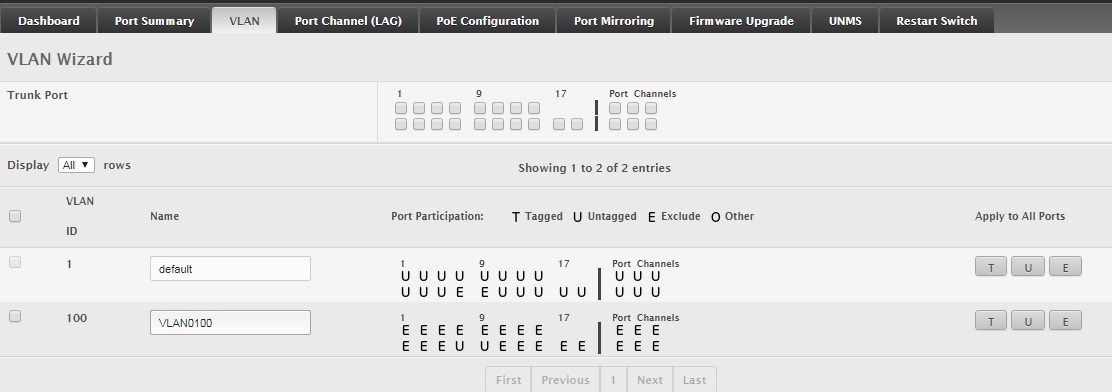
@opalit the E for the Ubiquiti means it excluded that port from the default Group ?
@sindy, if i wanted to implement the exact same thing with a 24port Mikrotik switch,i would add all 24 ports in my Bridge, then i could let e.g. the 12 first ports with PVID 1 the rest 12 with PVID lets say 2 and i would enable then Bridge VLAN Filtering, thus splitting the switch in two… Correct ?
The E does means excluded and the port is excluded from the default group, not tried it on a MicroTik, I would assume you would create a VLAN in the same way on the port and add the other ports to communicate with on the same VLAN
@Zacharias, responding to various points:
Fun fact: as I am not familiar with Ubnt’s feature set nor with the structure of their documentation, the first thing I’ve done was to look for LACP support in the EdgeSwitch documentation I could google up, but it didn’t come to my mind that I should look for configuration items under dashboard->port status. So I’ve concluded it’s not there.
Worse than that is that the link selection strategies in all that bonding/teaming/link aggregation assume that the member links of a bundle have the same bandwidth, and you can’t explicitly state any load distribution rule (the link selection algorithms have to be simple so that they could be implemented in hardware), and here we have something like 1 Gbit/s full duplex on the LHG60 and at best 500 Mbit/s full duplex on the Ubiquity link. Plus the aim of those link selection strategies is to use the same link for all packets of the same application connection in order to avoid packet missequencing, but there is no coordination between directions, so the two directions of the sam application connection can use different links. So the ability to manually assign each device at the mountain site to one of the links allows to distribute the available bandwidth between them in a more controlled way.
4 point-to-point antennas make two links to me, so I don’t understand what is your point here.
This is no worse that the initial state @opalit has described:
So the whole thing is of course a temp solution, but the preference of higher throughput to redundancy has been clearly stated.
Correct.
Initially I wanted to add a PowerBox pro to the mast and split the AP’s between S16 and Powerbox, the VLAN’s have done that job by splitting the S16 in to what is a effectively now two switches, this will do for the duration of the Lockdown, I have experimented before trying to get bonding, with failover, simple with mikrotik but not so with Ubiquiti, I have an 8 Port Ubiquiti Switch and a spare Mikrotik switch I am going to experiment with bonding and load balancing once I am happy I will do it on the live system.
so the two directions of the sam application connection can use different links
@sindy LACP 802.3ad does not split traffic accross links…
All packets associated with a given “conversation” are
transmitted on the same link to prevent mis-ordering
http://www.ieee802.org/3/hssg/public/apr07/frazier_01_0407.pdf
The only thing i did not take into account, is that the correct implementation of a 802.3ad, needs the links to be of the same bandwidth capabilities…