Firstly, I just wanted to mention that I know there are a lot of threads about this subject already, so apologies for creating another one. However, I have read through a lot of others, and unfortunately, I still haven't been able to get this working... I've hit a wall, hence the reason for this post.
I have a bridge (eth 4+5+6+7+8) with various VLANs configured (ID 10,20,30,40,50,200), along with a bond (eth 7+8) for connecting to the switch (which has the VLANs + tagging configured). For the life of me, I cannot figure out 'why' I cannot obtain a DHCP address.
Results:
- If I connect a device to any of the bridge ports (exc. 7+8), I do not obtain an address.
- If I connect a device to an untagged port on my switch (e.g., port 23/VLAN20), I do not obtain an address.
- As a test, I configured a bridge port for eth2 with PVID 20, and if I plug a device directly to it, it successfully obtains an address (from the configured pool for VLAN20).
(Note: I have tried setting the bridge port PVIDs to one of my configured VLANs (e.g., 200), as well as tried keeping them as 1 + setting VLAN ID 1 as untagged on the switch, but get the same outcome.)
Router Config:
(Important: I have removed ALL firewall-related rules/settings from the below, as they are currently disabled while I troubleshoot.)
# RouterOS 6.49.17
# model = CCR1009-8G-1S
/interface bridge
add name=bridge1 protocol-mode=none vlan-filtering=yes
/interface ethernet
set [ find default-name=ether1 ] name=eth1-wan
set [ find default-name=ether2 ] name=eth2
set [ find default-name=ether3 ] name=eth3-backup
set [ find default-name=ether4 ] name=eth4
set [ find default-name=ether5 ] name=eth5
set [ find default-name=ether6 ] name=eth6
set [ find default-name=ether7 ] name=eth7
set [ find default-name=ether8 ] name=eth8
set [ find default-name=sfp1 ] disabled=yes
/interface vlan
add interface=bridge1 name=vlan10-main vlan-id=10
add interface=bridge1 name=vlan20-guest vlan-id=20
add interface=bridge1 name=vlan30-lab vlan-id=30
add interface=bridge1 name=vlan40-iot vlan-id=40
add interface=bridge1 name=vlan50-cctv vlan-id=50
add interface=bridge1 name=vlan200-mgmt vlan-id=200
/interface bonding
add mode=802.3ad name=bond-sw1 slaves=eth7,eth8 transmit-hash-policy=layer-2-and-3
/interface list
add name=WAN
add name=LAN
/ip pool
add name=pool10-main ranges=10.10.10.11-10.10.10.254
add name=pool30-lab ranges=10.10.30.2-10.10.30.127
add name=pool200-mgmt ranges=10.10.200.2-10.10.200.254
add name=pool20-guest ranges=10.10.20.10-10.10.20.150
add name=pool40-iot ranges=10.10.40.10-10.10.40.254
add name=pool50-cctv ranges=10.10.50.10-10.10.50.254
/ip dhcp-server
add add-arp=yes address-pool=pool10-main disabled=no interface=vlan10-main lease-time=1d name=dhcp10-main
add add-arp=yes address-pool=pool30-lab disabled=no interface=vlan30-lab name=dhcp30-lab
add add-arp=yes address-pool=pool200-mgmt disabled=no interface=vlan200-mgmt name=dhcp200-mgmt
add add-arp=yes address-pool=pool20-guest disabled=no interface=vlan20-guest lease-time=8h name=dhcp20-guest
add add-arp=yes address-pool=pool40-iot disabled=no interface=vlan40-iot name=dhcp40-iot
add add-arp=yes address-pool=pool50-cctv disabled=no interface=vlan50-cctv name=dhcp50-cctv
/interface bridge port
add bridge=bridge1 interface=eth5
add bridge=bridge1 interface=eth6
add bridge=bridge1 interface=bond-sw1
add bridge=bridge1 interface=eth4
add bridge=bridge1 comment=testVLAN20 interface=eth2 pvid=20
/ip neighbor discovery-settings
set discover-interface-list=all
/interface bridge vlan
add bridge=bridge1 tagged=bridge1,bond-sw1,eth4,eth5,eth6 vlan-ids=10
add bridge=bridge1 tagged=bridge1,bond-sw1,eth4,eth5,eth6 vlan-ids=20
add bridge=bridge1 tagged=bridge1,bond-sw1,eth4,eth5,eth6 vlan-ids=30
add bridge=bridge1 tagged=bridge1,bond-sw1,eth4,eth5,eth6 vlan-ids=40
add bridge=bridge1 tagged=bridge1,bond-sw1,eth4,eth5,eth6 vlan-ids=50
add bridge=bridge1 tagged=bridge1,bond-sw1,eth4,eth5,eth6 vlan-ids=200
/interface list member
add interface=eth1-wan list=WAN
add interface=eth2 list=LAN
add interface=bridge1 list=LAN
add interface=bond-sw1 list=LAN
add interface=vlan10-main list=LAN
add interface=vlan20-guest list=LAN
add interface=vlan30-lab list=LAN
add interface=vlan40-iot list=LAN
add interface=vlan50-cctv list=LAN
add interface=vlan200-mgmt list=LAN
/ip address
add address=10.255.255.1/24 interface=eth3-backup network=10.255.255.0
add address=10.10.10.1/24 interface=vlan10-main network=10.10.10.0
add address=10.10.30.1/23 interface=vlan30-lab network=10.10.30.0
add address=10.10.40.1/24 interface=vlan40-iot network=10.10.40.0
add address=10.10.20.1/24 interface=vlan20-guest network=10.10.20.0
add address=10.10.50.1/24 interface=vlan50-cctv network=10.10.50.0
add address=10.10.200.1/24 interface=vlan200-mgmt network=10.10.200.0
/ip dhcp-client
add disabled=no interface=eth1-wan
/ip dhcp-server network
add address=10.10.10.0/24 comment=main dns-server=10.10.30.253 gateway=10.10.10.1
add address=10.10.20.0/24 comment=guest dns-server=1.1.1.1 gateway=10.10.20.1
add address=10.10.30.0/23 comment=lab dns-server=10.10.30.253 gateway=10.10.30.1
add address=10.10.40.0/24 comment=iot dns-server=10.10.30.253 gateway=10.10.40.1
add address=10.10.50.0/24 comment=cctv dns-server=10.10.30.253 gateway=10.10.50.1
add address=10.10.200.0/24 comment=mgmt dns-server=10.10.30.253,1.1.1.1 gateway=10.10.200.1
/ip dns
set allow-remote-requests=yes servers=1.1.1.1
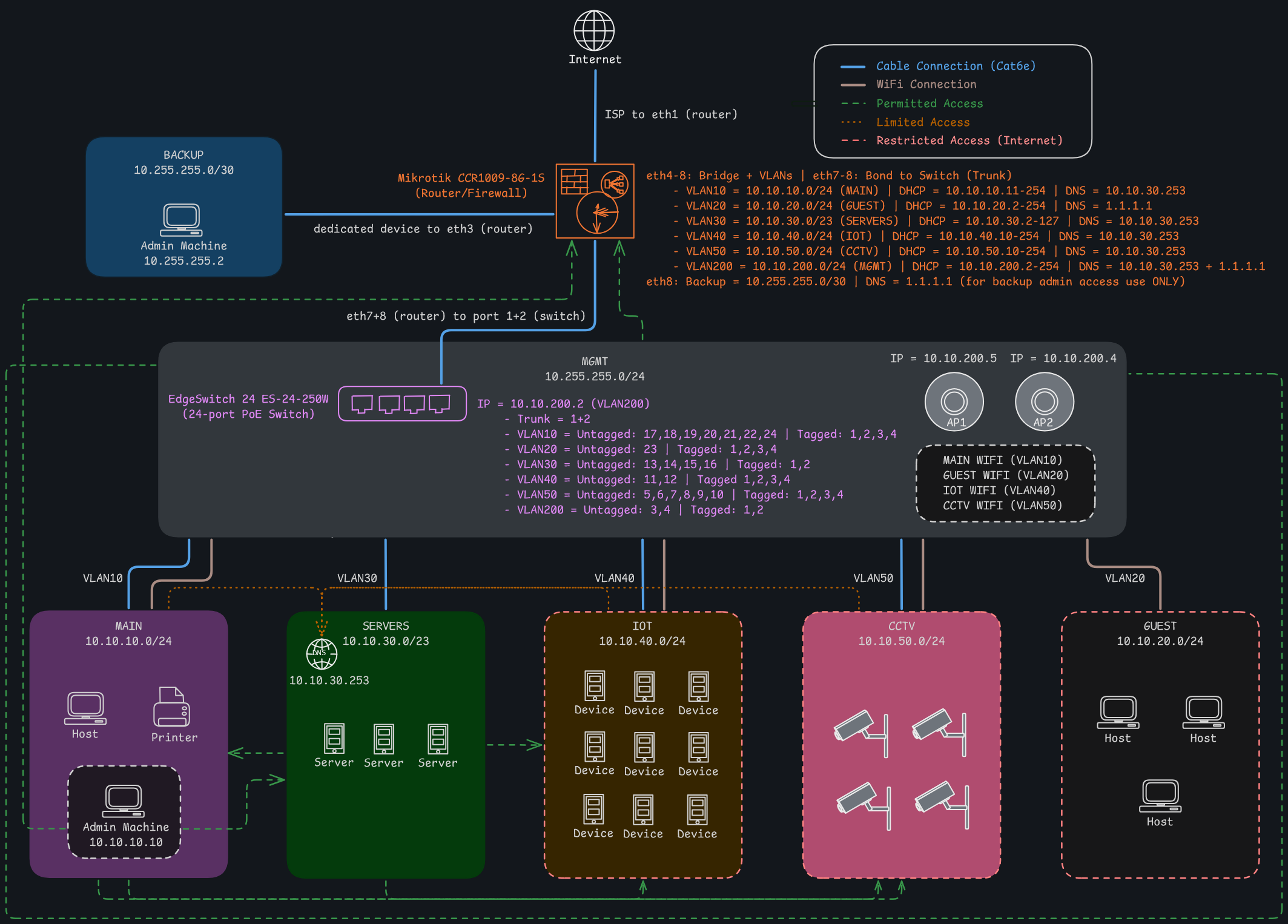
Network Diagram:
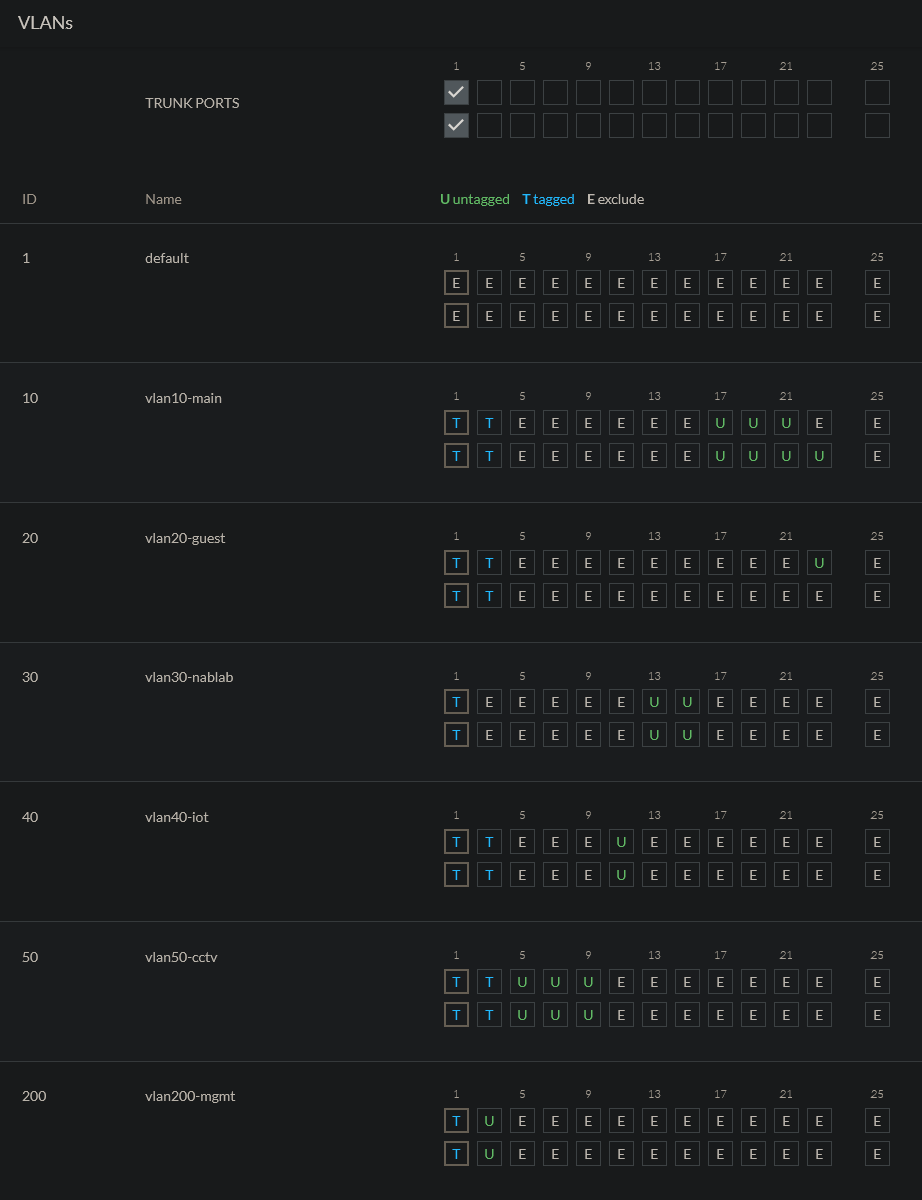
Switch VLAN Config:
Any help is greatly appreciated - and thank you in advance! Also, if any further info is required, please let me know.