Bridge Firewall Problem

I set up bridge firewall and created a bridge filter rule for vlan 10 and i can only see there is traffic going but not much. But I cannot access a printer from one of the bridge port to another bridge port. I figured out

/ip firewall filter
add action=drop chain=forward

is blocking the traffic. However, if I enable from “vlan10” as in interface to “vlan10” as as out interface, I still cannot access the printer from another bridge port. After checking the log of that firewal rule 9 which drops every forwarding traffic, I see the router only detects the traffic as from “bridge0” instead of “vlan10” interface. Is this normal that the device cannot distinguish the traffic is from a slave interface “vlan10” of the “bridge0”? Should this be considered a bug?

/interface list
add name=mgmt
add name=untrust
add name=trust
add name=guest
add name=internal
/interface vlan
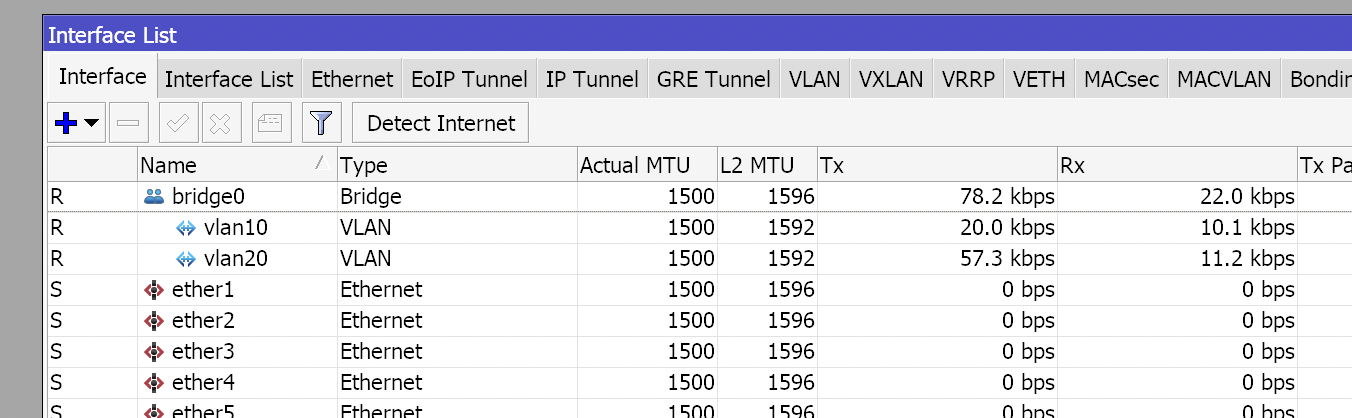
add interface=bridge0 name=vlan10 vlan-id=10
/interface bridge filter
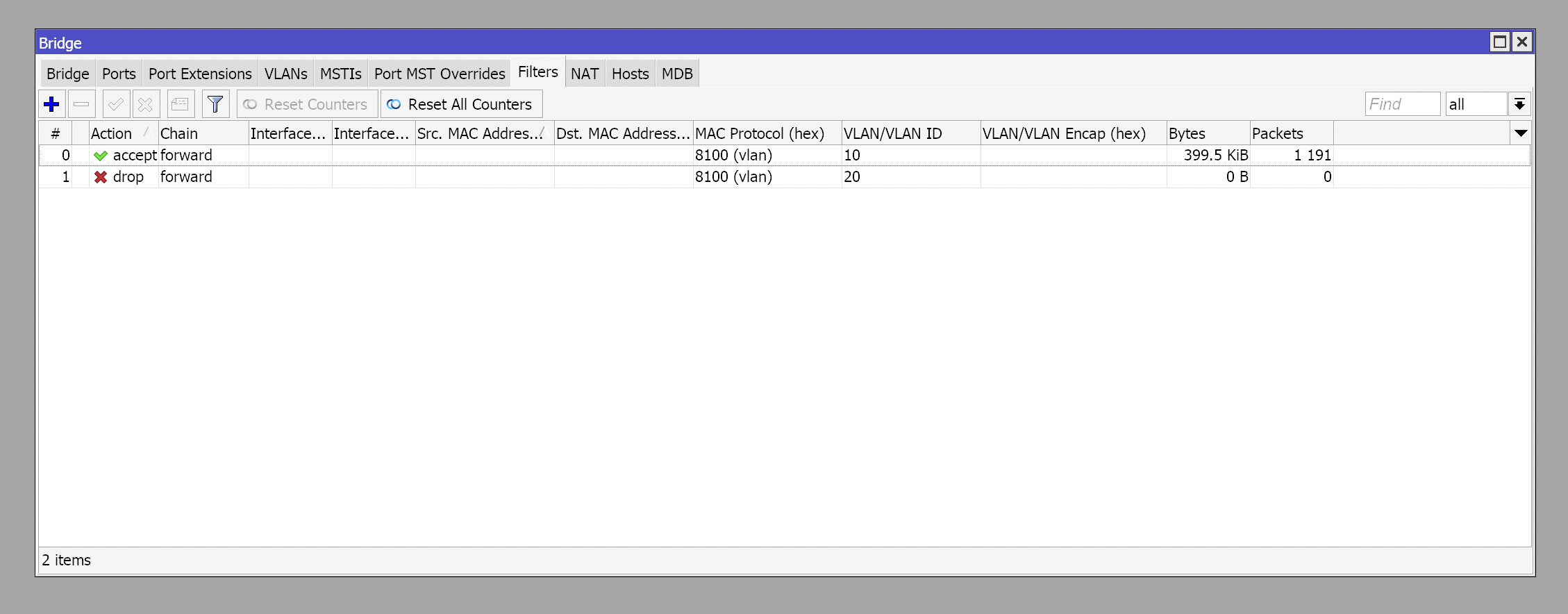
add action=accept chain=forward in-bridge=bridge0 mac-protocol=vlan \
    out-bridge=bridge0 vlan-id=10
add action=drop chain=forward in-bridge=bridge0 mac-protocol=vlan out-bridge=\
    bridge0 vlan-id=20
/interface bridge port
add bridge=bridge0 edge=no interface=sfp-sfpplus2 priority=0 restricted-role=\
    yes restricted-tcn=yes
add bridge=bridge0 edge=yes interface=ether1 priority=0 pvid=10 \
    restricted-role=yes restricted-tcn=yes
add bridge=bridge0 edge=yes interface=ether2 priority=0 pvid=10 \
    restricted-role=yes restricted-tcn=yes
add bridge=bridge0 edge=yes interface=ether3 priority=0 pvid=10 \
    restricted-role=yes restricted-tcn=yes
add bridge=bridge0 edge=yes interface=ether4 priority=0 pvid=10 \
    restricted-role=yes restricted-tcn=yes
add bridge=bridge0 edge=yes interface=ether5 priority=0 pvid=10 \
    restricted-role=yes restricted-tcn=yes
add bridge=bridge0 edge=yes interface=ether6 priority=0 pvid=10 \
    restricted-role=yes restricted-tcn=yes
add bridge=bridge0 edge=yes interface=ether7 priority=0 pvid=10 \
    restricted-role=yes restricted-tcn=yes
add bridge=bridge0 edge=yes interface=ether8 priority=0 pvid=10 \
    restricted-role=yes restricted-tcn=yes
/interface bridge settings
set use-ip-firewall=yes use-ip-firewall-for-pppoe=yes \
    use-ip-firewall-for-vlan=yes
/interface list member
add interface=ether15 list=mgmt
add interface=vlan10 list=trust
add interface=bridge0 list=internal
add interface=pppoe0 list=untrust
add interface=vlan20 list=guest
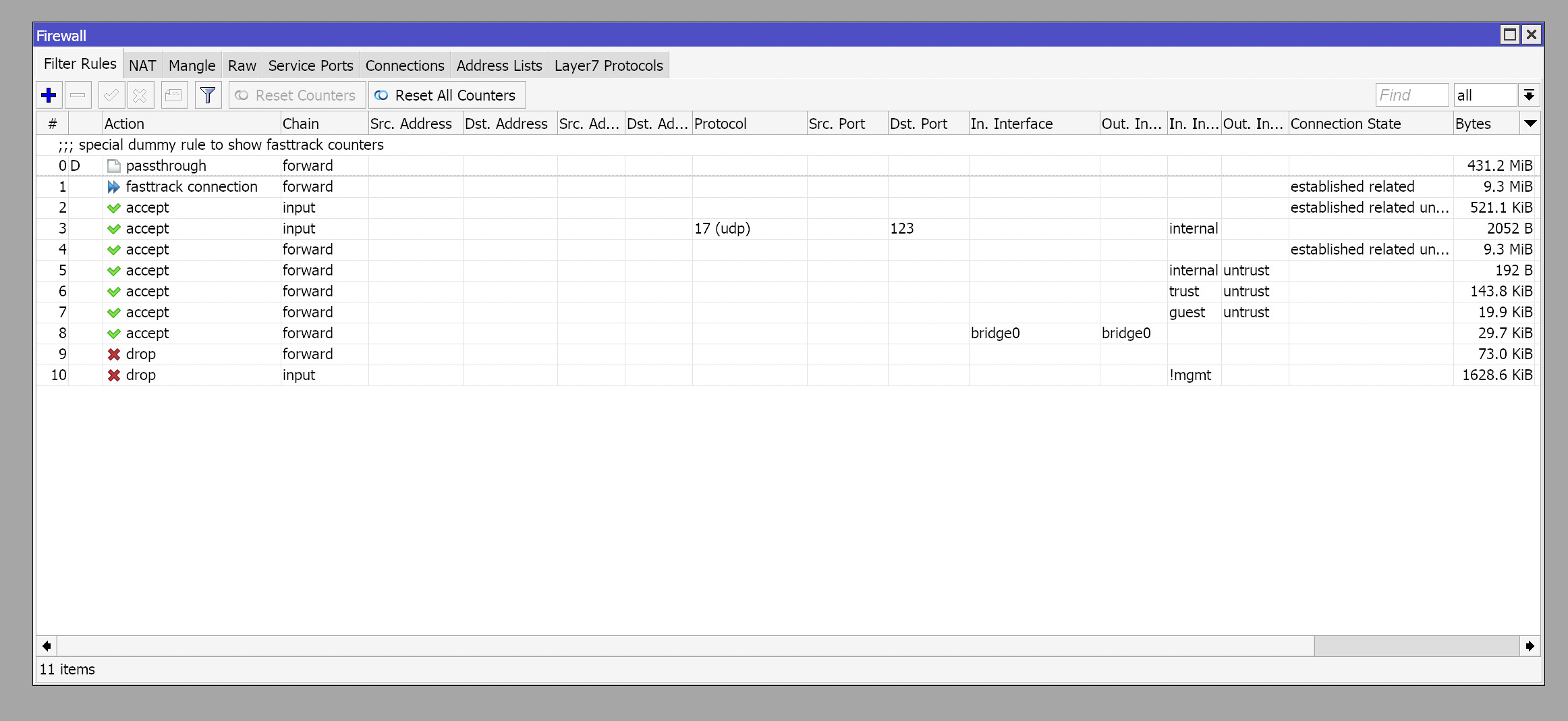
/ip firewall filter
add action=fasttrack-connection chain=forward connection-state=\
    established,related hw-offload=yes
add action=accept chain=input connection-state=established,related,untracked
add action=accept chain=input dst-port=123 in-interface-list=internal \
    protocol=udp
add action=accept chain=forward connection-state=\
    established,related,untracked
add action=accept chain=forward in-interface-list=internal \
    out-interface-list=untrust
add action=accept chain=forward in-interface-list=trust out-interface-list=\
    untrust
add action=accept chain=forward in-interface-list=guest out-interface-list=\
    untrust
add action=accept chain=forward in-interface=bridge0 out-interface=bridge0
add action=drop chain=forward
add action=drop chain=input in-interface-list=!mgmt

vlan filter.png
rule 09 logs.png
interface list.png
firewall rules.png

What prompted you to use bridge filters vice standard filters? Unique requirement?

I prefer setting it up like a dedicated firewall. So default to drop all traffic even from a layer 2 port need to be implemented.

‘‘I would like to set it as a special firewall. ‘’
Special?
In order for the mikrotik router to work stably and the traffic flow to be correct, we use default’’ firewall rules as a basis for everything. This is a kind of standard. You can supplement this default standard with your own rules, records for your needs, etc.
What you describe, that you want to create a special firewall, I highly doubt that it will work stably-correctly-and safely, because even now you already have a firewall problem.
If your task is to create 2 VLANs and for it all to work stably, then don’t bother with all kinds of inventions.

There is no default firewall rule for my CCR2004. Also, if a function is not implemented correctly, why would MikroTik put a button there and let user use the feature? Just remove the button and the command to activate this feature and call it a day.

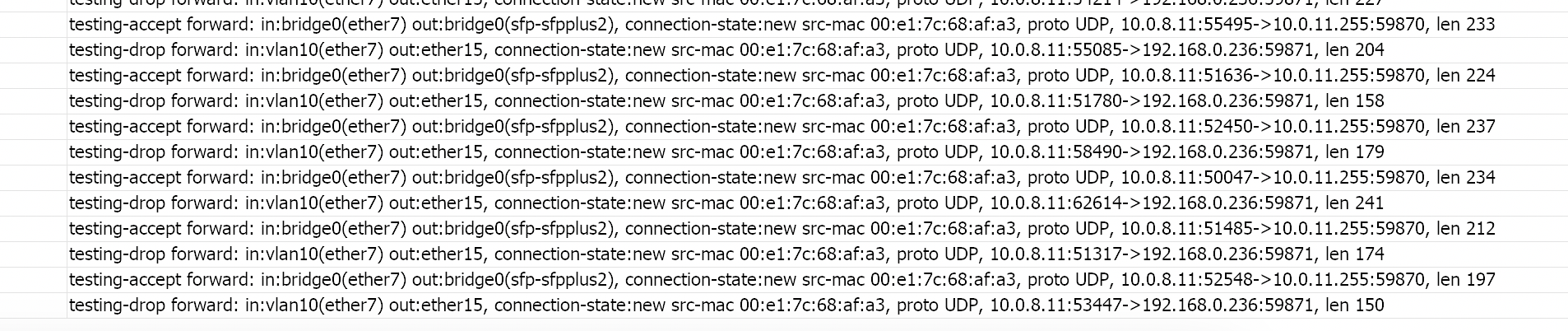
After further testing, the firewall can sometimes also pickup the traffic from vlan interfaces that are under the bridge.

testing-accept:

add action=accept chain=forward in-interface=bridge0 \
    log=yes log-prefix=testing-accept out-interface=bridge0 src-address=

testing-drop:

add action=drop chain=forward log=yes log-prefix=testing-drop

screenshot.png
2.png

Okay to confirm, you have no real knowledge of MT OS and how firewall rules work, and you are going by the assumption if a button exists I should use it.
Good to know. Hopefully others will chime in, as I will be assisting others
https://help.mikrotik.com/docs/display/ROS/Building+Your+First+Firewall

never mind

samurai84,
Am I trolling? Sorry friend, but maybe we didn’t understand each other. You have a very strange firewall configuration structure, that’s why I also asked about the “special” firewall. There is nothing irrelevant there. Sorry for my English, it’s not my native language.
Maybe the following information is useful for you- https://help.mikrotik.com/docs/pages/viewpage.action?pageId=103841836#CRS1xx/2xxseriesswitchesexamples-PortBasedVLAN
or - https://know.al/en/mikrotik-vlan-and-bridge-configuration/

Well, things are clear then, I thought you were mocking me using a router to set it up as a “special” firewall. No worries, sorry for my replies. Basically I setup the firewall to drop any forward or input traffic except the explicitly allowed input/forward traffic. After I turned on the bridge firewall, to allow traffic from port a to port b within vlan 10, the firewall rule that drops every forward traffic blocks that traffic, and I thought well, I need a rule that allows traffic from vlan10 in to vlan10 out. However, strangely, after setting up a firewall rule explicitly allow vlan10 in and vlan10 out, the drop-all rule is still picking up the traffic and blocking the traffic from vlan10 → vlan10. After further investigating the logs generated by the rule, the router is picking up traffic from vlan10 and it considers the traffic which comes from vlan10 is coming from bridge0. That’s really weird, and that’s what confuses me. Though the problem can be solve by adding a rule explicitly allow traffic from bridge0 to bridge0, but still, why ROS is thinking the traffic that comes from vlan10 is from bridge0 because in my setup bridge0 itself is actually vlan1 untagged, vlan10 and 20 are more like sub-interfaces under bridge0.