I noticed these strange messages on one of my routers today for the first time:
“ether2: bridge port received packet with own address as source address (mac), probably loop”
After poking around for a while I figured out my VLAN interface, ether2 interface and bridge interface all have the same MAC address.
Is this the reason these messages appear? How do I fix it?
I tried hitting “Reset MAC Address” on the eth2 interface but nothing happens.
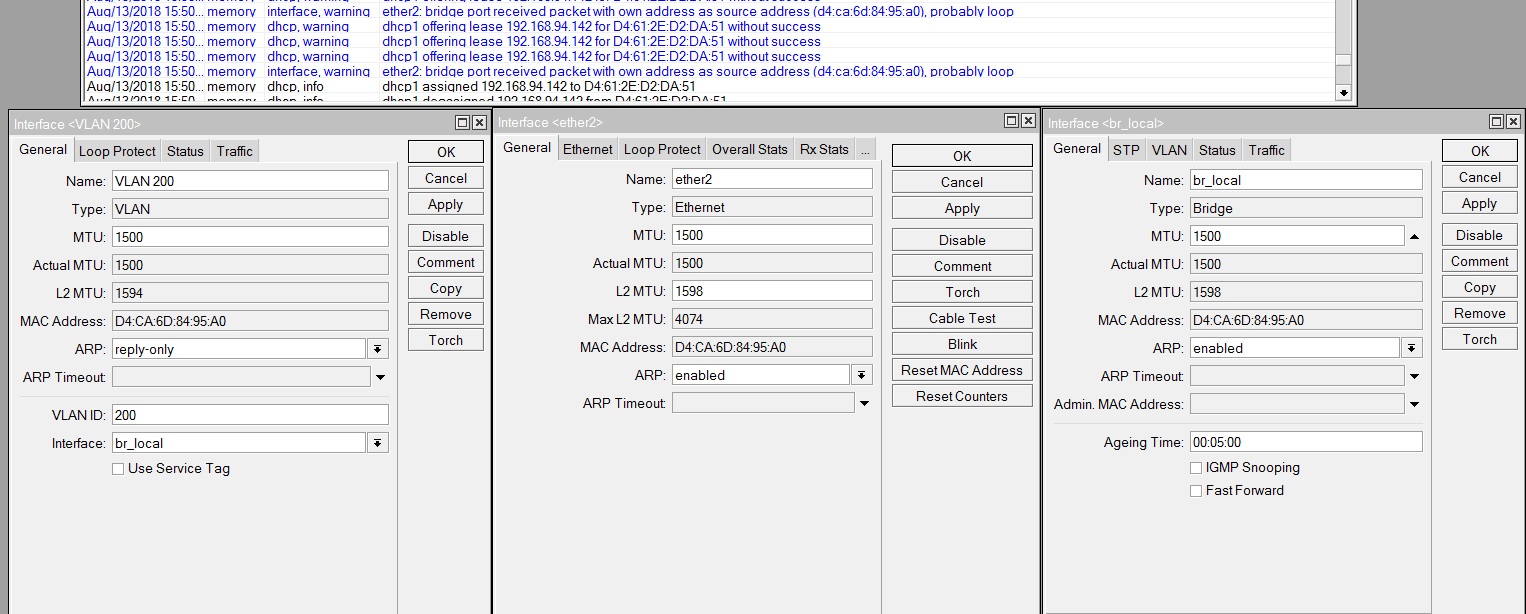
The duplicate MAC address behaviour is expected.
When you create a bridge, it requires a MAC address and by default it will use the same MAC address as one of its slave.
This behaviour does not affect packet processing since packet handling for this port is overridden by the bridge (master) interface.
The same principles can be applied to a VLAN interface. It will have the same MAC address as the master interface, though in VLAN interface scenario the packet is received by the master interface and then it checks if a packet has a VLAN tag. If the VLAN tag and VLAN ID matches, then only in that case the packet is captured by the VLAN interface and the MAC address is not used at the same time by both of these interfaces.
Now, if you decide to add this interface to a bridge, which is very likely that you did judging from the error message, then you are creating a loop inside your own bridge. Check this guide to make sure you have not used a configuration that is known to cause such issues:
https://wiki.mikrotik.com/wiki/Manual:Layer2_misconfiguration#VLAN_in_bridge_with_a_physical_interface
The error message is NOT related to the fact that your 3 interfaces have the exact same MAC addresses, it is supposed to be that way.
Don’t worry is not a loop. Is a mikrotik bug introduced ~ 2 years ago that appears random on many models. It is hapening to me on RB3001, RB100AHx2, POwerBox etc. It appears and disappears on its own with no configuration change.
Could this misconfiguration be the reason the DHCP servers keeps deassigning and assigning IPs to vlan200 clients?
My phone and a few other clients constantly keep getting dropped from the WiFi.
VLAN tag is given by 12 Unifi APs that all have two wireless networks configured. DHCP is off on unifi AP so forwarded to mikrotik
One network is for guests: 192.168.94.0/24 with VLAN 1
Other network is private: 192.168.95.0/24 with VLAN 200
eth1 is connected to the ISP router which is in bridge mode
Unifi APs are connected to eth2-4 via unmanaged switches
Here is the relevant configuration:
/interface bridge
add fast-forward=no mtu=1500 name=br_local protocol-mode=none
/interface ethernet
set [ find default-name=ether1 ] name=ether1-gateway
/interface vlan
add arp=reply-only interface=br_local name="VLAN 200" vlan-id=200
/ip pool
add name=dhcp_pool1 ranges=192.168.94.20-192.168.94.200
add name=vlan200pool ranges=192.168.95.2-192.168.95.254
/ip dhcp-server
add address-pool=dhcp_pool1 authoritative=after-2sec-delay disabled=no \
    interface=br_local lease-time=1d name=dhcp1
add add-arp=yes address-pool=vlan200pool authoritative=after-2sec-delay \
    disabled=no interface="VLAN 200" lease-time=1d name=vlan200dhcp
/interface bridge port
add bridge=br_local hw=no interface=ether2
add bridge=br_local hw=no interface=ether3
add bridge=br_local hw=no interface=ether4
/ip address
add address=192.168.94.1/24 interface=br_local network=192.168.94.0
add address=192.168.95.1/24 interface="VLAN 200" network=192.168.95.0
/ip dhcp-server network
add address=192.168.94.0/24 dns-server=192.168.94.1 gateway=192.168.94.1
add address=192.168.95.0/24 dns-server=192.168.95.1 gateway=192.168.95.1
And where is the most relevant part of config: “/interface bridge vlan”?
I dont have any such configuration. It is my understanding you only need this if you use bridge filtering.
On a side note, I restarted all devices yesterday and didn’t receive any such messages in the log since then.
InoX - this bug has been fixed a long time ago and this warning message indicates a problem in network’s topology or configuration.
shunkica - by logic the warning tells you that this device has received a packet that it sent out, this means that another device in your network has decided to send back a packet to a port that it received on the same port, which should never happen. Check the configuration on other devices in your network. DHCP lease reassigning might indicate that your network is receiving tagged BPDUs, which violates IEEE 802.1W, also make sure that you are running the latest software on all your devices.
Ah, I see. So you just use the bridge in a form of another dumb switch.
It should work fine.
Once again: each of the Unifi APs sends two types of traffic - untagged for guest network, and tagged vlan-id=200 for private network, right?
Then, I can think of only one theoretical problem - using vlan-id=1, as it can be treated differently by equipment from different vendors.
So I would’ve made the config symmetrical: by creating another VLAN interface on the bridge (with say vlan-id=100), moving dhcp1 to it and making the UniFi APs tag guest traffic with this vlan-id.
What about the Unifi APs themselves, should I leave them on dhcp1 server with vlan1?
The loop error message hasnt appeared since I made the first post by the way, without me making any configuration changes.
DHCP deassign-assign happens still on both DHCP servers, but this could be due to devices roaming from one AP to another as described here
http://forum.mikrotik.com/t/assigned-deassigned-log/75222/1
I am still not convinced though.
I think it’s better to have the APs themselves in private VLAN (or in another one, purely for management), but not in the guest one. 