Hi,
I’d like to ping the PC1 from PC2 and use the bridge. Do the ethernet cards on the pc with RouterOS need IP addresses to make the bridge work?
Thx 

Hi,
I’d like to ping the PC1 from PC2 and use the bridge. Do the ethernet cards on the pc with RouterOS need IP addresses to make the bridge work?
Thx
No, you only need to add the ethernet interfaces to the bridge.
You should be able to see the MAC addresses of the PCs in Bridge->Hosts.
Is your problem solved?
Kind of, I’ve tried it in VirtualBox using internal networking and the bridge sees the MAC addresses of the PCs but the ping still doesn’t work (firewalls are off).
But thanks for your answer, jacekes. ))
I think client isolation is on
/interface ethernet
set [ find default-name=ether1 ] default-forwarding=yes
set [ find default-name=ether2 ] default-forwarding=yes
Caution
If you change that take first backup from your configuration to set back if you have problems
this option should’t be for wireless interfaces??? “default-forwarding” does not exist on ethernet interfaces
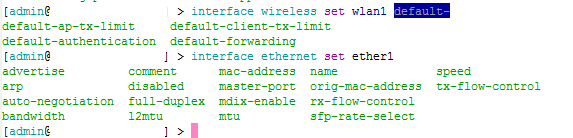
I doubted it but now I am sure Thanks to correct me
If I may hijack this thread, as the original poster appears satisfied, can I as a beginner ask about routing on a bridge?
I understand that a bridge essentially just accepts a packet on one interface and spits it out the other so that routing decisions shouldn’t be necessary, and that indeed the interfaces on a bridge don’t even need IP addresses (is that true?). However I don’t understand the following:
Isn’t it wise to have an address on the bridge so’s you can Winbox into it if anything needs checking or changing - ie suppose you want to check the health of the wireless card/signal, or scan from it to see if the other end of the wireless link has gone down?
If you have such an address for access don’t you need a routing entry of some sort so’s the bridge device itself knows which interface to spit replies to such enquiries out of?
If a wireless link beyond a bridge goes down doesn’t everything just get dropped silently by the bridge as it has nowhere to go? How do you actually know when such a thing has happened, beyond the fact that your browser is just sitting there on the screen with the little icon going round and round and round and round?
A bridge can have an ip assigned to it. A bridge is just a virtual interface which you can use with almost anything just like a physical interface.
OK, thanks.
But what’s the answer to Qs 2 and 3?
Are there any special problems, or steps to be taken, in order to bridge two wireless interfaces on the same device? Can it even be done?
I believe i did. A bridge acts just like a physical interface would. If a physical interface silently drops packets than a bridge would too. A bridge doesnt require a seperate route if it is connected to an interface. It is like using a patch panel.