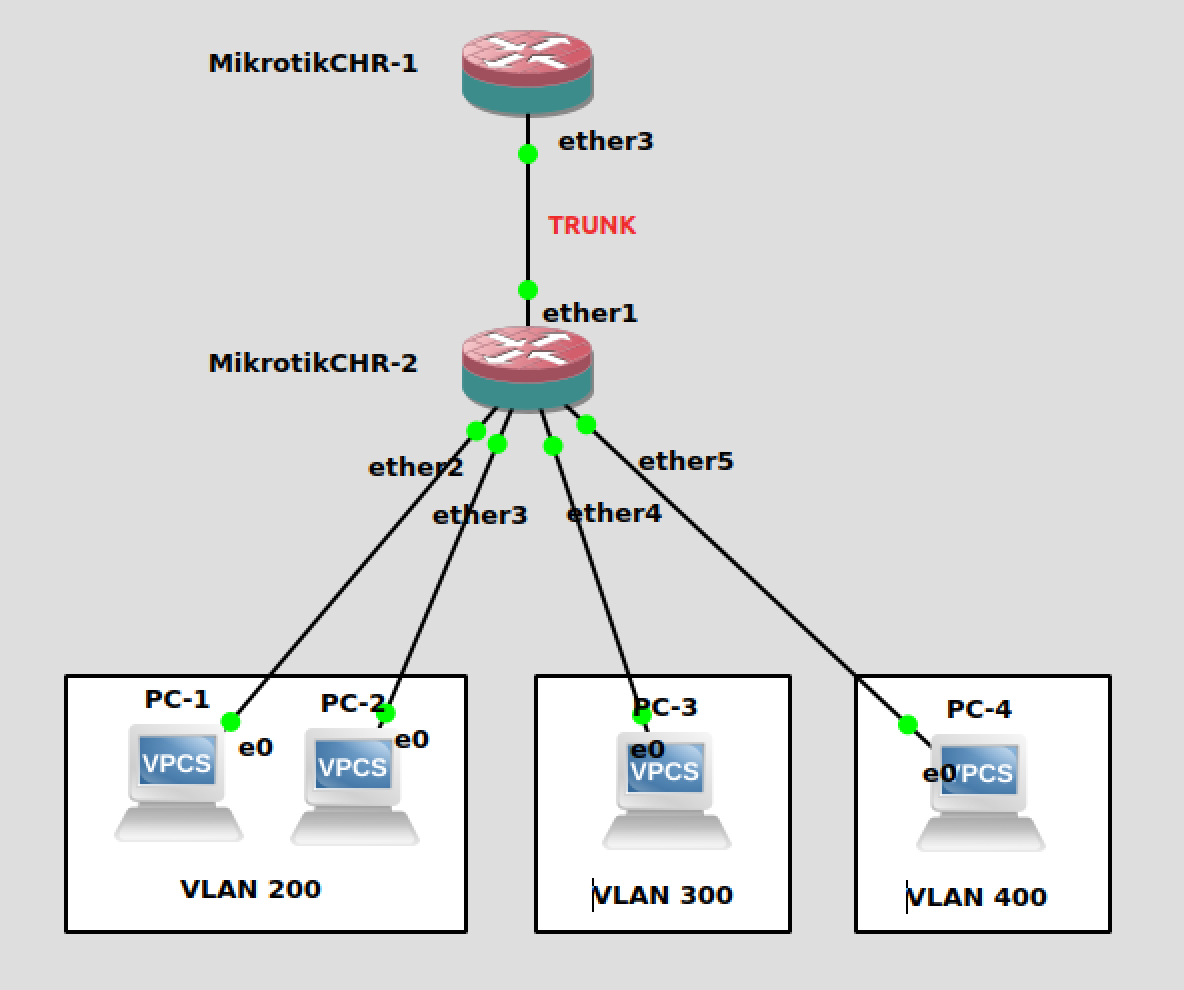
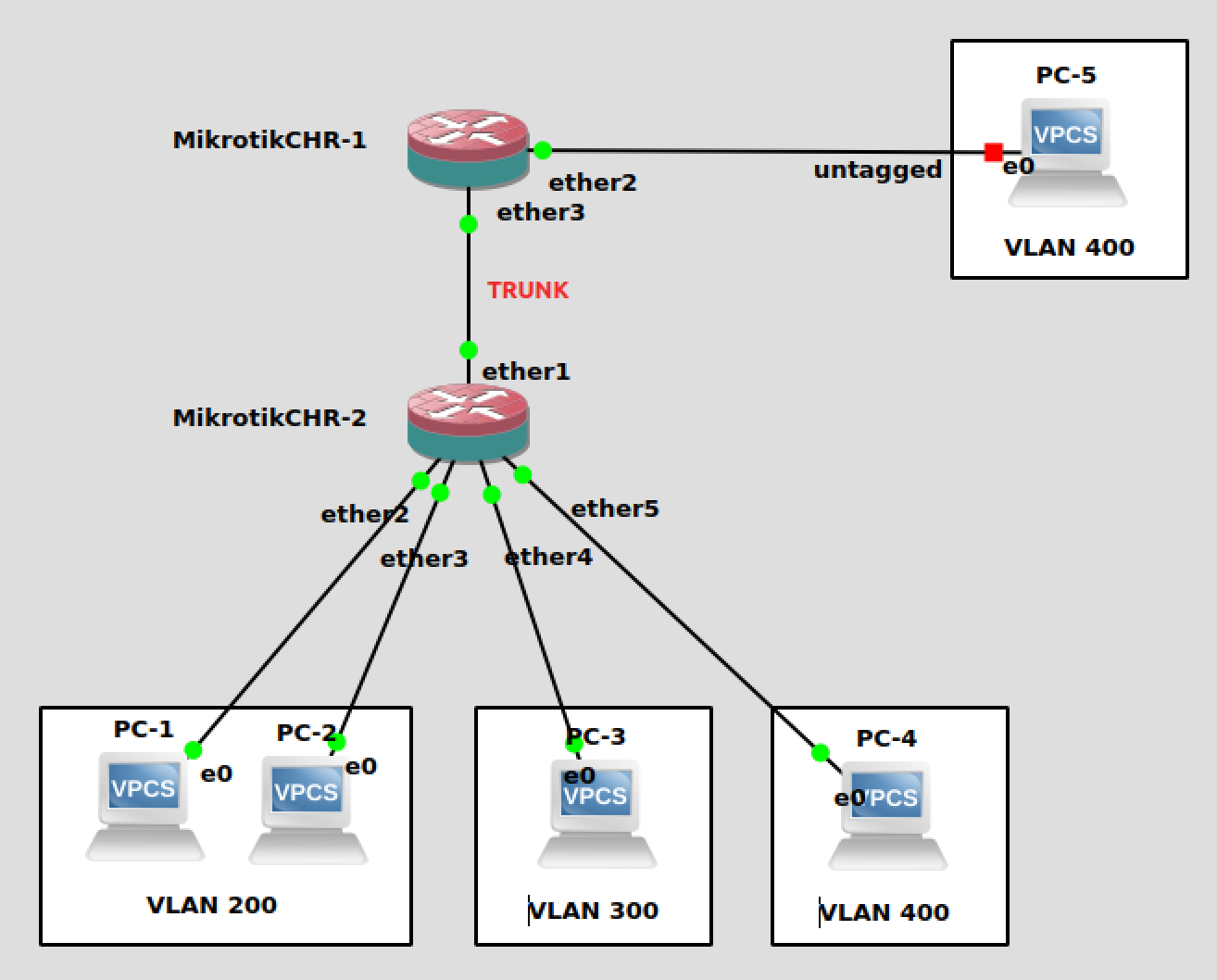
This all works absolutely fine. However, I’m struggling to work out how to add PC-5 untagged to ether2 of CHR-1 like this:-
I have tried a number of options but PC-5 would never get an IP from DHCP.
It has certainly crossed my mind that I should only be using ‘Bridge VLAN Filtering’ on CHR-2 and use the more traditional VLAN setup on CHR-1 but is it possible to use ‘Bridge VLAN Filtering’ on CHR-1 in this way? If so, how?
This part on CHR-1 is wrong: the interfaces should be created on top of the bridge, not ether3.
Then you add ether2 to the same bridge1, set PVID=400 for it and add it as untagged in /interface bridge vlan.
Thanks for coming back to me on this. I changed just part 1 of your advice under /interface vlan so the interface is bridge1 for each vlan but now PC-1 through 5 no longer get an IP from DHCP. CHR-1 currently looks like this:-
In the /interface bridge vlan node, you have to put the bridge itself to the list of its tagged (or untagged in some cases) members if you want to process the frames locally, e.g. by /interface vlan.
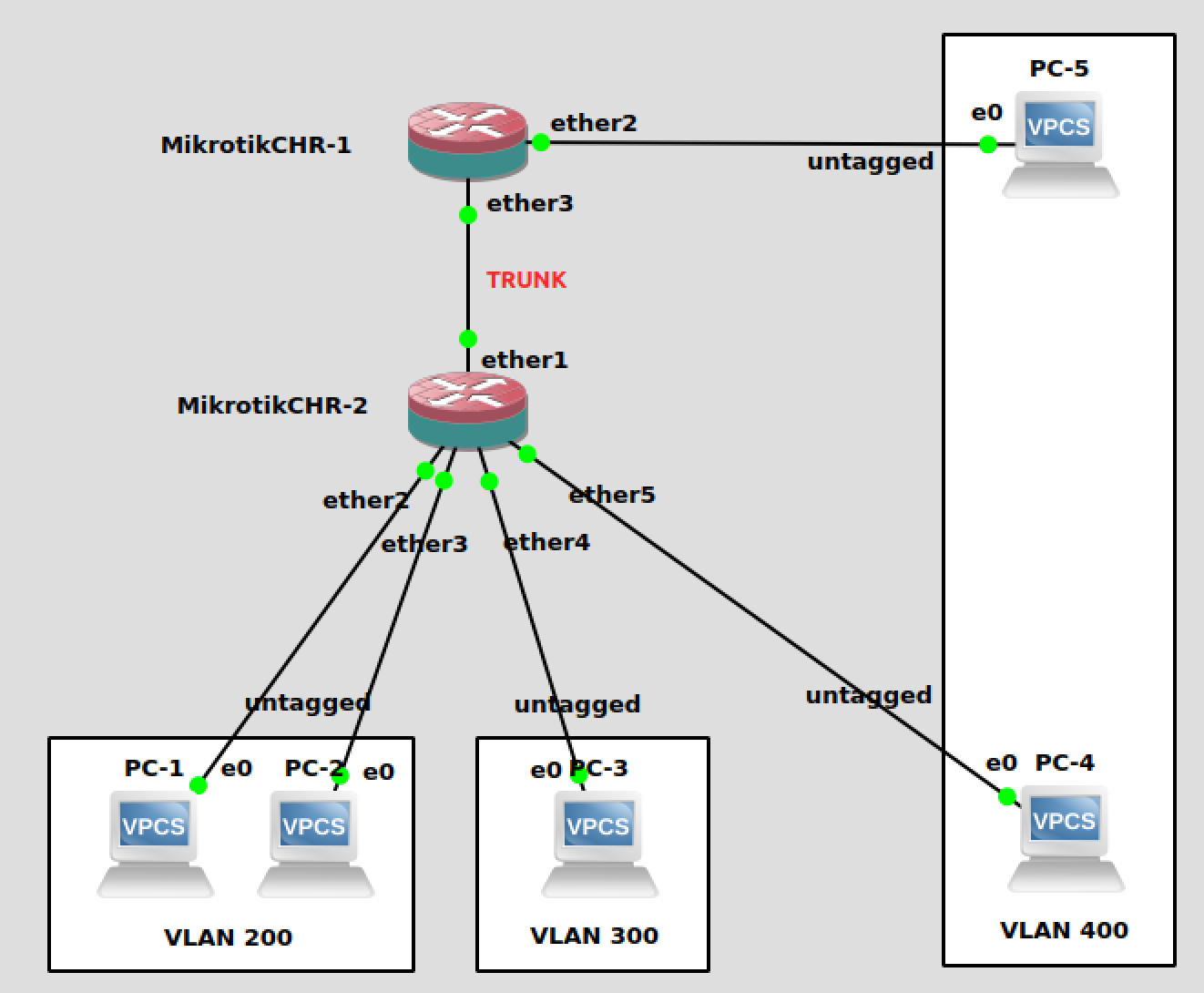
Thank you to both @xvo and @sindy’ for your help, it’s working perfectly. For completeness for anyone else in the future, I have included the final working configs and diagram are below:-
CHR-1
one question regarding this topic.
So as soon as VLAN filtering is enabled traffic will go through CPU?
i mean if i want to get ether and wlan i have to tick VLAN Filtering
in my case i have 3 routerOS, and the thing is i need to run VLAN on ether and wlan. So acording that traffic will go through CPU,is that correct?
I don’t know any Mikrotik model on which frames between wireless and Ethernet interface would not go through the CPU, regardless whether vlan-filtering is activated or not. Other than that, there is a table on the wiki regarding bridge (I’m writing from a mobile, you’ll have to find the exact page on your own) which gives an overview regarding which features are compatible with hardware forwarding between Ethernet ports for which switch chip type.
What I found very confusing when setting up my bridge with VLAN filtering is: when you specify a certain port as untagged in the /interface bridge vlan definition, you STILL need to set the pvid to the same value in the /interface bridge port definition!
This is the case in some switches too. It probably means the pvid on the port definition is used for input tagging and the untagged membership in the vlan definition is four output, but I cannot think of a situation where you would use this.
In my Netgear switch the same port can be untagged member of several different VLANs and the pvid defines what tag the received packets get, and I think the configuration of the MikroTik bridge VLAN filtering allows the same thing, but why would you want that?
In other switches I know the configuration either sets up VLANs and you define the ports that are tagged and untagged members of that VLAN, where each port can be untagged for only one single VLAN, or you set up the tagged and untagged VLAN memberships for each port (so a port can obviously only be untagged for one VLAN).
Not really, VLAN filtering itself will not cause CPU to process all packets on CRS3xx series, but will on others due to disabled HW offloading. You also have to take into consideration other parameters, for example:
This will allow VLAN300 packets to be received by CPU for CRS3xx series, but does not necessary mean that all packets will be processed by CPU. CPU will receive/process only broadcasts, unknown unicasts, packets which destination is the bridge itself etc.
Is there an explanation why “VLAN filtering itself will not cause CPU to process all packets on CRS3xx series, but will on others due to disabled HW offloading.” even when those other models can do the same thing WITH HW offloading when you configure it in the switch menu instead of the bridge menu? Can’t the bridge configuration just silently configure the switch when HW offloading is requested and only VLAN tagging is requested? (no spanning tree, no bridge filtering, etc)
My good old Dlink switch has this functionality, there it’s called “assymetrical VLAN”. I used to use it as kind of L2 firewall or split horizon … For example: on one port I have connection to my smart TV. I want this TV to be member of LAN (to be able to play media served by my DLNA server) but I don’t want it to have internet access (because one can’t disable automatic firmware updates nor I trust the phoning-home appliances). Surely this can easily be achieved using decent firewall (which my router at the time didn’t really have) or by port security features (such as horizon - which the said switch doesn’t have) or you can do it using the multi-untagged vlan feature. For example:
#let's assume that router/firewall is some other, non-VLAN device
/interface bridge port
add bridge=bridge interface=router pvid=10
add bridge=bridge interface=TV pvid=11
add bridge=bridge interface=DLNA pvid=12  # DLNA server
add bridge=bridge intefface=LAN pvid=12  # some other LAN host
/interface bridge vlan
add bridge=bridge untagged=DLNA,LAN vlan-ids=10 # router can send packets to DLNA and LAN ports
add bridge=bridge untagged=DLNA,LAN vlan-ids=11 # TV can send packets to DLNA and LAN ports, but not router
add bridge=bridge untagged=router,DLNA,LAN,TV vlan-ids=12 # DLNA and LAN can send packets to all other devices
[edit] the last config line was missing interface TV as untagged member of VLAN 12.
@anav, you’re such a moving target (and my eyes are getting old as well) so it’s hard to focus on you … but anyway, I was just jumping in to explain @pe1chl the possible use case of this “huh?” feature. You boys are doing well so I’ll stop to interfere.
So I didn’t react to your post. I’ll deny that it might be due to oversight from my side
Seriously though: yes, you’re right (and that’s why I didn’t react … so sorry I deprived you of a well deserved pat on your back ).
OK, kidding aside: the only reason that it might actually work for @harvey is that PC-5 might be windows and @sindy explained more than once that the first thing many windows drivers do for ingress packet is rip off all VLAN headers. So packets in direction CHR1-> PC-5 pass due to this driver feature and packets in the opposite direction get tagged by CHR1 on ingress due to pvid setting.

 See my germane question above the fluffy D-stink post.
 ).
).