Hi,
I would want use a bridge eth2 and wlan2.
wlan2 is connected on a Wi-Fi AP (box), and eth2 on my computer.
I would want get a DHCP of my box on my computer.
it’s possible ? how make ?
Thank you
Hi,
I would want use a bridge eth2 and wlan2.
wlan2 is connected on a Wi-Fi AP (box), and eth2 on my computer.
I would want get a DHCP of my box on my computer.
it’s possible ? how make ?
Thank you
Just create dhcp server on bridge interface and put in this bridge eth2 and wlan2 interfaces. Should work.
I was hesitating to answer because the OP can be read in several ways, including the one that the 'Tik acts as an AP client (STA) for a PC which doesn’t have its own wireless card, and in this case, the DHCPDISCOVER from the PC will not reach the server with the PC’s own MAC address as the 802.11 frames sent by the STA always have STA’s own MAC address as source.
So in this case some type of wireless bridge would be necessary, which requires that both the AP and the STA are Mikrotiks, or a NAT setup where the Mikrotik acting as STA gets an IP address from one subnet via the AP and assigns the PC an IP address from another subnet, routes between the two and src-nats the PC’s outgoing traffic so that the AP would route the responses properly without knowing anything about the subnet between the 'Tik and the PC.
This is my configuration :
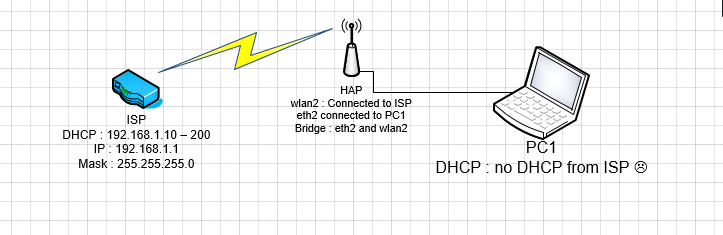
As the wireless AP is ISP’s one, the first question is whether the ISP’s intention is to provide more than a single address to each connected customer.
As I’ve written above, a standard wireless protocol does not allow to have several DHCP clients behind a wireless client, because the DHCP protocol assigns the IP addresses based on MAC addresses of the devices and the standard wireless protocol does not have separate fields for the MAC address of the wireless client itself and the device behind it.
So you can create a bridge between wlan1 and ether2 but DHCP won’t work anyway.
But if your ISP uses Mikrotik as well and is willing to provide you multiple addresses, you could agree on connecting your client in “wireless bridge” mode which is a proprietary one (hence both devices must be from the same manufacturer) and supports four MAC addresses over the air (source address, transmitter address, receiver address, destination address). The standard protocol assumes that source and transmitter is the same for frames sent by client, and that receiver and destination is the same for frames sent by AP.
Otherwise, you have to make the wlan a WAN interface, running a DHCP client receiving the address from the ISP, and ether2 a LAN interface in a separate IP subnet and either run a DHCP server on it or configure also the PC manually for another address from that subnet, and use NAT on the WAN interface.
And if you really need your PC to behave almost as if it had the IP address assigned by the ISP directly on itself, you have to use dst-nat on your Mikrotik, creating a setup which is called DMZ (de-miitarized zone).
Another option could be to set up the bridge between the wlan and ether2 interfaces and play a bit with bridge firewall rules, namely, L2 NAT, where the Mikrotik itself would not run a DHCP client and you would use the L2 dst-nat to forward the DHCP responses coming to the MAC address of the Mikrotik to the MAC address of the PC, but I have never tried this practically. This would work for a single device, as from the ISP’s AP perspective, your whole network is seen with the MAC of the Mikrotik’s wlan interface so can get a single IP address assignment via DHCP (except if the ISP would use wireless bridge mode as said above).
Hi,
Thank you for your reply,
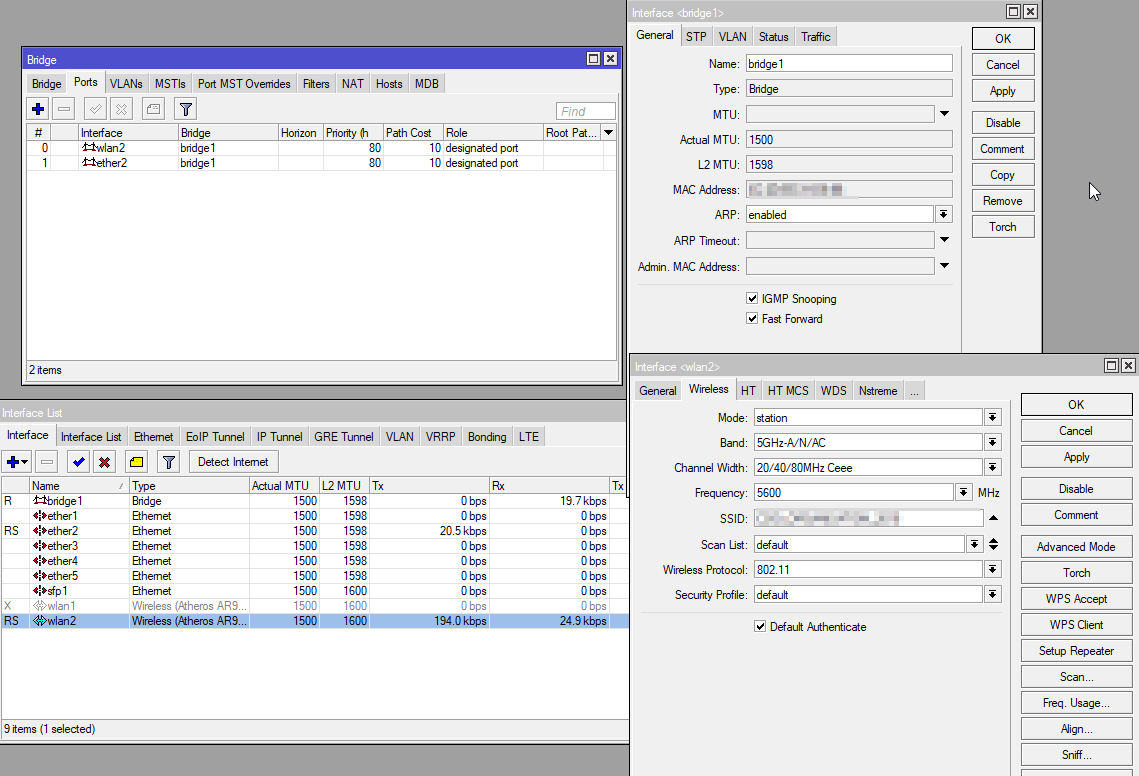
What I would like to achieve is very simple, I just want to add the wlan2 interface on the bridge1 so that my computer, which does not have a Wi-Fi card, is on the same network as the ISP box.
I just want to use the HaP, like a Wi-Fi → ethernet converter.
But that does not work … my computer does not get IP from DHCP server of the ISP box 
My HaP :
Thank you for your help.
Best Regards
Maybe station-pseudobridge-clone mode is what you’re looking for? I don’t have anything to test it with, but from description it could be it.
Yes. I’ve just spent quite some time finding out how to do that using bridge dst-nat rules, dealing with DHCP and ARP, and it comes out it is actually readily available in ROS 
In station pseudobridge clone mode, the Wi-Fi not connect to Wi-Fi of my ISP box
If you didn’t do it already, try to manually enter the MAC address (station-bridge-clone-mac=<computer’s MAC address>), to make sure that nothing else is chosen automatically.
Hi Sob,
It’s working
I do not understand why in bridge wlan with lan is so complicated? because with this solution, I can only put one PC, if ever want to put several comment I do? I tried to put the MAC address of the bridge in bridge-bridge-clone-mac, but it does not work …
Do you have any suggestions?
Best regards.
Because
The standard wireless protocol assumes that source and transmitter is the same for frames sent by client, and that receiver and destination is the same for frames sent by AP.
and therefore it saves frame space by not transmitting them separately. Therefore, the wireless protocol works as a kind of “L2 NAT”, shadowing the MAC addresses of all devices behind the wireless client by the one of the client. This prevents DHCP and ARP from working properly.