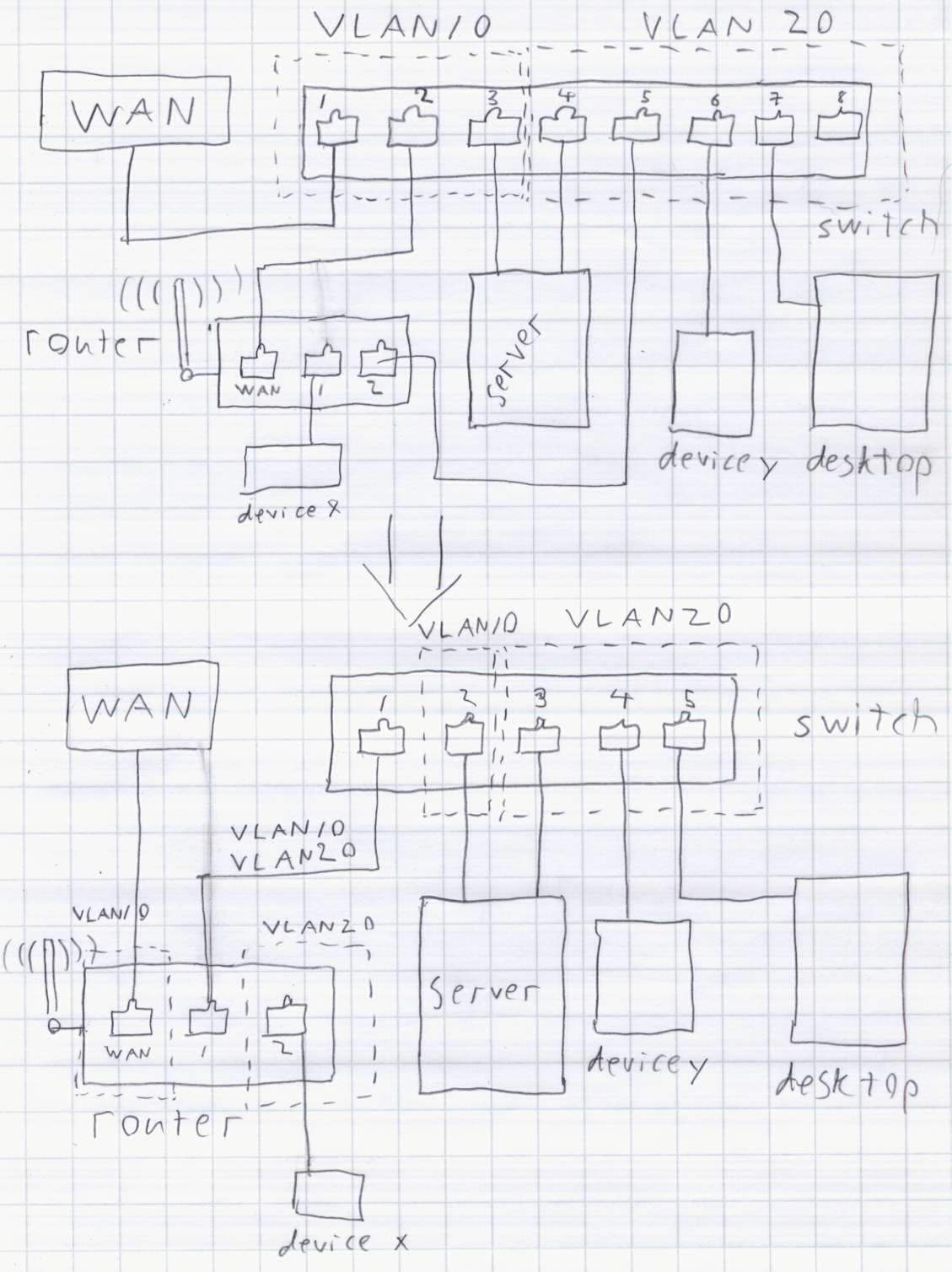
Hello, I’m using hAP ax lite as an AP/router, and I’d like to bridge WAN to a specific VLAN as I want that the virtual machines in the server are directly visible to outside world. Currently I’m doing that with a 8-port gigabit managed switch, which I have basically divided into two separate switches by setting ports 1-3 as access ports for VLAN10 (WAN) and 4-8 for VLAN20 (LAN). This has worked well enough, but I’m upgrading my LAN to 2,5G, and managed switches that have more than 5 ports are pretty expensive. So I bought an Ubiquiti Flex Mini 2,5G, which has five ports. I could solve the issue by using a separate gigabit switch for the WAN side, but I figured that I could avoid having two physical devices by utilizing VLANs.
Here’s a diagram of the layout. The switch is located in a metal cabinet that has the patch panel. WAN ethernet comes directly into the patch panel, and there are two cables going to each room. One room has router and device x, second room server (two NICs, one for WAN & virtual machines and one for LAN & NAS use) and third desktop and device y. I can’t put the router into the metal cabinet, because then wifi wouldn’t work.
Configuring the switch is straightforward enough, port 1 is trunk port and rest are access ports for respective VLANs. But how should I configure the hAP ax lite? I get that WAN should be access port for VLAN 10, one of the ports should be trunk port for VLAN10 & VLAN20 and the rest should be access ports for VLAN20. I was reading this guide, and it seems to be a bit different situation, as it’s describing how to configure a switch. Apparently NAT is configured as a bridge in the router, so would simply applying instructions in that guide mess it up? Ie. should I add another bridge that simply defines the trunk and access ports, or should I modify the existing bridge config?
I use a similar setup at home with RB5009 exposing via trunk some ports further down on L009 directly to WAN side of things (mainly for IPSEC connection to Azure and testing stuff).
Just look at it as another managed switch.
Define VLAN-WAN, setup your router functions on that interface instead of the real WAN port.
Define on which ports VLAN-WAN needs to be handled. Define your other required VLANs and access/trunk ports.
And that should be it.
This might be a dumb question, but do you mean that I would configure the switch in the AP as described earlier, and modify the routing to use VLAN10 as WAN and VLAN20 as LAN instead of the physical interfaces that came with the default config? I’m new with Mikrotik products, so I’m not familiar with a lot of the stuff.
I dont understand the first post.
Why cannot you simply make the devices available via port forwarding.
How can you expose devices to the internet if you only have one WANIP address, dont you need a block of public IP addresses??
I guess I could use port forwarding for everything but I don’t want to. ISP gives a few public IP addresses for free (with DHCP) so that’s not a problem.
Looks like the “how” part is what I haven’t understood yet. When I configure VLAN for ports in the bridge and set vlan-filtering on, I lose access to the management interface. I don’t understand why this happens, I’d imagine it would just drop access to WAN as routing hasn’t been modified yet.
Another thing, how do I modify the routing to use VLANs? I can create a new interface for the VLANs in Interfaces->VLAN tab and I guess I could change interfaces in IP->Address tab to the appropriate VLANs, but if I do that I also lose access to the management interface. This makes more sense as vlan-filtering is still turned off.
remove one port from the bridge example ether5 and use that as your management interface while you are trying to get your head around it, so that you won’t get lockout if bridge vlan filtering was on and not yet configured the switch to your liking and access the device via mac address in winbox, just my 0.02$
I got the LAN part to work fine, but I still don’t get WAN connection from the switch port that should have it. I wonder if there’s some firewall rule that’s blocking it or something?
EDIT: Looks like I had misconfigured the Ubiquiti switch. I tried setting up the old managed switch with the same VLAN config I had intended, and now everything is working… so I guess the router itself is now properly configured.