Broute table?

Greetings,

Are you planning to get back broute table funkcionality? This option disappeared in ROS 3.15:

%<—
*) bridge firewall broute table is removed - it did not work as expected anyway;
%<—

but I (and maybe other) need it for bridge firewall configuration with external transparent proxy.

Thank you for answer.

broute never worked correctly in RouterOS and most likely it will not be added back

I’ve RB1000 as bridge firewall and http trafic is (b)routing from bridge to transparent proxy (brouting → mangle → policy routing). Version ROS 3.10. It’s working well for about 6 months, so I would like to do upgrade to newer version, but without broute I probably can’t do that…

Really never worked correctly? I don’t think so.

/interface bridge settings set use-ip-firewall=yes

and then use IP - Firewall - Mangle

I use these settings (first for accept filtering on bridge at all, second for marking http traffic), but without brouting with action redirect, http traffic stays in bridge. Mangle rule (chain prerouting, action mark routing) as well as policy routing doesn’t work.

This configuration was on previous firewall based on linux iptables + ebtables.

what do you mean ‘stays in bridge’?..

please post your configuration

“Stays in bridge” means that ethernet frames stay in own layer and aren’t marked a routed elsewhere…

Well, configuration, version ROS 3.10:

%<----
/interface bridge broute
add action=redirect chain=brouting comment=
“redirect "80/tcp" (transparent proxy)” disabled=no
dst-port=80 in-bridge=br0 ip-protocol=tcp mac-protocol=ip

/ip firewall mangle
add action=accept chain=forward comment=
“prerouting accept from "proxy.xxx.xx"” disabled=no dst-port=80
protocol=tcp src-address-list=proxy-xxx-xx
add action=mark-routing chain=prerouting comment=
“80/tcp → mark routing "http"” disabled=no dst-port=80
new-routing-mark=http passthrough=yes protocol=tcp

/ip route
add comment=“routing mark "http" → proxy.xxx.xx” disabled=no distance=1
dst-address=0.0.0.0/0 gateway=172.25.204.38 routing-mark=http scope=30
target-scope=10
%<—

It’s working configuration, if first option (broute - redirect) is disabled, packets aren’t marked and traffic pass through bridge and isn’t routed to proxy.

Thank you for your interest and help.

why don’t just use one dst-NAT rule for redirect to proxy?..

So, i disabled broute rules and add:

/ip firewall nat
chain=dstnat action=dst-nat to-addresses=172.25.204.38 to-ports=80 src-address=!172.25.204.38 dst-port=80 protocol=tcp

client timeout, the same chain with dst-port=3128 (squid port on proxy) client got “No route to host”.

hmmm… please post whole page with ‘no route to host’

p.s. does your proxy have access to Internet?..

Page with ‘no route to host’ is from squid and is default for this situation. But I’ve tested web from terminal server and this server has access to internet through another proxy and this proxy return page with ‘no route to host’, because connections from main (parent) proxy exceeded time for return data.

The conclusion from using dst-nat is timeout in communication.

Main proxy has access to internet without problems.

I still think that ‘No route to host’ is ‘No route to host’, not ‘Connection Timeout’…

It’s maybe more than whatever else game with words. So, I again disabled broute rules, mangle rules and route to proxy for marked routing and again activated only dst-nat in form as I described above. In firefox (no proxy setup) a got:


Connection Interrupted

The connection to the server was reset while the page was loading.

The network link was interrupted while negotiating a connection. Please
try again.

In short, dst-nat itself doesn’t work, in this case is only working configuration that with “broute”.

please describe your configuration. didn’t you try to dst-nat to the same segment as client?

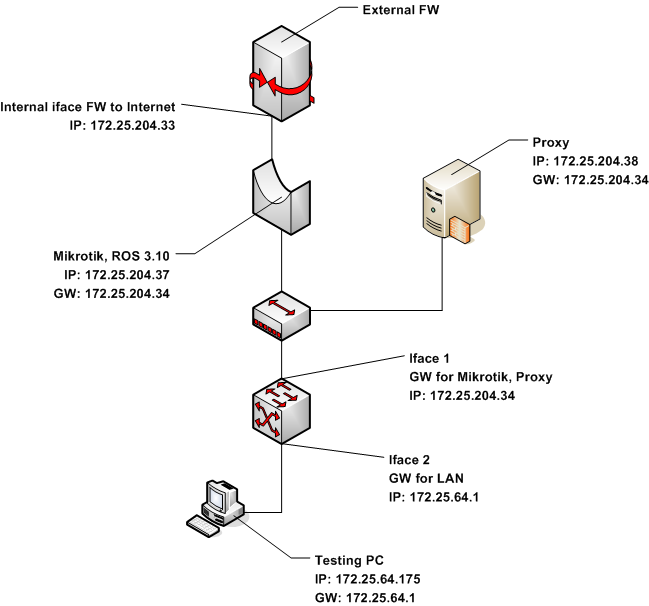
OK, I included network diagram, configuration of Mikrotik was stated early.

On Proxy (Squid on Linux) is configured forwarding:

iptables -A PREROUTING -t nat -i eth0 -p tcp --dport 80
-j REDIRECT --to-port 3128
tik-proxy.png

I think, you try to dst-nat to the same interface where request come from. so packets return to client from proxy directly, not via ROS, so ROS cannot ‘un-NAT’ them. you proxy should communicate with clients via RouterOS

Sorry, I didn’t understand your explanation. Can you be more specific? Can you, for example, repair my dst-nat rule?

you should either move your proxy to other subnet, or do something like you did with broute:

/ip firewall mangle add src-address=172.25.64.0/24 action=mark-routing new-routing-mark=redir
/ip route add  dst-address=0.0.0.0/0 gateway=172.25.204.38 routing-mark=redir

I can’t move proxy elsewhere, I don’t maintain network topology.

Your example doesn’t work without broute (missing in ROS after 3.15) for me. So, I don’t want redirect all traffic to proxy, destination 80/TCP from LAN is sufficient. It’s web proxy based on Squid in transparent mode. And at last, situation with LAN IP numbering isn’t easy. We have routed B class network + many other C class ones. 172.25.64.0/24 (correct suffix is /23) is one of many networks for LAN.

So, back to “broute” case. I’m very disapointed with Mikrotik approach. I feel it like change game rules in time of game. I’ve tested configuration of Mikrotik (with described network topology) in time I did a migration from previous Linux based bridge (ip + ebtables working) a I was happy I could use the same things. Now I can’t upgrade RB1000 to recent ROS version, even if I payed for upgrades to 4.x.

Why use a pay for Mikrotik, when next version of ROS can break functionality a force you to change, for example, network topology?
sorrry,

/ip firewall mangle add src-address=172.25.64.0/24 action=mark-routing new-routing-mark=redir

should be like

/ip firewall mangle add src-address=172.25.64.0/24 protocol=tcp dst-port=80 action=mark-routing new-routing-mark=redir

should work…