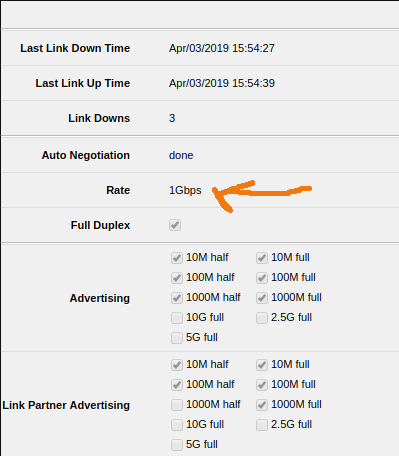
interface ethernet monitor ether1-out once
                      name: ether1-out
                    status: link-ok
          auto-negotiation: done
                      rate: 1Gbps
               full-duplex: yes
           tx-flow-control: no
           rx-flow-control: no
               advertising: 10M-half,10M-full,100M-half,100M-full,1000M-half,1000M-full
  link-partner-advertising: 10M-half,10M-full,100M-half,100M-full,1000M-full
So what is the confusing “speed=100Mbps” then?
This physical port is connected to the Internet provider which advertises 1GBps (among other values), I just can’t see where 100 Mbps could possibly come from (whatever the “speed” means) - it should negotiate to 1Gpbs right away, I would think…
The default fixed interface speeds when not using autonegotiation changed between v6.42 and v6.43 so this now appears in the compact configuration export after upgrading, it has no effect whilst autonegotiation is enabled.
A small comment for those who, like me, Google this thread on the keyword speed=100Mbps.
In order to remove this parameter from the output of export compact – it is necessary to disable Auto Negotiation in the interface properties, in the Ethernet tab, then switch the speed to 1Gbps and again enable Auto Negotiation, after which you need to click on the OK button.
This procedure must be repeated for all ethernet interfaces that have the speed=100Mbps parameter specified in the export compact output.