Hello everyone,
I've noticed a minor UI bug in RouterOS v7.23.1 regarding the Log window.
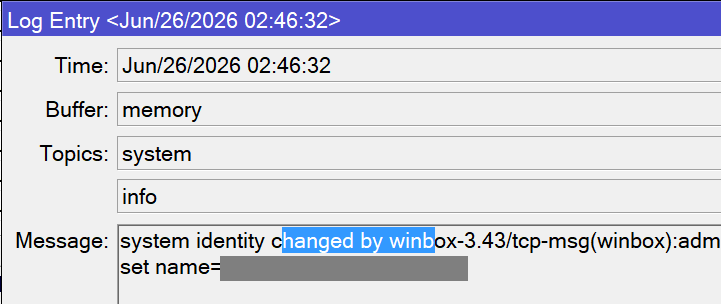
When opening a log entry and trying to select the text with the mouse, the selection highlight (the blue background color) does not appear. Visually, the text doesn't look selected at all.
However, the selection mechanism is actually working in the background. If I drag the mouse over the text and copy it, it successfully copies the exact portion I highlighted, even though there was no visual feedback on the screen.
Steps to reproduce:
-
Open the Log window.
-
Open any log entry to view its details.
-
Drag the mouse to select a portion of the text. (Notice there is no blue highlight).
-
Copy the text and paste it into a text editor. The text pastes correctly.
Environment:
-
RouterOS version: 7.23.1
-
WinBox version: 3.43
Has anyone else experienced this issue?
Thanks!
This is an issue since many RouterOS releases already and has been reported multiple times. But MikroTik will probably never fix it because it only affects WinBox 3, which is now legacy, and WinBox 4 does not have the problem.
Also, in WinBox 3, if you only need to copy the whole log message, you don't need to try to select the text. When the dialog popups, just immediately right click on the textbox and choose Copy and the full message will be copied to the clipboard.
Yes, this issue appeared somewhere after 7.20, when message field became multiline.
I've reported about this issue and they explicitly refused to fix it and recommended to use v4. Moreover, v4 had "beta" label at that time...
I will try to fix it in my custom ESR version, however I can't promise anything for now.
UPD: I've fixed the issue in my custom ESR version, the fix will be included in the upcoming version 3. Will be released within a week or two.
The topic is here: WinBox v3.43 ESR (bugfixes, improvements)