And with just the interface (no bridge), you can disconnect the ONT ethernet cable or disable that interface, bring it back and it’ll run through the EPOL process and then grab an IP?
Yes, and it works! I’ll will update the article now. Basically, follow the article, but set the clock, under System / Clock to be the correct time and date. Then reboot. Thereafter, you can unplug the cable, release/renew IP, turn off the interface, whatever, and it will re-auth correctly.
My time is correct and synced via NTP.
Can you get some captures on the wire to see if your IP traffic is encapsulated with VLAN 0 by hooking up wireshark to the mikrotik. It’s a known issue of Mikrotik to not handle VLAN 0 like other hardware out there, so I’m thinking your ONT is not setting that VLAN tag of 0.
Also, what is the model of ONT?
I have the Alcatel-Lucent G-010G-A. I’ll try to get a capture later. Won’t be today.
Same model here.
Replying to this again, going to take a break for now. However, please test the following:
- Do a System / Reset Configuration unchecking No Default Configuration.
- Reboot
- Set the System / Clock manually to ensure the correct time, right now.
- Import your certs
- Then apply a setup script that looks something like below. Note the order of things to keep auto mac assignments sane.
- Reboot
# dec/21/2019 23:11:39 by RouterOS 6.46.1
# model = RB4011iGS+

/system identity
set name=Router

# Create your LAN Bridge first
/interface bridge
add name=BR_LAN protocol-mode=none vlan-filtering=no

# Add their ports
/interface bridge port
add bridge=BR_LAN interface=ether2
# and so on
# yadda yadda

# WAN Port, now set the MAC to your cert MAC on ether1
/interface ethernet
set [ find default-name=ether1 ] mac-address=00:00:00:00:00:00

# IMPORT YOUR CERTS, then turn these off
/certificate settings set crl-download=no crl-use=no

# turn on the DHCP client
/ip dhcp-client
add disabled=no interface=ether1

# turn on the Dot1x interface, use your MAC
/interface dot1x client
add certificate=Client_Cert.pem_0 eap-methods=eap-tls anon-identity=000000000000 identity=000000000000 interface=ether1

# setup your firewall
/ip firewall filter
# yadda yadda

# NAT
/ip firewall nat
add action=masquerade chain=srcnat out-interface=ether1 comment="Default masq"

# turn on VLAN if desired
#/interface bridge set BR_LAN vlan-filtering=yes

# reboot
Hi, I followed the last instruction and keep the same message “Authorized without server”. Maybe my area have another kind of configuration or the Mikrotik RB4011iGS+ works different than my CCR1009-7G-1C(tile). Something curious is if I change my mac address in the Dotx using both format 000000000000 or 00:00:00:00:00:00 or removing it from the field anon-identity or changing eap-method to None. I always received the “Authorized without server”.
Note: I have at&t fiber residential account from 2017, my public ip always stay the same never change basic Internet.
Here is my capture. Please make one for your WAN interface, so we can compare. Go to Tools / Packet Sniffer. Under the General tab set the File Name to be something.pcap. Under the Filter tab, set the Interface, then Direction any. Then press Start. When done press Stop then download the file from the Files menu. Next, load the pcap file into Wireshark. To hide things, use a display filter like this at the top !(ip.addr == 1.2.3.4). Then photoshop the rest.
Wireshark Notes:
Right click on a column name at the top, choose Column Preferences, then Columns. Now, you can add a new column. I added __802.1Q VLAN id and set the label for it.
Notes about Starting a capture
My ether1 is my WAN port. It is not part of a bridge. So, I disabled the interface. Then I re-enabled it, and then pressed Start in the packet sniffer to get this capture. I think the packet sniffer tool may have an issue with disabled interfaces. That’s why I did it like this.
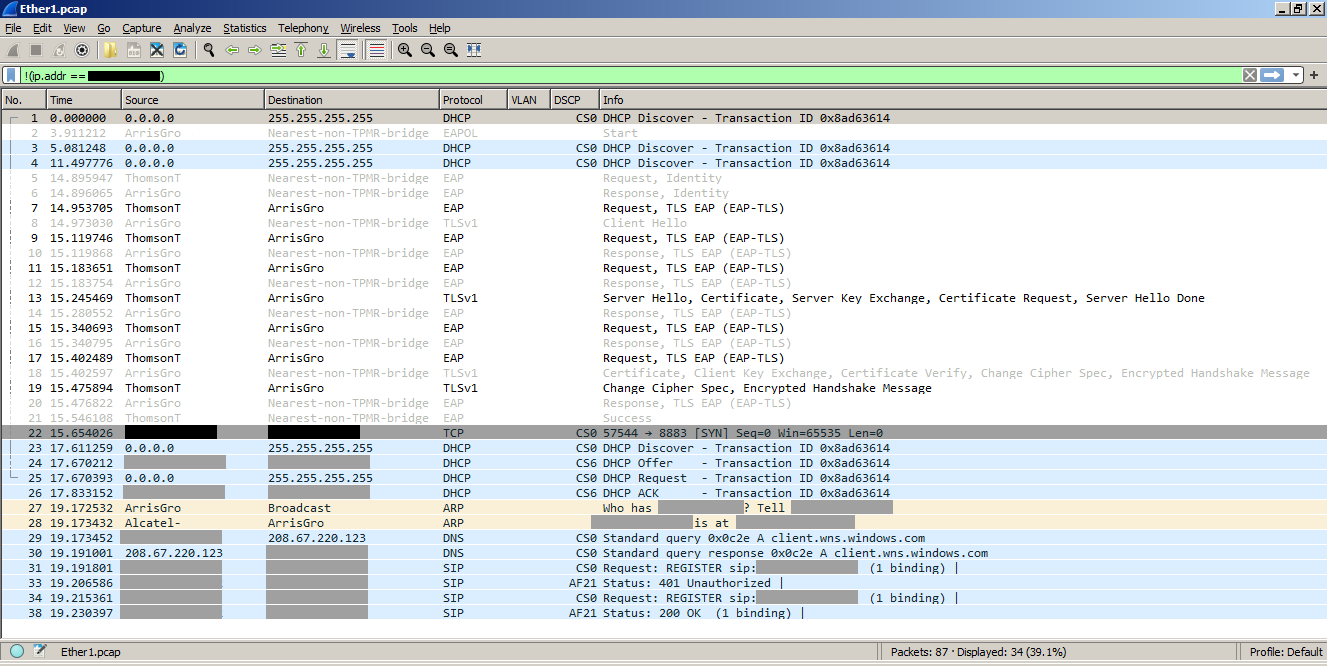
Here’s my capture. This is on my ether3-ont interface with no bridge. As you can see it goes through EPOL successfully and then when I broadcast for DHCP I get an offer back on VLAN 0. The only way I’ve been able to process those incoming packets (incl. all subsequent IP packets) is to place that interface on a bridge alone and enable VLAN Filtering to strip VLAN 0.
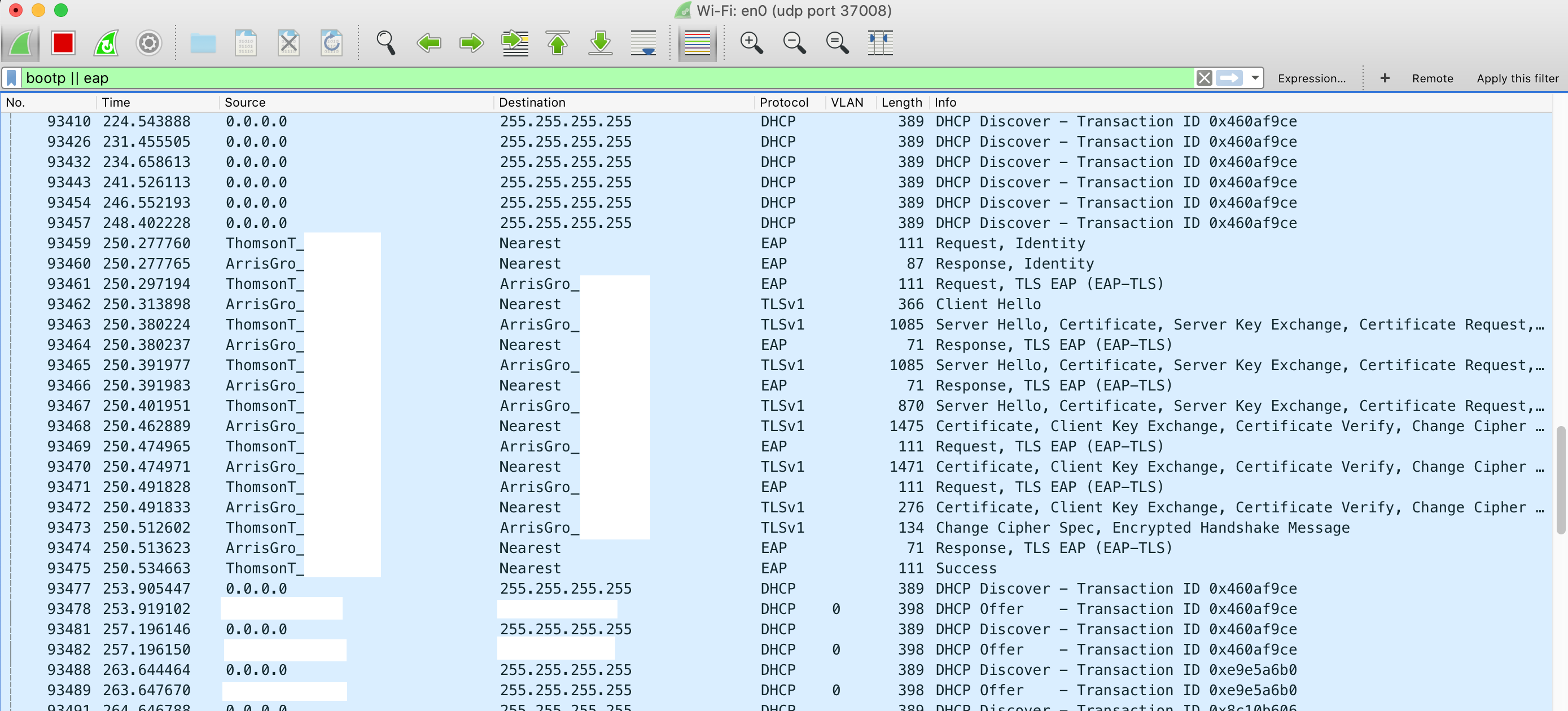
One thought – it looks like you are on a RB4011iGS+ (block diagram) which has two RTL8367 switch chips. The CCR1009-7G-1C-1S+PC (block diagram) does not have any. Perhaps that architecture is what allows processing of those VLAN 0 tagged packets whereas in my situation I have a raw CPU connection and cannot.


I’ve tried all combos of IP mangle to set DSCP to fix the packets, but it’s not early enough in the pipeline. In fact I never even see any packets match my rules when they are VLAN 0.
…
Thank you for the packet capture, very interesting. Your switch chip observation may have some truth to it. Whenever I export settings from an RB4011, the following appear in the results. So, it seems that VLAN 0 is the default. However, why would VLAN type packets not appear in the capture, as yours does? One way to know if ATT is doing this or its the MikroTik’s is for me to test with a CCR1009. I don’t have one at this time.
# This always appears when exporting configurations on an RB4011
/interface ethernet switch port
set 0 default-vlan-id=0
set 1 default-vlan-id=0
set 2 default-vlan-id=0
set 3 default-vlan-id=0
set 4 default-vlan-id=0
set 5 default-vlan-id=0
set 6 default-vlan-id=0
set 7 default-vlan-id=0
set 8 default-vlan-id=0
set 9 default-vlan-id=0
set 10 default-vlan-id=0
set 11 default-vlan-id=0
Update: see your post about the switch config, yeah that’s exactly what I’m thinking. Here’s my post I was just about to hit Submit on:
OK, my theory seems like it could be correct. I added DSCP into my Wireshark columns, and it shows CS6 level for all packets coming from the ONT. To test this, I took a managed switch (a TL-SG2216 I had around) that had VLAN capabilities and set it up with the following:
- ports 1 (ONT), 2 (Mikrotik) on VLAN 2, PVID 2, untagged – VLAN 2 is an arbitrary choice, just the next free one but doesn’t matter
- all other ports on VLAN 1 (default), PVID 2, untagged
This forces my switch to accept accept the frames and strip the VLAN tag before sending to my Mikrotik. The result looks like this:
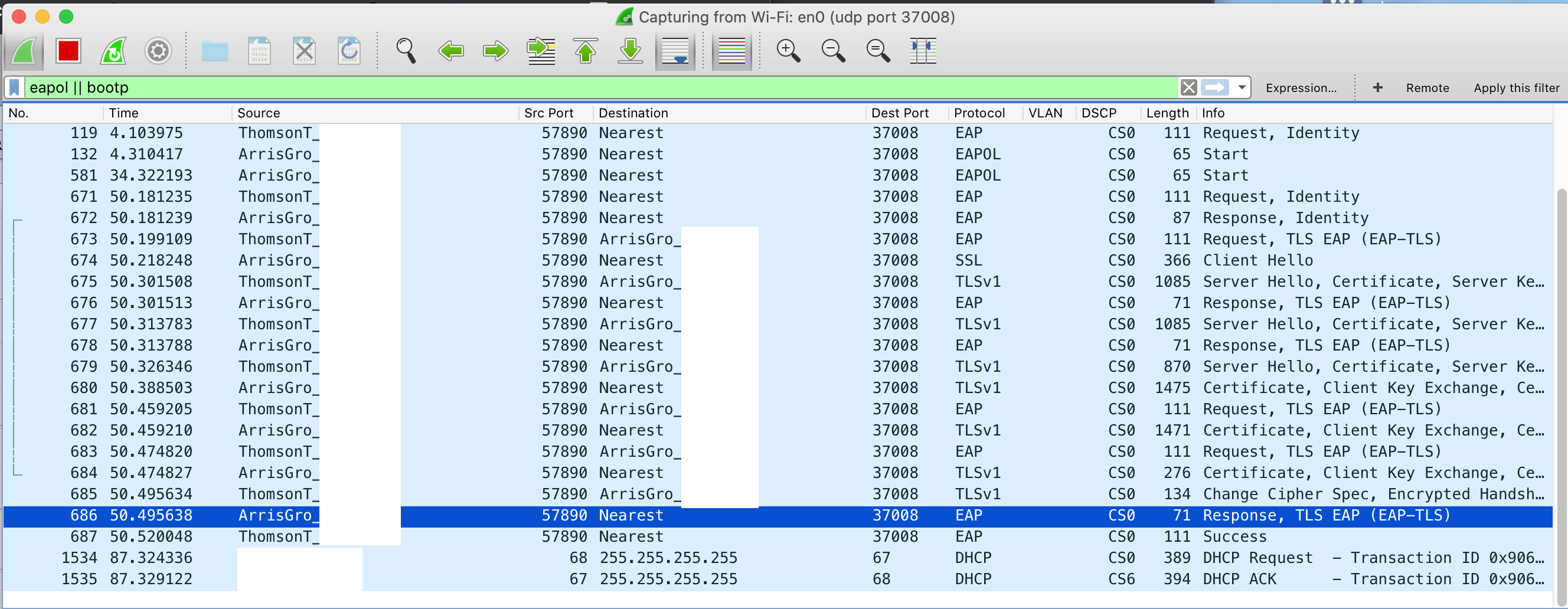
Notice that the DSCP header is unchanged, but the VLAN 0 tag has been removed.
This is a simpler setup without any scripts and running both dot1x and DHCP/everything else on the single port, no bridge. My CPU usage is around 1% now without the bridge, and it seems I may be getting slightly better speeds (was getting ~high 90s before, but who knows with the stuff between me and the test file):
/dev/null 26%[============> ] 268.57M 105MB/s
I updated my capture post to show DSCP.
I tried the bridge_ont option and for some reason my authorization fails, I think something is wrong with this certificate. On lines 14,18,21 the system ask for my real ip address? I include my wireshark image. Thanks with any idea.
I also tried the configuration without the bridge and I have no request for EAPOL.

Let’s work on EAPOL first, then we can work on ARP and DHCP. You’ll need to see an EAPOL Start, then finally an EAP Success. It takes about 30 seconds or so for that to happen. So, let’s start from the beginning for you. Since you have a CCR1009, wojo has discovered that ultimately you’ll need use the Bridge option. However, for testing, I only want to work on EAPOL first, so we’re going to use the bare interface method for now. In wireshark, please turn on the columns for VLAN (802.1Q) and DSCP (IP DSCP Value). Use the display filter: eapol || dhcp.
Do the following:
- Install firmware 6.46.1. Reboot. Then also the secondary part via the /system routerboard upgrade command. Reboot. Then reset everything via System / Reset Configuration unchecking No Default Configuration. Reboot. Now you have a base configuration.
- Set the System / Clock manually to ensure the correct time.
- Import the certs in the following order: CA, Client, then the PK. After importing, click Settings and uncheck CRL Download and Use CRL. Note the KT key with a MAC address for its Common Name.
- Finally, implement this script (adjust with your values). Keep your overall configuration simple, very few firewall rules, etc. We don’t care about that right now, we just want to see the EAP Success value in the capture.
/system identity set name=EAPOLTEST

# Create your LAN Bridge first
/interface bridge add name=BR_LAN protocol-mode=none vlan-filtering=no

# Add ports
/interface bridge port
add bridge=BR_LAN interface=ether2
# and so on yadda yadda

# WAN Port, set the MAC to your cert MAC on ether1
/interface ethernet set [ find default-name=ether1 ] mac-address=00:00:00:00:00:00

# IMPORT YOUR CERTS, then turn these off
/certificate settings set crl-download=no crl-use=no

# turn on the DHCP client
/ip dhcp-client add disabled=no interface=ether1

# turn on the Dot1x interface, use your MAC
/interface dot1x client add certificate=Client_Cert.pem_0 eap-methods=eap-tls anon-identity=123 identity=123 interface=ether1

# setup your firewall
/ip firewall filter
# yadda yadda

# NAT
/ip firewall nat add action=masquerade chain=srcnat out-interface=ether1 comment="Default masq"

#reboot, turn turn on Packet Sniffer tool
Here is my configuration with my modification. This one is without the WAN Bridge, the first screenshot was with the WAN Bridge. I removed the real MAC address for this post.
My first interface is combo1, then I have ether1....ether7
The RouterOS is 6.46.1
/system identity
set name=Mikrotik
Create your LAN Bridge first
/interface bridge
add name=BR_LAN protocol-mode=none vlan-filtering=no
Add their ports
/interface bridge port
add bridge=BR_LAN interface=ether1
add bridge=BR_LAN interface=ether2
add bridge=BR_LAN interface=ether3
add bridge=BR_LAN interface=ether4
add bridge=BR_LAN interface=ether5
add bridge=BR_LAN interface=ether6
add bridge=BR_LAN interface=ether7
WAN Port, now set the MAC to your cert MAC on combo1
/interface ethernet
set [ find default-name=combo1 ] mac-address=:00:00:00:00:00
IMPORT YOUR CERTS, then turn these off
/certificate settings set crl-download=no crl-use=no
turn on the DHCP client
/ip dhcp-client
add disabled=no interface=combo1
turn on the Dot1x interface, use your MAC
/interface dot1x client
add certificate=Client_000000-000000000000.pem_0 eap-methods=eap-tls anon-identity=000000000000 identity=000000000000 interface=combo1
setup your firewall
/ip firewall filter
yadda yadda
NAT
/ip firewall nat
add action=masquerade chain=srcnat out-interface=combo1 comment="Default masq"
turn on VLAN if desired
#/interface bridge set BR_LAN vlan-filtering=yes
reboot
And this is the result:

For the wireshark output, please put the VLAN and DSCP values to the left of the Info column, so we can see them.
Here is with the info requested. This one is without the Bridge. I see no activity for the authentication only EAPOL start and failure.

This one with the Bridge.

Hmm, the EPOL process is failing for sure. You get the identity request, but the tik doesn’t even try to respond.
Could you use “export hide-sensitive” and also mask the MACs so we can see the exact config? I haven’t tested all these combos of potential errors, they are just from memory but I believe I saw that status when one of these was wrong. Ensure that:
- the certificate imported has KT flags (aka has the private key in addition to the public key, and also is trusted)
- the rest of the cert chain is installed, 5 additional certs for me (Motorola Intermediate, Motorola Root CA, System Infrastructure Root CA, ATT Services Inc Root CA and Frontier-RootCA)
- on dot1x the identity and anon-identity MACs are set to the cert MAC (your example doesn’t have the colons, just from your redaction?)
- the interface has the MAC address overridden to the cert MAC via the CLI
- the cert MAC is correct (see commands below)
- dot1x use-crl must be no
- the MAC address is not on any other interface (I’ve done that while testing with many different ports, moving stuff around)
- system clock is correct
- that port is connected directly to ONT, and power cycle the ONT just in case
Check certificate CN for the MAC:
# openssl x509 -in Client-xxx.pem -text | grep Subject
        Subject: C=US, O=Motorola, Inc., CN=00:00:00:00:00:00/serialNumber=xxx