Edit: I made a mistake - I cannot ping 192.168.10.44 even from the WinBox terminal. I was pinging the wrong address. So… I can ping the bridge from Terminal and a PC, but not the Pi-hole in the container. Sounds like it either isn’t really running, or I just can’t get to it even on the router. Now I know that I’ll dig more.
I’ve installed Pi-hole on an RB5009 with ROS 7.18 according to the instructions here: https://help.mikrotik.com/docs/spaces/ROS/pages/84901929/Container
The only change (at first) was using IP addresses 192.168.10.1 (container bridge) and 192.168.10.44 (veth1). I also later changed the veth1 from /32 to /24, to see if it helped. It didn’t.
The container is shown as running. I can ping (Edit: no I can’t) the veth1 .44 from a terminal in WinBox. I cannot ping it from a PC, nor can I open the Pi-hole page. I can ping the container bridge .1 from the PC (and the terminal, obviously).
Can anyone point me in the right direction?
I do have VLANs set up, but I can’t see how that should stop this working unless I’m missing something. (which I obviously am).
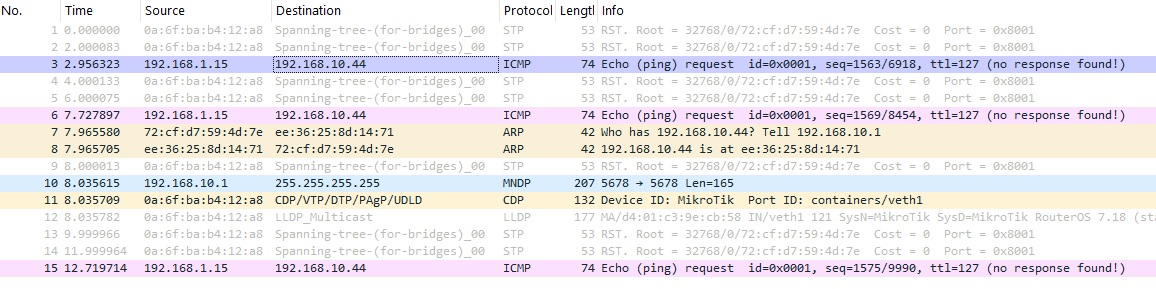
I’m at a loss now… been playing with it for several hours and got nowhere. Torch on veth1 showed some activity while pinging from the PC (the icmp req and an arp). I did a packet capture on veth1 while pinging and got the following (192.168.1.15 is my PC):
This is my config export, with some minor parts redacted (mainly the ipv6 config which I doubt is anything to do with it).
/container mounts
add dst=/etc/pihole name=etc_pihole src=/usb1/etc
add dst=/etc/dnsmasq.d name=dnsmasq_pihole src=/usb1/etc-dnsmasq.d
/interface bridge
add name=B1 protocol-mode=none vlan-filtering=yes
add name=containers
/interface ethernet
set [ find default-name=ether1 ] loop-protect=off name=Eth1-LAN_Sw1-26
set [ find default-name=ether2 ] loop-protect=off name=Eth2-IoT_Sw1-25
set [ find default-name=ether3 ] name=Eth3-LAN_PH1
set [ find default-name=ether4 ] name=Eth3-LAN_PH2
set [ find default-name=ether5 ] name=Eth5-Proxmox
set [ find default-name=ether6 ] name=Eth6-VOIP poe-out=off
set [ find default-name=ether7 ] name=Eth7-WiFi
set [ find default-name=ether8 ] name=Eth8-WAN
set [ find default-name=sfp-sfpplus1 ] name=SFP
/interface pppoe-client
add add-default-route=yes allow=pap,chap disabled=no interface=Eth8-WAN keepalive-timeout=disabled max-mru=1508 max-mtu=1508 name=WAN use-peer-dns=yes user=[redacted]
/interface 6to4
add !keepalive local-address=[redacted] mtu=1480 name=HET remote-address=[redacted]
/interface veth
add address=192.168.10.44/24 gateway=192.168.10.1 gateway6="" name=veth1
/interface vlan
add interface=B1 loop-protect=off name=IoT vlan-id=3
add interface=B1 loop-protect=off name=LAN vlan-id=2
add interface=B1 loop-protect=off name=VOIP vlan-id=4
/interface list
add include=none name=RestrictedVLANs
/ip pool
add name=LAN_DHCP_Pool ranges=192.168.1.120-192.168.1.149
add name=IoT_DHCP_Pool ranges=192.168.3.120-192.168.3.149
add name=VOIP_DHCP_Pool ranges=192.168.4.120-192.168.4.149
/ip dhcp-server
add address-pool=IoT_DHCP_Pool interface=IoT lease-time=23h59m59s name=IoT_DHCP
add address-pool=LAN_DHCP_Pool interface=LAN lease-time=23h59m59s name=LAN_DHCP
add address-pool=VOIP_DHCP_Pool interface=VOIP lease-time=23h59m59s name=VOIO_DHCP
/container
add envlist=pihole_envs interface=veth1 mounts=etc_pihole,dnsmasq_pihole root-dir=usb1/pihole workdir=/
/container config
set registry-url=https://registry-1.docker.io tmpdir=usb1/pull
/container envs
add key=TZ name=pihole_envs value=Europe/London
add key=WEBPASSWORD name=pihole_envs value=[redacted]
add key=DNSMASQ_USER name=pihole_envs value=root
/interface bridge port
add bridge=B1 frame-types=admit-only-untagged-and-priority-tagged interface=Eth1-LAN_Sw1-26 pvid=2
add bridge=B1 frame-types=admit-only-untagged-and-priority-tagged interface=Eth2-IoT_Sw1-25 pvid=3
add bridge=B1 frame-types=admit-only-untagged-and-priority-tagged interface=Eth3-LAN_PH1 pvid=2
add bridge=B1 frame-types=admit-only-untagged-and-priority-tagged interface=Eth3-LAN_PH2 pvid=2
add bridge=B1 interface=Eth5-Proxmox pvid=2
add bridge=B1 frame-types=admit-only-untagged-and-priority-tagged interface=Eth6-VOIP pvid=4
add bridge=B1 frame-types=admit-only-vlan-tagged interface=Eth7-WiFi
add bridge=containers interface=veth1
/ip neighbor discovery-settings
set discover-interface-list=!dynamic
/interface bridge vlan
add bridge=B1 tagged=B1,Eth7-WiFi vlan-ids=2
add bridge=B1 tagged=B1,Eth7-WiFi vlan-ids=3
add bridge=B1 tagged=B1,Eth5-Proxmox vlan-ids=4
/interface list member
add interface=IoT list=RestrictedVLANs
add interface=VOIP list=RestrictedVLANs
/ip address
add address=192.168.1.254/24 interface=LAN network=192.168.1.0
add address=192.168.3.254/24 interface=IoT network=192.168.3.0
add address=192.168.4.254/24 interface=VOIP network=192.168.4.0
add address=192.168.10.1/24 interface=containers network=192.168.10.0

/ip dhcp-server network
add address=192.168.1.0/24 dns-server=192.168.1.45,192.168.1.46 domain=[redacted] gateway=192.168.1.254
add address=192.168.3.0/24 dns-server=1.1.1.1 domain=[redacted] gateway=192.168.3.254
/ip dns
set allow-remote-requests=yes servers=1.1.1.1

/ip firewall address-list
add address=0.0.0.0/8 comment=RFC6890 list=NotPublic
add address=10.0.0.0/8 comment=RFC6890 list=NotPublic
add address=100.64.0.0/10 comment=RFC6890 list=NotPublic
add address=127.0.0.0/8 comment=RFC6890 list=NotPublic
add address=169.254.0.0/16 comment=RFC6890 list=NotPublic
add address=172.16.0.0/12 comment=RFC6890 list=NotPublic
add address=192.0.0.0/24 comment=RFC6890 list=NotPublic
add address=192.0.2.0/24 comment=RFC6890 list=NotPublic
add address=192.168.0.0/16 comment=RFC6890 list=NotPublic
add address=192.88.99.0/24 comment=RFC3068 list=NotPublic
add address=198.18.0.0/15 comment=RFC6890 list=NotPublic
add address=198.51.100.0/24 comment=RFC6890 list=NotPublic
add address=203.0.113.0/24 comment=RFC6890 list=NotPublic
add address=224.0.0.0/4 comment=RFC4601 list=NotPublic
add address=240.0.0.0/4 comment=RFC6890 list=NotPublic
add address=192.168.1.30 list=CCTV
add address=192.168.1.31 list=CCTV
add address=192.168.1.214 list=NAS
add address=192.168.1.215 list=NAS
add address=192.168.1.216 list=NAS
add address=192.168.1.217 list=NAS
add address=192.168.1.44 list=stat20
add address=192.168.1.45 list=stat20
add address=192.168.1.46 list=stat20
add address=192.168.4.1 list=stat20
/ip firewall filter
add action=fasttrack-connection chain=forward comment="Fasttrack Established, Related" connection-state=established,related hw-offload=yes
add action=accept chain=forward comment="Allow Established, Related" connection-state=established,related
add action=drop chain=forward comment="Drop Invalid" connection-state=invalid protocol=tcp
add action=drop chain=forward comment="Drop non-public destinations going to WAN" dst-address-list=NotPublic log-prefix=privateip out-interface=WAN
add action=jump chain=forward comment="NAS Forward VPN checks" jump-target=nas out-interface=WAN src-address-list=NAS
add action=jump chain=forward comment="CCTV Forward checks" in-interface=LAN jump-target=CCTV out-interface=WAN src-address-list=CCTV
add action=drop chain=forward comment=SonyTV_to_WAN disabled=yes out-interface=WAN src-mac-address=[redacted]
add action=fasttrack-connection chain=forward comment="Fastrack Anything > WAN" hw-offload=yes out-interface=WAN
add action=accept chain=forward comment="Allow LAN to anywhere" in-interface=LAN
add action=accept chain=forward comment="Allow Containers Anywhere" in-interface=containers
add action=accept chain=forward comment="Allow Restricted VLANs > WAN" in-interface-list=RestrictedVLANs out-interface=WAN
add action=jump chain=forward comment="WAN Forward ICMP checks" in-interface=WAN jump-target=icmp protocol=icmp
add action=accept chain=forward comment="Allow internal ICMP anywhere" protocol=icmp
add action=drop chain=forward comment="Drop Restricted VLANs jumping" in-interface-list=RestrictedVLANs
add action=drop chain=forward comment="Drop at end for In-WAN" in-interface=WAN
add action=drop chain=input comment="Drop Invalid connections" connection-state=invalid
add action=accept chain=input comment="Allow Established, Related" connection-state=established,related
add action=accept chain=input comment="Allow from LAN" in-interface=LAN
add action=jump chain=input comment="WAN Input ICMP checks" in-interface=WAN jump-target=icmp protocol=icmp
add action=accept chain=input comment="Allow ICMP Internally" icmp-options=8:0-255 protocol=icmp
add action=drop chain=input comment="Drop at End for Input chain"
add action=accept chain=icmp comment="ThinkBroadband Ping" dst-address=[redacted] icmp-options=8:0-255 protocol=icmp src-address=[redacted]
add action=accept chain=icmp comment="Allow ICMP from HE" dst-address=[redacted] protocol=icmp src-address=[redacted]
add action=accept chain=icmp comment="Allow Echo Reply" icmp-options=0:0-255 protocol=icmp
add action=accept chain=icmp comment="Allow Destination Unreachable" icmp-options=3:0-255 protocol=icmp
add action=accept chain=icmp comment="Allow Time Exceeded" icmp-options=11:0-255 protocol=icmp
add action=drop chain=icmp comment="Final drop for WAN ICMP"
add action=accept chain=nas comment="NAS VPN port" dst-port=1912 protocol=udp
add action=accept chain=nas comment="NAS VPN Port" dst-port=443 protocol=udp
add action=accept chain=nas comment="NAS DNS" dst-port=53 protocol=udp
add action=drop chain=nas comment="Drop NAS > WAN direct" out-interface=WAN
add action=accept chain=CCTV comment="Only allow CCTV to DNS and email on WAN" dst-port=53 protocol=udp
add action=accept chain=CCTV dst-port=587 protocol=tcp
add action=drop chain=CCTV log=yes log-prefix=Cam
/ip firewall nat
add action=src-nat chain=srcnat out-interface=WAN src-address=192.168.1.2 to-addresses=[redacted]
add action=src-nat chain=srcnat out-interface=WAN src-address=192.168.1.11 to-addresses=[redacted]
add action=src-nat chain=srcnat out-interface=WAN src-address=192.168.1.15 to-addresses=[redacted]
add action=src-nat chain=srcnat out-interface=WAN src-address-list=stat20 to-addresses=[redacted]
add action=src-nat chain=srcnat out-interface=WAN src-address=192.168.0.0/16 to-addresses=[redacted]
add action=masquerade chain=srcnat disabled=yes src-address=192.168.10.0/24
add action=dst-nat chain=dstnat dst-address=8.8.8.8 dst-port=53 protocol=udp to-addresses=192.168.1.45 to-ports=53
add action=dst-nat chain=dstnat dst-address=8.8.4.4 dst-port=53 protocol=udp to-addresses=192.168.1.45 to-ports=53
/ip firewall service-port
set tftp disabled=yes
set h323 disabled=yes
set pptp disabled=yes
/system clock
set time-zone-name=Europe/London
/system note
set show-at-login=no
/system ntp client
set enabled=yes
/system ntp server
set enabled=yes
/system ntp client servers
add address=192.168.1.45
add address="0.uk.pool.ntp.org 1.uk.pool.ntp.org"
add address=192.168.1.43
/tool sniffer
set file-name=pcap02 filter-interface=veth1